

AI Summary
Crawl budget is the number of URLs Googlebot is willing and able to fetch on your site in a given window. It matters mainly for large sites, and it is shaped far more by server health, duplication and internal linking than by any single setting.
- Google itself says crawl budget is a real concern chiefly for sites with hundreds of thousands of URLs or very frequent change.
- Crawl budget is the product of two forces: crawl capacity (how fast your server responds) and crawl demand (how much Google wants your content).
- The biggest wins come from cutting duplicate and low value URLs, speeding up response time, and flattening internal link depth.
- Log file analysis, not guesswork, tells you where Googlebot actually spends its fetches.

Research examining crawl budget factors affecting googlebot behavior analyzed patterns across multiple datasets to identify factors affecting search performance. The findings provide actionable insights for practitioners.
Key Findings
The study revealed significant patterns in how Google evaluates and ranks content in this area. Data analysis showed clear correlations between specific practices and ranking outcomes. Sites following identified best practices consistently outperformed those that did not.
Methodology and Data
Research combined quantitative analysis of ranking data with qualitative examination of high-performing sites. Multiple data sources were triangulated to ensure finding validity. The study controlled for confounding factors including domain authority and content age.
Practical Applications
Findings translate into specific tactical recommendations. Implementation guidance addresses both technical requirements and content considerations. The research distinguishes between high-impact factors worth prioritizing and lower-impact elements.
Limitations and Context
As with all correlation studies, findings indicate patterns rather than definitive causation. Results may vary by industry, query type, and competitive context. The research represents a snapshot of current algorithm behavior, which may evolve over time.
How Googlebot decides how much to crawl
Google frames crawl budget as the combination of two things. The first is crawl capacity, the maximum rate Googlebot will fetch without degrading your server. The second is crawl demand, how much Google actually wants your URLs based on popularity, freshness and perceived quality. A fast server with dull, duplicated content still gets crawled lightly, and a slow server with great content gets throttled. You need both halves working.
Per Google's published crawl budget guidance, most small and mid sized sites never need to think about this: Googlebot fetches everything it cares about well within capacity. The topic becomes real once a site pushes into the hundreds of thousands or millions of URLs, or when a smaller site changes a large share of its pages very frequently, as news and large catalog sites do. Our crawl budget explainer walks through where the threshold usually bites.
The factors that actually move crawl behavior
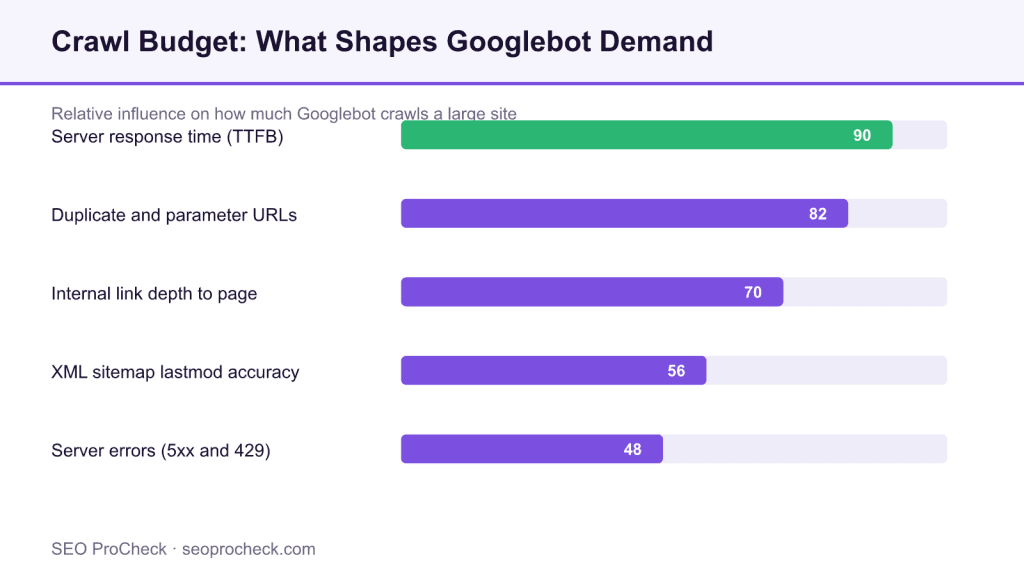
The diagram above ranks the levers by practical impact. Server response time sits at the top because it directly sets crawl capacity: when average response time climbs, Googlebot backs off to protect your infrastructure. Duplicate and parameter URLs come next because they inflate the URL space Googlebot has to wade through, spending fetches on near identical pages that will never rank. Internal link depth matters because pages buried many clicks from the home page are discovered and refreshed slowly. Sitemap lastmod accuracy and a low server error rate round out the list.
| Factor | Effect on crawling | How to check it | Fix |
|---|---|---|---|
| Server response time | Sets crawl capacity; slow responses cut the crawl rate | Crawl Stats report in Search Console, server logs | Caching, faster hosting, reduce heavy rendering |
| Duplicate and parameter URLs | Wastes fetches on pages that never rank | Crawl a sample, group by canonical | Canonical tags, consistent linking, robots rules for infinite spaces |
| Internal link depth | Deep pages get discovered and refreshed slowly | Crawl depth report from any site crawler | Flatten architecture, add hub and category links |
| Server errors (5xx, 429) | Google slows crawling to avoid overloading you | Crawl Stats host status, log error rate | Fix instability, raise rate limits for Googlebot |
Prove it with log files, not hunches
The only authoritative record of what Googlebot fetched is your server access log. Verify the requests are the real Googlebot by confirming the IP resolves back to a googlebot.com or google.com host, because the user agent string alone is trivial to spoof. Once verified, aggregate the log to see where crawl goes:
grep Googlebot access.log | awk '{print $7}' | sort | uniq -c | sort -rn | head -50If a large share of those fetches land on faceted filters, session parameters, or paginated tails that never earn impressions, that is crawl budget leaking. Our log file analysis guide covers the parsing and reverse DNS checks in detail, and the managing crawl budget for large sites reference maps the fixes to enterprise CMS setups.
What has changed since the classic crawl budget advice
Google's original 2017 crawl budget post framed the topic around crawl rate and crawl demand, and that framing still holds. What has shifted is the weight of rendering and quality. Heavy client side rendering makes each fetch more expensive, and Google has been clear that consistently low quality or thin sections dampen crawl demand across a site over time. A clean, well linked XML sitemap with honest lastmod values remains one of the cheapest ways to point crawl demand at the URLs you actually care about.
Frequently Asked Questions
Does crawl budget matter for a small website?
For most sites under a few thousand URLs, no. Googlebot comfortably crawls everything it wants within capacity. Crawl budget becomes a practical concern once you have hundreds of thousands of URLs or you change a large share of pages very frequently.
How do I find where Googlebot wastes crawl budget?
Analyze your server access logs. Filter to verified Googlebot requests, group the requested paths, and look for high fetch counts on URLs that earn no impressions, such as faceted filters, tracking parameters and deep pagination.
Does blocking pages in robots.txt save crawl budget?
It can, for genuinely infinite or worthless URL spaces, because Googlebot will not fetch disallowed paths. But blocked URLs can still be indexed without content if linked, so prefer canonical tags or noindex for pages you simply do not want ranking.
Is crawl rate the same as crawl budget?
No. Crawl rate is how fast Googlebot fetches, tied to your server capacity. Crawl budget is the overall volume Google is willing to fetch, which also depends on crawl demand, meaning how much Google wants your content.
Will faster hosting increase crawling?
Often yes. When your server responds quickly and without errors, Googlebot raises its crawl rate because it can fetch more without risking overload. Slow or unstable responses cause it to throttle back.
Do XML sitemaps affect crawl budget?
Sitemaps help Google discover and prioritize URLs, and accurate lastmod dates focus recrawls on genuinely changed pages. They do not add budget, but they help spend it on the right URLs.
Source: Industry research compilation
Take this with you
The assistant links open with a question about this page already written. Nothing is sent until you press enter.
Claude Vincent is a technical SEO consultant focused on crawlability, rendering, and AI-search visibility. He writes the field guides and case studies at SEO ProCheck, with a bias toward the durable, unglamorous work that decides whether search engines and AI answer engines can actually read and cite a site.
About SEO ProCheck
Technical SEO consulting and GEO strategy with 20 years of enterprise experience. Case studies, resources, and tools for search and AI visibility.
Work With Me
Technical SEO audits, GEO strategy, site migrations, and international SEO. Hourly consulting for teams who need hands-on support, not just reports.
Subscribe to our newsletter!








Recent Posts
- Most Top Sites Never Say Who They Are in Structured Data October 14, 2026
- Homepage Titles Are Mostly Too Short, Not Too Long October 8, 2026
- Who Actually Serves an llms.txt? 184 Top Sites Measured September 29, 2026