

AI Summary
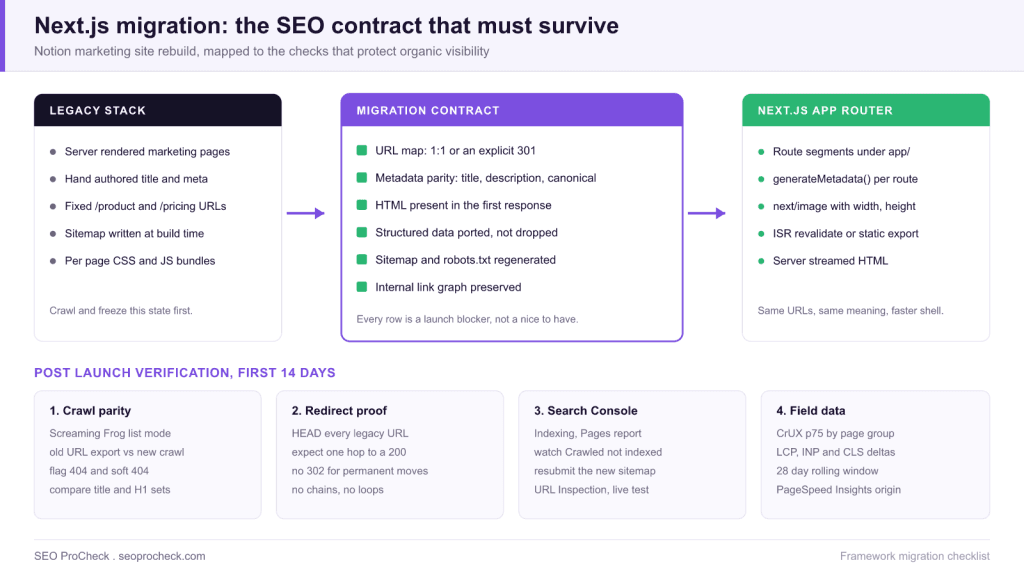
Notion moved its marketing pages to Next.js, the kind of rebuild that quietly decides whether a site keeps its organic visibility or spends two quarters recovering it. A framework migration is safe when four things survive the port intact: the URL set, the metadata, server rendered HTML in the first response, and the internal link graph.
- Freeze a full crawl of the old site before the cutover; without that export you cannot prove parity afterwards.
- Rendering mode is the ranking decision: static or server rendered routes ship HTML immediately, client only routes make Google wait for the render queue.
- In the App Router, metadata comes from
generateMetadata(), so a missing export silently drops the title, description and canonical for that route. - Every legacy URL needs one hop to a 200. Chains, loops and 302s are where migration traffic actually leaks.
Rebuilding a marketing site on a modern React framework is usually pitched as a developer experience win: faster builds, component reuse, a nicer content pipeline. The search consequences are rarely on the ticket. That is the gap this Notion case study is useful for. A marketing site is the part of a product company that earns non brand organic traffic, so the migration is not a frontend refactor, it is a change to every ranking signal the site emits at once.
The notes below are the practitioner layer around that story: what to capture before the cutover, which Next.js rendering choice matches which page type, how metadata behaves in the App Router, and the exact checks that tell you within two weeks whether the migration held.
Capture the baseline before anyone merges
The single most common migration failure is not a bad redirect, it is having no record of what the old site contained. Once the legacy build is gone, arguments about whether a page ever existed cannot be settled. Do this first, while the old stack is still serving traffic.
- Full crawl export. Screaming Frog or Sitebulb, internal HTML only, with the
Internaltab exported to CSV. Keep URL, status code, title, meta description, canonical, H1, word count and indexability columns. - The URL truth list. Union three sources: the crawl, the XML sitemap, and Search Console. In Search Console use Indexing, Pages and export, plus Performance filtered to the last 16 months and grouped by page. Search Console will surface old URLs that no longer appear in any crawl but still hold links and impressions.
- Server logs. Thirty days of raw access logs, filtered to verified Googlebot. Log data is the only source that shows what Google actually requests, including parameter variants and long tail URLs nobody remembers publishing.
- Field performance. Record the current CrUX p75 for LCP, INP and CLS by page group so you have a before number that predates the rebuild. The Core Web Vitals overview covers which thresholds count as passing.
The migration contract
Treat the following as a signed contract between the SEO owner and the engineering team. Each row is a launch blocker, and each row has a test that returns yes or no rather than a judgement call.
| Signal | What must be true after the port | How to test it |
|---|---|---|
| URLs | Every legacy URL either resolves 200 at the same path or 301s once to its closest equivalent | Crawl the legacy URL list in list mode against the new build, group by status code |
| Titles and descriptions | Present, unique, and materially the same as before unless deliberately rewritten | Diff the old and new crawl exports on the title column, sort by change size |
| Canonicals | Self referencing absolute URLs on the production domain, no localhost or preview host leakage | Crawl and filter canonicals that do not start with the production origin |
| First response HTML | Main copy, headings and links exist in the raw response, not only after hydration | Fetch the URL with curl and search the body for a sentence you can see on screen |
| Structured data | The same schema types emit on the same templates, with valid required properties | Rich Results Test on one URL per template, plus a crawl level extraction of ld+json blocks |
| Internal links | Navigation, footer and in body links render as real anchors with href attributes | Compare inlink counts per URL between the old and new crawl |
| robots.txt and sitemaps | Production robots.txt allows crawling, sitemap regenerates and lists only 200 canonical URLs | Fetch /robots.txt on the live host, then crawl the sitemap and check for non 200 entries |
The staging trap deserves a line of its own: the most expensive migration mistake in this category is shipping the staging robots.txt or a global noindex to production. It is invisible in QA because the page looks perfect, and it removes the site from search within days.
Rendering mode is a ranking decision
Next.js gives you several ways to produce the same page, and they are not equivalent for search. Google renders JavaScript, but rendering happens in a second pass, and content that only exists after hydration reaches the index later and less reliably. Marketing pages are exactly the page type that should never depend on that second pass.
| Mode | HTML in first response? | Best fit | Watch out for |
|---|---|---|---|
| Static (SSG) | Yes, prebuilt | Homepage, product, pricing, evergreen landing pages | Content edits need a rebuild or a revalidate trigger |
| ISR (revalidate) | Yes, cached then refreshed | Blog, changelog, docs, large template driven sets | A stale window means crawlers can see the old copy |
| Server rendered (SSR) | Yes, per request | Personalised or frequently changing pages | TTFB becomes your LCP ceiling, so cache at the edge |
| Client only (CSR) | No | Logged in app surfaces that should not rank | Indexing delay and thin rendered HTML, avoid for marketing |
If you inherit a build where marketing routes are client rendered, the diagnosis workflow in our guide to JavaScript rendering SEO diagnosis shows how to prove the gap between raw HTML and rendered DOM before you ask for engineering time. The background on server side rendering is worth sharing with the team that has to make the call.
Metadata in the App Router
In the Next.js App Router, page metadata is produced by an exported metadata object or an exported generateMetadata() function in the route segment. There is no template that silently fills gaps. If a route forgets the export, that page ships without a title tag, without a description and without a canonical, and nothing in the build fails. This is the most common reason a migrated site shows a sudden spike of duplicate or missing titles in a crawl.
Three rules keep it clean. First, define a root level metadata object with metadataBase set to the production origin so relative canonical and Open Graph URLs resolve to the live domain instead of a preview host. Second, set an explicit self referencing canonical through the alternates.canonical field on every indexable route. Third, add a crawl assertion to CI: fail the build if any route in the sitemap renders without a title or without a canonical. The deeper walkthrough lives in our Next.js rendering and metadata guide.
The redirect map is the whole ballgame
If URLs change, the redirect map carries the site's accumulated authority across the gap. Build it as a two column CSV of old path and new path, generated from the legacy URL truth list rather than typed by hand, and hold it to four rules:
- One hop. Legacy URL to final URL directly. A chain through an interim path burns crawl budget and dilutes the signal.
- 301, not 302. Temporary redirects tell the engine to keep the old URL. Use 301 for anything permanent.
- Closest equivalent, not the homepage. Mass redirecting retired pages to the root is treated as a soft 404 and loses the relevance the page had.
- Trailing slash consistency. Pick one convention, set it once in
next.config.js, and make sure canonical, sitemap and internal links all agree with it. Mixed conventions create a duplicate URL for every page on the site.
Verify with a batch HEAD request over the legacy list and group the results: anything that is not a single 301 to a 200 is a defect. Repeat the same sweep seven days after launch, because CDN rules and edge middleware often get edited during the first week.
Technical Challenge
Technical SEO issues often create invisible barriers to ranking potential. This case study identifies the specific technical challenges addressed, from crawlability issues to performance bottlenecks. Understanding the problem scope helps practitioners diagnose similar issues.
In a framework migration the barriers are structural rather than incremental. The old site's HTML was produced by one system and the new site's HTML is produced by another, so every derived signal is regenerated from scratch: titles, canonicals, hreflang, structured data, pagination, breadcrumbs. Nothing carries over by inheritance. The challenge is therefore not fixing individual defects but proving that a complete regeneration landed on the same values.
Diagnostic Process
Identifying technical issues requires systematic analysis using crawling tools, log file analysis, and Search Console data. This case study documents the diagnostic methodology that uncovered actionable issues. The process itself provides value for practitioners building technical audit capabilities.
For a migration the diagnostic is comparative, not absolute. Run the same crawl configuration against the old production site and the new staging build, export both, and diff them on URL as the join key. The four diffs that matter are status code, title, canonical and inlink count. A page that lost 80 percent of its internal links is a ranking problem even though every individual check passes. Pair that with a log file sample after launch to confirm that Googlebot is finding the new URL set rather than hammering the redirect layer.
Implementation and Solutions
Each identified issue required specific technical solutions implemented within development constraints. The case study details solutions for rendering issues, performance optimization, crawl management, and indexation improvements. Implementation approaches balance ideal solutions with practical constraints.
The practical constraint in a Next.js rebuild is usually the component boundary. Metadata, structured data and canonical logic want to live in the route segment, while designers work in leaf components, so ownership of SEO output has to be assigned explicitly or it falls between the two. The durable pattern is a single shared metadata helper called by every route, plus a schema builder keyed by template type, so there is one place to fix a defect rather than one per page. On the performance side, use next/image with explicit width and height on every image so the browser reserves layout space, which protects CLS during the rebuild.
Measurable Impact
Technical improvements demonstrate value through measurable outcomes: improved crawl stats, faster indexation, better Core Web Vitals scores, and ultimately improved rankings and traffic. This case study quantifies the impact of technical optimization.
Set the measurement window before launch so the reporting is not retrofitted to the result. A realistic sequence: crawl stats and redirect health settle within 7 to 14 days, indexation of the new URL set within 2 to 4 weeks, field Core Web Vitals within 28 days because CrUX reports a rolling 28 day window, and ranking or traffic movement over 4 to 8 weeks. Judging a migration on week one data is the fastest way to trigger an unnecessary rollback, and judging it on nothing at all is how a silent 20 percent loss becomes permanent.
Launch week runbook
| When | Check | Fail signal |
|---|---|---|
| Hour 0 | Fetch /robots.txt and one page of each template, read the robots meta | Any noindex or a Disallow inherited from staging |
| Hour 1 | Crawl the legacy URL list in list mode | Any 404, 302, redirect chain or loop |
| Hour 2 | Submit the regenerated sitemap, run URL Inspection live tests | Rendered HTML missing body copy or canonical |
| Day 3 | Search Console crawl stats and the Pages report | Crawl requests collapse, or Crawled not indexed climbs |
| Day 7 | Repeat the redirect sweep and the internal link diff | New chains introduced by edge rules or middleware edits |
| Day 28 | CrUX p75 comparison against the pre launch baseline | LCP regression on the templates that carry non brand traffic |
Technical SEO case studies like this one help practitioners understand the tangible value of investing in site infrastructure.
This technical SEO case study demonstrates how resolving technical issues and optimizing site infrastructure directly impacts organic visibility. The documented approach provides a template for technical optimization initiatives.
FAQ
Not by itself. Rankings move when the migration changes URLs without redirects, drops metadata, or pushes content behind client side rendering. If the URL set, titles, canonicals, structured data and internal links survive the port, a Next.js rebuild is usually neutral to positive because the page loads faster.
They need HTML in the first response, which static generation, ISR and server rendering all provide. Pure client side rendering is the one mode to avoid for pages you want to rank, because the content only exists after hydration and has to wait for the renderer.
Expect crawl and redirect health to settle in one to two weeks, indexation of the new URL set in two to four weeks, and ranking movement over four to eight weeks. Field Core Web Vitals lag by design because CrUX reports a rolling 28 day window, so a performance win is not visible in that report immediately.
In the App Router, metadata is produced by an exported metadata object or a generateMetadata function inside the route segment. A route that does not export either one renders with no title, no description and no canonical, and the build still succeeds, so the defect only shows up in a crawl.
No. A bulk redirect to the root is commonly treated as a soft 404 and throws away the topical relevance the old URL had. Send each retired URL to its closest equivalent, and only return a 410 or a 404 when genuinely nothing on the new site matches.
Fetch the URL with curl and search the raw response for a sentence that is visible on screen. If it is missing from the raw HTML but present in the browser, the content depends on rendering. Confirm with the URL Inspection live test in Search Console, which shows the rendered HTML Google produced.
Source: https://www.notion.so/blog/migrating-notion-marketing-to-next-js
Take this with you
The assistant links open with a question about this page already written. Nothing is sent until you press enter.
Claude Vincent is a technical SEO consultant focused on crawlability, rendering, and AI-search visibility. He writes the field guides and case studies at SEO ProCheck, with a bias toward the durable, unglamorous work that decides whether search engines and AI answer engines can actually read and cite a site.
About SEO ProCheck
Technical SEO consulting and GEO strategy with 20 years of enterprise experience. Case studies, resources, and tools for search and AI visibility.
Work With Me
Technical SEO audits, GEO strategy, site migrations, and international SEO. Hourly consulting for teams who need hands-on support, not just reports.
Subscribe to our newsletter!








Recent Posts
- Most Top Sites Never Say Who They Are in Structured Data October 14, 2026
- Homepage Titles Are Mostly Too Short, Not Too Long October 8, 2026
- Who Actually Serves an llms.txt? 184 Top Sites Measured September 29, 2026