

AI Summary
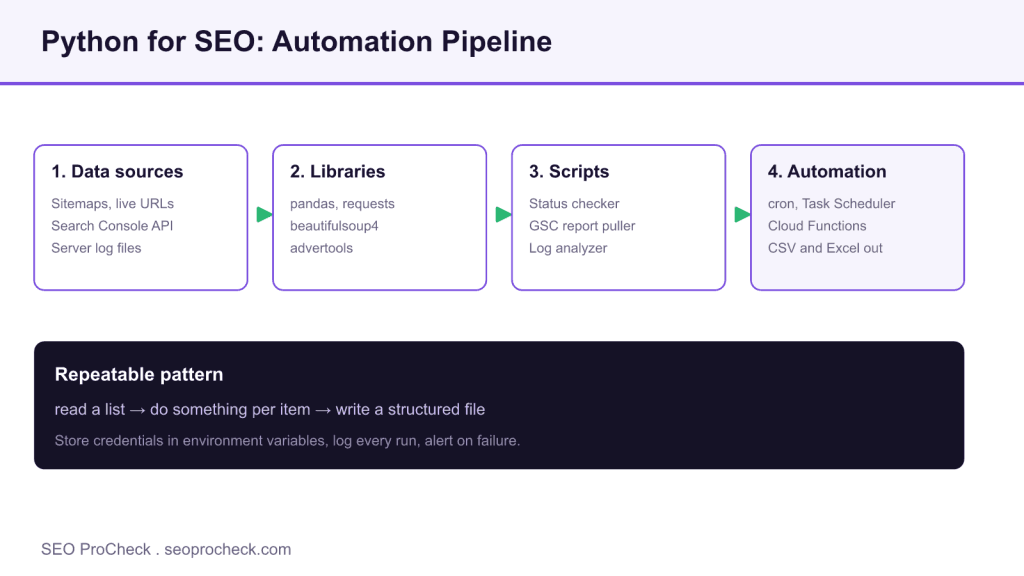
Python lets SEOs automate repetitive work by reading a list of inputs, processing each one, and writing a structured report, using libraries like pandas, requests, and advertools. Start with a small status checker or sitemap parser, then schedule the scripts you rebuild by hand each week.
- Core toolkit: pandas for data, requests for HTTP, beautifulsoup4 for parsing, advertools for SEO tasks.
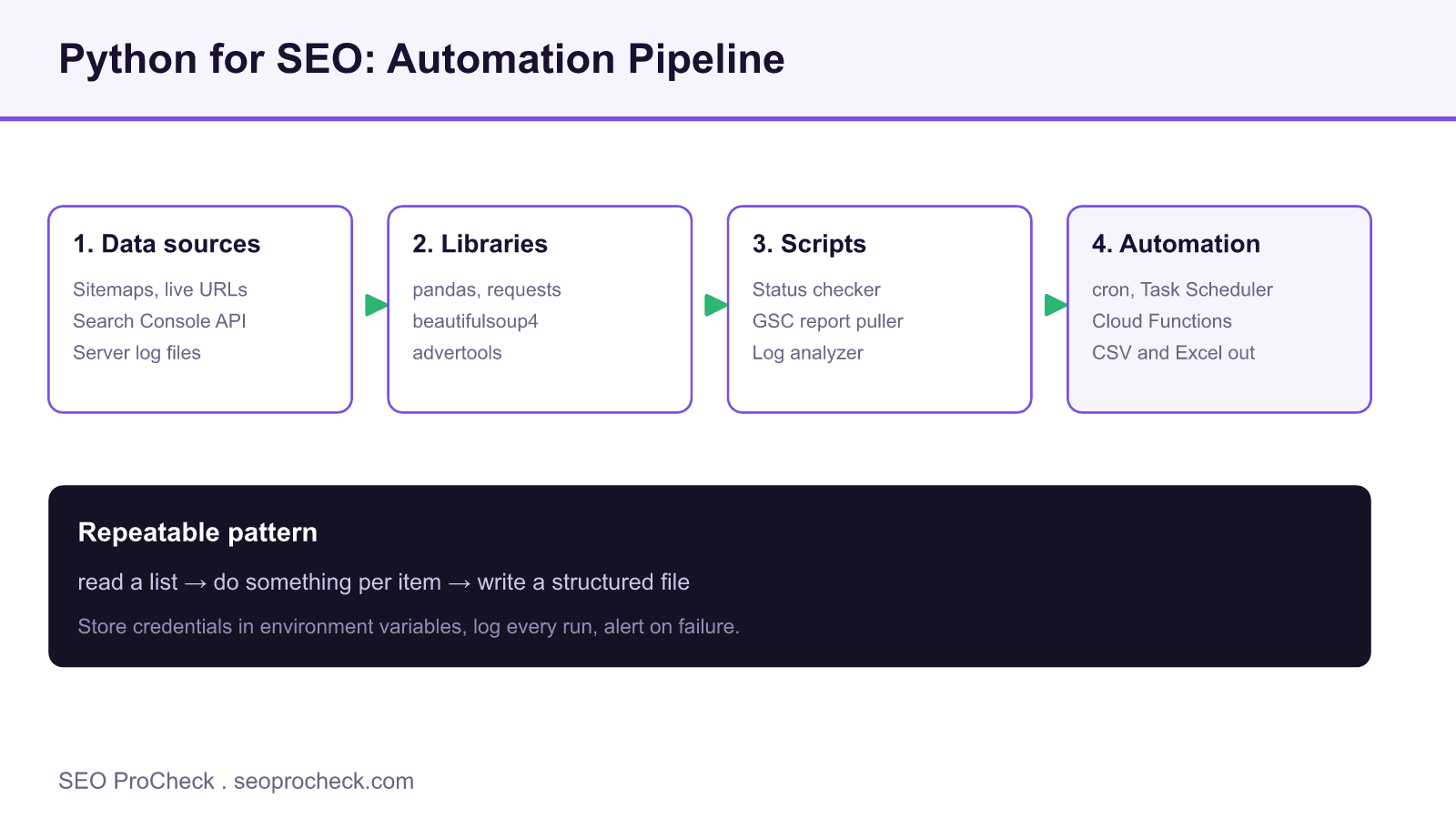
- Every script follows one pattern: read a list, act per item, write a file such as CSV or Excel.
- Schedule finished scripts with cron, Task Scheduler, or serverless functions, and alert on failure.
- Keep API credentials in environment variables, never hardcoded in the script.
Why Python for SEO
Python has become the language of choice for SEO automation due to its readable syntax, extensive libraries, and strong community support for data analysis. While many SEO tasks can be done with spreadsheets or tools, Python enables processing larger datasets, automating repetitive tasks, building custom tools tailored to specific needs, and connecting different data sources. Learning Python fundamentals opens doors to working with APIs, automating reports, analyzing log files, and building internal SEO tools that scale with your organization.
Essential Python Libraries for SEO
Several libraries form the core toolkit for SEO Python work. Pandas handles data manipulation with dataframes similar to spreadsheets but capable of processing millions of rows. Requests makes HTTP calls for scraping and API interactions. BeautifulSoup parses HTML for extracting on-page elements. Advertools provides SEO-specific functionality including crawling, sitemap parsing, and robots.txt handling. Google client libraries connect to Search Console, Analytics, and other Google APIs. Matplotlib and Seaborn create data visualizations.
| Library | Purpose | Example Use Case |
|---|---|---|
| pandas | Data manipulation | Analyzing crawl exports, combining datasets |
| requests | HTTP requests | Checking status codes, API calls |
| beautifulsoup4 | HTML parsing | Extracting titles, headers, links |
| advertools | SEO utilities | Parsing sitemaps, robots.txt, crawling |
| google-api-python-client | Google APIs | Search Console data extraction |
| openpyxl | Excel files | Reading/writing Excel reports |
Common SEO Python Scripts
Start with practical scripts that solve real problems. A sitemap parser extracts all URLs from XML sitemaps for analysis. A status code checker validates URLs return expected responses. A title/description extractor pulls metadata from lists of URLs for auditing. A Search Console data puller automates weekly performance reports. A log file analyzer processes server logs to understand crawl behavior. These foundational scripts can be modified and combined as your Python skills develop. Focus on solving actual workflow pain points rather than learning Python abstractly.
Setting Up Your Environment
Install Python from python.org (version 3.8 or higher recommended). Use pip to install libraries: pip install pandas requests beautifulsoup4 advertools. Choose a code editor like VS Code with Python extension for syntax highlighting and debugging. Jupyter Notebooks provide interactive environments ideal for data exploration and learning. Organize projects with virtual environments to manage dependencies. Store credentials securely using environment variables rather than hardcoding in scripts. Version control with Git tracks changes and enables collaboration.
Moving from Scripts to Automation
Once scripts are working reliably, schedule them to run automatically. Use cron (Linux/Mac) or Task Scheduler (Windows) for basic scheduling. Cloud platforms like Google Cloud Functions or AWS Lambda run scripts without maintaining servers. Build monitoring to alert when scripts fail. Create documentation so others can understand and maintain your code. Consider building internal web applications with Flask or Streamlit to make tools accessible to non-technical team members. As scripts become critical to workflows, invest in error handling, logging, and testing to ensure reliability.
A Worked Example: Bulk Status Code Checker
The fastest way to feel Python paying off is a script that audits a list of URLs for their HTTP response. Save the snippet below as status_check.py, drop your URLs into urls.txt (one per line), and run python status_check.py. It reads the file, requests each URL with a sensible timeout and a descriptive user agent, then writes a tidy CSV you can open in Sheets.
import csv, requests

HEADERS = {"User-Agent": "SEO ProCheck audit bot"}

with open("urls.txt") as f:
    urls = [line.strip() for line in f if line.strip()]

rows = []
for url in urls:
    try:
        r = requests.get(url, headers=HEADERS, timeout=15, allow_redirects=True)
        rows.append([url, r.status_code, r.url, len(r.history)])
    except requests.RequestException as e:
        rows.append([url, "ERROR", str(e), 0])

with open("status_report.csv", "w", newline="") as out:
    w = csv.writer(out)
    w.writerow(["url", "status", "final_url", "redirects"])
    w.writerows(rows)
The final_url and redirects columns surface redirect chains that waste crawl budget, and the try/except keeps one dead host from killing the whole run. This is the pattern most SEO automation follows: read a list, call something for each item, write a structured file.
Building a Weekly Search Console Report
Once the basics click, automate the report you rebuild by hand every Monday. Create a Google Cloud project, enable the Search Console API, download the service account JSON to a path like ~/.config/gsc/service_account.json, and add the service account email as a full user in the Search Console property. Then query the Search Analytics endpoint with a date range and dimensions such as query and page. Load the response straight into a pandas dataframe, sort by clicks, and export with df.to_excel("weekly_gsc.xlsx"). Point cron at the script for a hands off Monday deliverable. Store the credential path in an environment variable rather than the code so the same script runs safely across machines.
What to Automate First
Prioritize by frequency times pain. A task you repeat weekly and dread is a better first target than a clever one off. The table below maps common SEO chores to the library that solves them and the trigger that should run the finished script.
| Workflow | Core library | Output | Suggested trigger |
|---|---|---|---|
| Redirect and status audit | requests | CSV of status codes | Weekly cron |
| Sitemap coverage check | advertools | URL inventory dataframe | After each deploy |
| Search Console reporting | google-api-python-client | Excel dashboard | Monday morning cron |
| Meta title and description audit | beautifulsoup4 | Duplicate and length report | Monthly |
| Log file crawl analysis | pandas | Bot hit frequency table | On demand |
Pair these scripts with a full technical crawl in a desktop tool for context, our Screaming Frog advanced usage guide covers custom extraction that complements Python exports, and feed the performance numbers from your Core Web Vitals optimization work into the same reporting pipeline.
Frequently Asked Questions
Do I need to be a developer to use Python for SEO?
No. Most SEO automation reuses the same short patterns: read a list, loop over it, write a file. You can copy a working script, change the input, and get value on day one, then learn the underlying concepts as specific needs arise.
Which Python library should I learn first for SEO?
Start with pandas and requests. Pandas lets you slice crawl exports and Search Console data like a spreadsheet at scale, and requests handles the HTTP calls behind status checks and API pulls. Advertools is the natural third step for SEO specific tasks like sitemap and robots.txt parsing.
How do I schedule a Python SEO script to run automatically?
On Mac or Linux use cron, on Windows use Task Scheduler, and for serverless runs use Google Cloud Functions or AWS Lambda. Point the scheduler at your script, log the output to a file, and add a simple failure alert so you notice when a run breaks.
Is it safe to store API credentials in my scripts?
No, never hardcode keys or service account paths. Store them in environment variables or a separate config file kept out of version control. This keeps secrets out of Git history and lets the same script run across machines without edits.
Can Python replace tools like Screaming Frog?
Not entirely. Desktop crawlers handle rendering and full site crawls with a polished interface, while Python excels at custom data joins, scheduled reporting, and one off tasks no tool covers. In practice the two work together: crawl in the tool, then process the export in Python.
How long does it take to get useful results with Python for SEO?
You can run a useful status checker or sitemap parser within an hour of installing Python. Building reliable, scheduled reporting with error handling typically takes a few focused sessions as you get comfortable with the libraries.
Take this with you
The assistant links open with a question about this page already written. Nothing is sent until you press enter.
Claude Vincent is a technical SEO consultant focused on crawlability, rendering, and AI-search visibility. He writes the field guides and case studies at SEO ProCheck, with a bias toward the durable, unglamorous work that decides whether search engines and AI answer engines can actually read and cite a site.
About SEO ProCheck
Technical SEO consulting and GEO strategy with 20 years of enterprise experience. Case studies, resources, and tools for search and AI visibility.
Work With Me
Technical SEO audits, GEO strategy, site migrations, and international SEO. Hourly consulting for teams who need hands-on support, not just reports.
Subscribe to our newsletter!








Recent Posts
- Most Top Sites Never Say Who They Are in Structured Data October 14, 2026
- Homepage Titles Are Mostly Too Short, Not Too Long October 8, 2026
- Who Actually Serves an llms.txt? 184 Top Sites Measured September 29, 2026