

AI Summary
A 301 redirect is a permanent server instruction that forwards both users and search engines from an old URL to a new one and passes almost all of the old page ranking signals across. Set it up at the server level with .htaccess or Nginx, or with a plugin, then map each old URL to the closest matching live page.
- Use a 301 for permanent moves and a 302 only for short lived, temporary diversions.
- Redirect each old URL to the most relevant live page, not blanket everything to the home page.
- Avoid redirect chains and loops, point the old URL straight at the final 200 destination.
- Update internal links to the new URL so redirects are a safety net, not the main path.
What a 301 redirect does
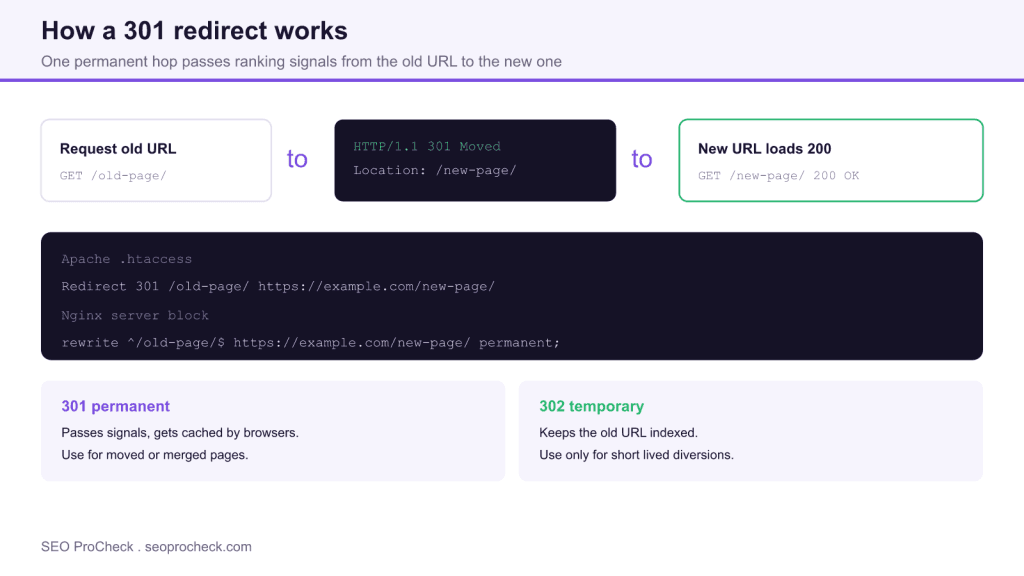
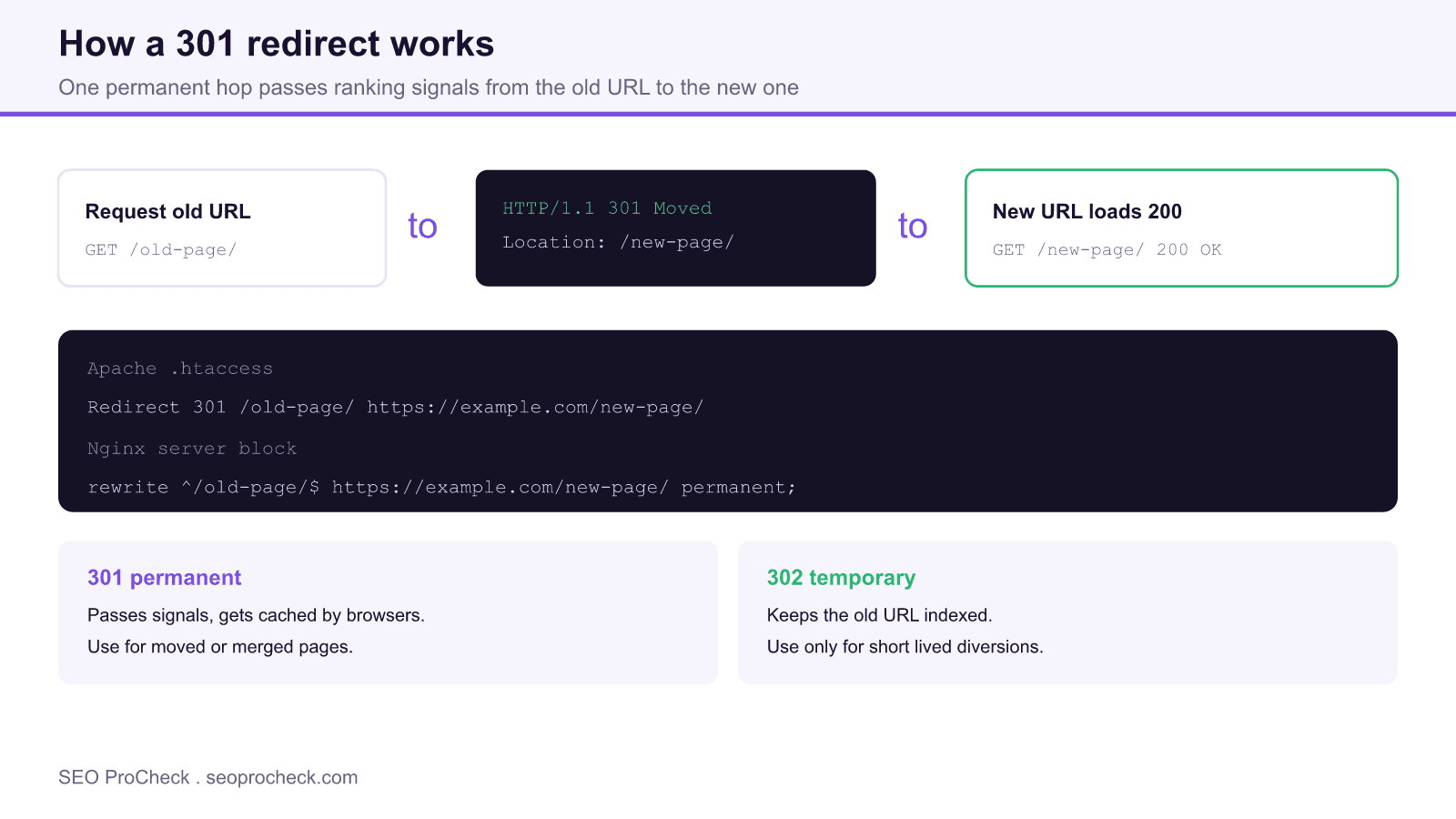
A 301 is an HTTP status code that means Moved Permanently. When a browser or crawler requests the old URL, the server answers with a 301 and a Location header naming the new URL, and the client immediately fetches that new URL, which should return 200. For SEO the important part is that a 301 consolidates the old page signals, its links, its history, and most of its ranking equity, onto the destination. That is why 301s are the correct tool whenever a URL changes: a site migration, an HTTPS move, a slug rename, or merging two overlapping pages into one.
301 versus 302 and the others
Choosing the wrong code is the most common mistake. A 301 is permanent and tells search engines to replace the old URL with the new one in the index. A 302 is temporary and tells them to keep the old URL indexed while briefly serving different content. Use a 302 only when the move genuinely is temporary, such as a seasonal landing page. A 307 is the HTTP/1.1 temporary equivalent, and a 308 is the permanent equivalent that also preserves the request method. For everyday SEO redirects, 301 is what you want.
Three ways to implement one
Pick the method that matches your server stack, and prefer the server level over application plugins where you can, because it is faster and fires before your CMS loads.
Apache with .htaccess
Redirect 301 /old-page/ https://example.com/new-page/

RewriteEngine On
RewriteRule ^old-page/?$ https://example.com/new-page/ [R=301,L]
Nginx server block
rewrite ^/old-page/?$ https://example.com/new-page/ permanent;WordPress or CMS plugin
If you cannot touch server config, a plugin such as Redirection or the redirect manager in Rank Math writes the same rules from an admin screen and is fine for modest volumes. On managed platforms like Shopify or Wix, use the built in URL redirect tool.
Map redirects the right way
Do not send every retired URL to the home page. A blanket redirect to the root is treated by Google as a soft 404 and throws away the topical relevance of the old page. Instead, map each old URL to the single most relevant live page. Where no close match exists, the next best target is the parent category, and only as a last resort the home page.
| Scenario | Redirect to | Code |
|---|---|---|
| URL slug renamed | The new slug, one to one | 301 |
| Two articles merged | The surviving article | 301 |
| Product out of stock, returning soon | Keep the URL live, do not redirect | 200 |
| Temporary campaign page swap | The interim page | 302 |
| Deleted page, no equivalent | Let it 404 or 410 | 404 |
Avoid chains, loops, and other traps
A redirect chain is old to interim to final. Each hop costs crawl time and dilutes signals slightly, and Google may stop following after several hops, so always point the old URL directly at the final destination. A redirect loop, where A points to B and B points back to A, breaks the page entirely. After you deploy, crawl the site and confirm every redirect resolves in exactly one hop to a 200 URL. Also make sure the target is not itself blocked by a stray directive, which is where the meta robots and x-robots-tag reference is useful.
Verify and maintain
Test each rule with a header checking tool or by watching the network tab, and confirm the first response is 301 and the second is 200. Then update internal links and your XML sitemap to reference the new URLs directly, so redirects act as a fallback for external links rather than the route your own site relies on. Keep the redirect map documented so future edits do not accidentally create chains.
Frequently asked questions
Does a 301 redirect pass full ranking value?
A 301 passes the large majority of ranking signals to the destination. Google has said PageRank is not reduced by a 301, though relevance still matters, so redirecting to a closely related page preserves more value than a mismatched one.
How long should I keep a 301 in place?
Keep it as long as the old URL might still be requested or linked, which in practice means indefinitely. Google recommends leaving migration redirects live for at least a year, and there is little cost to keeping them longer.
Should I redirect everything to my home page?
No. Blanket redirects to the home page are treated as soft 404s and discard the topical relevance of the old pages. Map each old URL to the most relevant live page instead.
What is the difference between 301 and 302?
A 301 is permanent and moves ranking signals to the new URL, replacing the old one in the index. A 302 is temporary and keeps the old URL indexed. Use 302 only for genuinely short lived changes.
Are redirect chains bad for SEO?
Yes. Chains waste crawl budget, slow the user, and can be abandoned by crawlers after a few hops. Always point the original URL straight at the final 200 destination in a single hop.
Can too many redirects slow my site?
Each redirect adds a round trip, so large chains and thousands of rules processed in application code can add latency. Server level rules and single hop redirects keep the impact negligible.
Claude Vincent is a technical SEO consultant focused on crawlability, rendering, and AI-search visibility. He writes the field guides and case studies at SEO ProCheck, with a bias toward the durable, unglamorous work that decides whether search engines and AI answer engines can actually read and cite a site.
About SEO ProCheck
Technical SEO consulting and GEO strategy with 20 years of enterprise experience. Case studies, resources, and tools for search and AI visibility.
Work With Me
Technical SEO audits, GEO strategy, site migrations, and international SEO. Hourly consulting for teams who need hands-on support, not just reports.
Subscribe to our newsletter!






