

How to Migrate a Website Without Losing Rankings
- January 20, 2025
- Site Migrations, Technical SEO
AI Summary
A website migration keeps its rankings when every old URL points to its closest new match through a permanent 301 redirect and the page level signals stay stable. Plan the redirect map before launch, preserve titles, canonicals, schema and internal links, then monitor Search Console daily until coverage settles.
- Redirect equity moves through 301 responses, not 302 or meta refresh.
- Map old URLs one to one to the most relevant new page, never blanket redirect to the homepage.
- Keep on page content, canonical tags and internal links unchanged at launch to isolate the variables.
- Expect a short dip, then recovery across two to four weeks if redirects and signals hold.
Overview
A website migration is any change that alters the URLs, hostname, protocol, CMS or template structure that search engines already know. Rankings survive a migration when the equity attached to each old URL is transferred cleanly to a single new URL and the ranking signals on that page stay recognisable. Rankings collapse when redirects are missing, chained, temporary, or pointed at the wrong page, and when content or internal links are quietly dropped during the rebuild. The work below treats a migration as a controlled experiment: change the address, hold everything else constant, and give Google an unambiguous trail to follow.
Most avoidable losses trace back to three failures: a redirect map that maps many old URLs to the homepage, redirects returning a 302 instead of a 301, and templates that ship with thinner content or missing structured data. Fix those three and you have removed the majority of migration risk before launch day.
Step-by-Step Process
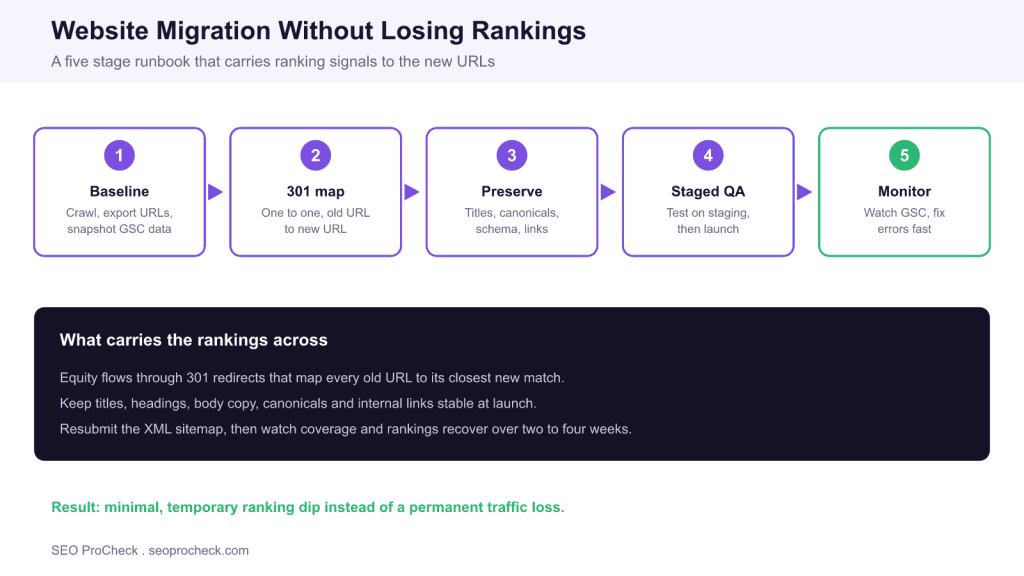
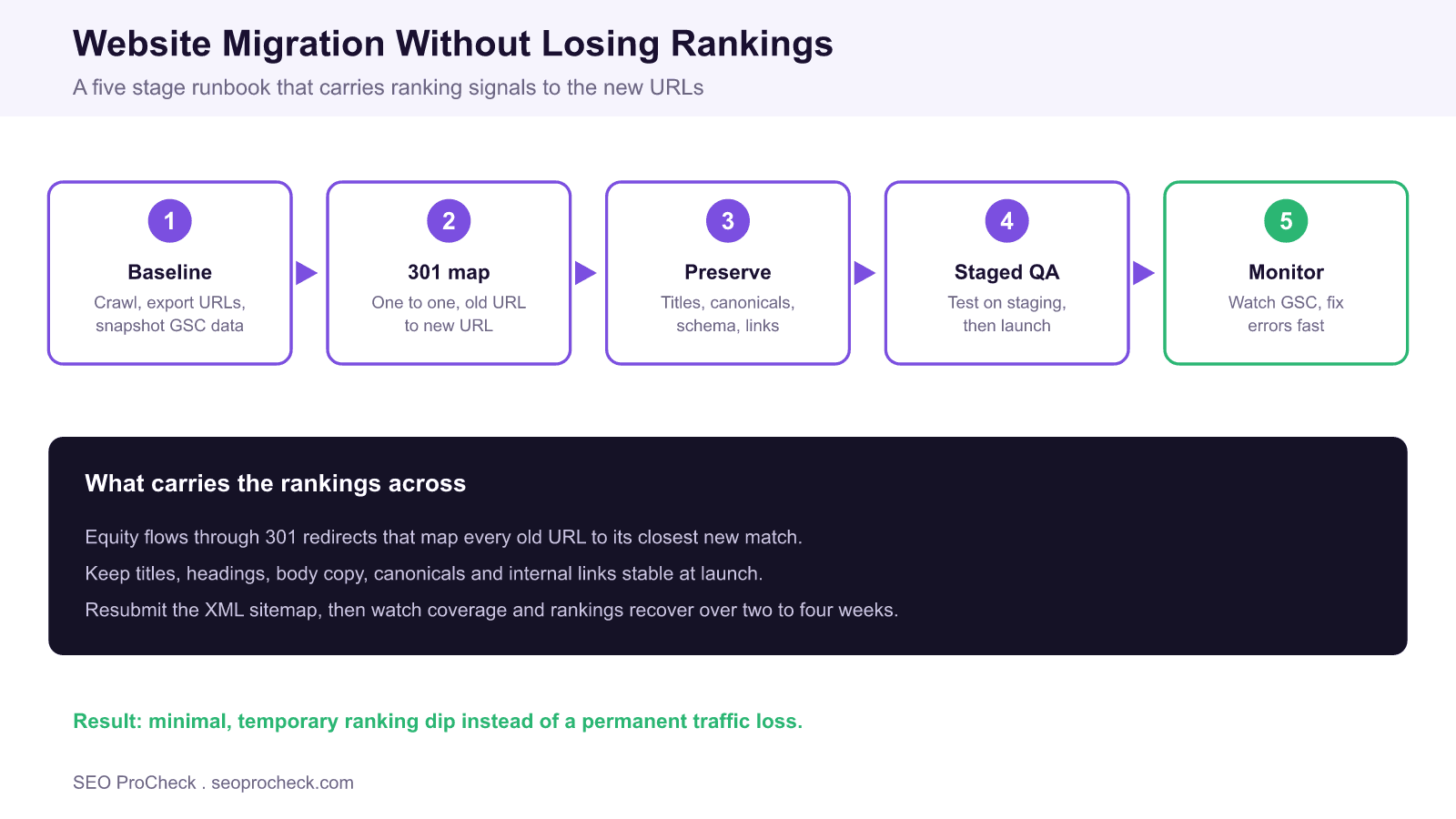
Start by building a complete baseline while the current site is still live. Run a full crawl to capture every indexable URL, its title, meta description, canonical target, response code and internal link count. Export the top pages by clicks and impressions from Search Console using a migration planning checklist so you know which URLs carry the traffic you cannot afford to lose. Pull the full list of indexed URLs from the XML sitemap and from server logs to catch pages a crawler alone would miss.
Next build the redirect map. Every old URL gets exactly one destination, and that destination is the closest topical equivalent on the new site, not a category page or the homepage. Where slugs can stay identical, keep them, because an unchanged path is the lowest risk transfer of all. Implement each rule as a permanent 301 so that link equity and historical signals pass through. If you are unsure which status code to use, review the practical differences in this guide to setting up 301 redirects and the wider HTTP status codes reference.
Implementation Details
Preserve the page level signals that Google uses to rank the URL. That means carrying over the title tag, H1, body copy, image alt text, self referencing canonical, hreflang annotations and structured data to the matching new page. Rebuild the internal linking so that the new pages link to each other with the same descriptive anchors, because a page that loses all its internal links loses the crawl paths that fed its authority. Keep the XML sitemap accurate: it should list only the new, indexable, canonical URLs and return them with a 200 response.
Watch for redirect chains and loops. A chain such as old URL to intermediate URL to final URL leaks a little equity at each hop and slows crawling, so flatten every rule to a single hop. Confirm that redirected URLs resolve to a 200 destination and that no rule points at a page that is itself noindexed or canonicalised elsewhere. If the migration also moves you to HTTPS, follow a dedicated HTTPS migration technical checklist to close mixed content and protocol split issues at the same time.
Verification and Testing
Do the testing on a staging copy before anything reaches production. Block staging from indexing with HTTP authentication rather than a robots disallow, so a stray staging URL can never be indexed and so your redirect tests are not muddied. Crawl the staging site and diff it against your baseline: every important old URL should either exist at the same path or resolve through a single 301 to a live 200 page. Spot check the highest traffic templates by hand to confirm titles, canonicals and schema render as expected.
The table below maps the common migration types to their primary ranking risk and the safeguard that neutralises it. Use it as a pre launch checklist keyed to the kind of change you are shipping.
| Migration type | What changes | Primary ranking risk | Key safeguard |
|---|---|---|---|
| Domain change or rebrand | Hostname | History and trust reset | 301 every URL, keep structure, file change of address in GSC |
| HTTP to HTTPS | Protocol | Duplicate URLs, mixed content | Force HTTPS, update canonicals and internal links |
| CMS replatform or URL restructure | Paths and markup | Broken redirects, orphaned pages | One to one 301 map, preserve slugs where possible |
| Site consolidation | Many sites into one | Diluted or lost equity | Map to closest topical match, never a blanket homepage redirect |
| Design or template refresh | Layout and markup | Dropped content, thinner pages | Keep copy, headings, schema and internal links intact |
Launch Day Sequence
Run launch as a scripted sequence rather than a single switch, so that if something breaks you know exactly which step to roll back. A dependable order looks like this:
- Freeze content edits on the old site and take a final crawl and Search Console export as the reference baseline.
- Deploy the new site with all 301 rules active and the staging index block removed only at cutover.
- Smoke test the twenty highest traffic URLs by hand: confirm each old URL 301s once to a live 200 page with the correct title and canonical.
- Publish the new XML sitemap, submit it in Search Console, and for a hostname change file the change of address tool.
- Trigger a fresh crawl of the live site and fix any Not found or Redirect error before you close out the day.
Keeping this order means the redirects, sitemap and indexing signals all reach Google in the same window, which shortens the time the search engine spends uncertain about where your content now lives.
Ongoing Maintenance
Launch is the start of the monitoring window, not the finish line. On launch day, resubmit the new XML sitemap in Search Console and, for a hostname change, file the change of address tool. For the first two weeks, check Coverage and Page indexing daily for spikes in Not found, Redirect error, or Crawled currently not indexed, and watch the server logs to confirm Googlebot is fetching the new URLs and following the 301s. Keep the redirect rules in place permanently, because search engines and inbound links can reference old URLs for years. A clean migration usually shows a shallow, temporary dip that recovers within two to four weeks once Google recrawls the moved URLs and consolidates the signals onto the new addresses.
Frequently Asked Questions
How long does it take to recover rankings after a website migration?
With a clean one to one 301 map and stable on page signals, most sites see a shallow dip for one to two weeks followed by recovery within two to four weeks. Larger sites take longer because Google needs more crawl cycles to revisit every moved URL. If rankings are still depressed after six weeks, audit for broken redirects, chains, or lost content.
Should I redirect all old URLs to the homepage?
No. A blanket redirect to the homepage is treated as a soft 404 for pages that had their own topic and equity, so those rankings are lost. Map every old URL to the single most relevant new page. Only send a URL to a parent category or the homepage when no closer equivalent exists.
Do I need to submit a change of address in Google Search Console?
Yes, whenever the hostname changes, for example a domain rebrand or a move between domains. The change of address tool tells Google the move is deliberate and speeds up signal transfer. It is not needed for a URL restructure inside the same domain, where the 301 redirects alone communicate the change.
Can I migrate and redesign at the same time?
You can, but it multiplies the risk because you cannot isolate which change caused a drop. If possible, ship the URL migration first with the existing design, confirm recovery, then roll out the new template. If you must combine them, keep the title tags, body copy, headings, schema and internal links equivalent so the only real variable is the address.
Why did my traffic drop after migration even though I set up redirects?
The most common causes are redirects that return 302 instead of 301, redirect chains that dilute equity, redirects pointing at noindexed or canonicalised pages, and templates that shipped with thinner content or missing structured data. Crawl the live site, follow each redirect to its final status code, and diff the new pages against your pre migration baseline to find the gap.
How long should I keep the old redirects live?
Keep them permanently. Backlinks, bookmarks, and older cached references can point at the old URLs for years, and removing the redirects turns those into 404s that waste the equity you worked to preserve. Redirect rules are cheap to maintain, so there is no upside to retiring them.
Take this with you
The assistant links open with a question about this page already written. Nothing is sent until you press enter.
Claude Vincent is a technical SEO consultant focused on crawlability, rendering, and AI-search visibility. He writes the field guides and case studies at SEO ProCheck, with a bias toward the durable, unglamorous work that decides whether search engines and AI answer engines can actually read and cite a site.
About SEO ProCheck
Technical SEO consulting and GEO strategy with 20 years of enterprise experience. Case studies, resources, and tools for search and AI visibility.
Work With Me
Technical SEO audits, GEO strategy, site migrations, and international SEO. Hourly consulting for teams who need hands-on support, not just reports.
Subscribe to our newsletter!








Recent Posts
- Most Top Sites Never Say Who They Are in Structured Data October 14, 2026
- Homepage Titles Are Mostly Too Short, Not Too Long October 8, 2026
- Who Actually Serves an llms.txt? 184 Top Sites Measured September 29, 2026