

AI Summary
An XML sitemap is a machine readable file that lists the canonical, indexable URLs you want search engines to crawl. Most sites should let their CMS or SEO plugin generate it automatically, keep it limited to HTTP 200 canonical pages, and submit it in Search Console.
- One file holds up to 50,000 URLs and 50 MB uncompressed, split larger sites with a sitemap index.
- Include only canonical, indexable, status 200 URLs, never redirects, noindex, or blocked pages.
- Use absolute URLs and an honest lastmod that reflects the real edit date.
- Reference the sitemap in robots.txt and submit it to Google Search Console and Bing.
What an XML sitemap is for
An XML sitemap is a structured list of the URLs on your site that you want search engines to discover and crawl. It does not force indexing and it is not a ranking factor, but it is a discovery aid: it helps crawlers find pages that are deep in the architecture, newly published, or poorly linked internally. For large sites, news sites, and sites with weak internal linking, a clean sitemap measurably speeds up discovery. For a small, well linked site, it is still worth having because it gives you a coverage report in Search Console.
The structure: index and child sitemaps
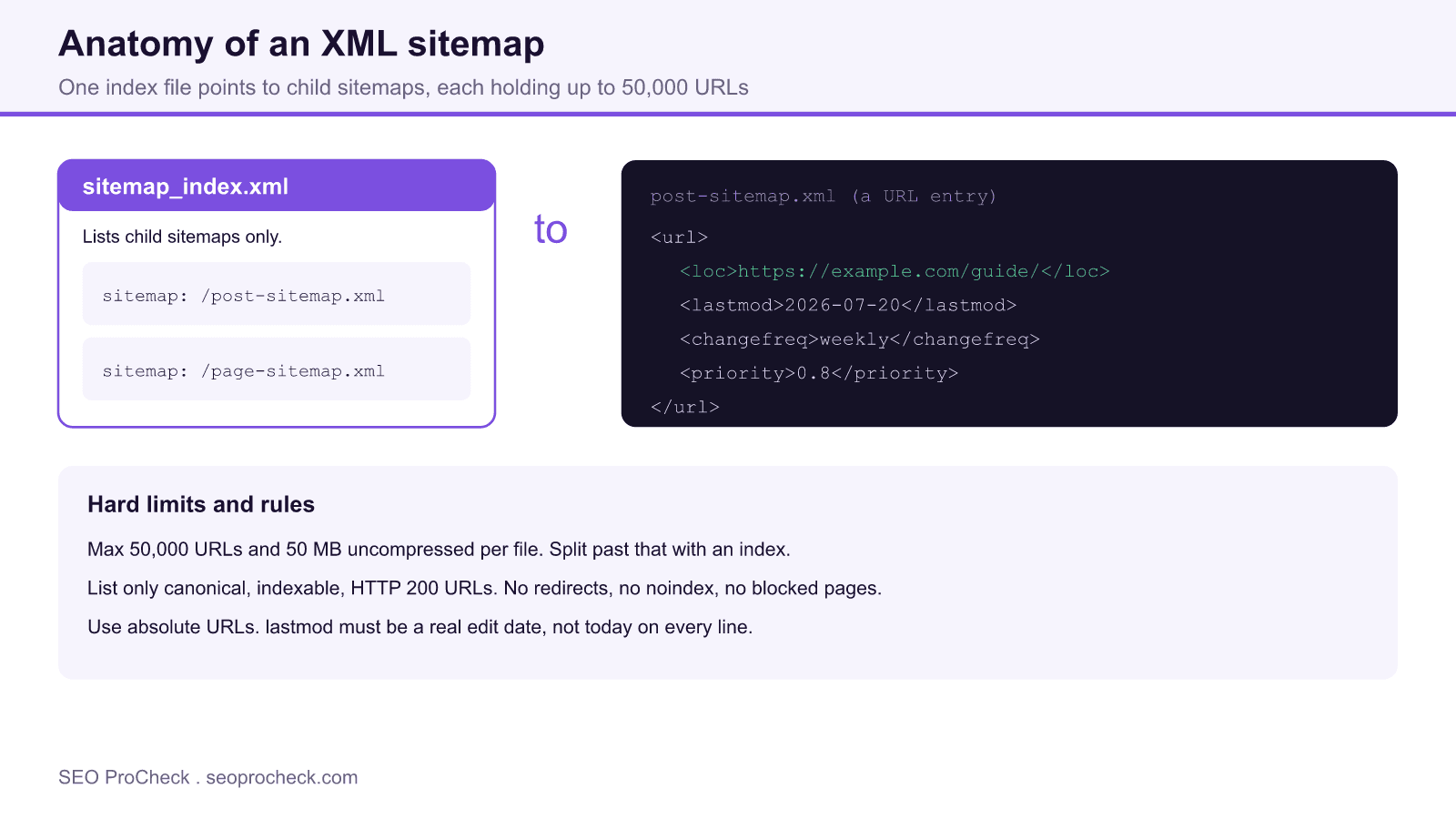
A sitemap is an XML file wrapped in a <urlset> element, with one <url> block per page. Each block must contain a <loc> with the absolute URL, and may contain optional <lastmod>, <changefreq>, and <priority> hints. Once you exceed the per file limits you use a sitemap index, a <sitemapindex> file that points to multiple child sitemaps instead of to pages. Most CMS platforms split by content type, for example a post sitemap, a page sitemap, and an image sitemap.
Hard limits you cannot exceed
A single sitemap file may contain at most 50,000 URLs and may be at most 50 MB uncompressed. Cross either limit and you must break the file up and reference the parts from an index. You can gzip sitemaps to save bandwidth, but the 50 MB ceiling applies to the uncompressed size.
A valid URL entry
Here is a single well formed entry. Note the absolute URL and the ISO 8601 date:
<url>
<loc>https://example.com/guide/</loc>
<lastmod>2026-07-20</lastmod>
<changefreq>weekly</changefreq>
<priority>0.8</priority>
</url>
Google ignores changefreq and priority entirely and treats lastmod as a signal only if it is consistently accurate. If every line shows today as the last modified date, Google learns to distrust the field, so populate lastmod from the real content edit timestamp or leave it off.
What belongs in the sitemap, and what never does
The golden rule: a sitemap lists only URLs you want indexed, and every one should be canonical, return HTTP 200, and be free of any noindex or robots block. Mixing in the wrong URLs sends contradictory signals and wastes crawl budget.
| URL type | Include? | Reason |
|---|---|---|
| Canonical page returning 200 | Yes | This is exactly what belongs |
| URL that 301 redirects | No | List the destination instead |
| Noindex or robots blocked page | No | Contradicts the include intent |
| Non canonical or parameter duplicate | No | Only the canonical should appear |
| Page returning 404 or 500 | No | Wastes crawl and flags errors |
How to generate one
You almost never hand write a sitemap. WordPress ships a basic one at /wp-sitemap.xml, and plugins such as Rank Math or Yoast produce a richer index at /sitemap_index.xml that updates automatically as you publish. Shopify, Wix, and Squarespace generate theirs automatically too. For custom stacks, generate the file at build time or with a crawler. Whatever produces it, validate the output and confirm the URLs match your canonical tags. When you build hreflang into the same file, follow our guide on how to implement hreflang tags.
Register and submit it
Add a reference line to robots.txt, for example Sitemap: https://example.com/sitemap_index.xml, so any crawler can find it. Then submit it explicitly in Google Search Console for coverage reporting, and remove any pages you have deliberately excluded via meta robots or x-robots-tag. The full submission walkthrough is in our guide on how to submit a sitemap to Google.
Frequently asked questions
Do I need an XML sitemap if my site is small?
You do not strictly need one for a tiny, well linked site, but it is still worth having. It gives you a coverage and error report in Search Console and helps crawlers pick up new pages faster, at essentially no cost since your CMS generates it.
How many URLs can one sitemap hold?
Up to 50,000 URLs and 50 MB uncompressed per file. Beyond either limit you split the URLs across multiple child sitemaps and list those children in a sitemap index file.
Should I include noindexed pages in my sitemap?
No. A sitemap is a list of pages you want indexed, so including a noindexed or blocked URL sends a contradictory signal. Keep the file to canonical, indexable, status 200 URLs only.
Does a sitemap guarantee my pages get indexed?
No. A sitemap aids discovery but does not force indexing. Google still decides whether each URL is worth indexing based on quality, canonicalization, and crawl signals.
Where should the sitemap live?
At a stable, root level URL such as /sitemap_index.xml, referenced from robots.txt. Keep the location consistent so search engines and your own monitoring can rely on it.
Do changefreq and priority matter?
Not much. Google ignores both fields. Spend your effort on an accurate lastmod and a clean URL list instead, since those are the parts crawlers actually use.
Take this with you
The assistant links open with a question about this page already written.
Claude Vincent is a technical SEO consultant focused on crawlability, rendering, and AI-search visibility. He writes the field guides and case studies at SEO ProCheck, with a bias toward the durable, unglamorous work that decides whether search engines and AI answer engines can actually read and cite a site.
About SEO ProCheck
Technical SEO consulting and GEO strategy with 20 years of enterprise experience. Case studies, resources, and tools for search and AI visibility.
Work With Me
Technical SEO audits, GEO strategy, site migrations, and international SEO. Hourly consulting for teams who need hands-on support, not just reports.
Subscribe to our newsletter!








Recent Posts
- Google Algorithm Updates: The Dated List Since 2003, and What to Do After Each October 31, 2026
- AI Readiness: The Checklist, the Research and the Free Tools October 28, 2026
- AI Readiness Checklist (2026): 51 Checks, Each With Its Source October 28, 2026