

IndexNow Protocol Implementation
- January 20, 2025
- Crawlability and Indexation, Technical SEO
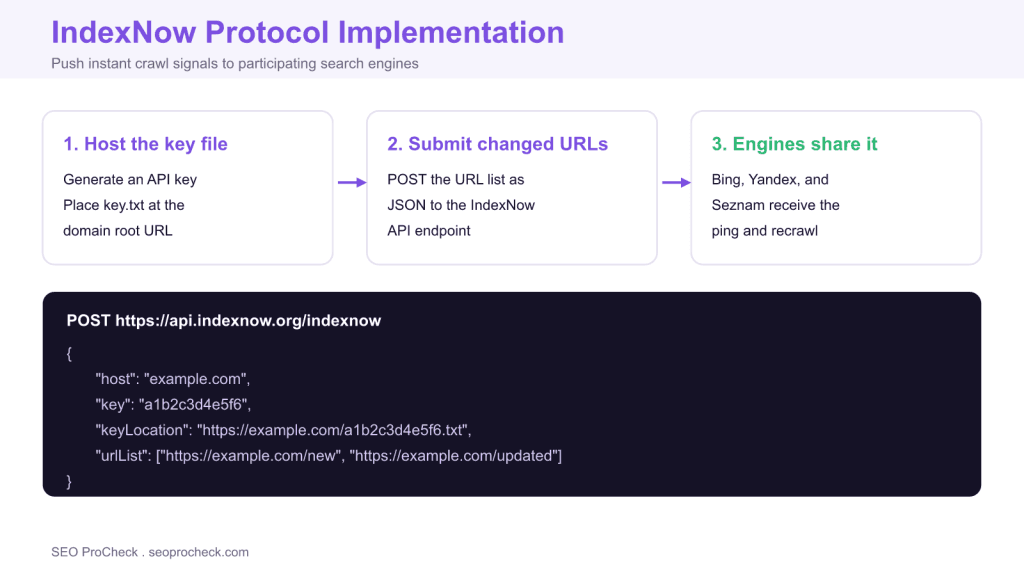
AI Summary
IndexNow is an open protocol that lets you notify participating search engines the instant a URL changes, so they crawl it sooner instead of waiting for a scheduled visit. You host a key file at your domain root, then POST the changed URLs as JSON, and Bing, Yandex, Seznam, and Naver share the ping between them.
- Host a key file of 8 to 128 hexadecimal characters at your root URL.
- POST up to 10,000 changed URLs per request to the IndexNow endpoint.
- Submit only real changes: added, updated, or deleted URLs.
- Bing, Yandex, Seznam, and Naver support it; Google is only testing.
What IndexNow does and why it matters
IndexNow is an open protocol that flips crawling from pull to push. Normally a search engine decides when to revisit your pages, and a new or updated URL can sit undiscovered for hours or days. With IndexNow you tell participating engines the moment something changes, and they fetch it on their own schedule but much sooner. Microsoft Bing, Yandex, Seznam, and Naver participate, and because they share submissions, a single ping reaches all of them. Google publicly announced it was testing IndexNow, but it has never confirmed the protocol as a live indexing input, so plan your gains around Bing and the other confirmed engines rather than Google.
The practical payoff is faster discovery for time sensitive content and better crawl efficiency for large sites. You are effectively pointing crawlers at exactly the URLs that changed, which spares them from rediscovering updates by recrawling everything. That plays directly into how you manage crawl budget on big properties.
Step 1: create and host your key
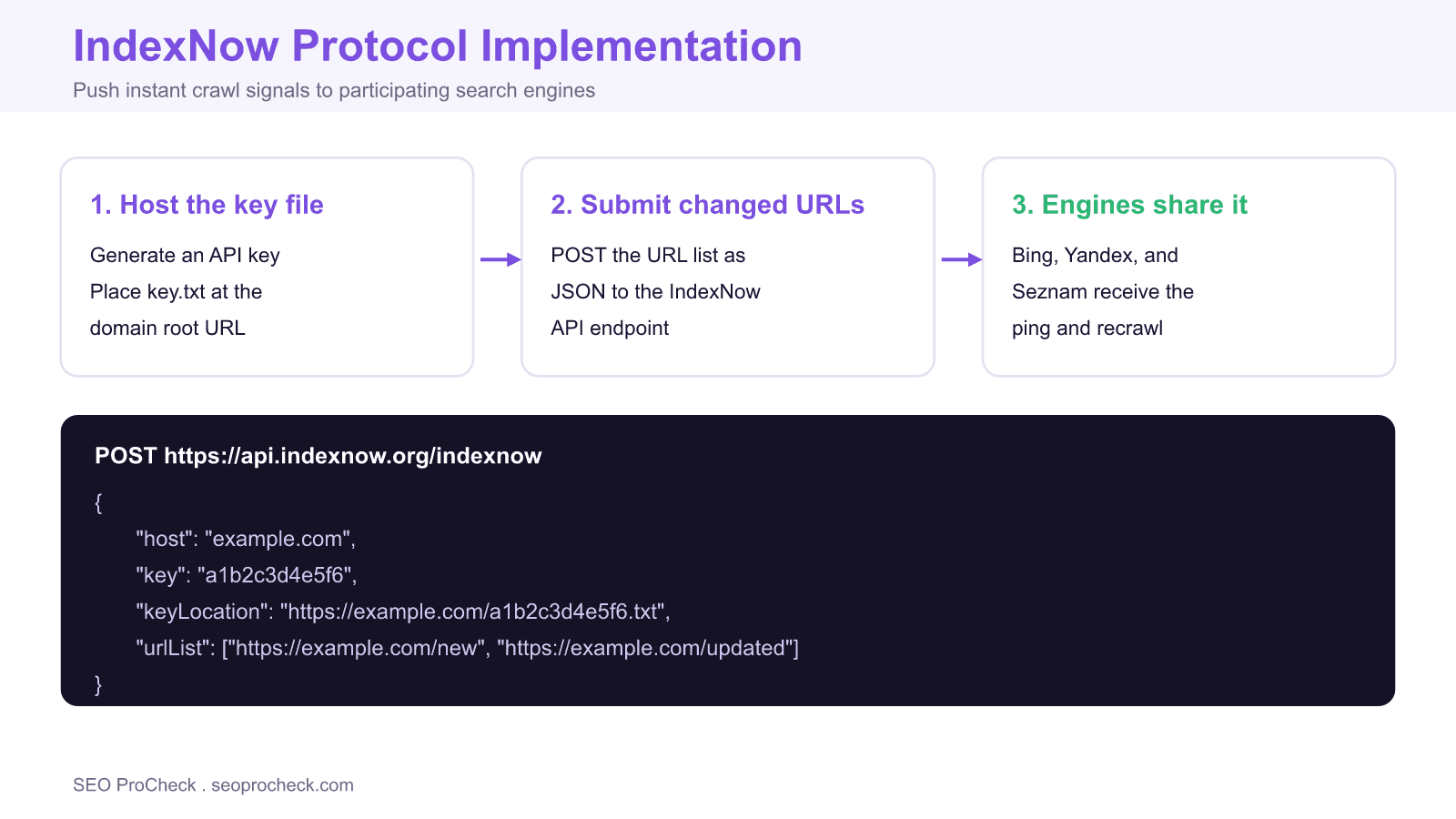
Generate an API key that is a hexadecimal string of 8 to 128 characters. Save it in a plain text file whose name is the key itself, for example a1b2c3d4e5f6.txt, and the file body must contain the same key as plain text. Host that file at the root of your domain so it resolves at https://example.com/a1b2c3d4e5f6.txt. When you submit URLs, you reference this file with the keyLocation field, and the engine fetches it to confirm you own the domain. You can host multiple keys if you manage several sections or subdomains.
Step 2: submit changed URLs
For a single URL you can send a simple GET request: https://api.indexnow.org/indexnow?url=https://example.com/page&key=a1b2c3d4e5f6. For batches, POST a JSON body to https://api.indexnow.org/indexnow with Content-Type: application/json. The body carries host, key, keyLocation, and a urlList array of up to 10,000 URLs. A 200 response means the submission was accepted; a 422 usually means a URL does not match the host or the key failed validation. Submit URLs when content is added, meaningfully updated, or removed, and skip unchanged pages, because repeatedly pinging stale URLs can get your key throttled or ignored.
Engine support at a glance
| Search engine | IndexNow support | Notes |
|---|---|---|
| Microsoft Bing | Yes, native | Original driver of the protocol |
| Yandex | Yes | Co founder of the protocol |
| Seznam | Yes | Leading engine in Czechia |
| Naver | Yes | Leading engine in South Korea |
| Testing only | Announced testing, not confirmed live |
Automating it without writing code
Most sites never touch the raw API. Rank Math and Yoast can fire IndexNow submissions automatically when you publish or update a post, and Cloudflare offers a one click integration that submits URLs at the edge. Our companion guide on IndexNow instant indexing walks through the plugin route. If you run a custom stack, hook the submission into your publish pipeline so every deploy that changes URLs sends a batch automatically. Pair that with a healthy XML sitemap, which remains the baseline discovery method even after you add IndexNow.
Verifying and troubleshooting
After you submit, confirm the key file is reachable in a browser and returns the exact key as plain text. In Bing Webmaster Tools you can see IndexNow submissions and any errors, which is the fastest way to catch a mismatched host or an unreachable key file. Common failures are a key file behind a redirect, a urlList that mixes domains, or URLs that are blocked by robots rules or carry a noindex directive, in which case the ping is wasted because the page cannot be indexed anyway. Treat IndexNow as an accelerator layered on top of solid indexation hygiene, not a replacement for it.
Frequently asked questions
What is the IndexNow protocol?
IndexNow is an open protocol that lets you notify participating search engines the moment a URL is added, updated, or removed. Instead of waiting for the next crawl, you POST the changed URLs and engines that support the protocol pull them quickly.
Which search engines support IndexNow?
Microsoft Bing, Yandex, Seznam, and Naver participate, and a ping to one endpoint is shared with the others. Google announced it is testing IndexNow but has not confirmed it as a live indexing input, so treat Google coverage as unconfirmed.
How do I get and host an IndexNow key?
Generate a hexadecimal key of 8 to 128 characters, save it in a text file named after the key, and host that file at your domain root, for example https://example.com/yourkey.txt. The file must return the key as plain text so engines can verify ownership.
How many URLs can I submit at once?
You can submit a single URL through a simple GET, or batch up to 10,000 URLs in one POST with a JSON body. Submit only URLs that genuinely changed, because spamming unchanged URLs can get your key ignored.
Does IndexNow help with Google rankings?
IndexNow does not directly influence Google, which has not confirmed live support. Its value is faster discovery on Bing and other participating engines, and cleaner crawl efficiency, which indirectly frees crawl budget rather than boosting rankings.
Do I need to code IndexNow myself?
Usually not. Rank Math, Yoast, and other SEO plugins can submit URLs automatically on publish, and Cloudflare offers a one click integration. Hand rolling a POST is only necessary for custom stacks or bulk submissions.
Take this with you
The assistant links open with a question about this page already written. Nothing is sent until you press enter.
Claude Vincent is a technical SEO consultant focused on crawlability, rendering, and AI-search visibility. He writes the field guides and case studies at SEO ProCheck, with a bias toward the durable, unglamorous work that decides whether search engines and AI answer engines can actually read and cite a site.
About SEO ProCheck
Technical SEO consulting and GEO strategy with 20 years of enterprise experience. Case studies, resources, and tools for search and AI visibility.
Work With Me
Technical SEO audits, GEO strategy, site migrations, and international SEO. Hourly consulting for teams who need hands-on support, not just reports.
Subscribe to our newsletter!








Recent Posts
- Most Top Sites Never Say Who They Are in Structured Data October 14, 2026
- Homepage Titles Are Mostly Too Short, Not Too Long October 8, 2026
- Who Actually Serves an llms.txt? 184 Top Sites Measured September 29, 2026