

AI Summary
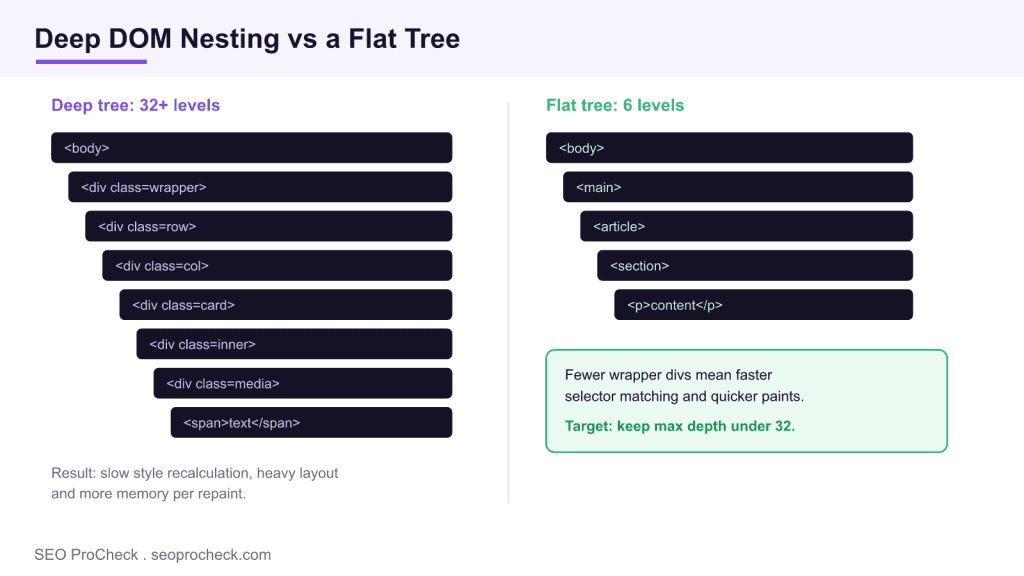
Excessive DOM depth means your HTML nests elements too many levels deep, which slows style recalculation, layout, and rendering. Lighthouse flags any element sitting more than 32 levels below the body, along with pages that push past roughly 1,500 total nodes.
- Google Lighthouse warns above about 1,500 DOM nodes and errors above roughly 3,000.
- The depth warning triggers when the deepest element sits more than 32 levels below the body element.
- Deep trees mainly hurt Interaction to Next Paint and other Core Web Vitals, not rankings directly.
- Fix it by removing wrapper divs and using CSS Grid or Flexbox instead of stacked containers.

Quick Reference
Element Code: PE-006
Issue: DOM tree has excessive nesting depth (over 32 levels)
Impact: Slower style calculations, increased memory usage
Fix: Flatten HTML structure by reducing unnecessary nesting
Detection: Lighthouse, Chrome DevTools Performance panel
What Is This Issue?
Deeply nested DOM structures require more resources to process. Each level of nesting adds computational overhead for style recalculation and layout.
Why This Matters for Your Website
Deep DOM trees slow down CSS selector matching and layout calculations. This affects both initial render and any subsequent DOM updates.
How to Fix This Issue
- Review HTML structure: Identify deeply nested areas
- Remove wrapper divs: Eliminate unnecessary containers
- Use CSS Grid/Flexbox: Modern layout reduces nesting needs
Tools for Detection
- Lighthouse: Reports maximum DOM depth
- DevTools: Elements panel shows structure
TL;DR (The Simple Version)
Your HTML is nested too deep. Remove unnecessary wrapper divs and flatten your structure. Deep nesting slows down page rendering.
How DOM depth is measured, and where 32 comes from
The Lighthouse audit named “Avoid an excessive DOM size” reports three numbers: the total node count, the maximum depth, and the maximum number of child elements on any single parent. It starts warning at about 1,500 total nodes and raises a hard error past roughly 3,000. The depth figure is the one this check cares about: when your deepest element sits more than 32 levels below the <body> tag, the browser has to walk a long chain every time it matches CSS selectors or recalculates layout.
You can reproduce these numbers yourself in Chrome DevTools without any paid tool. Open the console on the page you want to audit and run a node count, then measure the deepest branch with a short recursive helper:
document.querySelectorAll('*').length;

function maxDepth(node){
  let deepest = 0;
  for (const child of node.children){
    deepest = Math.max(deepest, maxDepth(child));
  }
  return deepest + 1;
}
console.log(maxDepth(document.body));
Compare the console output against the thresholds below. If the node count is fine but a single template partial blows past 32 levels, you have a localised nesting problem rather than a whole page that is too large.
| DOM signal | Lighthouse threshold | Why it matters |
|---|---|---|
| Total DOM nodes | Warns above ~1,500, errors above ~3,000 | More nodes mean more memory and slower style work |
| Maximum depth | Flags elements deeper than 32 levels | Deep branches slow selector matching and layout |
| Maximum child elements | Flags a parent with more than 60 children | Very wide nodes slow reflow when they change |
What actually causes a deep DOM
In my audits the same culprits show up again and again. Visual page builders such as Divi, Elementor, and WPBakery wrap every row, column, and module in several container divs, so a simple three column section can be eight or nine levels deep before any real content appears. Nested grid frameworks, accordion and tab widgets that render all panels up front, infinite comment threads, and large data tables round out the list. A single reusable card component that is nested inside a carousel, inside a section, inside a full width wrapper quickly compounds across a page.
A practical flattening workflow
Start by crawling the site and isolating the worst pages. Screaming Frog can render pages and you can pair its crawl with a custom extraction, or you can lean on the DevTools snippet above for spot checks. Once you know which templates offend, replace stacks of presentational wrappers with a single parent that uses CSS Grid or Flexbox, since one grid parent can position many children without extra nesting. Lazy render off screen sections so the initial tree stays small, and audit third party embeds, which often inject their own deep markup. For the performance context around this work, see our guide to Interaction to Next Paint, review the wider performance checks, and use the Screaming Frog advanced usage guide to script the crawl.
Frequently asked questions
What is a good maximum DOM depth?
Lighthouse warns when the deepest element sits more than 32 levels below the body. Aim to keep your deepest nesting well under that, ideally in the low twenties, and keep total node count under about 1,500.
How do I check my DOM depth?
Open Chrome DevTools, run document.querySelectorAll('*').length in the console for the node count, and use a short recursive function to measure the deepest branch. Lighthouse also reports the largest DOM size and the worst offending element.
Does deep DOM nesting hurt SEO directly?
There is no direct ranking penalty, but excessive depth slows style and layout work, which harms Core Web Vitals like Interaction to Next Paint, and those field metrics do feed into ranking and user experience.
What usually causes an oversized DOM?
Page builders and nested grid frameworks that wrap every element in several container divs, large data tables, endless comment threads, and widgets that render hidden markup are the most common causes.
How do I flatten a deep DOM without breaking the layout?
Replace stacks of wrapper divs with CSS Grid or Flexbox on a single parent, remove presentational containers, and lazy render off screen sections so the initial tree stays small.
Take this with you
The assistant links open with a question about this page already written. Nothing is sent until you press enter.
Claude Vincent is a technical SEO consultant focused on crawlability, rendering, and AI-search visibility. He writes the field guides and case studies at SEO ProCheck, with a bias toward the durable, unglamorous work that decides whether search engines and AI answer engines can actually read and cite a site.
About SEO ProCheck
Technical SEO consulting and GEO strategy with 20 years of enterprise experience. Case studies, resources, and tools for search and AI visibility.
Work With Me
Technical SEO audits, GEO strategy, site migrations, and international SEO. Hourly consulting for teams who need hands-on support, not just reports.
Subscribe to our newsletter!








Recent Posts
- Most Top Sites Never Say Who They Are in Structured Data October 14, 2026
- Homepage Titles Are Mostly Too Short, Not Too Long October 8, 2026
- Who Actually Serves an llms.txt? 184 Top Sites Measured September 29, 2026