

AI Summary
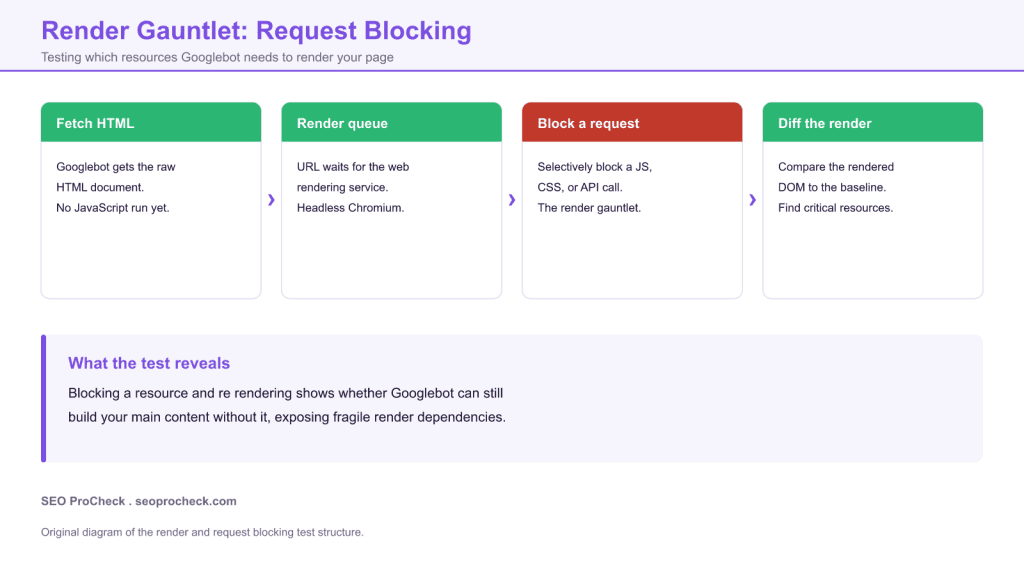
The render gauntlet is a request blocking test that reveals which resources Googlebot truly needs to render your page. You block one script, stylesheet, or API call at a time, re render the page, and diff the output against a clean baseline to see whether your main content still appears. It turns a vague worry about JavaScript SEO into a concrete list of fragile render dependencies you can fix.
- Google indexes in two waves: raw HTML first, then a delayed render.
- Block a resource, re render, and diff to see what the crawler loses.
- A blocked API or script that erases main content is a critical failure.
- Chrome DevTools request blocking and the URL Inspection tool are your gauntlet.
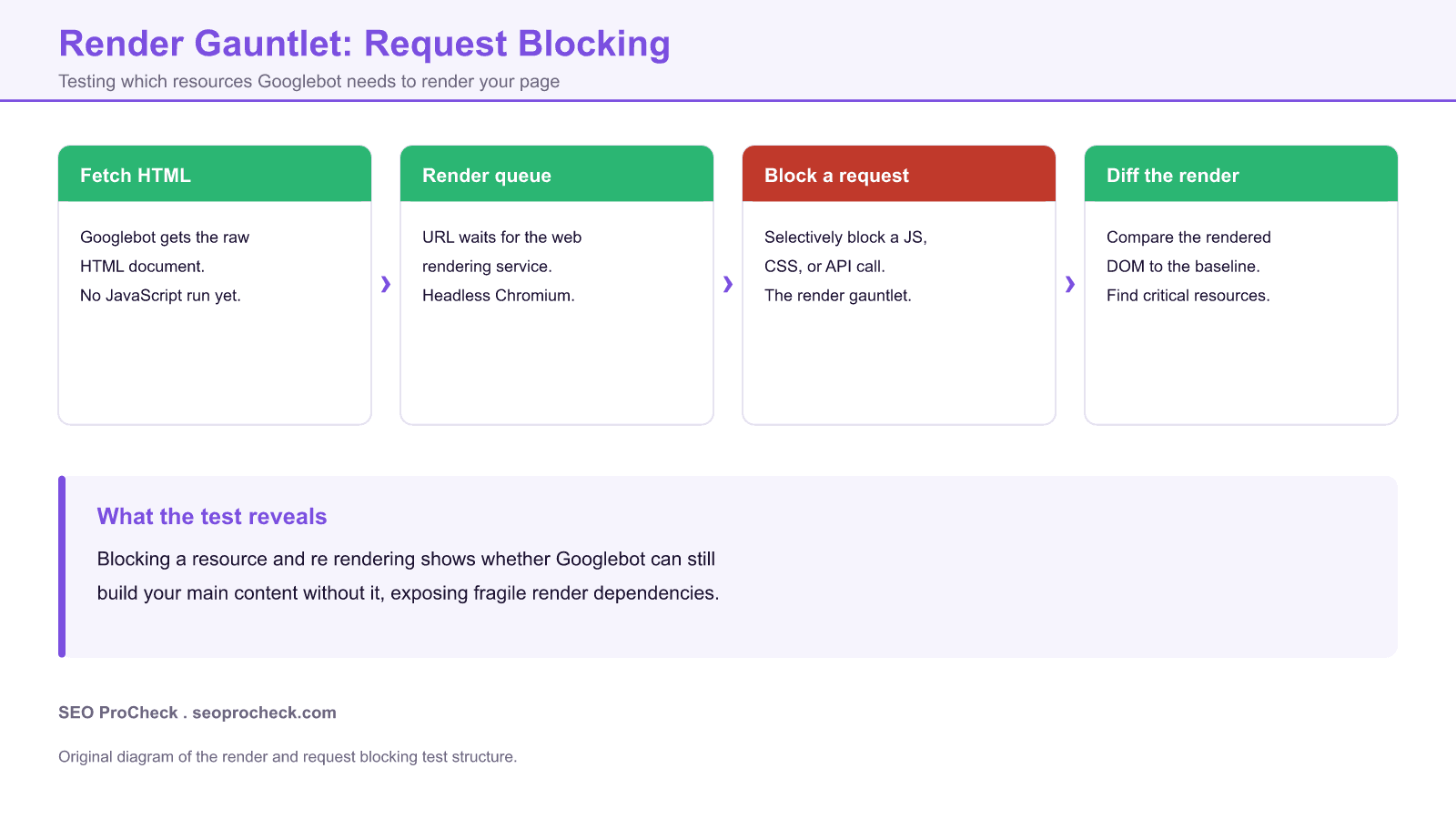
This page documents the render gauntlet, a request blocking technique for JavaScript SEO, and adds a practitioner walkthrough of how to run it, read it, and act on it. If your pages depend on JavaScript to build their main content, the gauntlet answers the only question that matters: when a resource fails to load, can Google still see what you want indexed?
This SEO case study documents a successful optimization initiative, providing actionable insights for practitioners. The documented approach demonstrates how strategic SEO implementation drives measurable results.
Initial Situation
Understanding the starting point is essential context for evaluating any case study. This documentation covers the initial challenges, competitive position, and business objectives that shaped the SEO strategy.
Strategy and Approach
The strategic approach combined multiple SEO disciplines to address identified opportunities. Key decisions around prioritization and resource allocation provide a template for similar initiatives.
Implementation
Moving from strategy to execution required specific technical implementations, content development, and process changes. This case study documents the practical steps that translated strategy into action.
Results and Learnings
The outcomes demonstrate effectiveness through measurable improvements in rankings, traffic, and business metrics. Analysis of successes and challenges provides learning value for practitioners.
What the render gauntlet tests
Google indexes JavaScript pages in two waves. First it crawls the raw HTML that the server returns. Then, sometimes seconds and sometimes days later, the page enters a render queue where a headless Chromium instance runs the JavaScript and produces a rendered DOM. Everything Google indexes for a client rendered page comes from that second wave. The render gauntlet stress tests that second wave. You take a page, block one request at a time, force a re render, and compare the result to a clean baseline. If blocking a resource makes your product grid, article body, or internal links vanish, you have found a dependency that will silently cost you indexing whenever that resource is slow, blocked, or broken.
Two waves, one failure point
The reason this technique works is that the render step is fragile in ways the first wave is not. The renderer skips resources disallowed in robots.txt, times out on slow requests, and does not retry failed API calls the way a browser might. So a page that looks perfect in your own browser can arrive at Google's index half built. The gauntlet makes that gap visible before it costs you traffic.
How to run a request blocking test
| Resource | How to block it | What a break means |
|---|---|---|
| Framework bundle | DevTools network request blocking on the JS file | If content disappears, rendering fully depends on client JavaScript. |
| Content API | Block the XHR or fetch endpoint pattern | A blank main region means Google may index an empty page. |
| Third party script | Block the vendor domain | A tag manager or widget should never gate your core content. |
| CSS | Block the stylesheet | Content should remain in the DOM even if the layout looks broken. |
The fastest path is Chrome DevTools. Open the Network panel, right click a request, and choose to block the request or its domain, then reload and inspect the DOM. For the crawler view that matters most, use the URL Inspection tool in Search Console, run Test Live URL, and open the rendered HTML, the screenshot, and the list of page resources Google could not load. That resource list is the render gauntlet run for you by Google itself.
Common failures the gauntlet exposes
- Main content injected only after a client side API call that Google may not wait for.
- Internal links rendered by JavaScript, so the crawler never discovers deeper pages.
- A JavaScript or JSON endpoint accidentally disallowed in robots.txt, which the renderer skips.
- Lazy loaded content that never triggers without a real scroll event.
- A single third party script whose failure blocks the whole app from mounting.
The fix is usually to serve the main content in the initial HTML through server side rendering or prerendering, and to make sure every resource the render depends on is crawlable. For related reading, see our JavaScript SEO case studies, our meta robots and X-Robots-Tag reference, and the wider indexing and crawl library.
What has changed since this test
Googlebot now renders with an evergreen Chromium, so it keeps pace with modern browser features, but the core fragility remains: the render step still skips robots.txt blocked resources and still gives up on slow or failed requests. AI crawlers add a new wrinkle, because several of them execute little or no JavaScript, so content that only appears after a client side render can be invisible to AI answers even when Google can see it. That raises the value of putting your main content in the initial HTML. Run the gauntlet periodically, since a new dependency can slip in with any front end deploy.
Case studies like this contribute to the SEO knowledge base, helping practitioners learn from documented real-world experiences.
Source: https://ohgm.co.uk/render-gauntlet-request-blocking/
Frequently asked questions
What is the render gauntlet in SEO?
It is a request blocking test where you block one resource at a time, re render the page, and diff the output against a baseline to find which scripts, styles, or API calls Googlebot needs to build your main content.
How does Google render JavaScript pages?
In two waves. It first crawls the raw HTML, then queues the page for a delayed render where a headless Chromium runs the JavaScript. Everything indexed for a client rendered page comes from that second wave.
How do I block a request to test rendering?
Use Chrome DevTools. In the Network panel, right click a request and block the request or its domain, then reload and inspect the DOM. The URL Inspection tool in Search Console also lists resources Google could not load.
Why does my page render in my browser but not for Google?
The renderer skips resources disallowed in robots.txt, times out on slow requests, and does not retry failed API calls the way a browser does, so a page can arrive at the index half built.
Does blocking CSS remove content from the index?
It should not. Blocking CSS breaks the layout, but the content should still exist in the DOM. If content vanishes when CSS is blocked, the content itself depends on scripts that ride with that request.
Do AI crawlers render JavaScript?
Many do not, or only partially. Content that appears only after a client side render can be invisible to AI answer engines even when Google can see it, which is a strong reason to serve main content in the initial HTML.
Take this with you
The assistant links open with a question about this page already written. Nothing is sent until you press enter.
Claude Vincent is a technical SEO consultant focused on crawlability, rendering, and AI-search visibility. He writes the field guides and case studies at SEO ProCheck, with a bias toward the durable, unglamorous work that decides whether search engines and AI answer engines can actually read and cite a site.
About SEO ProCheck
Technical SEO consulting and GEO strategy with 20 years of enterprise experience. Case studies, resources, and tools for search and AI visibility.
Work With Me
Technical SEO audits, GEO strategy, site migrations, and international SEO. Hourly consulting for teams who need hands-on support, not just reports.
Subscribe to our newsletter!








Recent Posts
- Most Top Sites Never Say Who They Are in Structured Data October 14, 2026
- Homepage Titles Are Mostly Too Short, Not Too Long October 8, 2026
- Who Actually Serves an llms.txt? 184 Top Sites Measured September 29, 2026