

AI Summary
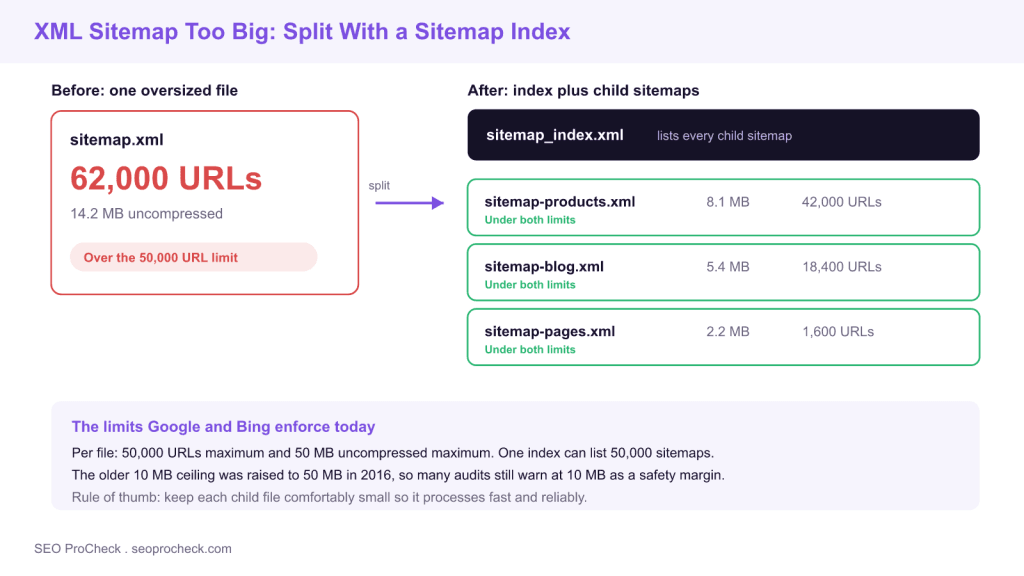
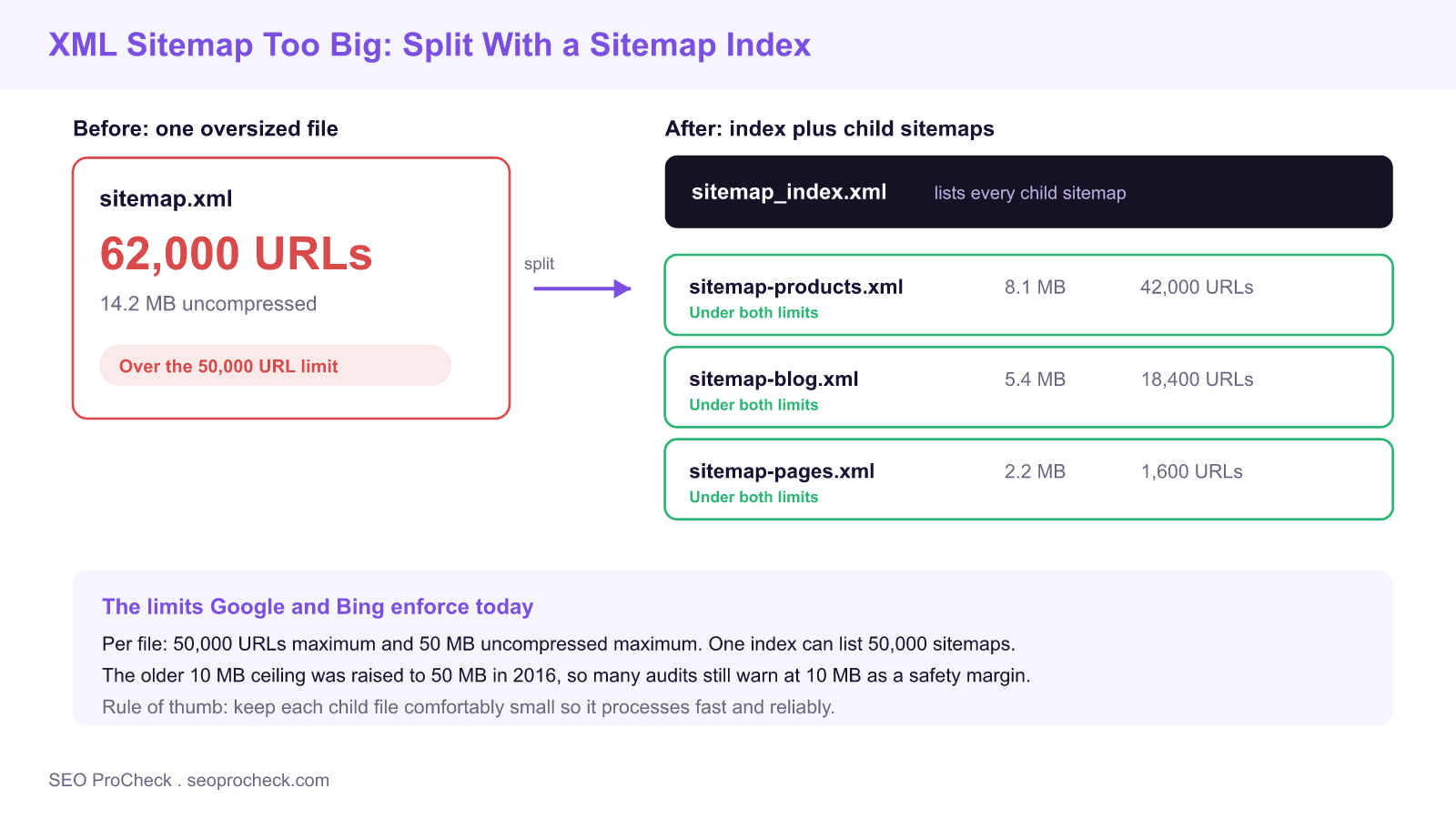
A single XML sitemap must stay under 50,000 URLs and 50 MB uncompressed. When a file crosses either limit, split it into several themed child sitemaps and reference them all from one sitemap index file, so search engines still discover every URL.
- Hard limits enforced by Google and Bing: 50,000 URLs and 50 MB uncompressed per sitemap file.
- One sitemap index can point to up to 50,000 child sitemaps, a practical ceiling of 2.5 billion URLs.
- Gzip shrinks transfer size, but the 50 MB limit is measured uncompressed, so compression does not raise the ceiling.
- The older 10 MB limit was raised to 50 MB in 2016, which is why many audits still flag files over 10 MB as a safety margin.
Quick Reference
Element Code: XM-011
Issue: Sitemap file exceeds 10MB uncompressed, a legacy safety threshold (the hard limit is 50MB or 50,000 URLs)
Impact: May not be fully processed by search engines
Fix: Split into multiple smaller sitemaps with sitemap index
Detection: File size check, Screaming Frog
What Is This Issue?
XML sitemaps have a 50MB uncompressed or 50,000 URL limit; 10MB was the limit before 2016 and survives as a safety threshold. Files over the hard limit may not be processed completely by search engines.
Why This Matters for Your Website
Oversized sitemaps may be truncated or rejected. URLs beyond the limit will not be discovered via sitemap.
How to Fix This Issue
- Split sitemap: Create multiple files
- Use sitemap index: List all sitemaps in index file
- Organize logically: By content type or date
Tools for Detection
- File manager: Check file sizes
TL;DR (The Simple Version)
Your sitemap is over 10MB, the legacy safety threshold; the hard limit is 50MB uncompressed or 50,000 URLs. Split it into multiple smaller sitemaps using a sitemap index file.
What "over the limit" actually means in 2026
The current ceiling for a single XML sitemap, set by both Google and Bing, is 50,000 URLs and 50 MB uncompressed, whichever you hit first. For most sites the URL count is the binding constraint: a file can hold well under 50 MB of markup and still cross 50,000 entries. If a check flags your sitemap for being over 10 MB, treat that as an early warning rather than a hard failure. The 10 MB figure is the legacy limit Google used before late 2016, and many audit tools still surface it as a conservative threshold because smaller files are fetched and parsed more reliably.
The practical takeaway: you do not have to panic at 10 MB, but you do need a plan before you approach 50,000 URLs or 50 MB. Splitting early keeps each file fast to download, easy to debug in Search Console, and simple to regenerate when only one section of the site changes.
How to check your sitemap file size and URL count
Measure both dimensions before you decide how to split. Three reliable methods:
- Header check for transfer size: run
curl -sI https://example.com/sitemap.xmland read thecontent-lengthvalue in bytes. Remember this is the transferred size. If the file is served gzipped, it will look far smaller than the uncompressed size that actually counts. - Uncompressed size: download the file, and if it ends in
.gzexpand it withgunzip sitemap.xml.gz, then read the real size withls -lh sitemap.xml. The 50 MB limit applies to this expanded number. - URL count: count the entries with
grep -c "<loc>" sitemap.xml. Anything approaching 50,000 needs splitting. A crawler such as Screaming Frog reports the same count under its sitemap audit.
Sitemap limits and thresholds at a glance
| Metric | Hard limit (Google and Bing) | Conservative warning threshold | Action if exceeded |
|---|---|---|---|
| URLs per file | 50,000 | 45,000 | Split into themed child sitemaps under one index |
| File size, uncompressed | 50 MB | 10 MB (legacy safety margin) | Split, or trim low value URLs before splitting |
| Sitemaps per index | 50,000 | n/a | Nest a second index only for very large sites |
| Index file size | 50 MB and 50,000 entries | n/a | Split into multiple index files, rare |
How to split a sitemap and build the index
Group URLs so that each child file maps to a section you update independently. A store might use one child per catalog area, plus one for blog posts and one for static pages. Every child is a normal urlset, and a single index file points to all of them:
<?xml version="1.0" encoding="UTF-8"?>
<sitemapindex xmlns="http://www.sitemaps.org/schemas/sitemap/0.9">
  <sitemap>
    <loc>https://example.com/sitemap-products.xml</loc>
    <lastmod>2026-07-20</lastmod>
  </sitemap>
  <sitemap>
    <loc>https://example.com/sitemap-blog.xml</loc>
    <lastmod>2026-07-21</lastmod>
  </sitemap>
  <sitemap>
    <loc>https://example.com/sitemap-pages.xml</loc>
    <lastmod>2026-06-30</lastmod>
  </sitemap>
</sitemapindex>
Reference the index in robots.txt with a line such as Sitemap: https://example.com/sitemap_index.xml, and submit only the index in Google Search Console under Sitemaps. Google reads the index, then fetches each child on its own schedule. Splitting by section also means a change to one catalog area only touches one small file, which keeps the lastmod signal honest and helps reduce crawl waste. See our guide to crawl budget for why tighter, well organized sitemaps matter on large sites.
Common mistakes when splitting sitemaps
- Submitting every child separately: submit the index once and let Google discover the children. Submitting all of them individually just adds noise.
- Leaving the old oversized file live: once you switch to an index, retire or replace the single giant file so crawlers do not keep fetching it.
- Ignoring the uncompressed rule: a 9 MB gzipped file can expand well past 50 MB. Always measure the expanded size.
- Padding sitemaps with junk URLs: parameter duplicates, thin tag pages, and dead URLs bloat the file and feed index bloat. Trim them first, then split.
- Stale lastmod on every line: a sitemap that reports today for every URL trains Google to ignore the field. Only update lastmod when the page actually changes.
What changed since the 10 MB era
Before November 2016, Google capped sitemaps at 10 MB and 50,000 URLs, and much of the tooling written in that period still enforces 10 MB. Google and Bing then raised the size ceiling to 50 MB while keeping the 50,000 URL cap. Nothing about the split strategy changed: a sitemap index is still the supported way to represent an arbitrarily large site, and keeping individual files small is still the reliable choice. If a URL sits in a sitemap but never gets picked up, the sitemap size is rarely the cause, so cross check it against discovered, currently not indexed before assuming the file is at fault.
Frequently asked questions
What is the maximum size of an XML sitemap?
A single sitemap file can hold up to 50,000 URLs and up to 50 MB uncompressed, whichever limit you reach first. Both Google and Bing enforce these figures. To go larger, split into multiple sitemaps and list them in a sitemap index.
Was the sitemap limit ever 10 MB?
Yes. Before late 2016, Google capped sitemaps at 10 MB. Google and Bing raised the size ceiling to 50 MB while keeping the 50,000 URL cap. Many older audits and plugins still warn at 10 MB, which is a useful safety margin rather than a hard failure.
Does gzipping my sitemap raise the limit?
No. Gzip reduces the transfer size and is fully supported, but the 50 MB limit is measured on the uncompressed file. Always check the expanded size, because a small gzipped file can exceed 50 MB once decompressed.
Do I submit the sitemap index or each child sitemap?
Submit only the index file in Google Search Console and reference it in robots.txt. Google reads the index and then fetches each child sitemap on its own schedule, so submitting the children individually is unnecessary.
Should I split by content type or by date?
Split by whatever section you update independently. Content type works well for most sites, for example products, blog, and static pages. Very large news or catalog sites sometimes split by date so that only recent files change, which keeps the lastmod signal accurate.
How many URLs can a sitemap index cover in total?
An index can list up to 50,000 sitemaps, and each sitemap can hold up to 50,000 URLs, so a single index covers up to 2.5 billion URLs. If you somehow need more, you can nest indexes, though almost no site reaches that scale.
Take this with you
The assistant links open with a question about this page already written. Nothing is sent until you press enter.
Claude Vincent is a technical SEO consultant focused on crawlability, rendering, and AI-search visibility. He writes the field guides and case studies at SEO ProCheck, with a bias toward the durable, unglamorous work that decides whether search engines and AI answer engines can actually read and cite a site.
About SEO ProCheck
Technical SEO consulting and GEO strategy with 20 years of enterprise experience. Case studies, resources, and tools for search and AI visibility.
Work With Me
Technical SEO audits, GEO strategy, site migrations, and international SEO. Hourly consulting for teams who need hands-on support, not just reports.
Subscribe to our newsletter!








Recent Posts
- Most Top Sites Never Say Who They Are in Structured Data October 14, 2026
- Homepage Titles Are Mostly Too Short, Not Too Long October 8, 2026
- Who Actually Serves an llms.txt? 184 Top Sites Measured September 29, 2026