


AI Summary
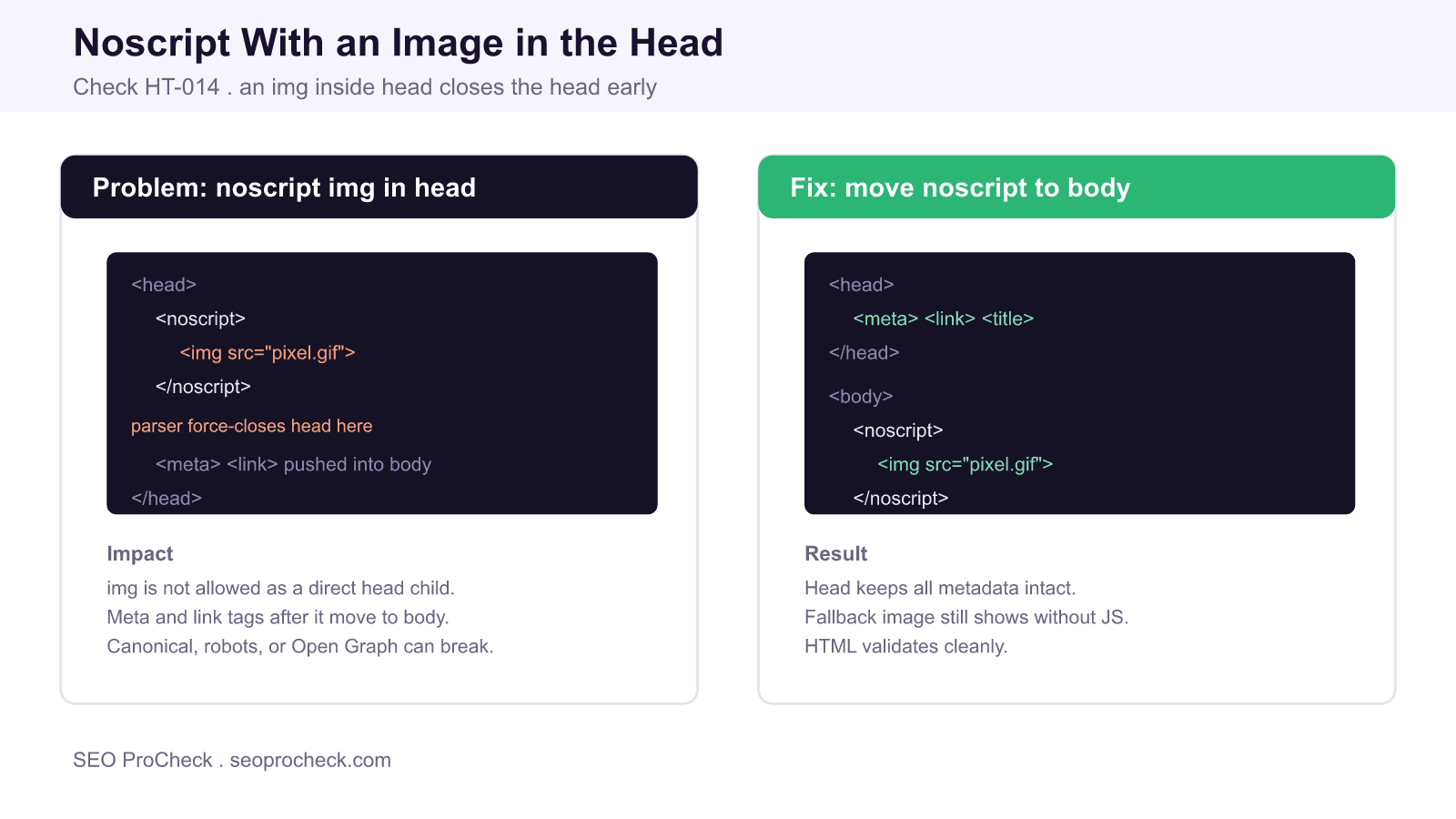
The HT-014 check flags a <noscript> that contains an <img> inside the document <head>. An image is not a valid direct or indirect child of the head, so the browser force-closes the head at that point and pushes every meta, link, and title tag that follows into the body, where they no longer function.
- Only metadata elements are allowed in the head; img is not one of them.
- An img in the head triggers an implicit end of the head element.
- Canonical, robots, viewport, and Open Graph tags placed after it can stop working.
- The fix is to move the noscript image into the body, where it belongs.
Quick Reference
Element Code: HT-014
Issue: Noscript with an image inside the head
Impact: The head closes early and later meta tags move to the body
Fix: Move the noscript image into the body
Detection: HTML validation, rendered DOM inspection
What Is This Issue?
The HTML head is reserved for document metadata: <title>, <meta>, <link>, <style>, <script>, <base>, and <noscript>. Inside the head, a <noscript> is only allowed to contain those same metadata elements, typically a <link> to a stylesheet for users without JavaScript. It is not allowed to contain an <img>.
When the parser meets an <img> while it is still building the head, it treats that as flow content, which cannot exist in the head. Per the HTML parsing rules the browser silently ends the head element and starts the body. Any <meta>, <link>, or other metadata that appears after the offending image is then parsed as body content. This is the exact situation the HT-014 check detects: a noscript image in the head that quietly relocates the rest of your metadata.
Why This Matters for SEO
Search engines and social platforms only read directives that live in the head. A canonical <link>, a <meta name="robots"> rule, an hreflang set, or Open Graph and Twitter Card tags are all head-only signals. If a stray noscript image forces the head to close before those tags, they end up in the body where crawlers ignore them. The visible page may look fine, but your canonical could be dropped, an intended noindex may not apply, and your social previews can break, all without an obvious symptom.
The classic offender is an analytics or advertising fallback: a tracking pixel wrapped in a noscript so it fires for users without JavaScript. The snippet is often pasted high in the head, right where it does the most damage to the metadata below it.
Allowed Versus Disallowed Head Content
| Element | Allowed directly in head? | Allowed inside noscript in head? |
|---|---|---|
<meta> | Yes | Yes |
<link> | Yes | Yes |
<style> | Yes | Yes |
<img> | No | No, closes the head |
<iframe> | No | No, closes the head |
How to Detect
- Run the page through the W3C Nu HTML Checker and look for a message that an img element is not allowed as a child of head, or that the head element ended unexpectedly.
- Open DevTools, inspect the Elements panel, and confirm that every meta and link tag actually sits inside
<head>and not<body>. - In the console, run
document.head.querySelectorAll('meta, link').lengthand compare it to what you expect from the source. - View the raw source and search for
<noscript>that contains an<img>before the closing head tag.
How to Fix
- Locate the noscript image, usually a tracking or advertising pixel, in the head.
- Move the entire noscript block, image and all, to the top of the
<body>instead. - In the head, keep only metadata: for a JavaScript fallback stylesheet, a bare
<noscript><link rel="stylesheet"></noscript>is fine. - Re-validate the page and confirm all meta and link tags remain inside the head in the rendered DOM.
- Re-check that canonical, robots, and social tags are being honored.
A Correct Noscript Pixel Example
If you need a JavaScript-free tracking fallback, place it in the body:
<body>
  <noscript>
    <img src="https://example.com/pixel.gif" width="1" height="1" alt="" />
  </noscript>
  ...
</body>
This keeps the head clean, preserves every metadata directive, and still serves the fallback image to visitors who have scripting disabled.
Related reading on SEO ProCheck: the full HTML structure checks library, why multiple title tags cause problems, and how to eliminate render blocking resources.
Frequently Asked Questions
Why can't I put an image inside the head?
The head is only for document metadata such as title, meta, link, style, and script. An img is flow content, which is not permitted there, so the browser ends the head element when it encounters one and starts the body.
What actually breaks when a noscript image sits in the head?
Every meta, link, or title tag that appears after the image gets parsed into the body instead of the head. Crawlers only read head-level directives, so your canonical, robots meta, hreflang, or Open Graph tags placed after the image can stop working.
Is a noscript ever allowed in the head?
Yes, but only if it contains metadata elements such as a link to a stylesheet. A common valid use is a noscript with a fallback stylesheet link. It must not contain an img, iframe, or other flow content.
How do I fix a noscript tracking pixel?
Move the whole noscript block, including the image, to the top of the body. Keep the head limited to metadata. The pixel still fires for users without JavaScript, and your head-level SEO tags stay intact.
How do I confirm my head is intact?
Validate the page with the W3C checker and inspect the rendered DOM in DevTools. Confirm that all meta and link tags appear inside the head element and not the body, which is where they land after a premature head close.
Does this hurt rankings or just validation?
It can hurt rankings indirectly. If a canonical or robots directive is displaced into the body, Google may ignore it, leading to duplicate content handling or unintended indexing. Fixing the markup restores those signals.
TL;DR
An img inside a noscript in the head is invalid and forces the browser to close the head early, pushing later meta and link tags into the body where crawlers ignore them. Move the noscript image into the body and keep the head for metadata only.
Take this with you
The assistant links open with a question about this page already written. Nothing is sent until you press enter.
Claude Vincent is a technical SEO consultant focused on crawlability, rendering, and AI-search visibility. He writes the field guides and case studies at SEO ProCheck, with a bias toward the durable, unglamorous work that decides whether search engines and AI answer engines can actually read and cite a site.
About SEO ProCheck
Technical SEO consulting and GEO strategy with 20 years of enterprise experience. Case studies, resources, and tools for search and AI visibility.
Work With Me
Technical SEO audits, GEO strategy, site migrations, and international SEO. Hourly consulting for teams who need hands-on support, not just reports.
Subscribe to our newsletter!








Recent Posts
- Most Top Sites Never Say Who They Are in Structured Data October 14, 2026
- Homepage Titles Are Mostly Too Short, Not Too Long October 8, 2026
- Who Actually Serves an llms.txt? 184 Top Sites Measured September 29, 2026