

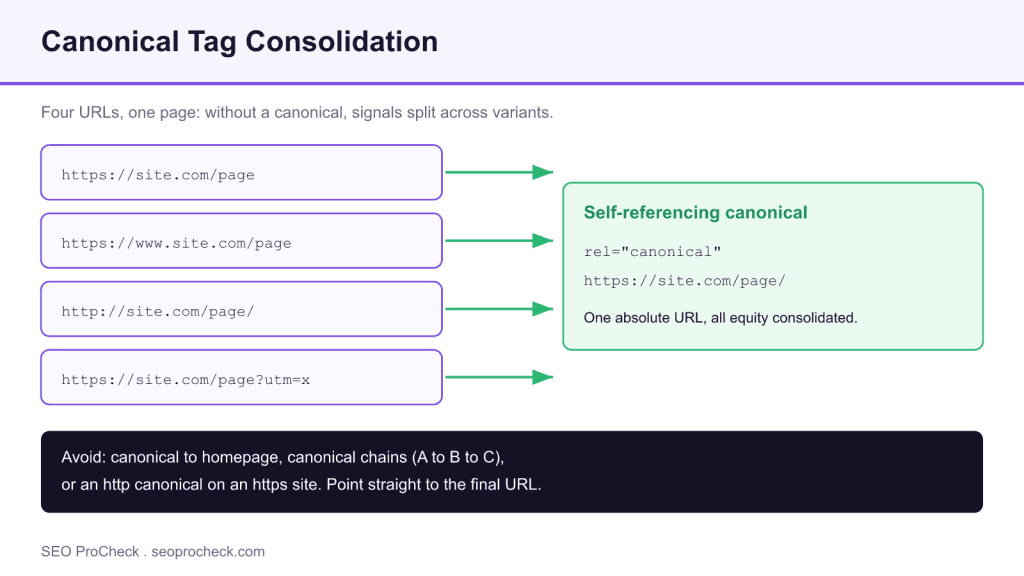
A missing canonical tag leaves Google to guess which URL is the authoritative version of a page, which risks the wrong variant being indexed and splits link equity across duplicates. The fix is a self-referencing canonical with an absolute URL on every indexable page, pointing parameter and filter variants at the clean base URL.
- A canonical tag names the preferred URL for a page.
- Without one, http, www, trailing-slash, and parameter variants compete with each other.
- Add a self-referencing, absolute-URL canonical to every indexable page.
- Never chain canonicals or point every page at the homepage.
- Element Code: ON-046
- Issue: Page has no canonical tag declaring its preferred URL
- Impact: Duplicate-content risk; Google may index the wrong URL variant
- Fix: Add a self-referencing canonical to every indexable page
- Detection: View source / HTML check, Screaming Frog
What this issue means
A canonical tag (<link rel="canonical" href="…">) tells search engines which URL is the authoritative version of a page. When it's missing, Google picks a canonical for you, and it doesn't always pick the one you want. A clear signal from you removes that guesswork.
Why it matters
The same content is often reachable at multiple URLs: http vs https, www vs non-www, trailing slash, tracking parameters (?utm_…), pagination, and faceted filters. Without a canonical, those variants compete with each other, splitting link equity and risking the wrong version being indexed. A clear self-referencing canonical consolidates those signals onto one URL. For a deeper reference, see our canonical tags complete reference and the canonical tag glossary entry.
How the variants consolidate
The table shows the common URL variants that trigger this issue and the canonical action for each.
| URL variant | Risk if left alone | Canonical action |
|---|---|---|
| http and https versions | Duplicate versions compete; insecure URL may rank | Canonical to the https URL, and redirect http to https |
| www and non-www | Signals split between two hostnames | Pick one host and self-canonical to it site-wide |
| Trailing slash differences | Two URLs for one page | Canonical to your chosen slash convention |
| Tracking parameters (utm and similar) | Endless duplicate URLs from campaigns | Canonical parameter URLs to the clean base URL |
| Faceted or filter URLs | Near-duplicate thin pages crawled and indexed | Canonical to the base where content is the same; see duplicate content guide |
How to fix it
- Add a self-referencing canonical to every indexable page, pointing to its own clean, absolute URL.
- Use absolute URLs (
https://example.com/page/), never relative paths. - Point parameter and filter URLs to the clean base URL where the content is the same.
- In WordPress, RankMath and Yoast add self-referencing canonicals automatically. If one is missing, check for a plugin conflict or a custom theme template overriding the head.
- Verify in the page source and with Google's URL Inspection tool ("Google-selected canonical").
Common mistakes
- Canonicalizing every page to the homepage (tells Google your pages are duplicates of the homepage).
- Combining
noindexand a canonical to another URL, which sends conflicting signals. - Canonical chains (A points to B points to C). Point straight to the final URL.
- Relative or
httpcanonicals on anhttpssite.
Tools to detect it
Screaming Frog and Sitebulb report missing/duplicate canonicals at scale; Google Search Console's URL Inspection shows the Google-selected canonical per URL.
Auditing canonicals across a whole site
On anything larger than a few dozen pages, checking canonicals by hand does not scale. Crawl the site with Screaming Frog or Sitebulb and pull the canonical column, then look for three things. First, any indexable URL with an empty canonical, which is the missing-tag case this issue flags. Second, canonicals that point somewhere other than the page itself when they should be self-referencing, which often reveals a template bug. Third, URLs where the declared canonical and the Google-selected canonical disagree, which you confirm one page at a time in URL Inspection. Export the list, group the problems by template, and fix the template rather than the individual pages, because a single header template usually generates the tag for thousands of URLs at once.
Canonical tags versus other consolidation tools
A canonical is a hint, not a command, so it is only one of several ways to consolidate signals. A 301 redirect is the strongest option and the right choice when a URL should genuinely no longer exist. A canonical is better when both URLs must stay reachable, for example a printer-friendly view or a filtered listing whose content matches the base page. Blocking a URL in robots.txt does neither job, because a blocked page can still be indexed as a bare link and its canonical may never be read. Use redirects for retired URLs, canonicals for reachable duplicates, and reserve noindex for pages that must stay live but out of the index.
FAQ
Does every page need a canonical?
Every indexable page benefits from a self-referencing canonical. It is a clear, low-risk signal that names the preferred URL and helps consolidate any variants onto one address.
Is a missing canonical a penalty?
No. A missing canonical is not a penalty, but it weakens signal consolidation and can let the wrong URL rank. Adding a self-referencing canonical is a cheap way to remove that risk.
What is a self-referencing canonical?
It is a canonical tag on a page that points to that same page's own clean, absolute URL. It confirms to search engines that this URL is the authoritative version, even when parameter or protocol variants exist.
Should I use a canonical or a redirect?
Use a 301 redirect when a URL should truly be gone and users should land on the new one. Use a canonical when both URLs need to stay reachable but only one should be indexed, such as a filtered version of a page whose content matches the base.
Can I point a canonical to the homepage?
No. Canonicalizing every page to the homepage tells Google those pages are duplicates of the homepage, which can remove them from the index. Each page should point to its own URL unless it is a genuine duplicate of another specific page.
How do I confirm which canonical Google chose?
Use the URL Inspection tool in Google Search Console. It reports the Google-selected canonical for a URL, which you can compare against the canonical you declared to spot mismatches.
Related: Canonical Tags FAQ · Duplicate Content FAQ
Want a second set of eyes on your technical SEO?
This is one of dozens of issues I check for in a full technical audit. See how an advanced SEO audit works →
Take this with you
The assistant links open with a question about this page already written. Nothing is sent until you press enter.
Claude Vincent is a technical SEO consultant focused on crawlability, rendering, and AI-search visibility. He writes the field guides and case studies at SEO ProCheck, with a bias toward the durable, unglamorous work that decides whether search engines and AI answer engines can actually read and cite a site.
About SEO ProCheck
Technical SEO consulting and GEO strategy with 20 years of enterprise experience. Case studies, resources, and tools for search and AI visibility.
Work With Me
Technical SEO audits, GEO strategy, site migrations, and international SEO. Hourly consulting for teams who need hands-on support, not just reports.
Subscribe to our newsletter!








Recent Posts
- Most Top Sites Never Say Who They Are in Structured Data October 14, 2026
- Homepage Titles Are Mostly Too Short, Not Too Long October 8, 2026
- Who Actually Serves an llms.txt? 184 Top Sites Measured September 29, 2026