

AI Summary
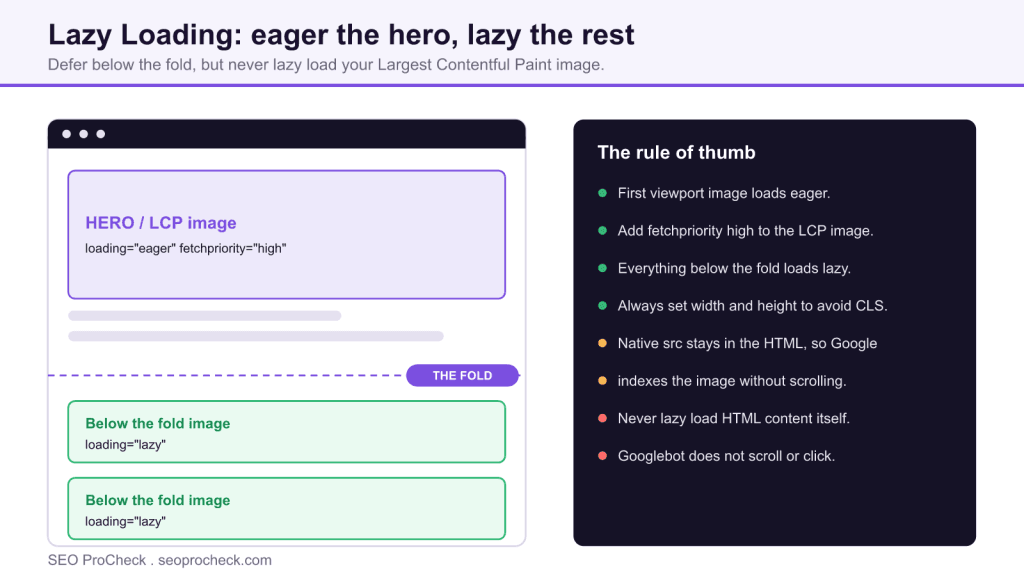
Lazy loading defers the download of below the fold images and iframes until the user scrolls near them, which cuts initial page weight on media heavy pages. The rule that matters most is to keep it off your Largest Contentful Paint image, because a lazy hero delays the exact metric it should protect.
- Use the native loading="lazy" attribute; a JavaScript library is rarely needed in current browsers.
- Load the first viewport image with loading="eager" and fetchpriority="high".
- Native lazy loading is crawler safe because the real src stays in the HTML.
- Never lazy load HTML content on scroll, since Googlebot does not scroll to reveal it.
Lazy loading defers fetching of below-the-fold resources, mostly images and iframes, until the user scrolls near them, instead of downloading everything up front. Done right, it cuts initial page weight dramatically on image-heavy pages. Done wrong, it delays your LCP image or hides content from crawlers entirely, and both failure modes are epidemic because lazy loading is now a default in themes, plugins, and frameworks that apply it indiscriminately.
Native lazy loading and the LCP trap
Since every major browser now supports it, the baseline is one attribute:
<img src="/img/review-photo-3.jpg" alt="Sole wear after 400km"
     width="800" height="533" loading="lazy">
With loading="lazy", the browser postpones the fetch until the image approaches the viewport (each browser uses its own distance threshold, typically over a thousand pixels on fast connections, so it fires earlier than people assume). loading="eager" is the default behavior stated explicitly.
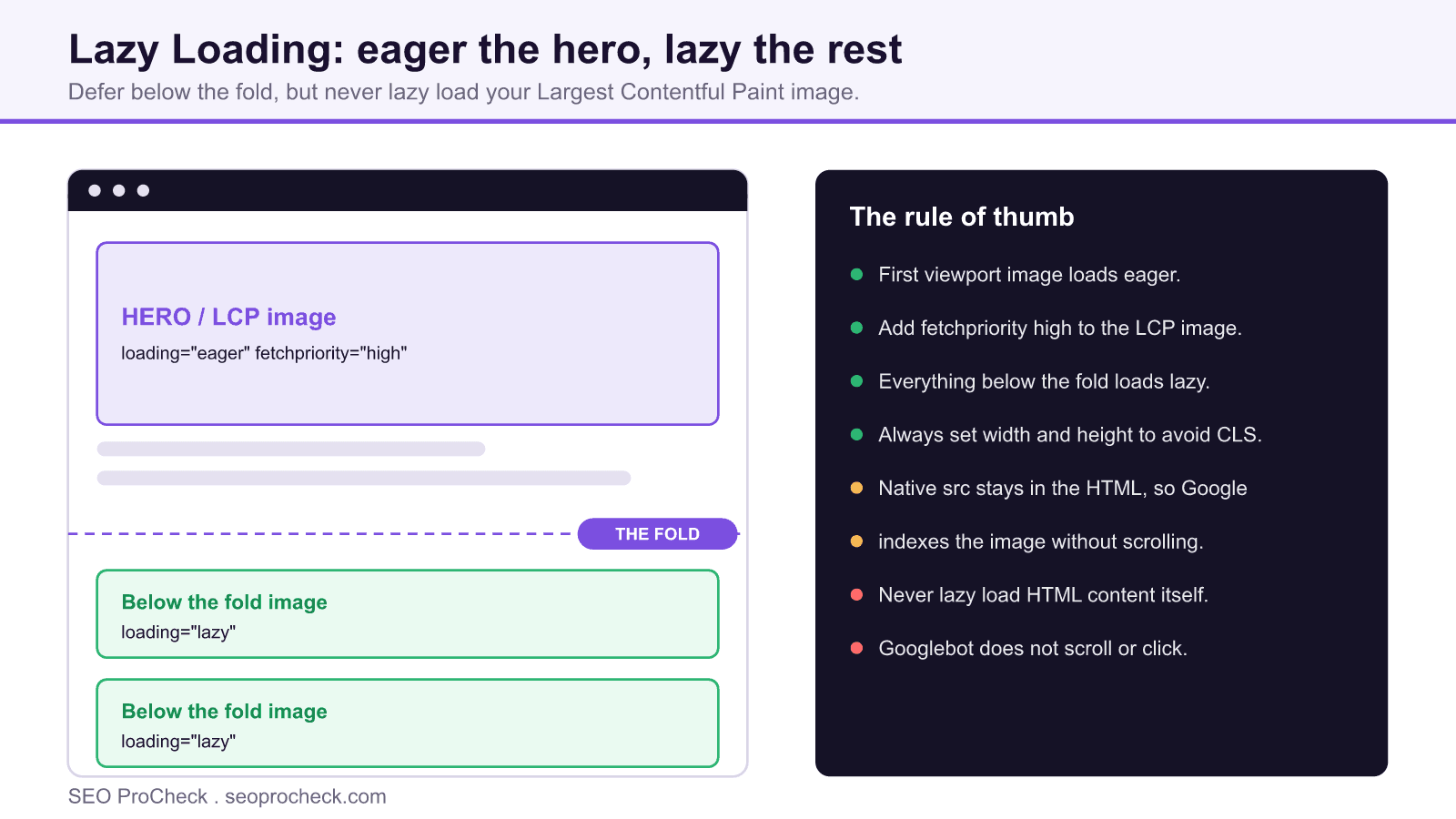
Here is the trap: lazy-loaded images are deprioritized in the loading queue and skipped by the preload scanner's early pass. Put loading="lazy" on your hero image, the thing that IS your Largest Contentful Paint, and you have volunteered to slow down your most important metric. This is one of the most common findings in Lighthouse audits, because plugins blanket-apply the attribute to every <img> on the page. The correct pattern is the opposite for the hero:
<img src="/img/hero.jpg" alt="..." width="1600" height="900"
     loading="eager" fetchpriority="high">
Rule of thumb: first image likely to be in the viewport loads eager (with fetchpriority="high" if it's the LCP candidate); everything below the fold loads lazy. Always with width and height so late-loading images don't shove the layout around and bill you in CLS.
Implementation approaches compared
| Approach | How it works | Crawler safety | Main pitfalls |
|---|---|---|---|
Native loading="lazy" | Browser handles deferral; no JS involved | Safe, the real src is in the HTML, so Google indexes the image regardless of scrolling | Blanket application hitting the LCP image; no control over the distance threshold |
| IntersectionObserver (custom JS) | Observer fires as placeholder enters an expanded viewport margin; JS swaps data-src into src | Conditionally safe, Google's renderer loads pages in a very tall viewport, which usually triggers observers; scroll/mouse-event triggers do NOT fire | Image invisible to crawlers until JS runs; broken if JS fails; must ship a <noscript> fallback |
| Legacy JS libraries (lazysizes-era, scroll handlers) | Scroll-event listeners swap data-src attributes | Risky, Googlebot does not scroll, so pure scroll-listener implementations never fire during rendering | Images absent from the rendered DOM = absent from image search; extra JS payload for something the browser now does free |
| CSS background-image deferral | Class swap loads background images via CSS | Unsafe for indexing, background images aren't indexable image content at all | Any image that should rank in image search must be an <img> element |
Lazy iframes (loading="lazy" on iframe) | Same native mechanism, applied to embeds | Safe for the host page | Almost none, lazy YouTube embeds are among the cheapest wins on article pages |
If you're on native lazy loading in 2026 you've probably already won; the residual risk lives in old themes and JS-framework image components with custom loaders. The related check on deferring offscreen images covers the Lighthouse side of the same coin.
Lazy loading content, not just images
A nastier variant: lazy loading actual content, product grids, comments, article bodies, via scroll-triggered fetches. Googlebot renders pages but does not scroll or click, so content that only exists after a scroll event never enters the index. If a content block matters for ranking, it must be present in the rendered HTML without user interaction. Deferred images inside indexed HTML are fine; deferred HTML is a visibility hole.
How to check it on your own site
- Find the LCP element first. DevTools → Performance panel → run a trace → click the LCP marker. Now check that specific element's markup: if it carries
loading="lazy"or adata-srcplaceholder, you've found the finding. - Audit attribute usage at scale. Screaming Frog custom extraction (XPath
//img[@loading='lazy']/@src) across templates, you're looking for lazy attributes on first-viewport images and for<img>tags withdata-srcbut empty/placeholdersrc. - Watch the Network panel while scrolling. Filter to Img, load the page, then scroll: images should stream in ahead of the viewport. Images loading only after they're visible (visible pop-in) means the trigger margin is too tight.
- Check what Google renders. URL Inspection → Test Live URL → View Rendered HTML: search for a below-the-fold image's real filename. If only a placeholder pixel is in the rendered source, that image is not getting indexed.
- Confirm images are indexed. Spot-check image search for
site:yoursite.complus a distinctive image topic; systematic absence of below-fold images points at a broken swap mechanism.
Common mistakes
- Lazy-loading the LCP image. The classic. A plugin adds
loading="lazy"to everything, LCP degrades several hundred ms, nobody connects the two. Fix: exempt the first viewport image; addfetchpriority="high"to the true LCP candidate. - Placeholder
srcwith no fallback. A 1×1 gray pixel insrc, the real URL indata-src, and no<noscript>. When the swap script fails, or a crawler doesn't run it, the page's images are gray pixels. Fix: native attribute, or noscript fallbacks on every swapped image. - Missing width/height on lazy images. Every late image reflows the page, a self-inflicted CLS generator. Fix: explicit dimensions or CSS
aspect-ratioon all of them. - Scroll-event triggers. Content or images gated on scroll listeners that Googlebot never fires. Fix: IntersectionObserver with a generous
rootMargin, or better, the native attribute. - Lazy-loading a handful of tiny icons. Deferring 2KB SVGs adds orchestration for zero benefit. Fix: lazy loading pays off on heavy media; leave trivial assets alone.
FAQ
Indirectly, deferring below-fold images frees bandwidth so the LCP image loads sooner. Directly lazy-loading the LCP image itself does the opposite. The metric context is in the Core Web Vitals overview.
Yes. With loading="lazy" the true URL sits in src in the raw HTML, indexing doesn't depend on the fetch happening during render.
For images and iframes, no, native support is universal in current browsers. Custom JS is only justified when you need responsive art-direction logic or must support genuinely ancient browsers.
Almost always. A YouTube embed pulls hundreds of KB of player code; loading="lazy" on the iframe (or a click-to-load facade) is one of the highest-ratio fixes on article templates.
Whatever is actually visible at common viewport sizes, usually one to three. When in doubt, eager-load one extra rather than lazy-load one too many; a wasted early fetch is cheaper than a delayed LCP. Broader image-level optimization lives in image SEO beyond alt text.
Take this with you
The assistant links open with a question about this page already written. Nothing is sent until you press enter.
Claude Vincent is a technical SEO consultant focused on crawlability, rendering, and AI-search visibility. He writes the field guides and case studies at SEO ProCheck, with a bias toward the durable, unglamorous work that decides whether search engines and AI answer engines can actually read and cite a site.
About SEO ProCheck
Technical SEO consulting and GEO strategy with 20 years of enterprise experience. Case studies, resources, and tools for search and AI visibility.
Work With Me
Technical SEO audits, GEO strategy, site migrations, and international SEO. Hourly consulting for teams who need hands-on support, not just reports.
Subscribe to our newsletter!








Recent Posts
- Most Top Sites Never Say Who They Are in Structured Data October 14, 2026
- Homepage Titles Are Mostly Too Short, Not Too Long October 8, 2026
- Who Actually Serves an llms.txt? 184 Top Sites Measured September 29, 2026