

Soft 404s: What They Are and How to Fix Them
- November 4, 2025
- Redirects & HTTP Status Codes
AI Summary
A soft 404 is a URL that returns HTTP 200 OK while delivering no real content, so Google treats it as a missing page and keeps it out of the index. The fix is always to make the signal match reality: serve a genuine 404 or 410 when a page is gone, add substance or noindex when it is thin, and redirect only to a closely related destination.
- Google decides by analyzing the rendered content, not the status code, so a perfect 200 can still be flagged.
- Never blanket-redirect removed URLs to the homepage, an irrelevant target is itself a soft 404 trigger.
- Find them in Search Console under Indexing → Pages → Soft 404, then confirm the real status with
curl. - Blocking the URL in robots.txt does not fix it, because Google cannot see a corrected signal on a URL it may not fetch.

A soft 404 is a page that returns an HTTP 200 OK status while behaving like a missing page: it has no real content, shows a "not found" message, or is so thin that Google judges it as effectively absent. Google flags these because the mismatch between the status code and the content wastes crawl budget, clutters the index, and frustrates users. The fix depends on the cause: serve a true 404 or 410 for pages that are genuinely gone, add substantive content or apply noindex to thin pages, repair JavaScript that renders nothing for crawlers, and redirect missing URLs only to a closely related page. Find them in the Search Console Page indexing report under the "Soft 404" reason, and confirm with a crawler.
Soft 404s are one of the most misunderstood entries in Google Search Console. The status code says everything is fine, yet Google refuses to index the page and labels it a problem. This guide explains what a soft 404 actually is, why Google treats it as an error, how it detects them, the causes you are most likely to hit, and the specific fix for each one.
What a soft 404 is
A soft 404 is a URL that returns a successful HTTP 200 OK response but does not deliver the content a successful response implies. In other words, the server tells crawlers and browsers "here is your page" while the page itself is empty, missing, or so thin that it carries no real value.
There are three common shapes:
- A "not found" message served with a 200. The page displays text like "Sorry, this product is no longer available" or "No results found," but the server still answers with 200 instead of 404.
- An empty or near-empty page. The URL resolves, but there is little or no meaningful content for Google to index.
- A page Google judges as effectively missing. Even without an explicit error message, Google's systems can conclude that the page offers nothing a user came looking for.
The defining trait is the mismatch: the status code claims success, the experience says failure. For a deeper look at how the genuine error codes differ, see our guide to 404 vs 410 status codes.
Why Google flags them
Google does not flag soft 404s to be pedantic. The label exists because the mismatch causes real problems:
- It wastes crawl budget. Googlebot keeps revisiting URLs that return 200, treating them as live pages worth re-checking. A true 404 or 410 signals "stop coming back." Soft 404s never send that signal, so crawl effort is spent on pages that should be dropped.
- It pollutes the index. A 200 invites indexing. If thin or empty pages slip in, they dilute the quality signals of your site and can crowd out pages that deserve to rank.
- It confuses users. Someone who lands on a 200 page expecting content, only to read "nothing here," has a worse experience than someone shown a clear, helpful 404 with navigation back to useful pages.
Because of these costs, Google excludes soft 404s from the index and reports them so you can correct the underlying signal.
How Google detects them
Google does not rely on the status code alone. It analyzes the rendered content of the page and compares it against what a real, useful page looks like. Signals include phrases that suggest an error ("not found," "no longer available," "no results"), an empty or minimal main content area, and patterns learned across the web that correlate with missing pages.
This is why a page can return a perfect 200 and still be classified as a soft 404. The verdict comes from content analysis, not from the header. It also means you cannot fix a soft 404 just by changing wording at the surface. You have to change either the status code, the content, or the indexing directive so the page and its signal agree.
Common causes
- Empty category, search, or tag pages. A category with no products, a tag archive with no posts, or an internal search results page with zero matches renders a 200 but holds nothing to index.
- JavaScript that renders nothing for bots. If the meaningful content depends on client-side JavaScript that fails to execute or returns empty for the crawler, Google sees a blank shell.
- Redirecting missing pages to the homepage. A removed URL that 301-redirects to the homepage is a frequent trigger. Google often classifies an irrelevant redirect target as a soft 404 because the destination does not answer the original request.
- Out-of-stock or expired product pages. A discontinued product that shows "currently unavailable" with no alternatives, served with a 200, reads as a missing page.
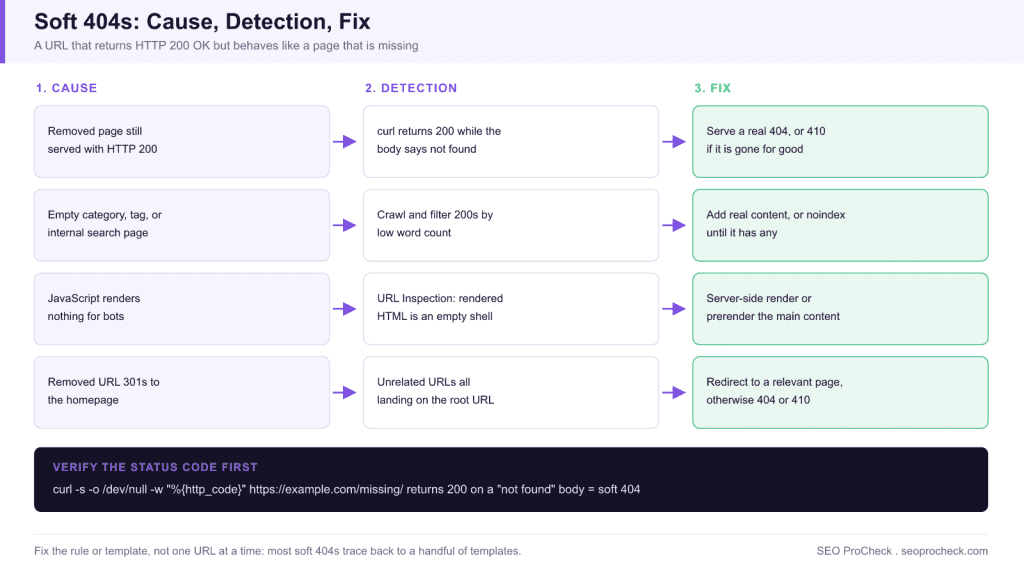
Cause, detection, and fix at a glance
| Cause | How to detect it | Fix |
|---|---|---|
| Removed page still served with 200 | curl the URL and read the status code; the body says “not found” but the header says 200 | Serve a real 404, or 410 if permanently gone, with a helpful error template |
| Empty category / tag / internal search page | Crawl the site and filter 200 pages by word count or empty main-content area | Populate with real content, or apply noindex until it has any |
| JavaScript renders nothing for bots | URL Inspection → View crawled page: rendered HTML is an empty shell | Server-side render or prerender the main content; never leave it JS-only |
| Removed URL 301s to the homepage | Crawl redirect targets; a cluster of unrelated URLs all landing on / is the tell | Redirect to a relevant replacement or parent category, otherwise 404/410 |
| Discontinued product page with “unavailable” text | Search Console Soft 404 list plus a crawl filtered on availability phrases | Keep the page useful with alternatives, redirect to a replacement, or 410 |
How to fix each cause
Pages that are genuinely gone
If the content is permanently removed and will not return, serve a real 404 (Not Found) or 410 (Gone). The 410 is the stronger signal that the resource is gone for good. Here is a minimal PHP example that sets a true 404 header instead of a silent 200:
<?php
// Send a real 404 instead of a 200 with a "not found" message
http_response_code(404);

// Optional: load your themed 404 template so users get navigation
include __DIR__ . '/templates/404.php';
exit;
?>
You can do the same at the server level. In Apache, returning a 410 for a known-dead URL is direct:
# .htaccess: tell crawlers a removed URL is gone for good
Redirect 410 /old-discontinued-product/

# Make sure your custom error pages are wired up too
ErrorDocument 404 /404.php
ErrorDocument 410 /gone.php
Thin or empty pages
If the page should exist but currently holds little value, either add substantive, useful content or keep it out of the index with a noindex directive. Internal search results pages almost always belong in the noindex bucket. For empty category or tag archives, populate them or remove them from indexing until they have real content. Pair this with sound crawl controls; our robots.txt complete reference explains where blocking is appropriate and where it backfires.
JavaScript that renders nothing
Verify what Googlebot actually receives. Use the URL Inspection tool in Search Console to view the rendered HTML. If the main content is missing, the fix is to ensure critical content is present in the server response or is reliably rendered, through server-side rendering, prerendering, or hydration that does not leave the crawler with an empty shell. A blank render for bots is a soft 404 even when human visitors see a full page.
Irrelevant redirects
Stop redirecting every removed URL to the homepage. Redirect only to a genuinely relevant destination: a replacement product, the parent category, or a closely matching article. If no relevant target exists, a clean 404 or 410 is the correct, honest answer. Note that redirect-driven soft 404s differ from genuine server faults; if you are chasing 5xx responses instead, see our notes on 5xx server errors and SEO.
Out-of-stock product pages
Keep the page live with real value: show the product details, mark availability accurately, and offer alternatives or a restock notice. If the product is permanently discontinued, redirect to the most relevant replacement or category, or serve a 410 if nothing fits.
How to find them
Two sources cover almost every case:
- Search Console Page indexing report. Open the Pages report and look for the "Soft 404" reason under "Why pages aren't indexed." Click it to see the affected URLs, inspect a sample with the URL Inspection tool, and confirm the rendered content.
- Crawler tools. A site crawler helps you spot the patterns Search Console samples: URLs returning 200 with empty main content, thin templated pages, and redirects landing on the homepage. Crawlers surface these at scale so you can group fixes by cause rather than one URL at a time.
Before you touch anything, confirm the actual status code from the command line. Browsers hide redirects and error-page styling; curl does not:
# Just the status code
curl -s -o /dev/null -w "%{http_code}\n" https://example.com/missing-page/

# Status code plus any redirect hops
curl -sIL https://example.com/missing-page/ | grep -i -e "^HTTP" -e "^location"
If that returns 200 for a page whose body says “not found,” you have confirmed the soft 404 mechanically. The exact report path in Search Console is Indexing → Pages → “Why pages aren’t indexed” → Soft 404; export the URL list from there and group it by template before fixing anything.
Work cause by cause rather than URL by URL. Most soft 404s on a site trace back to a handful of templates or rules, so fixing the rule clears many pages at once.
FAQ
They serve different purposes. A real 404 or 410 is the correct response for a page that is gone and costs you nothing when used properly. A soft 404 is the problem state, because it sends a "page is fine" signal that does not match reality, which is what Google flags.
The flagged pages themselves are excluded from the index, so they will not rank. At scale, large numbers of soft 404s waste crawl budget and can dilute site quality signals, which is why it is worth resolving them rather than ignoring the report.
No. Blocking in robots.txt stops crawling but does not remove the underlying mismatch, and Google cannot see a corrected status or directive on a URL it is not allowed to fetch. Fix the status code, content, or indexing directive at the source instead.
After you fix the cause, use Validate Fix in the Page indexing report. Google then re-crawls the affected URLs and updates their status over the following days to weeks, depending on how often it crawls your site.
Usually because Googlebot is not seeing the content you see. Check the rendered HTML in URL Inspection: client-side JavaScript that fails for the crawler, a bot-blocked API powering the main content, or an interstitial served to non-logged-in visitors all produce an empty render. Thin boilerplate-heavy templates can also trip the classifier even with some text present.
No. Google explicitly treats redirects from removed URLs to an unrelated page like the homepage as soft 404s, because the destination does not answer the original request. Redirect only when a genuinely equivalent page exists; otherwise a clean 404 or 410 with a helpful error template is the right response.
We will trace every soft 404 back to its root cause, fix the status codes and templates, and verify the recovery in Search Console.
Take this with you
The assistant links open with a question about this page already written. Nothing is sent until you press enter.
Claude Vincent is a technical SEO consultant focused on crawlability, rendering, and AI-search visibility. He writes the field guides and case studies at SEO ProCheck, with a bias toward the durable, unglamorous work that decides whether search engines and AI answer engines can actually read and cite a site.
About SEO ProCheck
Technical SEO consulting and GEO strategy with 20 years of enterprise experience. Case studies, resources, and tools for search and AI visibility.
Work With Me
Technical SEO audits, GEO strategy, site migrations, and international SEO. Hourly consulting for teams who need hands-on support, not just reports.
Subscribe to our newsletter!








Recent Posts
- Most Top Sites Never Say Who They Are in Structured Data October 14, 2026
- Homepage Titles Are Mostly Too Short, Not Too Long October 8, 2026
- Who Actually Serves an llms.txt? 184 Top Sites Measured September 29, 2026