


AI Summary
Wix is a genuinely capable SEO platform for small and mid-size sites: it gives you full control of titles, meta, URL slugs, 301 redirects, sitemaps, and robots.txt through its SEO tools and the Wix SEO Setup Checklist. Its weaker spots are Core Web Vitals on heavier pages and deep structured-data control, which power users work around with custom markup or Velo.
- Strong on the on-page essentials: editable titles, meta, slugs, redirects, sitemap, robots.txt.
- Partial on structured data and canonicals: some is automatic, custom needs markup or Velo.
- Weakest on Core Web Vitals: pages can be heavy and the underlying stack is not yours to tune.
- A solid fit for small business and content sites; enterprise technical SEO may outgrow it.
Is Wix actually good for SEO?
The old reputation that Wix cannot rank is outdated. Since the platform rebuilt its SEO tooling, a Wix site can compete for most small and mid-size search markets, and Google has publicly confirmed it crawls and indexes Wix pages normally. The honest picture is a scorecard, not a verdict: Wix is strong on the on-page fundamentals that most sites actually need, adequate on structured data and canonicals, and genuinely constrained on raw performance. This review walks each capability so you can decide whether Wix fits your specific project rather than trusting a blanket yes or no.
Where Wix is strong: the on-page basics
Everything you touch in day-to-day SEO is well covered. Every page, blog post, product, and category lets you edit the title tag and meta description, and the SEO patterns feature applies templated titles across a whole collection so you are not hand-writing hundreds of them. URL slugs are editable, and the historical complaint about a forced /post/ prefix on blog URLs has been addressed for new sites. The built-in redirect manager handles 301 redirects in bulk with no code, which makes migrations and slug changes safe. Wix generates an XML sitemap automatically and lets you edit robots.txt directly, so crawl control is in your hands. For a small business site, this set is everything you need.
Where Wix is partial: schema and canonicals
Structured data is the first real constraint. Wix adds some schema automatically, for example on products and events, and the Wix SEO Setup Checklist exposes a few controls, but there is no rich native editor for arbitrary schema types. To add custom JSON-LD, such as FAQPage, HowTo, or detailed Article markup, you either inject it through the custom code or markup settings or build it with Velo, the platform's development framework. Canonical tags are handled automatically and usually correctly, but manual override is limited, which occasionally matters for sites with faceted or duplicated URLs. These are workable, but they ask more of you than a developer-first stack would.
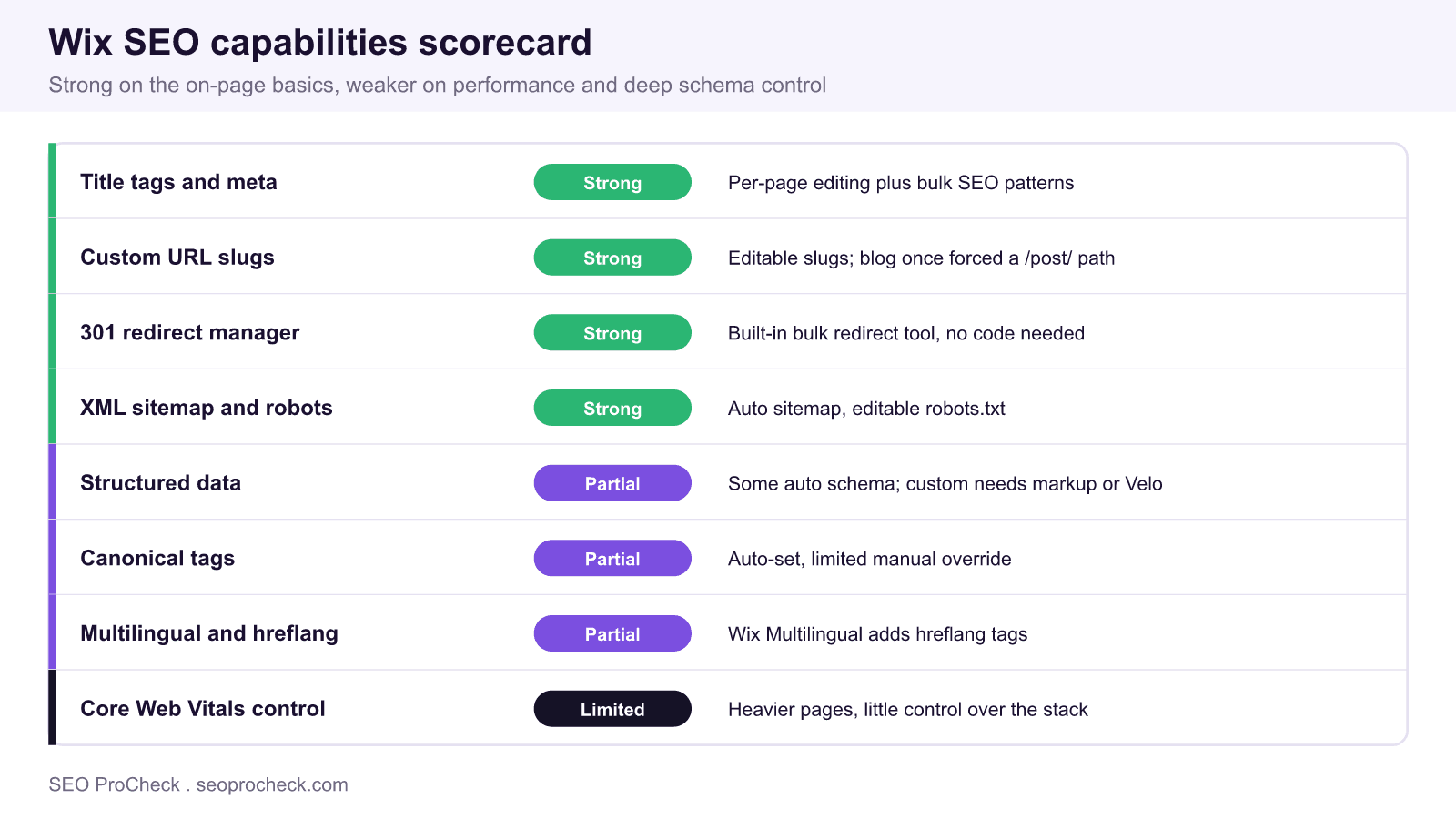
| Capability | Wix rating | Notes for practitioners |
|---|---|---|
| Titles and meta descriptions | Strong | Per-page editing plus bulk SEO patterns |
| Custom URL slugs | Strong | Editable; legacy blog /post/ prefix resolved |
| 301 redirects | Strong | Bulk redirect manager, no code required |
| Sitemap and robots.txt | Strong | Auto sitemap, editable robots file |
| Structured data | Partial | Some automatic; custom via markup or Velo |
| Canonical tags | Partial | Auto-set, limited manual override |
| Multilingual and hreflang | Partial | Wix Multilingual adds hreflang tags |
| Core Web Vitals control | Limited | Heavier pages, little stack control |
Where Wix is weakest: performance
Core Web Vitals is the honest weak point. Wix pages tend to ship more JavaScript and heavier assets than a lean hand-built or headless site, and because you do not control the hosting stack, bundling, or server response directly, your tuning options are narrower. You can still help yourself: keep pages simple, avoid stacking heavy third-party widgets and animations, compress and correctly size images, and lean on Wix's own image optimization. But if your target keywords sit in a fiercely competitive space where every fraction of Largest Contentful Paint matters, this is where Wix can hold you back, and it is worth testing real templates in PageSpeed Insights before committing.
Practical setup on Wix
Whatever platform you use, the workflow is the same, and Wix supports it well. Run through the Wix SEO Setup Checklist first, which connects Google Search Console and walks the basics. Then work your keyword map into the site: one primary keyword per page, edited into the title, H1, and slug. Add descriptive image alt text on every image, which the editor exposes on each element. For any page that deserves rich results, inject custom JSON-LD through the markup settings and validate it. Submit the auto-generated sitemap in Search Console and monitor indexing there rather than assuming it worked.
Wix on-page SEO pass, per page
1. Title tag: primary keyword first, under 60 chars
2. Meta description: 150 to 155 chars with the keyword
3. URL slug: short, keyword-based, editable in page settings
4. H1 matches intent; logical H2 structure
5. Image alt text on every image
6. Custom JSON-LD via markup settings where rich results apply
7. Confirm indexing in Search Console
Who Wix suits, and who should look elsewhere
Wix is a strong choice for small businesses, portfolios, local services, and content sites that value a visual editor and want the on-page fundamentals handled without a developer. It is a weaker choice for large e-commerce catalogs, sites that live or die on page speed in ultra-competitive niches, or teams that need granular control over rendering, schema at scale, and log-level technical SEO. Match the platform to the ambition of the project rather than to the marketing on either side.
Wix SEO myths versus reality
- Myth: Google cannot index Wix sites. Reality: Google has stated plainly that Wix pages crawl and index like any other, and plenty of Wix sites rank on page one.
- Myth: you cannot edit URLs or metadata. Reality: slugs, titles, and meta descriptions are all editable per page, with bulk patterns for scale.
- Myth: Wix has no technical SEO tools. Reality: it ships a redirect manager, editable robots.txt, an auto sitemap, and a guided SEO setup checklist.
- Myth: performance issues make ranking impossible. Reality: performance is a real constraint but a relative one; disciplined, lightweight pages still rank in most markets.
How to get the most SEO from Wix
The platform rewards discipline more than tricks. Keep templates lean so Core Web Vitals stay healthy, because that is the one area where Wix needs your help most. Use the SEO patterns tool to standardize titles across large collections rather than editing them one by one, which also keeps your keyword targeting consistent. Add custom JSON-LD only where a page can genuinely earn a rich result, and validate every block before publishing so you do not ship broken markup. Finally, treat Search Console as your dashboard: submit the sitemap, watch indexing and Core Web Vitals reports, and let real data, not assumptions, drive your next fixes. Done this way, Wix comfortably handles the SEO needs of the sites it is built for.
The SEO process on Wix is the same as anywhere: map keywords, brief the pages, and prioritize the work. See how to plan that in building a keyword map, spec each page in creating SEO content briefs, and compare platforms in the CMS platforms library.
Frequently Asked Questions
Is Wix good for SEO in 2026?
Yes, for most small and mid-size sites. Wix gives you full control of titles, meta descriptions, URL slugs, 301 redirects, the sitemap, and robots.txt, and Google crawls and indexes Wix pages normally. Its limitations are around Core Web Vitals performance and deep custom schema, which matter most for large or highly competitive sites.
Can you edit meta titles and descriptions on Wix?
Yes. Every page, blog post, and product lets you edit the title tag and meta description individually, and the SEO patterns feature can apply templated titles and descriptions across an entire collection at once, so you do not have to write each one by hand.
Does Wix support 301 redirects?
Yes. Wix includes a built-in URL redirect manager that creates 301 redirects in bulk without any code, which makes URL changes and site migrations safe. This is one of the platform's stronger technical SEO features.
Can you add custom structured data on Wix?
Partly. Wix adds some schema automatically, but for custom JSON-LD such as FAQPage or HowTo you inject it through the custom markup settings or build it with Velo, the platform's development framework. There is no full native rich-schema editor, so custom structured data takes extra effort.
Is Wix bad for page speed?
It is the platform's weakest area. Wix pages tend to be heavier and you do not control the hosting stack directly, so Core Web Vitals can lag a lean custom build. You can improve results by simplifying pages, limiting heavy widgets, and optimizing images, but test real templates in PageSpeed Insights if speed is critical to your niche.
Should I choose Wix or WordPress for SEO?
Choose Wix if you want an all-in-one visual builder with the on-page basics handled and no developer, which fits small business and content sites. Choose WordPress if you need granular control over performance, schema at scale, and technical SEO, or expect to grow into a large or complex site. Match the tool to the project's ambition.
Take this with you
The assistant links open with a question about this page already written. Nothing is sent until you press enter.
Claude Vincent is a technical SEO consultant focused on crawlability, rendering, and AI-search visibility. He writes the field guides and case studies at SEO ProCheck, with a bias toward the durable, unglamorous work that decides whether search engines and AI answer engines can actually read and cite a site.
About SEO ProCheck
Technical SEO consulting and GEO strategy with 20 years of enterprise experience. Case studies, resources, and tools for search and AI visibility.
Work With Me
Technical SEO audits, GEO strategy, site migrations, and international SEO. Hourly consulting for teams who need hands-on support, not just reports.
Subscribe to our newsletter!








Recent Posts
- Most Top Sites Never Say Who They Are in Structured Data October 14, 2026
- Homepage Titles Are Mostly Too Short, Not Too Long October 8, 2026
- Who Actually Serves an llms.txt? 184 Top Sites Measured September 29, 2026