

AI Summary
Google has said repeatedly that it uses HTML headings to understand the structure of a page, not as a rigid ranking checklist. You are free to use more than one H1, but a clean heading order still matters most for screen readers and for keeping your content scannable for both people and machines.
- Headings describe structure and hierarchy; Google is flexible about how many H1 tags a page uses.
- Skipping heading levels rarely moves rankings, but it breaks navigation for screen reader users.
- Match every heading to the content beneath it instead of stuffing keywords into tags.
- Use CSS for size and weight, and reserve heading tags for genuine hierarchy.

What Google clarified about headings
The recurring message from Google is that headings are a structural signal. They help the search engine parse what a page is about and how its sections relate, in the same way a table of contents helps a reader. What Google has consistently pushed back on is the idea that there is a strict, mechanical rule, such as exactly one H1 per page or a fixed keyword formula, that decides rankings. Multiple H1 elements are acceptable in modern HTML, and Google says it can handle them.
That flexibility is easy to misread as permission to ignore structure. It is not. Headings still do real work: they define the outline that assistive technology reads aloud, they let AI systems chunk a page into passages, and they make long content skimmable. Treating them as decoration is where sites get into trouble.
Why heading order still matters
Screen reader users navigate by pulling up a list of headings and jumping between them. If your page leaps from an H2 straight to an H4, or wraps a styled paragraph in an H3 purely to make it big and bold, that navigation list becomes confusing or misleading. Search engines are forgiving about this; humans using assistive technology are not.
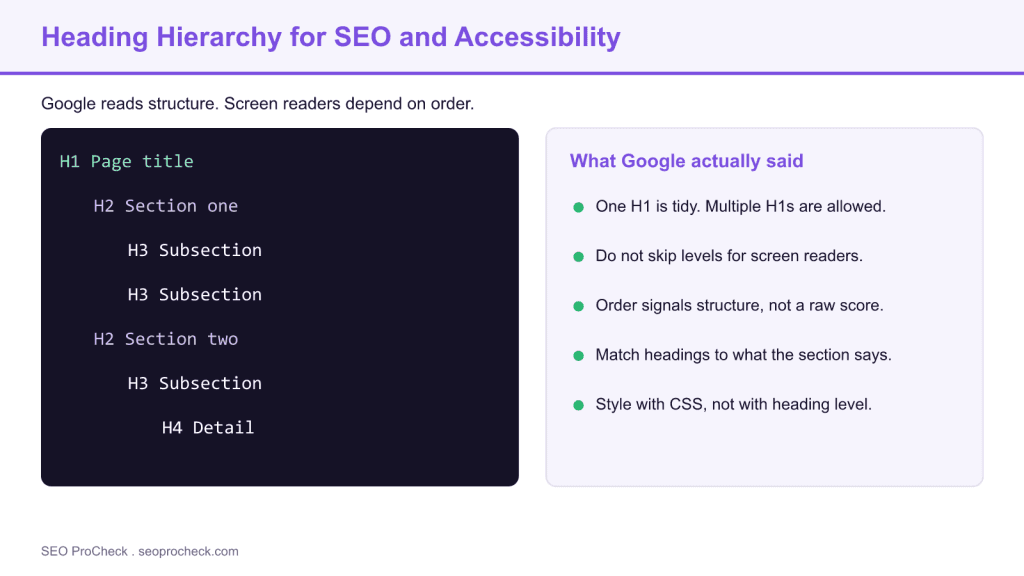
There is also a content quality angle. A logical outline forces you to organize the argument of the page. When headings map cleanly to what each section actually says, the page reads better, earns featured snippets more easily, and gives answer engines clean units of text to quote. The diagram above shows a tidy H1 to H4 outline next to the practical rules that matter.
Practical rules that keep you safe
Lead each page with one clear H1 that states the topic. It is fine if a design system produces more than one H1, but a single obvious title is easier to reason about. Nest sections with H2 and H3 in order, and do not skip levels just to reach a font size. Write headings that describe the section rather than repeating your target keyword five times. Finally, style with CSS: if you want big text that is not a section heading, use a class, not an H2.
To audit this on a live site, three checks do most of the work: confirm each page has a primary heading with the page needs H1 check, catch broken outlines with heading level skips, and find templates that emit the same title everywhere with URLs with duplicate H1s.
Heading levels: purpose, ranking weight, and accessibility impact
| Tag | Primary purpose | Direct ranking weight | Accessibility impact |
|---|---|---|---|
| H1 | Names the whole page | Low as a raw factor, high for clarity | Announces the page topic |
| H2 | Splits the page into sections | Low direct, aids relevance | Primary navigation landmarks |
| H3 | Breaks sections into subpoints | Minimal direct | Supports deeper navigation |
| H4 to H6 | Fine grained detail | Negligible direct | Only useful if levels are not skipped |
What has changed since
The advice that a single H1 was mandatory dates from an earlier era; Google later confirmed that multiple H1 tags are fine and that HTML5 sectioning made the old rule obsolete. The newer wrinkle is AI search. Large language model powered answer engines lean heavily on headings to segment a page into passages they can quote, so a clean outline now pays off in featured snippets and AI Overviews as well as in accessibility. The safe posture has not changed: write semantic, well ordered headings that describe the content, and let CSS handle the styling.
Frequently asked questions
Does Google require exactly one H1 per page?
No. Google has confirmed that multiple H1 tags are acceptable in modern HTML. A single clear H1 is still tidy and easy to reason about, but it is a best practice rather than a strict ranking rule.
Do heading tags directly boost rankings?
Headings are a structural signal that helps Google understand a page, not a strong standalone ranking factor. Their biggest value is clarity for readers, assistive technology, and passage extraction.
Is it bad to skip from H2 to H4?
For rankings it rarely matters, but for accessibility it does. Screen reader users navigate by heading level, so skipping levels makes the outline confusing. Keep the order sequential.
Should my H1 match my title tag?
They can be similar but do not have to be identical. The title tag targets the search result snippet, while the H1 orients someone already on the page. Aligning the core topic across both is sensible.
Do headings matter for AI search and featured snippets?
Yes. Answer engines and featured snippet systems use headings to break a page into quotable passages, so a logical heading structure improves your odds of being surfaced.
Can I style text to look like a heading instead of using heading tags?
You can, and often should, use CSS to style non heading text. Reserve heading tags for real hierarchy so that screen readers and search engines get an accurate outline.
Original summary and source
Google Clarifies H1-H6 Headings For SEO provides valuable insights for SEO practitioners. This resource examines approaches and considerations that can improve organic search performance.
Key Concepts
Understanding the fundamental principles behind this topic helps inform strategic decisions. Whether optimizing for traditional search or emerging AI platforms, foundational concepts remain relevant. This resource covers the essential knowledge practitioners need.
Implementation Considerations
Moving from concept to execution requires understanding practical constraints and opportunities. Different situations call for different approaches. This resource provides guidance for applying concepts in real-world contexts.
Measuring Impact
SEO efforts require measurement to demonstrate value and guide optimization. Identifying appropriate metrics, establishing baselines, and tracking progress enables data-driven improvement. This resource addresses how to evaluate success.
This resource contributes to the knowledge base SEO practitioners need for effective optimization in an evolving search landscape.
Take this with you
The assistant links open with a question about this page already written. Nothing is sent until you press enter.
Claude Vincent is a technical SEO consultant focused on crawlability, rendering, and AI-search visibility. He writes the field guides and case studies at SEO ProCheck, with a bias toward the durable, unglamorous work that decides whether search engines and AI answer engines can actually read and cite a site.
About SEO ProCheck
Technical SEO consulting and GEO strategy with 20 years of enterprise experience. Case studies, resources, and tools for search and AI visibility.
Work With Me
Technical SEO audits, GEO strategy, site migrations, and international SEO. Hourly consulting for teams who need hands-on support, not just reports.
Subscribe to our newsletter!








Recent Posts
- Most Top Sites Never Say Who They Are in Structured Data October 14, 2026
- Homepage Titles Are Mostly Too Short, Not Too Long October 8, 2026
- Who Actually Serves an llms.txt? 184 Top Sites Measured September 29, 2026