

How can you streamline your content audit and gap analysis with automation tools?
- July 31, 2024
- General
AI Summary
You streamline a content audit by automating the three mechanical stages, collection, joining and scoring, and keeping only the final judgement manual. The bottleneck in most audits is not gathering data, it is reconciling a crawl export, a Search Console export and an analytics export that all describe the same URL differently.
- Normalize every source to one URL key first: lowercase, consistent host, tracking parameters stripped, one trailing slash convention.
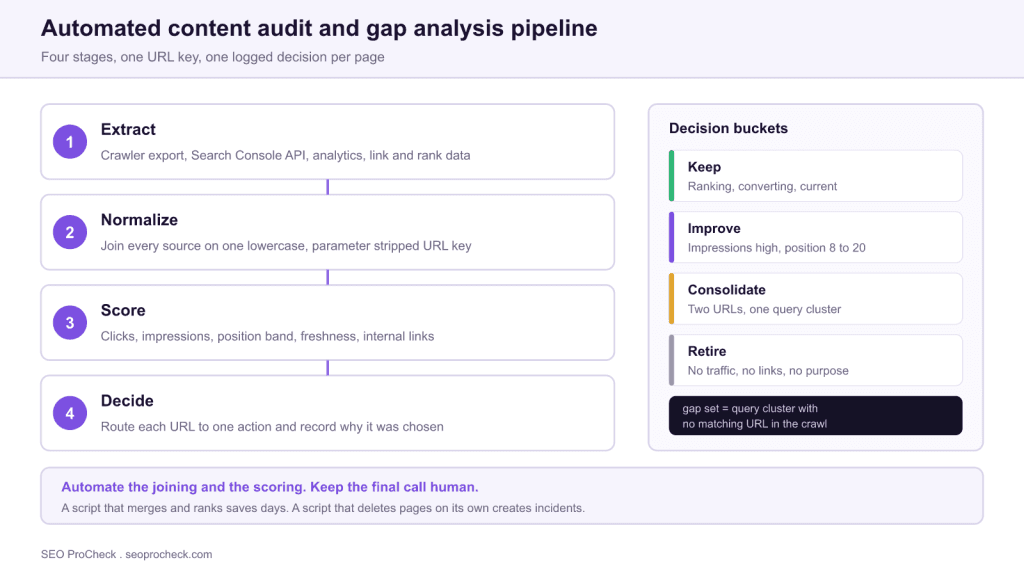
- Score each URL on clicks, impressions, average position, freshness and internal links, then route it to keep, improve, consolidate or retire.
- Run the gap analysis from the same dataset: a gap is a query cluster with no URL that matches it.
- Never let a script delete or noindex pages on its own. Automate the ranking, approve the action.
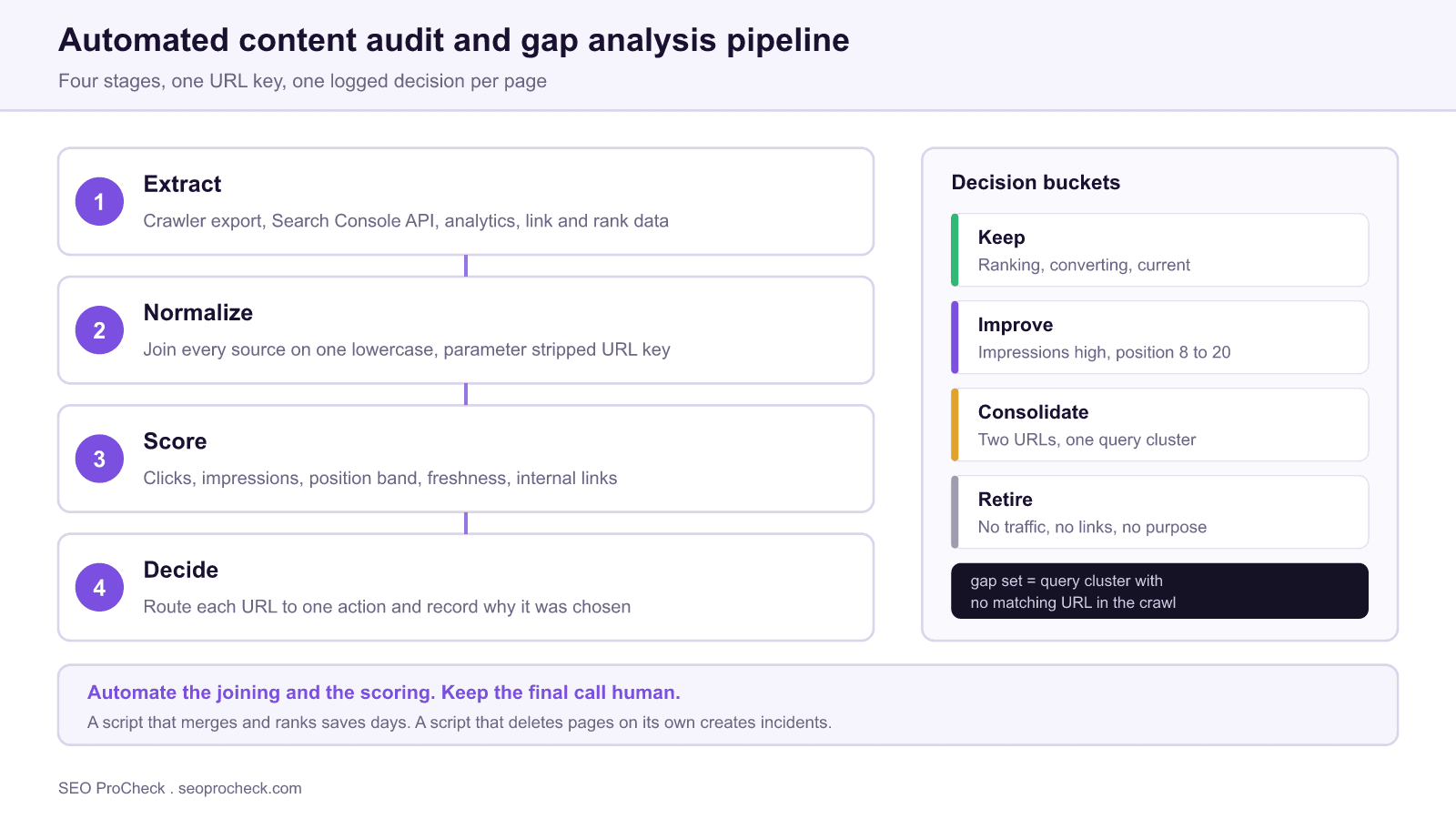
Most content audits stall in the same place. The data is available, the exports run fine, and then someone spends three days trying to make a crawl export line up with a Search Console export because one says https://example.com/Page/, the other says example.com/page, and the analytics export has a campaign parameter glued to the end. That reconciliation work is what automation is actually for. It is repetitive, rule based and unforgiving of manual error, which makes it the opposite of the part you want a human doing.
This page covers how to wire the pipeline so that a repeat audit costs hours instead of weeks, and where to deliberately stop automating. If you want the underlying method rather than the tooling, the content audit process walkthrough covers the decision framework, and the content audit glossary entry defines the terms used below.
Crawlability Essentials
The crawl export is the spine of the audit, so its configuration determines what the audit can even see. Four settings matter more than the rest.
- Render JavaScript. If the site builds its main content or its internal links client side, a raw HTML crawl will report thin pages and orphaned URLs that are neither. Run rendering on, accept the slower crawl.
- Do not obey noindex during discovery. You want the audit to contain pages that are currently excluded, because a noindexed page with backlinks is a finding. Configure the crawler to record the directive as a column rather than to drop the URL.
- Feed the crawler extra seed lists. A pure link crawl finds only what is linked. Import your XML sitemaps, a Search Console URL export and an analytics landing page export as additional sources, then the difference between those lists and the link crawl gives you the orphan set for free.
- Record crawl depth. Depth is the cheapest proxy you have for internal link equity, and it explains a large share of the pages that sit stuck on page two.
If the sitemap side of that is shaky, fix it before auditing rather than after, because an unreliable sitemap corrupts the orphan analysis. The XML sitemaps reference covers the generation rules that matter here.
Indexation Optimization
A content audit that ignores index status produces recommendations nobody can act on. You need to know, per URL, whether Google has it indexed, whether it chose a different canonical, and whether it is getting impressions at all. Those three facts split the inventory cleanly.
Pull index status two ways. The Page indexing report in Search Console gives you bulk category exports, which are capped, so treat them as a sample. The URL Inspection API gives you authoritative per URL status including the Google selected canonical, at a daily quota, which makes it the right tool for the few hundred URLs your scoring flagged as ambiguous rather than for the whole site. Run the bulk export first, then spend the API quota only on the rows where the decision hinges on it.
The Google selected canonical column is the one people skip and then regret. When it differs from your declared canonical, you have found a consolidation candidate that no word count or traffic threshold would have surfaced.
Performance and Experience
Add page experience data as an audit column, at the template level rather than the URL level. Field data in the Core Web Vitals report is grouped by URL pattern, and that grouping is usually the correct unit of action anyway, because the fix lives in a template.
This changes recommendations more often than practitioners expect. A page with strong impressions, a reasonable position and poor click through is frequently read as a content problem and sent for a rewrite. If the same template is failing its Largest Contentful Paint threshold, the rewrite will not move it and you have spent a writer's week for nothing. Carrying one performance column stops that mistake at triage.
Build the join key before anything else
Every downstream step depends on one normalized key. Settle these rules once, apply them to all sources, and store the normalized value in its own column so the original URL stays intact for reference.
- Force the scheme and host to a single canonical form, so
httpandwwwvariants collapse. - Lowercase the path. Preserve case only if the server genuinely serves case sensitive URLs, which is worth checking rather than assuming.
- Strip tracking parameters such as
utm_source,gclidandfbclid. Keep functional parameters that change the content, and record which ones you kept. - Pick one trailing slash convention and apply it everywhere.
- Decode percent encoding consistently, otherwise non ASCII URLs will silently fail to match.
Rows that fail to match after normalization are not noise to be dropped. A crawl URL with no Search Console row means the page has never earned an impression. A Search Console row with no crawl URL means Google knows about a page your crawler cannot reach, which usually points at an orphan or a redirect you forgot. Keep both sets and label them.
| Source | What it gives you | Practical limit | Refresh cadence |
|---|---|---|---|
| Site crawler export | Status codes, canonical, robots directives, titles, word count, depth, internal links | Only finds what is linked unless you import seed lists | Per audit, plus before any migration |
| Search Console Search Analytics API | Clicks, impressions, average position, per query and per page | Sampled and thresholded on low volume queries | Monthly pull, 12 to 16 month window |
| Search Console URL Inspection API | Index status and the Google selected canonical, authoritative | Daily quota, so reserve it for ambiguous rows | On demand, per shortlist |
| Analytics export | Sessions, engagement, conversions or assisted value per landing page | Attribution windows and consent gaps understate real value | Monthly, aligned to the Search Console window |
| Link tool export | Referring domains and authority per URL | Index coverage varies by vendor, so do not mix vendors mid audit | Per audit |
| CMS export | Author, publish date, last modified date, template, taxonomy | Modified dates are often touched by bulk edits and lie | Per audit |
Score first, decide second
Scoring exists to order the queue, not to make the decision. Keep the rubric small enough that you can explain any row's placement to a stakeholder in one sentence. A workable starting point is to bucket by performance and effort, then let the buckets drive the conversation.
| Signal pattern | Likely bucket | Why | First action |
|---|---|---|---|
| Clicks healthy, position strong, updated recently | Keep | It is working and current | Leave it alone, recheck next quarter |
| Impressions high, clicks low, position 8 to 20 | Improve | Demand exists and you are close to the fold | Match intent, expand coverage, strengthen internal links |
| Two or more URLs ranking for one query cluster | Consolidate | You are competing with yourself and splitting signals | Merge into the stronger URL, redirect the weaker |
| No clicks, no impressions, no links, no business purpose | Retire | It adds crawl and maintenance cost with no return | Human review, then merge or redirect, never bulk delete |
| Strong impressions but failing Core Web Vitals at template level | Improve, technical | The blocker is delivery, not copy | Fix the template before commissioning a rewrite |
| Declared canonical differs from Google selected canonical | Investigate | Google is already consolidating without you | Resolve duplication, then align the declaration |
Gap analysis from the same dataset
Once the audit table exists, the gap analysis is mostly a second query against it rather than a separate project. Take your query level Search Console export, cluster the queries, and left join the clusters against your URL inventory. Clusters with no matching URL are true gaps. Clusters with a matching URL that ranks poorly are not gaps, they are improvement work, and mixing the two is the most common way a gap analysis produces briefs for pages that already exist.
Competitor derived gaps are worth adding, with a caveat: a keyword a competitor ranks for is evidence of demand, not evidence that the demand is yours to serve. Filter competitor gap lists against your own business relevance before they reach a writer, or you will fund content for an audience that never converts.
Where crawl budget is the constraint rather than content quality, log file analysis tells you what search engines actually fetch, which is the one dataset a content audit cannot infer.
Where to stop automating
Three guardrails keep an automated audit from becoming an incident.
- No automated removal. A script may propose retirement. A person approves it. The pages that rules delete wrongly are exactly the ones with unusual value: a page carrying a strong backlink, a compliance page nobody searches for, a seasonal page measured in the wrong quarter.
- Snapshot before you touch anything. Store the current title, meta description, word count and content hash per URL at audit time. Without a baseline you cannot prove three months later whether the change helped.
- Record a reason per row. A decision without a written reason is unauditable, and by the next quarterly run nobody will remember why the page was left alone.
The last one has an obvious tell. If a column in your template has never once changed a decision, remove the column. Audit sheets accumulate their own debt.
FAQ
For a site under 5,000 URLs, a practitioner who has the joins scripted can go from raw exports to a scored sheet in an afternoon. The manual review of the borderline rows is what takes the real time, usually two to four days. If your tooling is sound, the split is roughly 20 percent data work and 80 percent judgement.
None of them can, and treat any that claim to with suspicion. Crawlers such as Screaming Frog, Sitebulb and Lumar automate collection, Search Console and analytics APIs automate performance data, and a spreadsheet or a short Python script automates the joining and scoring. The keep, improve, consolidate or retire call still needs someone who knows the business.
An audit looks inward at pages you already have and asks what to do with each one. A gap analysis looks outward at demand you are not serving and asks what is missing. They share the same data pull, which is why it is efficient to run them together, but they answer opposite questions.
No. Automate the collection, the joining and the scoring, then stop. Rules that look safe in aggregate remove pages that carry links, serve a legal purpose, or rank for a term nobody put in the seed list. Let the script produce a ranked recommendation and have a human approve each removal.
Normalize both sides to the same URL key before joining: force lowercase, keep the protocol and host consistent, strip tracking parameters, and settle on one trailing slash convention. Search Console reports the canonical URL it selected, so unmatched rows are a finding in themselves rather than a data error.
Rebuild the data quarterly and re-score, but only re-review the rows whose bucket changed. Because the pipeline is scripted, a repeat run costs hours instead of weeks, which is the main practical argument for automating it in the first place.
Source: https://www.linkedin.com/advice/1/how-can-you-streamline-your-content-audit-gap-xlcbc
Take this with you
The assistant links open with a question about this page already written. Nothing is sent until you press enter.
Claude Vincent is a technical SEO consultant focused on crawlability, rendering, and AI-search visibility. He writes the field guides and case studies at SEO ProCheck, with a bias toward the durable, unglamorous work that decides whether search engines and AI answer engines can actually read and cite a site.
About SEO ProCheck
Technical SEO consulting and GEO strategy with 20 years of enterprise experience. Case studies, resources, and tools for search and AI visibility.
Work With Me
Technical SEO audits, GEO strategy, site migrations, and international SEO. Hourly consulting for teams who need hands-on support, not just reports.
Subscribe to our newsletter!








Recent Posts
- Most Top Sites Never Say Who They Are in Structured Data October 14, 2026
- Homepage Titles Are Mostly Too Short, Not Too Long October 8, 2026
- Who Actually Serves an llms.txt? 184 Top Sites Measured September 29, 2026