

How Google handles JavaScript throughout the indexing process – Vercel
- July 31, 2024
- General
AI Summary
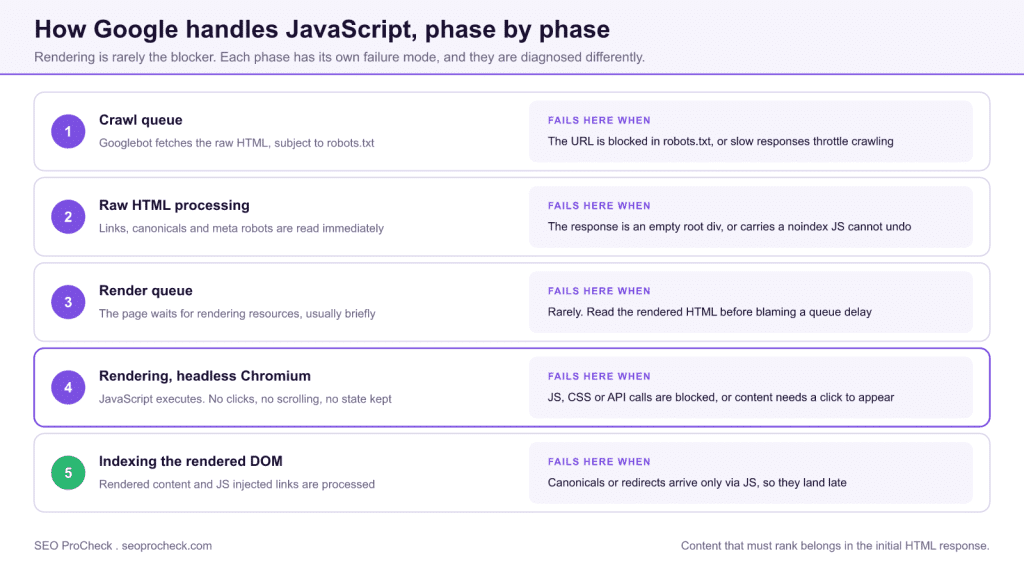
Google puts a JavaScript page through five phases: crawl, raw HTML parse, render queue, rendering in headless Chromium, then indexing of the rendered DOM. Research published by Vercel with MERJ found Googlebot renders JavaScript far more reliably and quickly than the old two-waves-of-indexing model implied, so rendering itself is rarely what blocks you.
- The real failures are blocked resources, links that exist only after rendering, timeouts, and content that needs a user interaction to appear.
- A
noindexin the raw HTML is honoured before rendering ever happens, so JavaScript cannot remove it. - The renderer performs no clicks and no scrolling and keeps no state between loads.
- Most non-Google crawlers, including many AI crawlers, do not execute JavaScript at all, which makes server rendering worth more than Google alone justifies.
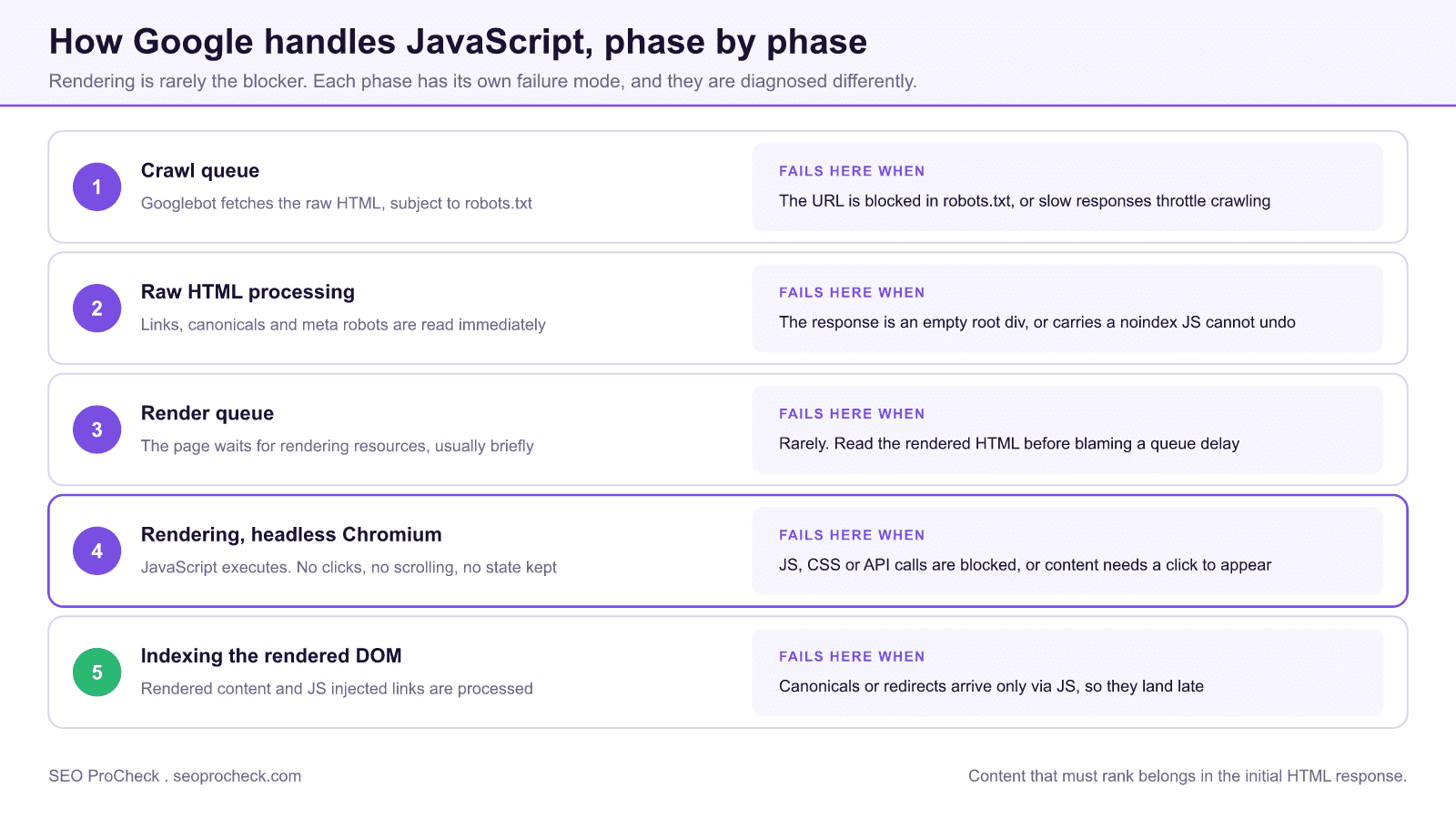
Quick answer: Google processes JavaScript pages through a pipeline: crawl, raw-HTML parse, render queue, headless-Chromium rendering, then indexing of the rendered DOM. Vercel's research (with MERJ) found that Googlebot successfully renders JavaScript pages far more reliably and quickly than the old "two waves of indexing" model suggested, with most pages rendered shortly after crawling rather than days later. The practical takeaway: rendering itself is rarely the blocker anymore: failures come from blocked resources, links that only exist post-render, timeouts, and content that requires user interaction to appear.
JavaScript SEO continues to present unique challenges as frameworks evolve and search engine rendering capabilities improve. This resource addresses the technical considerations for ensuring JavaScript-powered websites maintain full search visibility while delivering modern user experiences.
How the Indexing Pipeline Handles JavaScript
| Phase | What happens | Common failure at this stage |
|---|---|---|
| 1. Crawl queue | Googlebot fetches the URL's raw HTML, subject to robots.txt and crawl budget | URL blocked in robots.txt; server errors or slow responses throttle crawling |
| 2. Raw HTML processing | Google parses the initial response: links, canonicals, meta robots, and any server-rendered content are read immediately | Empty <div id="root"></div> shell, so nothing is indexable before rendering; a noindex in raw HTML halts everything (a noindex removed later by JS is still honored) |
| 3. Render queue | The page waits for rendering resources; per the Vercel/MERJ data this is typically fast, not the days-long delay of SEO folklore | Pages assumed "stuck in the queue" are usually failing for another reason, so check the rendered HTML in Search Console before blaming the queue |
| 4. Rendering (headless Chromium) | The Web Rendering Service executes JS with an evergreen Chromium, producing the rendered DOM. State is not persisted: no clicks, no scroll events, no cookies across loads | JS/CSS/API endpoints blocked by robots.txt; content requiring interaction (tabs, "load more" buttons); render-time errors; timeouts on slow third-party scripts |
| 5. Indexing of rendered DOM | Rendered content, JS-injected links, and JS-modified meta tags are processed; links found only post-render join the crawl queue later | Client-side redirects and JS-injected canonicals processed late or inconsistently; critical navigation only discoverable after rendering slows deep-page discovery |
Rendering Considerations
The fundamental challenge with JavaScript SEO is ensuring content is accessible when search engines crawl pages. While Googlebot can render JavaScript, processing delays mean server-side or hybrid rendering approaches often provide faster indexation. Understanding when JavaScript rendering suffices versus when pre-rendering is necessary informs architectural decisions.
A practitioner's decision rule: content that must rank should be in the initial HTML response, via SSR, static generation, or hybrid frameworks (Next.js, Nuxt, SvelteKit make this the default). Pure client-side rendering is acceptable for logged-in areas and interactive widgets, risky for anything competing in search. And even though Google renders well, most other crawlers, including many AI crawlers, do not execute JavaScript at all, which is an increasingly expensive gap if AI search visibility matters to you.
Crawlability Requirements
JavaScript applications must ensure links and navigation remain crawlable. Single-page applications particularly need attention to ensure internal linking works for both users and search engine crawlers. Standard anchor tags with href attributes remain the most reliable approach for crawlable navigation.
The syntax matters exactly: <a href="/category/page/"> is discoverable; <span onclick="router.push('/page')"> and <a href="#"> with a click handler are not links to Googlebot. Router libraries can render real anchors and still intercept clicks for client-side navigation, so use their Link components rather than raw handlers. Also verify pagination: infinite scroll without paginated, linkable URLs (?page=2 or path-based) leaves everything past the first viewport undiscovered.
Performance Optimization
JavaScript impacts Core Web Vitals metrics directly. Large JavaScript bundles delay interactivity and can hurt LCP. Code splitting, lazy loading, and minimizing render-blocking scripts improve both user experience and SEO performance signals.
Note the separation of concerns the Vercel piece underlines: Core Web Vitals are measured from real Chrome users (CrUX field data), not from Googlebot's render. Heavy JS therefore hurts you twice through different mechanisms: slower field metrics feeding page-experience signals, and higher render cost/fragility on the indexing side. Fixing one does not automatically fix the other.
How to Verify What Google Actually Renders
Don't guess: inspect. In Search Console, use URL Inspection > Test Live URL > View Tested Page to see the rendered HTML, console errors, and blocked resources exactly as the Web Rendering Service saw them. Cross-check locally by crawling with JavaScript rendering enabled (in Screaming Frog: Configuration > Spider > Rendering > JavaScript) and diffing raw versus rendered output. Any content, link, or meta tag present only in one of the two states is a finding.
This resource provides practical guidance for the intersection of JavaScript development and SEO requirements, helping teams build performant sites that maintain search visibility.
Choosing a rendering strategy
The decision is not "JavaScript or not", it is where the HTML gets assembled and how fresh it has to be. Each option puts a different amount of content into the first response, which is the only thing every consumer of your pages agrees on:
| Strategy | What arrives in the first response | Best for | Watch for |
|---|---|---|---|
| Static generation (SSG) | Complete HTML, built ahead of time | Content that changes on a publishing cadence: articles, docs, marketing pages | Build times on very large sites; stale pages if the rebuild trigger is missed |
| Server-side rendering (SSR) | Complete HTML, built per request | Personalised or fast-moving pages that still need to rank | Server cost and time to first byte; a slow origin becomes a crawl-rate problem |
| Incremental regeneration | Complete HTML, rebuilt on a revalidation interval | Large catalogues where most pages are stable and a few change often | Revalidation windows long enough that price or stock data goes stale in the index |
| Client-side rendering (CSR) | A shell, with content assembled in the browser | Logged-in areas, dashboards, interactive widgets | Anything that must rank, and every crawler that does not execute JavaScript |
| Hybrid, server shell plus client islands | Core content server rendered, interactivity hydrated after | The common case: ranking content plus rich interaction on the same page | Interactive islands quietly containing content that only exists after hydration |
Framework specifics matter here more than general advice does. In the Next.js App Router, for example, components are server rendered unless you opt out, and metadata generated in a client component arrives later than metadata exported from the route, which is exactly the kind of detail that turns into a missing canonical in production. The Next.js rendering and metadata guide covers those tradeoffs in detail.
What to diff between raw and rendered
Verification is a comparison, not a glance. Fetch the raw response (curl -A "Googlebot" -L https://example.com/page/ or view-source) and put it beside the rendered HTML from URL Inspection. Seven things are worth checking every time, because each one fails differently:
- Title and meta description. Present in raw, or written by JavaScript after load? JavaScript-written titles are read, but later and less predictably.
- Meta robots and canonical. These belong in the raw response or an HTTP header. A canonical injected client-side is the single most common cause of "Google picked a different canonical".
- The h1 and the main body copy. If the raw response contains a shell and no copy, everything downstream depends on rendering succeeding every time.
- Internal link count. Count anchors with real
hrefvalues in each version. A large gap means your link graph exists only after rendering, which slows discovery of deep pages. - Structured data. JSON-LD injected by a tag manager renders, but it is fragile: any script error upstream takes the markup with it.
- hreflang annotations. These need to be in the raw HTML or the HTTP headers or the sitemap. Client-side hreflang is unreliable.
- Blocked resources. URL Inspection lists every resource it could not load. A blocked API endpoint is invisible in a browser and fatal in the renderer.
Anything present in exactly one of the two states is a finding, and the direction tells you the fix. Present in raw but missing from rendered means JavaScript is removing or overwriting it. Present in rendered but missing from raw means you are betting that page on the render succeeding, which is a bet worth taking only when the content is not what you rank for. For a fuller treatment of the diagnosis path, see the JavaScript SEO and rendering guide.
Frequently Asked Questions
Does Google really render all JavaScript pages?
Google attempts to render essentially every indexable HTML page it crawls, and the Vercel/MERJ research found rendering succeeds at a much higher rate than older SEO advice assumed. Rendering is not the same as ranking, though: a rendered page still competes on content quality, links, and speed like any other page.
Is the "two waves of indexing" model still accurate?
No. It described Google's pipeline years ago, when rendering could lag crawling by days. Current evidence shows the render queue typically clears quickly. If your JS content isn't indexed, look for blocked resources, render errors, or interaction-dependent content instead of blaming a queue delay.
Do I still need server-side rendering if Google renders JavaScript?
For Google alone, often not strictly, but SSR still wins in practice: content is available on first parse, discovery of deep links is faster, field performance is usually better, and non-rendering crawlers (Bing in some cases, most AI/LLM crawlers, social scrapers) see your content at all. For revenue-critical pages, ship the content in the initial HTML.
Can Googlebot click buttons, scroll, or accept cookie banners?
No. The renderer loads the page and executes its JavaScript, but performs no user interactions and persists no state. Content behind tabs implemented as display toggles in the DOM is fine; content fetched only after a click, scroll event, or consent acceptance is invisible to indexing.
Why is my JavaScript content missing from Google's index?
Work through the pipeline in order: is the URL crawlable (robots.txt, status code)? Does raw HTML carry a noindex? Are the JS bundles, CSS, and API endpoints the page fetches allowed in robots.txt? Does URL Inspection's rendered HTML contain the content? Does it require interaction to appear? One of those five checks finds the cause in almost every case.
Do JS-injected meta tags like canonical and robots work?
Google can pick up meta tags added or changed by JavaScript at render time, but it's the fragile path: a noindex in the raw HTML is honored before rendering ever happens (so JS cannot "remove" it), and JS-injected canonicals are processed later and less consistently than server-sent ones. Put directives in the initial HTML response or HTTP headers whenever you control the stack.
Source: https://vercel.com/blog/how-google-handles-javascript-throughout-the-indexing-process
Take this with you
The assistant links open with a question about this page already written. Nothing is sent until you press enter.
Claude Vincent is a technical SEO consultant focused on crawlability, rendering, and AI-search visibility. He writes the field guides and case studies at SEO ProCheck, with a bias toward the durable, unglamorous work that decides whether search engines and AI answer engines can actually read and cite a site.
About SEO ProCheck
Technical SEO consulting and GEO strategy with 20 years of enterprise experience. Case studies, resources, and tools for search and AI visibility.
Work With Me
Technical SEO audits, GEO strategy, site migrations, and international SEO. Hourly consulting for teams who need hands-on support, not just reports.
Subscribe to our newsletter!








Recent Posts
- Most Top Sites Never Say Who They Are in Structured Data October 14, 2026
- Homepage Titles Are Mostly Too Short, Not Too Long October 8, 2026
- Who Actually Serves an llms.txt? 184 Top Sites Measured September 29, 2026