

AI Summary
Websites that feel instant almost always share one recipe: they send plain server-rendered HTML, cache aggressively at every layer, prefetch the likely next page before you click, and ship very little JavaScript. Speed is an architecture decision made early, not a plugin installed afterwards.
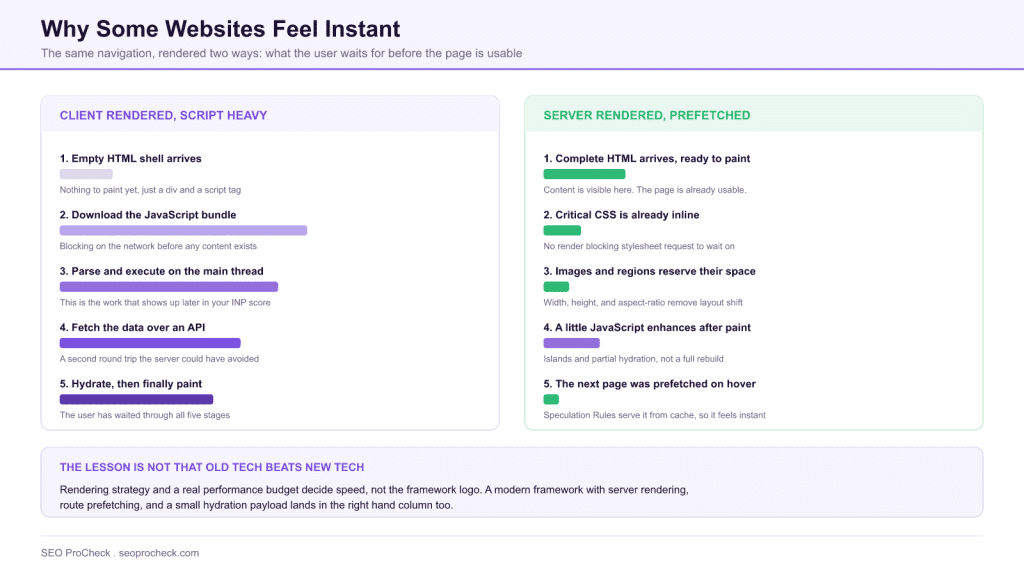
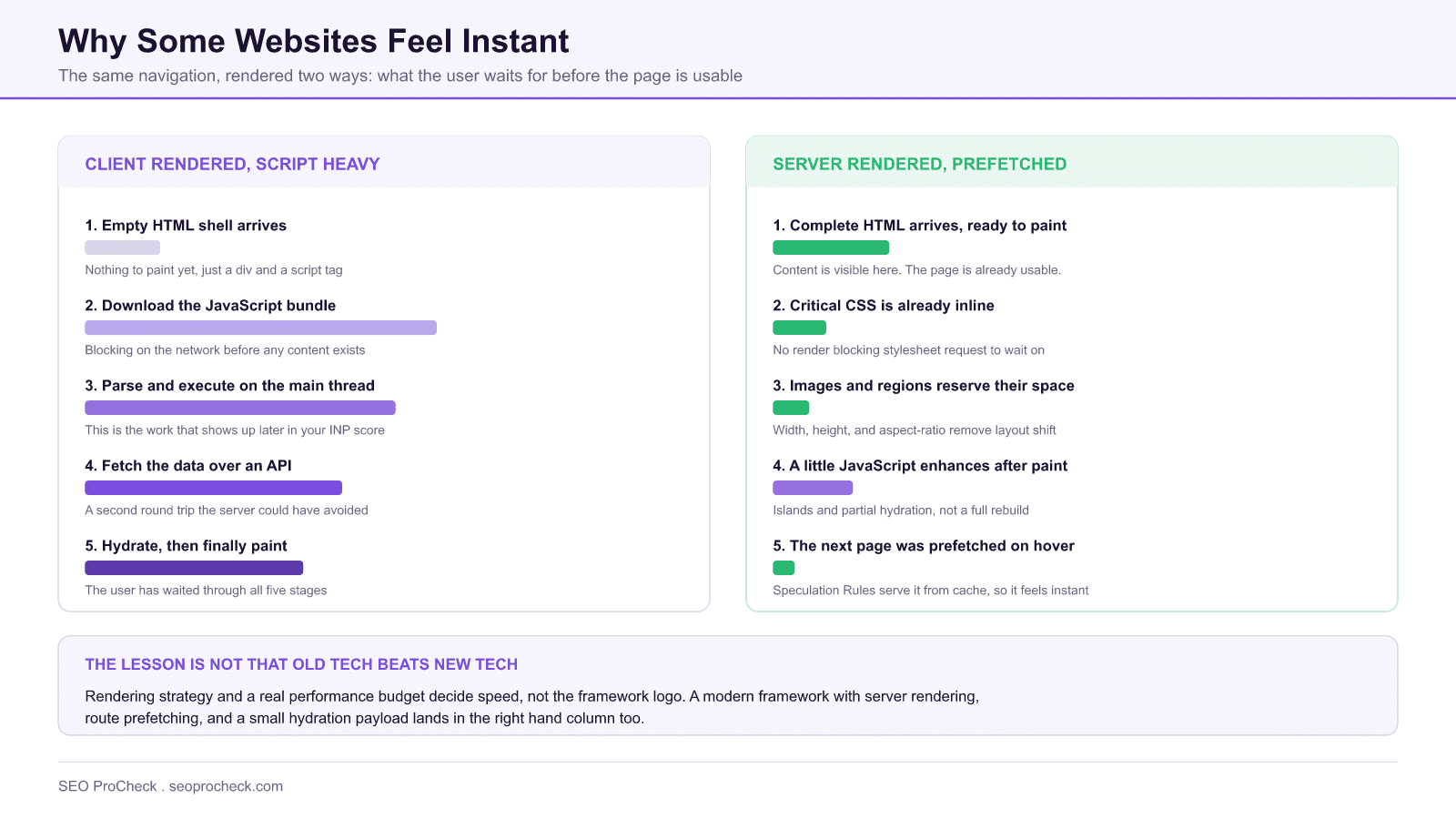
- Server-rendered HTML arrives ready to paint, so the user is not waiting on a bundle download, a parse, and a data fetch before anything appears.
- Prefetching the next page is now native: Chrome's Speculation Rules API replaced the old hover-prefetch libraries.
- INP replaced First Input Delay in Core Web Vitals in March 2024, which makes "ship less JavaScript" more consequential than it used to be.
- Treat speed primarily as a conversion, crawl-efficiency, and retention investment. Google describes page experience as one signal among many, not a dominant one.
Why do some websites feel instant? The fastest sites on the web almost always share the same recipe: they send plain server-rendered HTML, cache aggressively at every layer, prefetch the next page before you click, and ship very little JavaScript. Speed is an architecture decision, not a plugin you install afterward.
How is this website so fast? provides valuable insights for SEO practitioners. This resource examines approaches and considerations that can improve organic search performance.
What the viral "how is this website so fast?" discussion was about
The source below is Wes Bos's breakdown of a question that went viral in late 2024: how does a decades-old industrial parts catalog feel faster than most modern web apps? The discussion centered on McMaster-Carr, an e-commerce site with an enormous product catalog that navigates page-to-page nearly instantly. The techniques surfaced in that conversation are not exotic. They are old-school fundamentals applied with unusual discipline:
- Server-rendered HTML. The page arrives ready to paint, instead of an empty shell that JavaScript must fill in.
- Aggressive prefetching. Likely next pages are requested before the user clicks (for example, when a link is hovered), so navigation feels instantaneous.
- Heavy HTTP caching and CDN use. Repeat views and shared assets come from cache, not from a fresh origin round trip.
- Critical CSS inlined and assets consolidated. The browser can render above-the-fold content without waiting on extra requests; sprite sheets keep image requests few.
- Fixed layout dimensions. Images and page regions reserve their space up front, so nothing jumps while loading.
- Minimal JavaScript. There is simply less code to download, parse, and execute before the page becomes usable.
What SEO practitioners should take from it
The tempting misread is "old tech beats new tech." That is not the lesson. The lesson is that performance budgets and rendering strategy matter more than the framework logo. A React or Next.js site with server rendering, route prefetching, and a small hydration payload can feel just as fast; a WordPress site with six render-blocking plugins can feel just as slow as any bloated SPA.
A practical order of operations for applying this to your own site:
- Measure first. Pull field data (Core Web Vitals from real users) before lab data. Our Core Web Vitals checker and page speed analyzer give you both views.
- Fix delivery before code. Caching headers, compression, and CDN coverage are usually cheaper wins than rewriting templates.
- Cut JavaScript before optimizing it. Removing an unused script beats deferring it. Audit third-party tags ruthlessly.
- Reserve space for everything. Explicit width/height on images and embeds addresses layout shift at the source.
- Add prefetching last. Prefetch only likely next pages, and only after the basics are in place, or you waste bandwidth masking slower underlying pages.
For the business case, the pattern is well documented: faster pages convert better. See our summary of the Vodafone experiment where a faster page lifted sales 8%.
Technique-by-technique: old-school tactic vs. modern equivalent
| Tactic in the discussion | What it does | Modern equivalent |
|---|---|---|
| Server-rendered HTML | First paint without waiting for JS | SSR/SSG in Next.js, Astro, Nuxt; classic PHP/WordPress output |
| Hover/likely-link prefetch | Next page is in cache before the click | Speculation Rules API, <link rel="prefetch">, instant.page-style libraries |
| Long-lived HTTP caching | Repeat views skip the network | Immutable fingerprinted assets, stale-while-revalidate, CDN edge caching |
| Inlined critical CSS | Removes render-blocking requests | Critical CSS extraction at build time |
| Sprite sheets | Fewer image requests | Less critical under HTTP/2+, but SVG sprites and icon fonts persist |
| Fixed image dimensions | No layout shift | Width/height attributes, CSS aspect-ratio (directly improves CLS) |
| Minimal JavaScript | Less main-thread work | Islands architecture, partial hydration, deleting third-party tags |
Which metric each technique actually moves
"Make the site faster" is not an actionable brief. Every technique in the table above pushes on a specific metric, and knowing which one saves you from spending a sprint on a fix that your field data was never going to reward. Map the failing metric to the technique, not the other way round.
| Technique | Primary metric moved | Why it moves that metric | Typical effort |
|---|---|---|---|
| Server-rendered HTML instead of a client-rendered shell | LCP, and TTFB indirectly | The largest element exists in the first response instead of after a bundle plus a data fetch | High, it is an architecture change |
| CDN plus long-lived cache headers | TTFB | Removes origin round trips and physical distance from the critical path | Low, mostly configuration |
| Inlining critical CSS | LCP, FCP | Eliminates a render-blocking stylesheet request before first paint | Medium, needs a build step |
| Deleting unused JavaScript and third-party tags | INP | Less main-thread work means input handlers run sooner after a tap or click | Low technically, high politically |
| Explicit width and height, or CSS aspect-ratio | CLS | The browser reserves the box before the asset arrives, so nothing shifts | Low |
| Preconnect and preload for the LCP resource | LCP | Starts the connection or fetch earlier in the discovery order | Low |
| Speculation Rules prefetch or prerender | Perceived next-page speed | The next document is already in cache when the click happens, so navigation feels instant | Low |
If your field data says INP is the failing metric, the JavaScript row is the only one that matters and the image rows are a distraction. Our guide to INP, Interaction to Next Paint covers the diagnosis, and the complete LCP guide does the same for the loading side.
Prefetching without a library
The hover-prefetch trick that made the original discussion notable no longer needs custom code. Chrome's Speculation Rules API takes a JSON block in the document and handles the eagerness heuristics for you. A conservative starting configuration looks like this:
<script type="speculationrules">
{
  "prefetch": [
    { "where": { "href_matches": "/*" }, "eagerness": "moderate" }
  ]
}
</script>
Three notes that save wasted bandwidth. First, moderate triggers on hover or pointer-down rather than on every visible link, which is the right default for most sites; eager is for small sites with a genuinely predictable next click. Second, exclude anything stateful or destructive with a "not" clause: logout links, add-to-cart endpoints, and anything that mutates data should never be speculatively fetched. Third, prerender goes further than prefetch by rendering the page in the background, which is dramatic when it lands and expensive when it does not, so earn your way up to it after prefetch is working.
None of this affects crawling. Speculation rules are a browser behavior for real users, and search crawlers do not execute them as extra crawl demand.
How to tell which half of the diagram you are on
The comparison at the top of this page is only useful if you can place your own site on it. Three checks, in order, settle it in about ten minutes:
- View source, not the inspector. The DevTools Elements panel shows the DOM after JavaScript has run, so it always looks server-rendered. Use view-source, or
curlthe URL, and search the raw response for your headline text. If it is missing, you are on the left-hand side of the diagram. - Read field data before lab data. In Search Console, open the Core Web Vitals report under Experience. That is real-user data from the Chrome UX Report and it is the version that reflects your actual audience, their devices, and their networks. A green Lighthouse score on your laptop proves nothing about a mid-range Android on a congested network.
- Count the JavaScript. In DevTools, open the Network panel, filter to JS, and read the transferred total. Then open Coverage and read what percentage of it went unused on that page view. Unused bytes that still had to be parsed and compiled are the cheapest thing to delete and the most common reason INP fails.
Beyond the three headline metrics there is a longer tail of delivery problems worth knowing about, which we cover in site speed beyond Core Web Vitals.
What's changed since the original discussion
Two things are worth updating if you read the source today. First, Interaction to Next Paint (INP) replaced First Input Delay as the responsiveness metric in Core Web Vitals in March 2024, which makes the "ship less JavaScript" point even more consequential: INP is far harder to pass on script-heavy pages than FID ever was. Second, prefetching has been standardized: Chrome's Speculation Rules API now lets you declare prefetch and prerender rules natively, so the hover-prefetch trick no longer requires a custom library. On the ranking side, nothing has reversed: Google continues to describe page experience as one signal among many, not a dominant factor, so treat speed primarily as a conversion, crawl-efficiency, and user-retention investment with a modest ranking upside. If crawl efficiency and rendering are dragging your indexation, that intersection is exactly what our performance and indexation consulting covers.
Frequently asked questions
Only modestly. Page experience, including Core Web Vitals, acts as one lightweight signal among many. The larger SEO benefits are indirect: better crawl efficiency, lower abandonment, and higher conversion from the traffic you already earn.
Because of architecture, not magic: server-rendered HTML, prefetching of likely next pages, aggressive caching, inlined critical CSS, and very little JavaScript. Each technique removes waiting from a different stage of navigation.
Generally yes. Server-rendered HTML is available to crawlers immediately, avoids reliance on Google's rendering queue, and produces a faster first paint for users. Client-rendered sites can be indexed, but they add failure modes you do not need.
In most audits, the ordered wins are: enable proper caching and compression, put assets behind a CDN, remove unused JavaScript and third-party tags, compress and correctly size images, and inline critical CSS. Measure before and after each change.
No. Prefetching is a browser-side behavior for real users; crawlers do not execute your prefetch hints as extra crawling. The only real cost is user bandwidth, which is why you should prefetch selectively and exclude stateful URLs.
Fix whichever one your field data says is failing, but INP is where most sites now struggle, because it accumulates from all the JavaScript on the page rather than from any single asset. Check the Core Web Vitals report in Search Console first, since that reflects your real users rather than your laptop.
This resource contributes to the knowledge base SEO practitioners need for effective optimization in an evolving search landscape.
Take this with you
The assistant links open with a question about this page already written. Nothing is sent until you press enter.
Claude Vincent is a technical SEO consultant focused on crawlability, rendering, and AI-search visibility. He writes the field guides and case studies at SEO ProCheck, with a bias toward the durable, unglamorous work that decides whether search engines and AI answer engines can actually read and cite a site.
About SEO ProCheck
Technical SEO consulting and GEO strategy with 20 years of enterprise experience. Case studies, resources, and tools for search and AI visibility.
Work With Me
Technical SEO audits, GEO strategy, site migrations, and international SEO. Hourly consulting for teams who need hands-on support, not just reports.
Subscribe to our newsletter!








Recent Posts
- Most Top Sites Never Say Who They Are in Structured Data October 14, 2026
- Homepage Titles Are Mostly Too Short, Not Too Long October 8, 2026
- Who Actually Serves an llms.txt? 184 Top Sites Measured September 29, 2026