

JavaScript SEO Best Practices and Debugging Tools - MarketingSyrup
- November 12, 2021
- General

AI Summary
Kristina Azarenko's guide on MarketingSyrup sets out the JavaScript SEO fundamentals: use real anchor href links, put real image URLs in src, render content server side, and confirm the rendered HTML contains your copy, canonical, meta tags, structured data and hreflang. Every debugging step reduces to comparing what you ship with what a crawler actually renders.
- Links must be anchor elements with href attributes. onclick handlers and hash fragments are not links to Googlebot.
- Images need the real file in src. A placeholder in src with the real file in data-src gets the placeholder indexed.
- Server side or static rendering is the reliable answer. Google now calls dynamic rendering a workaround, not a solution.
- Verify with URL Inspection and the Rich Results Test. The Mobile Friendly Test named in the original guide was retired by Google.
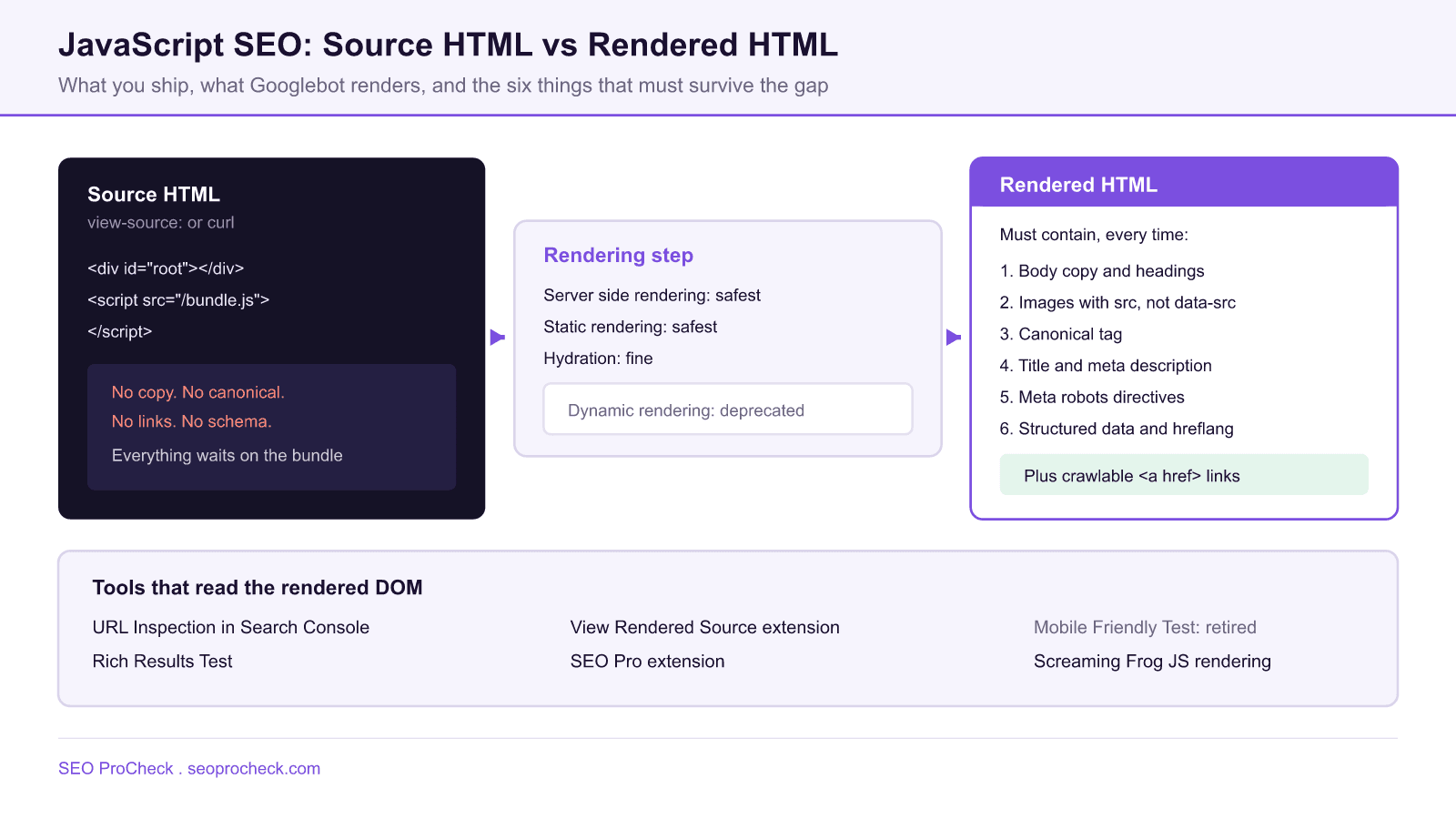
The five practices from the source
Kristina Azarenko's guide reduces JavaScript SEO to a short list of things that keep going wrong. They are worth restating precisely because none of them are exotic.
Add links using web standards. Use proper anchor elements with href attributes rather than window.location.href, onclick handlers or hash fragments, so Google can discover and follow them.
Implement images correctly. Images should use the src HTML attribute rather than data-src. Where lazy loading is used, swap the placeholder for the target image so Google sees the real content.
Use server side rendering. Ensure the content exists on the server rather than only in the browser, so Google can read and rank it.
Employ dynamic rendering as a fallback, serving static HTML to search engines while users receive HTML plus JavaScript. See the note below on how Google's position on this has shifted.
Include key information in the rendered HTML. Verify the rendered output contains the page copy, images, canonical tag, title and meta description, meta robots tags, structured data and hreflang.
What has changed since
Two items in the original guide have moved, and both matter.
Dynamic rendering is no longer recommended. Google's documentation now states that dynamic rendering was a workaround and not a long term solution for problems with JavaScript generated content in search engines, and that it is not a recommended solution because it creates additional complexities and resource requirements. The documented alternatives are server side rendering, static rendering, or hydration. If you already run a prerender service, it continues to work and there is no urgency to rip it out. Do not architect a new site around it.
The Mobile Friendly Test is gone. Google retired the Search Console Mobile Usability report, the Mobile Friendly Test tool and its API from 1 December 2023. Technical SEOs used that tool heavily as a way to see Google's rendered HTML without Search Console access for the property. The direct replacement for reading rendered HTML is the Rich Results Test. For the mobile usability checks the old tool performed, use Lighthouse or PageSpeed Insights.
The debugging toolkit, updated
| Tool | What it shows | Status and caveat |
|---|---|---|
| URL Inspection, Search Console | Google's own rendered HTML, plus crawled versus live comparison | Current. Requires verified property access. The most authoritative read available. |
| Rich Results Test | Rendered HTML and structured data from Google infrastructure | Current. Works on any public URL, so it is the go to when you lack Search Console access. |
| View Rendered Source extension | Side by side diff of source HTML against rendered DOM | Current. Renders in your browser, not Googlebot's, so treat differences as leads not verdicts. |
| SEO Pro extension | Titles and key metadata read from the rendered DOM | Current. Fast first pass on whether meta tags survived rendering. |
| Screaming Frog, JavaScript rendering mode | Rendered crawl at scale, with a rendered versus raw HTML diff | Current. Enable under Configuration, Spider, Rendering, JavaScript. |
| Google Mobile Friendly Test | Previously showed mobile rendered HTML from Google | Retired from 1 December 2023, along with the Mobile Usability report and API. |
Debugging tools named in the source, with their current status. The rendering behaviour they reveal has not changed, the tool availability has.
Running the comparison yourself
The single most useful diagnostic is a diff between raw and rendered HTML across a template, not a single URL. Screaming Frog does this natively once JavaScript rendering is enabled.
# Screaming Frog
# Configuration > Spider > Rendering > JavaScript
#   AJAX timeout: 5 seconds
#   Window size:  Googlebot Smartphone
# Configuration > Spider > Extraction > tick Store HTML and Store Rendered HTML

# After the crawl, per URL:
#   View Source tab, toggle between HTML and Rendered HTML
# Report > JavaScript > gives you the prebuilt lists:
#   Contains JavaScript Links
#   Contains JavaScript Content
#   Noindex Only in Original HTML
#   Canonical Only in Rendered HTML
Those last two reports catch the failures that cost the most. Noindex Only in Original HTML flags pages that ship a noindex which JavaScript later removes: Google may act on the version it saw first. Canonical Only in Rendered HTML flags canonicals injected by script, which is fragile because a rendering failure leaves the page with no canonical at all.
Ordering the fixes
Not every JavaScript SEO issue is worth engineering time. This is the order that reflects actual risk.
| Priority | Symptom | Fix |
|---|---|---|
| 1 | Primary body copy absent from rendered HTML | Server side or static render the content. Nothing else matters until this is true. |
| 2 | Navigation or pagination has no anchor href | Emit real anchor elements. Attach the router to them rather than replacing them. |
| 3 | Canonical, title or meta robots injected by script | Move them into the server response. They must never depend on a successful render. |
| 4 | Images using data-src with a placeholder in src | Put the real URL in src and use the native loading attribute for lazy loading. |
| 5 | Structured data injected client side | Works, but ships late. Prefer server rendered JSON LD for anything you depend on. |
| 6 | Large bundle delaying interactivity | Code split, defer non critical scripts, audit third party tags. |
Fix order for JavaScript SEO issues, sorted by how much visibility is at stake rather than by how easy the fix is.
For the deeper mechanics of how rendering queues work and how AI crawlers differ from Googlebot, see our JavaScript SEO rendering guide and SSR versus CSR for AI crawlers, which matters because most AI crawlers execute no JavaScript at all. The forgotten HTML covers what those bots actually retrieve, and the LCP guide covers the performance half of the problem.
FAQ
Use the URL Inspection tool in Search Console, then Test Live URL, then View Tested Page, then the HTML tab. That is Google's own rendering of your page. The Rich Results Test gives you a second read from Google infrastructure. Browser extensions such as View Rendered Source compare source against rendered DOM but they use your browser, not Google's.
No. Google's documentation now states plainly that dynamic rendering was a workaround and not a long term solution, and that it is not recommended because it creates additional complexity and resource requirements. Google points to server side rendering, static rendering or hydration instead. Existing dynamic rendering setups still work, but do not build new ones.
Because your browser executes JavaScript on a fast connection with your cookies and your geolocation, and Googlebot does not. The usual culprits are content that only loads on user interaction, content behind a client side fetch that fails without a session, and lazy loaded elements that never enter the viewport of a headless render.
Only if the real image URL ends up in the src attribute of the rendered img element. A placeholder in src with the real file in data-src means Google indexes the placeholder. Native lazy loading with the loading attribute set to lazy and a genuine src is the safe pattern, and it needs no JavaScript at all.
Not reliably. Google discovers links from anchor elements with an href attribute pointing at a resolvable URL. A div with a click handler, a button that calls a router, or an anchor with href set to a hash fragment are all invisible as links. Render a real href and attach your router to it if you need client side navigation.
Directly. Large bundles delay the main thread, which pushes out Interaction to Next Paint, and render blocking scripts delay Largest Contentful Paint. Code splitting, deferring non critical scripts and cutting third party tags are the usual fixes, and they improve both the user experience and the field data Google measures.
Not sure what Googlebot renders on your framework?
An advanced audit runs a rendered crawl and diffs it against your source HTML across every template.
Source: https://marketingsyrup.com/javascript-seo-best-practices-and-debugging-tools/
Take this with you
The assistant links open with a question about this page already written. Nothing is sent until you press enter.
Claude Vincent is a technical SEO consultant focused on crawlability, rendering, and AI-search visibility. He writes the field guides and case studies at SEO ProCheck, with a bias toward the durable, unglamorous work that decides whether search engines and AI answer engines can actually read and cite a site.
About SEO ProCheck
Technical SEO consulting and GEO strategy with 20 years of enterprise experience. Case studies, resources, and tools for search and AI visibility.
Work With Me
Technical SEO audits, GEO strategy, site migrations, and international SEO. Hourly consulting for teams who need hands-on support, not just reports.
Subscribe to our newsletter!








Recent Posts
- Most Top Sites Never Say Who They Are in Structured Data October 14, 2026
- Homepage Titles Are Mostly Too Short, Not Too Long October 8, 2026
- Who Actually Serves an llms.txt? 184 Top Sites Measured September 29, 2026