

Mixed directives a reminder that robots txt files are handled by subdomain and protocol including ww
- April 30, 2020
- General
AI Summary
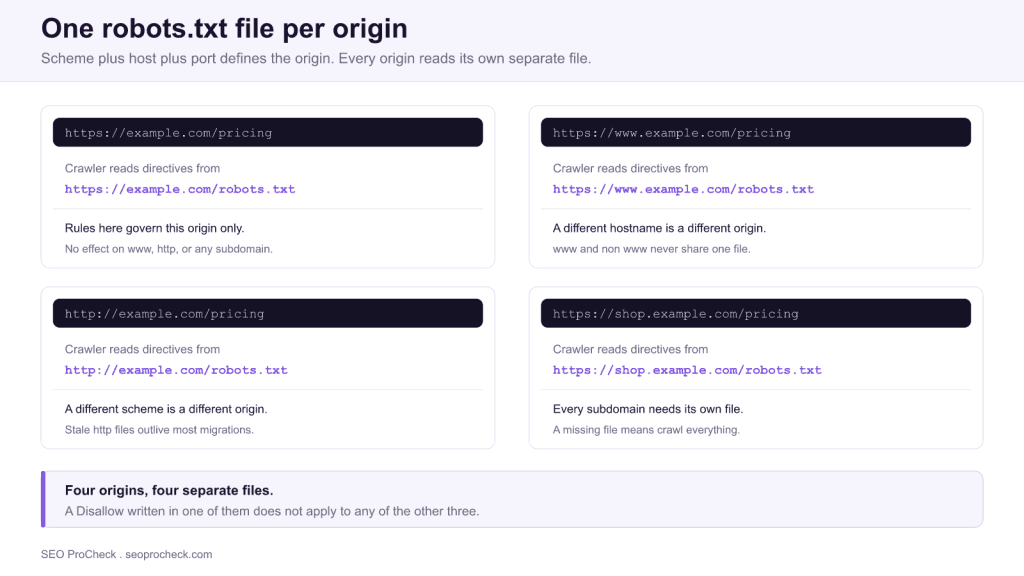
A robots.txt file governs exactly one origin, and an origin is the combination of scheme, hostname and port. That means https://example.com, http://example.com, https://www.example.com and https://shop.example.com each read a completely separate file, which is how a site ends up serving contradictory crawl directives without anyone noticing.
- A
Disallowon one origin has zero effect on any other origin. - Post migration, a stale
http://file often still servesDisallow: /from staging. - A missing robots.txt (any 4xx) means crawl everything, not crawl nothing.
- AI crawlers such as GPTBot and ClaudeBot resolve robots.txt per origin too, so an unguarded subdomain stays fully open.
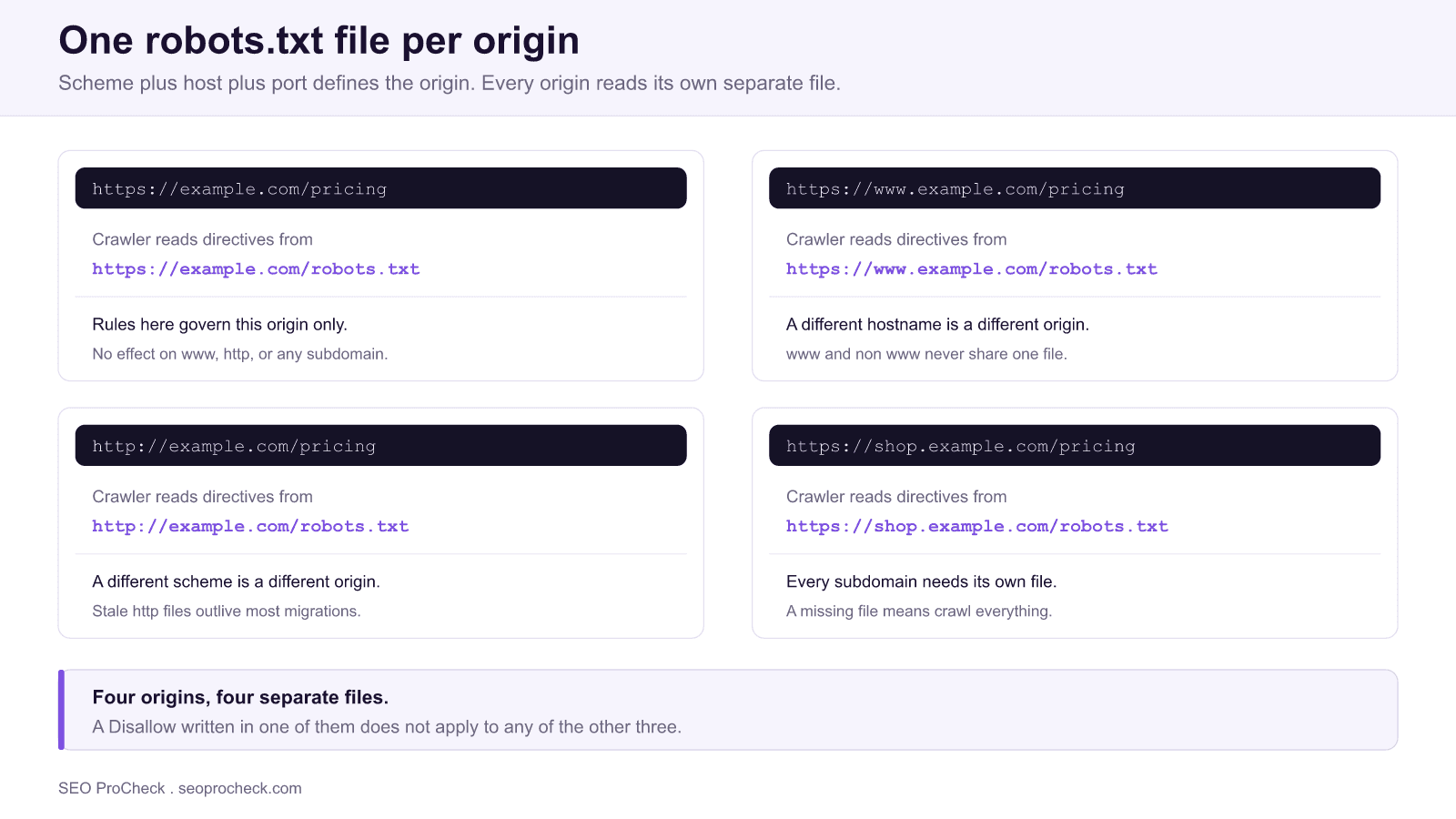
Almost everyone learns robots.txt as "the file at the root of your site." That mental model is close enough to work until the day a site has more than one root, and nearly every real site does. The Robots Exclusion Protocol, standardised as RFC 9309 in 2022, scopes a robots.txt file to a single origin: the exact combination of URI scheme, host and port. Change any one of those three and you are addressing a different file that a crawler will fetch and obey independently.
The practical consequence is that a site can publish four or five robots.txt files simultaneously, disagree with itself across them, and show no obvious symptom until traffic to one hostname quietly disappears. The Search Engine Land case study cited below documents exactly that pattern, where www and non www plus http and https were serving different directives.
What "per origin" actually means
A crawler about to request https://shop.example.com/collections/boots does not consult a central rulebook for your brand. It resolves the origin of that URL, which is https://shop.example.com, appends /robots.txt, and fetches https://shop.example.com/robots.txt. If that request 404s, the crawler proceeds as if no rules exist.
Three attributes define the origin, and all three matter:
- Scheme.
httpandhttpsare distinct. They are frequently served by different virtual hosts. - Host.
example.com,www.example.comandshop.example.comare three separate hosts. There is no parent or child inheritance between them. - Port. Default ports are implied (80 for http, 443 for https). A service on
https://example.com:8443needs its own file athttps://example.com:8443/robots.txt.
The file must sit at the root path and be named in lowercase. A file at /subfolder/robots.txt is an ordinary text file with no protocol meaning whatsoever, which is a recurring surprise on sites where a subfolder is treated as a distinct property.
The origin matrix
This table is the whole article in one view. Read it as: for the URL on the left, the crawler fetches the file on the right, and nothing else.
| URL being crawled | robots.txt that governs it | Governed by the others? |
|---|---|---|
https://example.com/a | https://example.com/robots.txt | No |
https://www.example.com/a | https://www.example.com/robots.txt | No |
http://example.com/a | http://example.com/robots.txt | No |
http://www.example.com/a | http://www.example.com/robots.txt | No |
https://shop.example.com/a | https://shop.example.com/robots.txt | No |
https://example.com:8443/a | https://example.com:8443/robots.txt | No |
https://example.com/docs/a | https://example.com/robots.txt | Subfolders share the origin file |
The last row is the only inheritance that exists. Paths share an origin; hostnames and schemes never do.
How mixed directives actually happen
Nobody sets out to publish contradictory files. They appear through infrastructure drift, and the causes repeat across sites:
- An HTTPS migration that left the http vhost live. If
http://answers on its own rather than redirecting, it keeps serving whatever was on disk at cutover. On a depressing number of servers that is a development copy containingDisallow: /. - www and non www served by different stacks. One hostname points at the CMS, the other at a legacy server, a marketing landing page builder, or a parked default. Each has its own file.
- A CDN or reverse proxy with hostname specific routing. The canonical hostname is proxied to the application; everything else falls through to an origin default that was never reviewed.
- Third party subdomains. Help centres, status pages, documentation portals and storefronts on hosted platforms ship their own robots.txt that you often cannot edit and rarely think to read.
- A staging clone promoted to production. The
Disallow: /that protected the staging subdomain travels with the deployment.
What Google does with each response status
Understanding the failure modes matters as much as understanding the scoping, because the safe assumption is usually backwards. A missing file is permissive; a broken file is restrictive.
| robots.txt response | How Google treats it | Net effect on crawling |
|---|---|---|
| 200 with rules | Parsed and applied to that origin | Rules enforced |
| 4xx (404, 403, 410) | As if no robots.txt exists | Everything crawlable |
| 5xx or timeout | Origin treated as disallowed while the error persists | Crawling pauses, then falls back to the last cached copy |
| 3xx redirect | Followed for at least five hops | Target file applies; beyond the hop limit it is treated as a 404 |
| 200 but larger than 500 KiB | Content past the limit is ignored | Later rules silently dropped |
The redirect row is the useful one for migrations: an http to https redirect on the robots.txt request itself is the clean way to make one file serve two schemes.
Optimization Approaches
Auditing this takes minutes, and it should be a standing item rather than a reaction to a traffic drop. Enumerate every origin that answers, then diff them.
curl -sIL https://example.com/robots.txt
curl -s https://example.com/robots.txt
curl -s https://www.example.com/robots.txt
curl -s http://example.com/robots.txt
curl -s http://www.example.com/robots.txt
curl -s https://shop.example.com/robots.txt
curl -s https://docs.example.com/robots.txt
Read the output for three things. First, whether the origin redirects to the canonical host or answers independently: curl -sIL shows the full redirect chain, and an origin that answers 200 directly is one you now have to maintain. Second, whether any body contains a bare Disallow: /. Third, whether the Sitemap: lines point at the correct hostname, because a stale file usually advertises stale sitemaps as well.
To enumerate the subdomains you may have forgotten, pull the hostnames out of your DNS zone and your certificate's subject alternative names, then test each one. A wildcard certificate is a strong hint that more origins answer than anyone has documented.
In Search Console, a Domain property covers every subdomain and both protocols at once, which makes it the right property type for this problem. URL prefix properties only ever show you the one origin you registered, and that narrow view is part of why mixed directives survive so long. Pair the audit with the Search Console page indexing report and look for a hostname where "Blocked by robots.txt" appears in volume.
For the syntax itself, including group matching and how Allow beats Disallow on ties, see the complete robots.txt reference. If your goal is to keep a page out of the index rather than out of the crawl, robots.txt is the wrong instrument entirely; the meta robots and X-Robots-Tag reference covers the right one.
Understanding AI Content Consumption
Every crawler that respects the protocol resolves robots.txt the same way, and that now includes the AI user agents. GPTBot, ClaudeBot, PerplexityBot, CCBot and Applebot-Extended each fetch the file from the origin they are about to read, apply the group that matches their token, and proceed; Google-Extended has no user agent of its own, it is a token that Google's existing crawlers read per origin, and it does not affect Search or AI Overviews.
This creates a specific and very common gap. A team decides to restrict AI training access, adds the user agent blocks to the main site's robots.txt, and considers the matter closed. Meanwhile the documentation subdomain, the help centre and the developer portal, which between them often hold more prose than the marketing site, serve either no robots.txt or a hosted platform default that blocks nothing. The AI crawlers read those origins without ever seeing the rule.
The reverse error is just as costly. A blanket Disallow: / inherited from staging on a subdomain will keep AI assistants from citing content you actively want surfaced. Whichever direction you want, the decision has to be made once per origin and verified once per origin. For the wider picture of which files AI systems read and what each one is for, see the machine readable web.
Strategic Implications
Mixed directives are a governance problem wearing a technical costume. The file is trivial to write; the difficulty is that origins are created by people who are not thinking about crawling. A developer spins up a docs subdomain, marketing buys a hosted landing page host, support enables a help centre, and each of those actions silently creates a new robots.txt surface with a default nobody chose.
Three habits keep it under control. Treat "which origins answer for this brand" as a documented list rather than tribal knowledge, and revisit it whenever DNS changes. Make robots.txt part of deployment rather than something edited by hand on a server, so the file that reaches production is the file in version control. And check the origin matrix after every migration, replatform and CDN change, because those are the three events that produce almost all of these incidents.
The failure is quiet by design. Crawling simply stops on one hostname while everything else looks healthy, and unless someone is watching per hostname, the first signal is a ranking decline weeks later. A recurring check across origins costs almost nothing and removes an entire category of incident. If crawl efficiency is the broader concern, crawl budget explained covers when that genuinely matters.
Frequently asked questions
No. Every subdomain is a separate origin and must serve its own robots.txt at its own root. A rule written at example.com/robots.txt has no effect on shop.example.com or docs.example.com. If a subdomain serves no robots.txt at all and returns a 404, crawlers treat that subdomain as fully open.
Technically yes, because they are different hostnames and therefore different origins. In practice most sites redirect one to the other, and crawlers follow that redirect when fetching robots.txt, so a single file ends up serving both. The problem appears when the non canonical hostname resolves independently instead of redirecting, because it can then serve a different and often much older file.
If your http URLs redirect to https, the http robots.txt request redirects too and Google follows it, so the https file governs both. If the http vhost still answers directly, it keeps serving whatever file was deployed there, which on many servers is a forgotten pre migration copy. That is the single most common source of mixed directives after a migration.
The opposite. Google treats any 4xx response, including 404, 403 and 410, as though no robots.txt exists, which means no crawl restrictions apply. A missing file is permissive, not restrictive. A 5xx response is what causes Google to temporarily stop crawling the origin.
Request the file directly from each origin with curl and compare the bodies: https and http, www and non www, plus every subdomain that serves pages. Add the redirect trace so you can see whether an origin answers on its own or hands off to the canonical host. A handful of curl calls will surface a stale file faster than any interface.
Yes. GPTBot, ClaudeBot, PerplexityBot, CCBot and Applebot-Extended all fetch robots.txt from the origin they are about to crawl, and the Google-Extended token, which has no user agent of its own and does not affect Search, is read per origin by Google's crawlers. Blocking an AI user agent on your main hostname does nothing for a documentation or help subdomain, which is frequently the largest body of text a site has.
Take this with you
The assistant links open with a question about this page already written. Nothing is sent until you press enter.
Claude Vincent is a technical SEO consultant focused on crawlability, rendering, and AI-search visibility. He writes the field guides and case studies at SEO ProCheck, with a bias toward the durable, unglamorous work that decides whether search engines and AI answer engines can actually read and cite a site.
About SEO ProCheck
Technical SEO consulting and GEO strategy with 20 years of enterprise experience. Case studies, resources, and tools for search and AI visibility.
Work With Me
Technical SEO audits, GEO strategy, site migrations, and international SEO. Hourly consulting for teams who need hands-on support, not just reports.
Subscribe to our newsletter!








Recent Posts
- Most Top Sites Never Say Who They Are in Structured Data October 14, 2026
- Homepage Titles Are Mostly Too Short, Not Too Long October 8, 2026
- Who Actually Serves an llms.txt? 184 Top Sites Measured September 29, 2026