

AI Summary
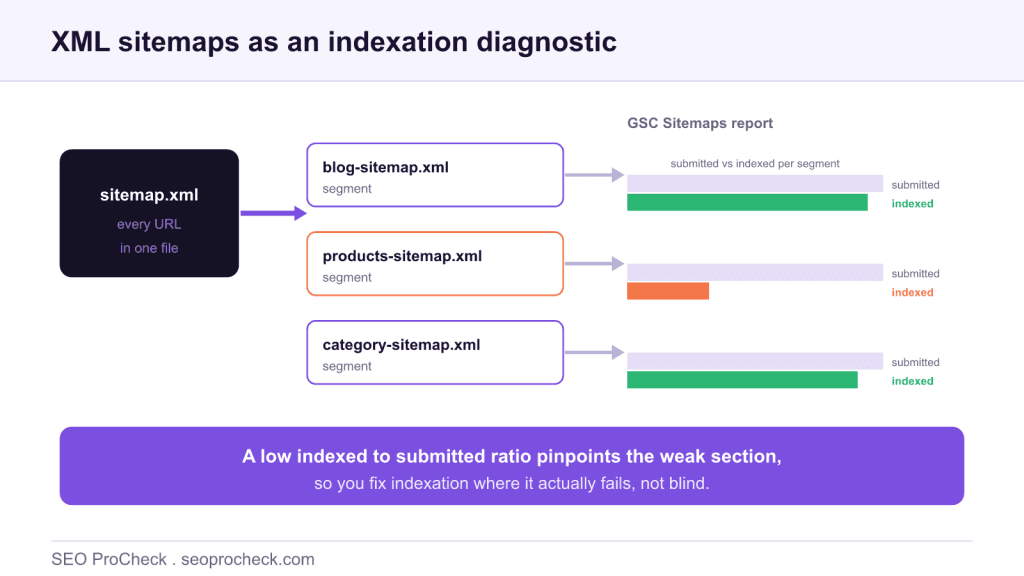
The alternative approach to XML sitemaps is to use them as a diagnostic instrument, not just a discovery feed. By splitting URLs into segmented sitemaps and reading the submitted-versus-indexed counts per segment in Search Console, you pinpoint exactly which section of a site is failing to get indexed.
- Segment sitemaps by section or template instead of listing every URL in one file.
- Search Console reports indexed vs submitted per sitemap, so a low ratio isolates the weak segment.
- This idea is drawn from the approach published at ohgm; see the source link below.
- A single sitemap holds up to 50,000 URLs and 50MB; use a sitemap index to organise segments.
Most people treat an XML sitemap as a chore: generate one file, list every URL, submit it, and forget it. That works as a discovery aid, but it wastes the most useful thing a sitemap can give you, a per-file readout of how well your pages are actually being indexed. The alternative approach, popularised in the write-up linked at the foot of this page, is to design sitemaps so they answer a diagnostic question rather than merely announcing URLs.
The standard job of a sitemap, briefly
An XML sitemap lists URLs you want search engines to know about, optionally with a last-modified date. It helps discovery on large or poorly linked sites and gives Google a clean list to check against. It does not force indexing, and it does not override quality signals: a URL in a sitemap can still be left unindexed if Google judges it thin, duplicate, or low value. For the full mechanics, formats and limits, see our complete XML sitemaps reference.
The alternative approach: a sitemap as a diagnostic
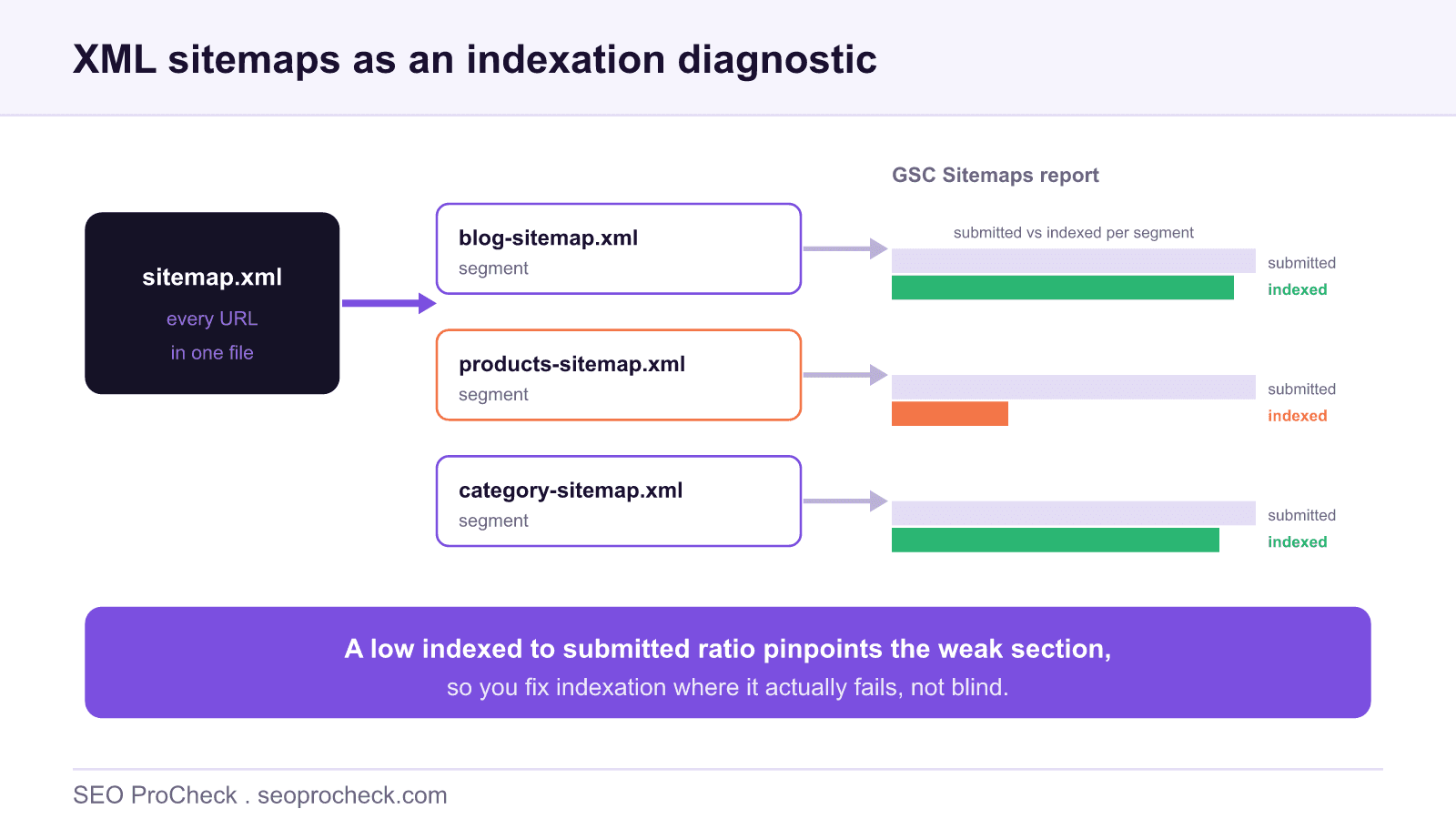
The insight, credited to the source below, is that Search Console reports the submitted and indexed counts per sitemap. If every URL sits in one giant file, that readout is a single blunt number for the whole site. Split the same URLs into meaningful segments and the same report becomes a map of where indexation succeeds and where it fails.
Concretely, instead of one sitemap.xml, you publish a sitemap index that points to child sitemaps grouped by section or template:
sitemap_index.xml
  |__ blog-sitemap.xml        (articles)
  |__ products-sitemap.xml    (product pages)
  |__ categories-sitemap.xml  (category / hub pages)
  |__ pages-sitemap.xml       (static pages)
Now each child sitemap has its own submitted-versus-indexed ratio. A blog sitemap indexed at ninety-plus percent and a product sitemap indexed at a third immediately tells you where to look, without crawling the whole domain first.
How to read the segmented report
The workflow in Search Console is short and repeatable:
1. Submit each segment sitemap (or the index file) under Indexing then Sitemaps.
2. Select a sitemap to see its Discovered URLs and how many are indexed.
3. Open Indexing then Pages and filter by that sitemap to read the exclusion reasons for the URLs that did not make it. Our walkthrough of the Search Console page indexing report explains what each status means.
The table below is the interpretation layer: what a low indexed ratio in a given segment usually points to.
| Segment shows low indexed ratio | Most likely cause | First check |
|---|---|---|
| Product or listing pages | Thin, near-duplicate, or faceted URL variants | Canonicals, content depth, parameter handling |
| Blog or article pages | Quality threshold or slow discovery | Internal links, content value, publishing cadence |
| Category or hub pages | Duplicate or empty hubs | Unique intro content, correct canonicals |
| Paginated URLs | Expected partial indexing | Confirm canonical and internal linking strategy |
| Whole site low | Crawl or template-level blocker | robots.txt, noindex, server errors, canonical loops |
Other diagnostic uses
Once you think of sitemaps as instruments, more uses open up:
Isolation sitemaps. Put only the URLs you are investigating into a small temporary sitemap so their indexed ratio is trivial to watch over the following days. It is the cleanest way to monitor a specific batch, for example a new template rollout.
Recrawl nudges. Submitting or resubmitting a sitemap, especially with accurate lastmod dates, is a legitimate way to prompt Google to revisit changed URLs. It is a request, not a command, but it is more scalable than inspecting URLs one by one.
Budget and crawl insight. When large segments sit unindexed, you may be spending crawl effort on pages Google does not value. Reading that alongside crawl budget helps you decide what to consolidate or prune. If a segment is unindexed because URLs error out, our note on 403 forbidden URLs in XML sitemaps covers a common culprit.
Keep the hygiene right
Segmentation only tells the truth if the sitemaps are clean. Include only canonical, indexable, 200-status URLs. Do not list noindexed, redirected, or blocked URLs, because they pollute the submitted count and make the indexed ratio meaningless. Keep each file within the 50,000 URL and 50MB limits, and let the index file hold the structure. A tidy, segmented sitemap set is one of the highest-leverage, lowest-effort diagnostics in technical SEO.
FAQ
Instead of dumping every URL into one sitemap, you split URLs into segmented sitemaps by section or template. Because Search Console reports submitted versus indexed counts per sitemap, segmentation turns the Sitemaps report into a diagnostic that shows exactly which part of the site has an indexation problem.
They isolate the signal. If one segment sitemap shows a much lower indexed-to-submitted ratio than the others, you have located the weak area without crawling the whole site. You can then focus on why that template is not being indexed, such as thin content, canonicals or crawl issues.
A single sitemap can contain up to 50,000 URLs and must be no larger than 50MB uncompressed. Beyond that you use a sitemap index file that points to multiple child sitemaps, which is also the natural place to apply segmentation by section.
In Google Search Console under Indexing then Sitemaps, select a sitemap to see how many of its submitted URLs are indexed. Pair it with the Pages report, filtered by that sitemap, to read the specific reasons URLs were excluded.
Yes. A temporary, isolation sitemap containing only the URLs you are investigating makes their indexed ratio easy to watch, and submitting or resubmitting a sitemap is a legitimate nudge for recrawl. A sitemap is a discovery and diagnostic aid, not a guarantee of indexing.
Not directly. Segmentation does not add ranking power; it improves your visibility into indexation so you can fix the pages that are being left out. The ranking gain, if any, comes from getting valuable pages indexed that previously were not.
Pages sitting in a sitemap but never getting indexed?
An audit segments your sitemaps, reads the indexation gaps, and traces each one back to the template, canonical or crawl issue behind it.
Source: https://ohgm.co.uk/an-alternative-approach-to-xml-sitemaps/
Take this with you
The assistant links open with a question about this page already written.
Claude Vincent is a technical SEO consultant focused on crawlability, rendering, and AI-search visibility. He writes the field guides and case studies at SEO ProCheck, with a bias toward the durable, unglamorous work that decides whether search engines and AI answer engines can actually read and cite a site.
About SEO ProCheck
Technical SEO consulting and GEO strategy with 20 years of enterprise experience. Case studies, resources, and tools for search and AI visibility.
Work With Me
Technical SEO audits, GEO strategy, site migrations, and international SEO. Hourly consulting for teams who need hands-on support, not just reports.
Subscribe to our newsletter!








Recent Posts
- Google Algorithm Updates: The Dated List Since 2003, and What to Do After Each October 31, 2026
- AI Readiness: The Checklist, the Research and the Free Tools October 28, 2026
- AI Readiness Checklist (2026): 51 Checks, Each With Its Source October 28, 2026