

Technical SEO: an experiment to optimize Crawl Budget in big ecommerce sites
- June 18, 2021
- Crawling and Indexing
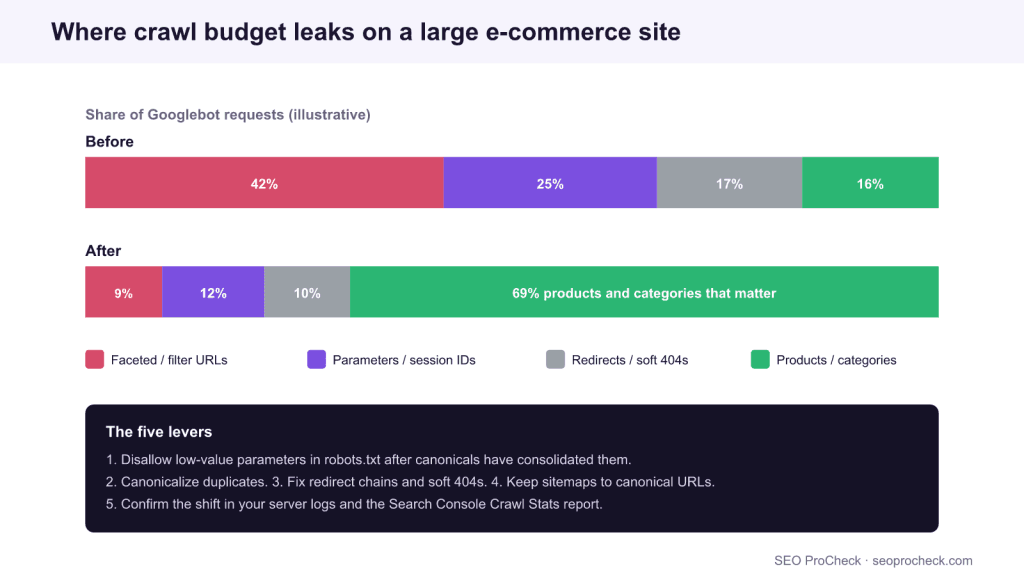
AI Summary
Crawl budget is the number of URLs Googlebot will fetch on your site in a given period, and on a large e-commerce store most of it can be wasted on faceted, parameter, and duplicate URLs. The experiment this page cites shows the winning move: stop the crawler spending time on low-value URLs so it reaches your products and categories more often.
- Crawl budget mainly matters for large sites, roughly a million or more URLs, or medium sites with heavy churn.
- robots.txt disallow saves crawl budget because the fetch never happens; noindex does not, because the page is still crawled to read the tag.
- Faceted navigation, session parameters, redirect chains, and soft 404s are the usual leaks.
- Measure the before and after in the Search Console Crawl Stats report and in your raw server logs.
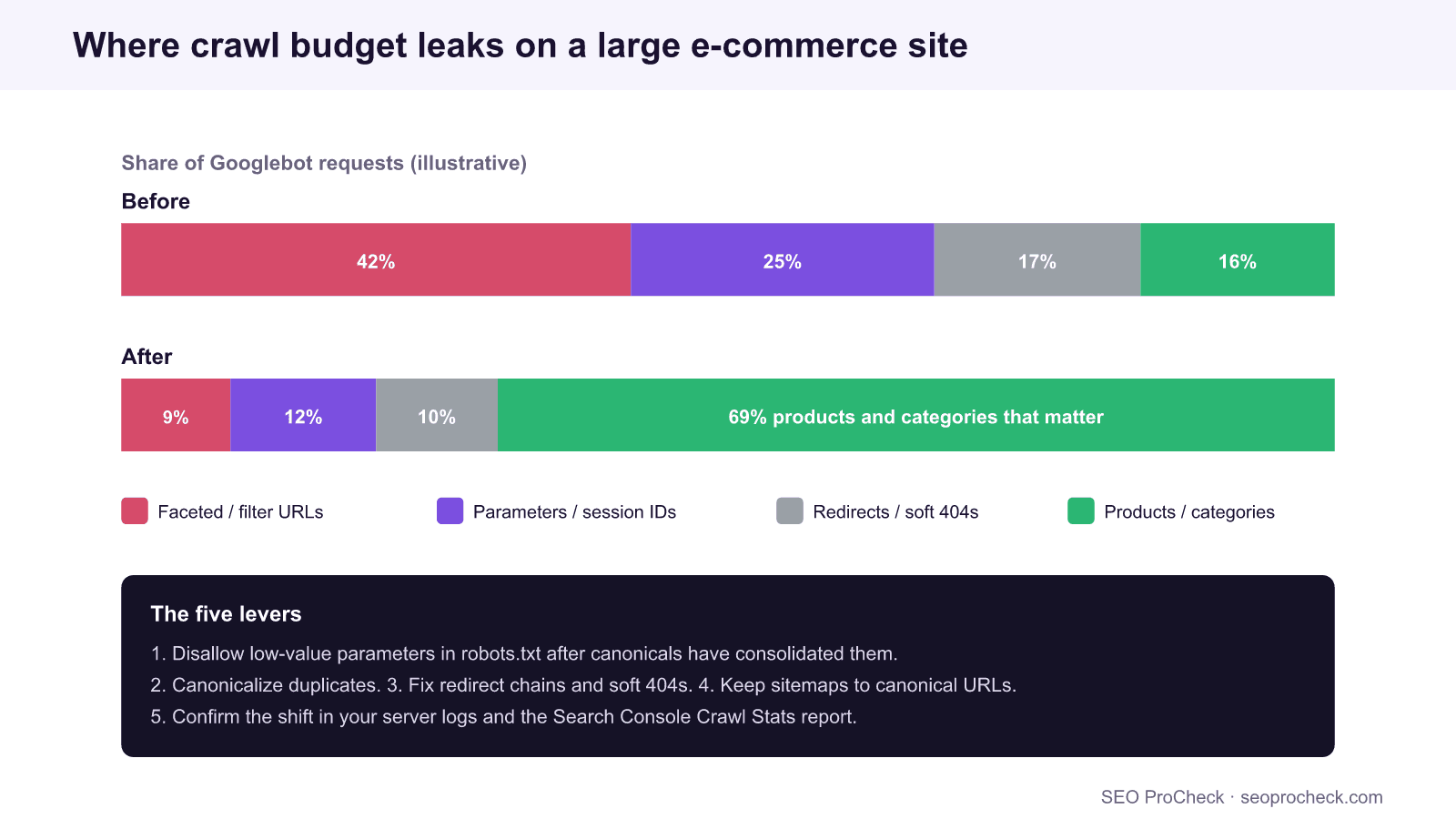
The experiment this page cites, from an engineering team running one of Latin America’s largest online stores, asks a very practical question: if a catalog has millions of URLs and Googlebot will only fetch so many per day, how do you make sure it spends that budget on the pages that earn revenue rather than on parameter noise? That is the whole game of crawl budget optimization at scale, and it is one of the few technical SEO levers whose impact you can watch move in a log file within weeks.
This guide defines crawl budget precisely, shows where big catalogs leak it, lays out the optimization playbook the experiment illustrates, and explains how to measure the shift. If you want the shorter conceptual primer first, see crawl budget explained, and for the enterprise angle our guide on managing crawl budget for large sites.
This SEO case study documents a successful optimization initiative, providing actionable insights for practitioners. The documented approach demonstrates how strategic SEO implementation drives measurable results.
Initial Situation
Understanding the starting point is essential context for evaluating any case study. This documentation covers the initial challenges, competitive position, and business objectives that shaped the SEO strategy.
Strategy and Approach
The strategic approach combined multiple SEO disciplines to address identified opportunities. Key decisions around prioritization and resource allocation provide a template for similar initiatives.
Implementation
Moving from strategy to execution required specific technical implementations, content development, and process changes. This case study documents the practical steps that translated strategy into action.
Results and Learnings
The outcomes demonstrate effectiveness through measurable improvements in rankings, traffic, and business metrics. Analysis of successes and challenges provides learning value for practitioners.
Case studies like this contribute to the SEO knowledge base, helping practitioners learn from documented real-world experiences.
What crawl budget actually is
Google describes crawl budget as the product of two things. Crawl capacity is how many simultaneous connections Googlebot will use and how long it waits between them, tuned to how fast and stable your server is. Crawl demand is how much Google wants to crawl you, driven by how popular and how fresh your URLs are. The budget is the overlap: a healthy, fast server raises capacity, and important, frequently-updated pages raise demand.
Most sites never need to think about this. Google is explicit that crawl budget is a concern chiefly for sites with around a million or more URLs, or medium sites with a large volume of rapidly-changing pages. A large e-commerce catalog with faceted navigation hits both conditions at once, which is why it is the classic case study subject.
Where big catalogs leak crawl budget
The leaks are predictable. Each one sends Googlebot to fetch a URL that will never earn a ranking, at the expense of a product or category that would.
| Leak | Symptom in logs or Search Console | Fix |
|---|---|---|
| Faceted navigation combinations | Thousands of parameter URLs crawled per category | Consolidate with canonicals, then disallow the parameters |
| Session IDs and tracking parameters in URLs | The same content crawled under many query strings | Strip or ignore the parameters, canonical to the clean URL |
| Internal search result pages | Infinite thin URLs under a search path | noindex and disallow the internal search path |
| Redirect chains | Googlebot fetching multiple hops for one destination | Collapse every chain to a single 301 |
| Soft 404s (empty or out-of-stock pages) | Budget spent on pages with no useful content | Return a real 404 or 410, or restore and improve the page |
| Duplicate product paths | Two URLs indexed per product | Rely on the canonical to the clean product URL |
| Slow server responses | Crawl rate throttled, fewer URLs fetched per day | Reduce response time so Google raises crawl capacity |
Faceted navigation is almost always the biggest single line item, which is why crawl-budget work and faceted-nav work are the same project. Our faceted navigation SEO guide covers the decision of which facets, if any, deserve to be indexed.
The optimization playbook
The experiment’s logic is subtractive: you rarely add crawlable pages to fix crawl budget, you remove reasons for the crawler to waste it. Work in this order so you never block a signal Google still needs to read.
- Consolidate duplicates with canonicals and let Google recrawl. This is the safe first step because it loses nothing.
- Return correct status codes. Turn soft 404s into real 404 or 410 responses so the crawler stops revisiting dead URLs, and collapse redirect chains to a single hop.
- Disallow the low-value parameter space in robots.txt only after canonicals have consolidated it. This is where the budget is actually reclaimed, because a disallowed URL is never fetched.
- Trim the XML sitemaps to canonical, indexable URLs with accurate
lastmoddates, which raises crawl demand for the pages you care about. - Strengthen internal linking to important categories and products so crawl demand follows your commercial priorities rather than your navigation’s accidents.
The sequencing point in step three is the one teams get wrong most often, and it is the same trap covered in the crawl budget primer: disallow a URL before its canonical is processed and you freeze the duplicate in place, because the crawler can no longer fetch it to see the signal that would have removed it.
How to measure the shift
Crawl-budget work is measurable, which is what makes it satisfying. Two data sources tell the story.
The Crawl Stats report in Search Console (Settings → Crawl stats) shows total crawl requests over time, split by response code, file type, Googlebot type, and purpose (discovery versus refresh). After optimization you want total requests holding steady or rising while the share going to 404s, redirects, and parameter URLs falls.
Server log analysis is the ground truth. Filter your access logs to Googlebot and group the requests by path to see exactly where the budget goes:
grep "Googlebot" access.log | cut -d' ' -f7 | sort | uniq -c | sort -rn | head -20Run that before and after. A successful project shows the most-crawled paths shifting from parameter and filter URLs toward product and category templates. Our log file analysis guide covers parsing and segmenting these logs properly, including how to verify a request really came from Googlebot rather than a spoofed user-agent.
FAQ
Crawl budget is how many URLs Googlebot will fetch on your site in a period, set by your server’s crawl capacity and Google’s crawl demand. It mainly matters for large sites of roughly a million or more URLs, or medium sites with many rapidly-changing pages; most small sites do not need to manage it.
Consolidate duplicates with canonicals, return correct 404 and 410 codes, collapse redirect chains, then disallow low-value parameters in robots.txt once canonicals have consolidated them. Trim sitemaps to canonical URLs and strengthen internal links to priority pages.
No. A noindexed page is still crawled so Google can read the tag, so it saves index space, not crawl budget. To stop the fetch entirely and reclaim budget, disallow the URL in robots.txt, but only after its ranking signals are consolidated elsewhere.
Use the Crawl Stats report in Search Console for totals by response code, file type, and purpose, and analyze your raw server logs to group Googlebot requests by path. Comparing the two before and after a change shows where the budget moved.
Usually yes, and they are typically the largest single leak on a big catalog. Filter and sort combinations multiply into huge numbers of near-duplicate URLs, so consolidate them with canonicals and then disallow the parameters.
Yes. A faster, more stable server raises Google’s crawl capacity, so Googlebot will fetch more URLs per visit. A slow server causes Google to throttle its crawl rate to avoid overloading you, which lowers the budget.
Is Googlebot spending its budget on the wrong URLs?
A technical audit reads your Crawl Stats and server logs, finds the leaks, and hands you the canonical, status-code, and robots rules to redirect the budget to revenue pages.
Take this with you
The assistant links open with a question about this page already written. Nothing is sent until you press enter.
Claude Vincent is a technical SEO consultant focused on crawlability, rendering, and AI-search visibility. He writes the field guides and case studies at SEO ProCheck, with a bias toward the durable, unglamorous work that decides whether search engines and AI answer engines can actually read and cite a site.
About SEO ProCheck
Technical SEO consulting and GEO strategy with 20 years of enterprise experience. Case studies, resources, and tools for search and AI visibility.
Work With Me
Technical SEO audits, GEO strategy, site migrations, and international SEO. Hourly consulting for teams who need hands-on support, not just reports.
Subscribe to our newsletter!








Recent Posts
- Most Top Sites Never Say Who They Are in Structured Data October 14, 2026
- Homepage Titles Are Mostly Too Short, Not Too Long October 8, 2026
- Who Actually Serves an llms.txt? 184 Top Sites Measured September 29, 2026