

Hulu.com JavaScript Fail - 56% Visibility Drop and Counting
- September 7, 2020
- JavaScript SEO

AI Summary
The Hulu.com case study documents how a JavaScript heavy relaunch coincided with a reported search visibility drop of about 56 percent, a classic pattern when content that used to be in the HTML moves behind client side rendering. The lesson for practitioners is to verify that crawlers can still read your content and follow your links before, not after, a relaunch goes live.
- A relaunch that hides content behind JavaScript can collapse organic visibility if crawlers only receive an empty shell.
- Common causes include content rendered only by script, links coded as onclick handlers, and blocked JS or CSS files.
- The reported drop of about 56 percent comes from the LinkResearchTools case study behind this page.
- Detection relies on comparing raw HTML against rendered HTML and inspecting the page in Google Search Console.
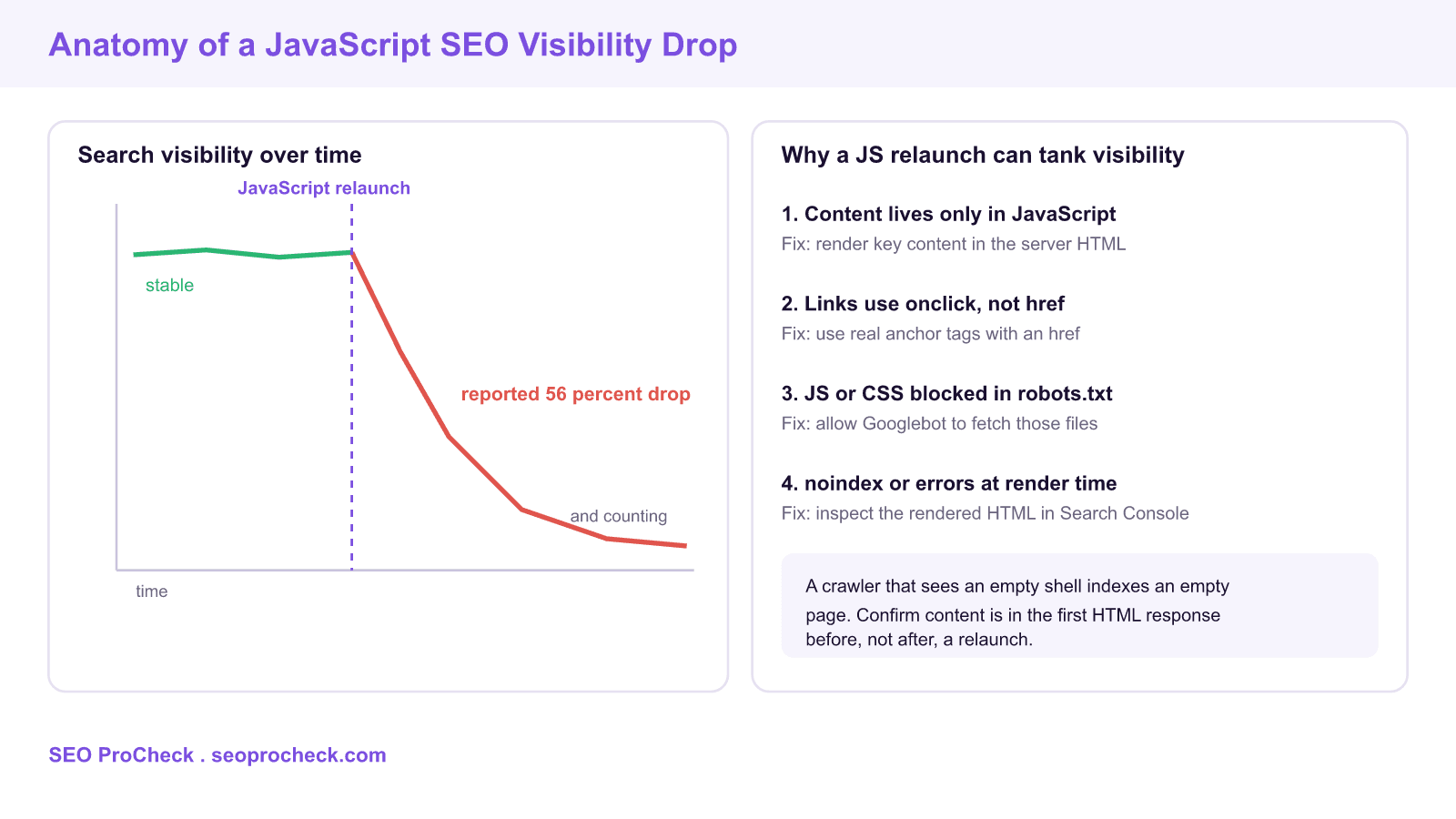
The LinkResearchTools case study behind this page reports that Hulu.com suffered a search visibility drop of about 56 percent, and it ties that decline to a JavaScript related failure. It is one of the most cited examples of a familiar and expensive pattern: a site relaunches on a modern JavaScript stack, the new build looks great to users, and organic visibility falls off a cliff because search engines can no longer see the content the way they used to. This page keeps the source and adds practitioner detail on why these drops happen and how to catch them.
Why a JavaScript relaunch can crash visibility
The root cause is almost always the same. On the old site, headings, body copy, and internal links were present in the HTML the server returned. On the new site, that content is generated in the browser by JavaScript, so the first response a crawler receives is a near empty shell. Google can render JavaScript, but rendering is queued and resource limited, and any error in that pipeline means the content is never indexed. When thousands of URLs simultaneously lose their indexable content, visibility does not dip, it collapses, which is exactly the shape the case study describes.
The common failure modes
JavaScript SEO failures cluster into a handful of recurring problems. The table below maps the symptom to the cause, how to detect it, and the fix.
| Symptom | Cause | How to detect | Fix |
|---|---|---|---|
| Pages indexed but ranking gone | Content only rendered by script | Raw HTML has no body copy | Server render the key content |
| Deep pages not discovered | Links coded as onclick handlers | No anchor href in the markup | Use real anchors with an href |
| Blank rendered screenshots | JS or CSS blocked in robots.txt | URL Inspection shows blocked resources | Allow Googlebot to fetch those files |
| Pages dropped from the index | noindex or errors added at render | Rendered HTML contains a noindex | Remove the tag, fix the render error |
How to diagnose it before it hurts
The first check takes seconds. Fetch the raw HTML the way a crawler does and look for real content and real links:
# Does the main heading exist in the raw HTML?
curl -s https://example.com/show/some-title | grep -i "]*href="[^"]*"' | head
If the heading and links are missing from that output but visible in a browser, your content depends on rendering, and that is the exposure. Confirm it inside Google Search Console. Open the URL Inspection tool, run a live test, and read the rendered HTML and the screenshot under the crawled page view. Check two things: that your content appears in the rendered HTML, and that the resources report does not list blocked scripts or stylesheets. A visibility monitoring tool then tells you the scale, tracking the aggregate movement across your ranking keywords the way the source case study measured the Hulu decline.
How to recover
Recovery follows the diagnosis. If content is missing from the first response, move to server side rendering or static generation so the HTML arrives complete, a pattern explained in our server side rendering and SEO case study. If links are click handlers, rebuild them as anchor tags with a real destination. If robots.txt blocks scripts or styles, unblock them so Googlebot can build the page. And if a noindex or an error is injected during rendering, trace it in the rendered HTML and remove it. After fixing, request validation in Search Console and watch the coverage and visibility trend recover, which is usually gradual rather than instant because Google has to recrawl and reprocess the affected URLs.
What has changed since this case study
Google renders JavaScript more reliably today than when this case study was published, and the render delay is usually shorter. The risk has not disappeared, though. Rendering still fails on heavy or broken scripts, blocked resources still hide content, and links without an href are still invisible. The safest posture is unchanged: put content and links in the first HTML response, and treat any relaunch onto a JavaScript framework as an SEO project, not just a front end one. Stage it, crawl the staging build, and confirm content and links are present before you ship. For more worked examples, browse our JavaScript SEO case studies and the wider case study library.
Frequently asked questions
Why did Hulu.com lose search visibility?
The case study attributes a reported visibility drop of about 56 percent to a JavaScript related failure around a relaunch. The pattern it describes is content that used to be in the HTML moving behind client side rendering, so crawlers received an empty shell. When many URLs lose indexable content at once, aggregate visibility falls sharply.
Can a website redesign hurt SEO?
Yes, especially a redesign that moves to a JavaScript framework without server rendering. If content and links that were in the HTML become dependent on client side rendering, crawlers may not see them, and rankings can drop across the site. Treat any relaunch as an SEO project and test crawlability on staging first.
How do I know if JavaScript is blocking my SEO?
Fetch the raw HTML with a tool like curl and check whether your main heading, body copy, and internal links are present. If they only appear in a rendered browser view, your content depends on rendering. Confirm with the URL Inspection tool in Search Console by reading the rendered HTML and the blocked resources report.
Does Google index JavaScript content?
Google can render JavaScript and index the result, but rendering is queued and resource limited, so it can be delayed or fail. Content that is present in the first HTML response is indexed reliably, while content that only appears after rendering is at risk. That risk is why server side rendering is safer for pages that must rank.
How long does it take to recover from a JavaScript SEO drop?
Recovery is usually gradual rather than instant. After you fix the rendering, links, or blocked resources, Google has to recrawl and reprocess every affected URL before rankings return. Requesting validation in Search Console helps, but a full recovery across a large site commonly takes weeks.
How can I prevent a visibility drop during a relaunch?
Stage the new build, crawl the staging environment, and confirm that content and internal links appear in the raw HTML before launch. Verify a sample of templates in the URL Inspection tool, and make sure robots.txt does not block scripts or styles. Launching only after these checks pass avoids the surprise drop this case study describes.
Source: https://smart.linkresearchtools.com/linkthing/case-studies/hulu-javascript-fail-visibility-drop
Take this with you
The assistant links open with a question about this page already written. Nothing is sent until you press enter.
Claude Vincent is a technical SEO consultant focused on crawlability, rendering, and AI-search visibility. He writes the field guides and case studies at SEO ProCheck, with a bias toward the durable, unglamorous work that decides whether search engines and AI answer engines can actually read and cite a site.
About SEO ProCheck
Technical SEO consulting and GEO strategy with 20 years of enterprise experience. Case studies, resources, and tools for search and AI visibility.
Work With Me
Technical SEO audits, GEO strategy, site migrations, and international SEO. Hourly consulting for teams who need hands-on support, not just reports.
Subscribe to our newsletter!








Recent Posts
- Most Top Sites Never Say Who They Are in Structured Data October 14, 2026
- Homepage Titles Are Mostly Too Short, Not Too Long October 8, 2026
- Who Actually Serves an llms.txt? 184 Top Sites Measured September 29, 2026