

15 Quick SEO Wins for Any Website
- January 20, 2025
- Core Web Vitals and Performance, Technical SEO
AI Summary
A quick SEO win is a change you can ship in under an hour that removes a technical blocker or clarifies a page’s intent to search engines. The highest-leverage wins on most sites are indexing fixes (sitemaps, stray noindex tags, canonicals), tight on-page tags (titles, H1s, alt text), and cleanups that improve the Core Web Vitals Google's ranking systems use.
- Check for a leftover site-wide
noindexfirst: it is the single fastest way to lose or recover all organic traffic. - Every indexable page needs a unique title under roughly 60 characters and exactly one
H1that matches search intent. - Image compression and lazy loading move Largest Contentful Paint, the Core Web Vital most sites fail on mobile.
- Fix orphan pages by adding internal links; a page with no internal links is crawled rarely and ranks poorly.

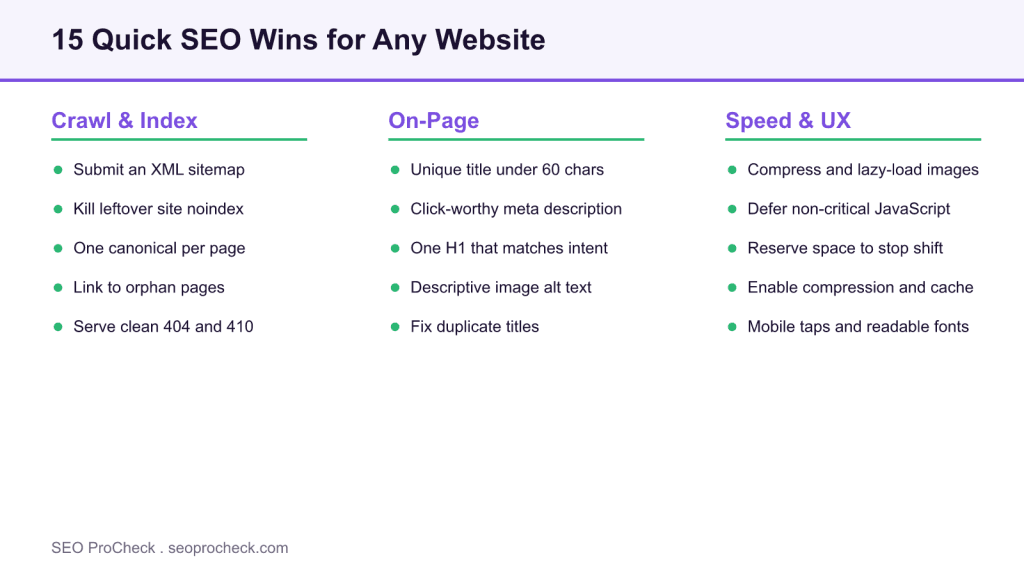
Most sites do not need a six-month strategy to rank better next month. They need the handful of quick fixes that are quietly holding them back: a stray indexing tag, a missing sitemap, titles that repeat across fifty pages, images that take four seconds to paint. This is a working list of 15 quick SEO wins you can ship on almost any website, grouped by where they live and ordered so the highest-leverage items come first. Each one is concrete, and each tells you exactly where to make the change.
Work top to bottom. The crawling and indexing fixes come first because a page that cannot be indexed cannot benefit from anything else you do to it.
Crawling and indexing wins
1. Find and remove a leftover site-wide noindex. The most expensive bug in SEO is a noindex left on after a site relaunch. In WordPress, check Settings, then Reading, and confirm "Discourage search engines from indexing this site" is unchecked. Then confirm the live pages by running curl -sI https://yourdomain.com/ and reading the response, or by loading the page and searching source for name="robots". If you see noindex where you expect a page to rank, that is your whole problem.
2. Submit an XML sitemap in Search Console. Most SEO plugins generate one at /sitemap_index.xml or /sitemap.xml. Open Google Search Console, go to Indexing, then Sitemaps, and submit the URL. This does not guarantee indexing, but it gives Google a clean discovery path and a report of which submitted URLs are actually indexed.
3. Set one canonical URL per page. Duplicate or near-duplicate URLs (with and without a trailing slash, with tracking parameters, HTTP and HTTPS) split ranking signals. Each page should declare a single self-referencing canonical in the head. Confirm it points to the version you actually want indexed, not a staging or parameterized copy.
4. Add internal links to orphan pages. An orphan page is one that no other page on your site links to. Crawlers reach it rarely, and it accumulates almost no internal authority. Pull a crawl in any SEO tool, filter for pages with zero inlinks, and add two or three contextual links to each from relevant published pages.
5. Serve clean 404 and 410 status codes. Soft 404s (a "not found" message returned with a 200 status) waste crawl budget and confuse indexing. Dead pages should return a real 404, and permanently removed pages a 410. Test with curl -sI and read the status line, do not trust the on-page message alone.
On-page wins
6. Write a unique title tag under about 60 characters. Titles are still one of the strongest on-page signals and they drive click-through from the results page. Keep the primary keyword near the front, keep each title unique across the site, and stay near 60 characters, since Google truncates titles by pixel width (about 600px on desktop) rather than at a set character count. Duplicate titles across many pages is one of the most common issues an audit surfaces.
7. Write a meta description that earns the click. Google may rewrite it, but a clear, specific description still lifts click-through on the queries where it is shown. Treat it as ad copy for the page: state the benefit, include the term the searcher used, and keep it near 150 characters.
8. Use exactly one H1 that matches search intent. The H1 should restate what the page is about in the words a person would search. One H1 per page, then a logical H2 and H3 outline beneath it. A page whose H1 says something different from its title tag sends a mixed signal about its topic.
9. Add descriptive alt text to meaningful images. Alt text is an accessibility requirement first and an image-search and context signal second. Describe what the image shows in a plain sentence. Leave decorative images with empty alt so screen readers skip them.
10. Fix duplicate and templated title collisions. Archive pages, tag pages, and paginated series often ship identical or near-identical titles from a template. Give them distinct titles, or noindex the thin ones deliberately. This overlaps with the most common technical SEO mistakes, which is worth reading alongside this list.
Speed and user-experience wins
11. Compress and lazy-load images. Images are the usual cause of a slow Largest Contentful Paint on mobile. Serve modern formats (WebP or AVIF), size them to their display dimensions, and add loading="lazy" to below-the-fold images while leaving the hero image eager with fetchpriority="high".
12. Defer non-critical JavaScript. Heavy third-party scripts block the main thread and hurt Interaction to Next Paint. Defer or async anything not needed for first render, and remove tag-manager entries you no longer use. Fewer scripts is almost always faster.
13. Reserve space for images and embeds. Layout shift (a poor CLS score) comes from elements that load without reserved dimensions. Always set width and height attributes on images, and reserve height for ad slots and embeds so content does not jump as they load.
14. Enable text compression and browser caching. Confirm the server sends Gzip or Brotli on HTML, CSS, and JavaScript, and sets long cache lifetimes on static assets. Most managed hosts and CDNs do this with one toggle, and it is a measurable speed gain for near-zero effort.
15. Make the page comfortable on mobile. Body text at 16px or larger, tap targets at least 48px, no horizontal scroll, and no intrusive interstitial on load. These are the mobile-usability basics Google checks, and they map directly onto the metrics in the Core Web Vitals and performance guide.
Quick reference: where each win lives and what it moves
Use this table to triage. Start with anything in the "Indexing" group, because those wins gate every other one.
| Win | Where you make the change | Typical time | What it moves |
|---|---|---|---|
| Remove stray noindex | Settings, Reading / robots meta | 5 min | Indexing (all traffic) |
| Submit sitemap | Search Console, Sitemaps | 10 min | Discovery, index coverage |
| Unique titles | SEO plugin, per page | 30 min | Rankings, click-through |
| Image compression | Media pipeline, CDN | 30 min | LCP (Core Web Vitals) |
| Internal links to orphans | Page body content | 20 min | Crawl depth, authority flow |
| Defer JavaScript | Theme, tag manager | 45 min | INP, main-thread time |
None of these require a redesign or a developer sprint. They require an afternoon and a checklist. If you want to spot the on-page and speed issues faster while you browse, a small toolkit of SEO browser extensions surfaces most of them in a click.
FAQ
Indexing fixes can show within days, because Google acts on them the next time it crawls the page. Title and content changes typically take a few weeks to settle as pages are re-crawled and re-evaluated. Core Web Vitals field data updates on a 28-day rolling window, so speed wins take about a month to fully reflect.
Check for a leftover site-wide noindex before anything else. It takes five minutes and, if present, it is silently suppressing every page. After that, submit a sitemap and fix duplicate title tags, in that order.
They are not a direct ranking factor, but they influence click-through rate on the queries where Google shows them. A higher click-through rate on a result tends to reinforce its position, so a clear, specific description is still worth writing.
An orphan page is a page that no other page on your site links to. Search crawlers discover pages by following links, so orphans are crawled rarely and receive almost no internal authority. Adding two or three contextual internal links from relevant pages usually fixes it.
Run the page through PageSpeed Insights and read the Largest Contentful Paint value. If the LCP element is an image and the score is poor, compress it, serve WebP or AVIF, size it to its display dimensions, and mark below-the-fold images as lazy. The hero image should stay eager with high fetch priority.
They remove the technical friction that stops a page from ranking, but rankings on competitive terms still depend on content quality, search intent match, and links. Think of quick wins as clearing the runway: necessary for takeoff, not the whole flight.
Want the full list of what is holding your site back?
Quick wins clear the obvious blockers. A full audit finds the ones you cannot see from the front end.
Take this with you
The assistant links open with a question about this page already written.
Claude Vincent is a technical SEO consultant focused on crawlability, rendering, and AI-search visibility. He writes the field guides and case studies at SEO ProCheck, with a bias toward the durable, unglamorous work that decides whether search engines and AI answer engines can actually read and cite a site.
About SEO ProCheck
Technical SEO consulting and GEO strategy with 20 years of enterprise experience. Case studies, resources, and tools for search and AI visibility.
Work With Me
Technical SEO audits, GEO strategy, site migrations, and international SEO. Hourly consulting for teams who need hands-on support, not just reports.
Subscribe to our newsletter!








Recent Posts
- Google August 2026 Spam Update: Dates, Duration and How to Read Your Data November 2, 2026
- Google Algorithm Updates: The Dated List Since 2003, and What to Do After Each October 31, 2026
- AI Readiness: The Checklist, the Research and the Free Tools October 28, 2026