

AI Summary
Rendering path optimization means making sure your important text, links and metadata exist in the HTML Googlebot receives on the first fetch, before any JavaScript runs. Google indexes in two phases, so content that only appears after client side rendering waits in a render queue and can be indexed late or missed.
- Google crawls the raw HTML first, then queues the page for a second pass where the Web Rendering Service executes JavaScript.
- Server side rendering (SSR) and static generation (SSG) put content in the first HTML, so it is indexed without waiting for render.
- Client only rendering ships an empty shell, so critical content depends on the render queue and can be delayed.
- Test with the URL Inspection tool live test and view rendered HTML, not just the raw source in view source.

Rendering path optimization is the practice of controlling what exists in your HTML at each stage of how a search engine processes your page, so that the content you care about is available as early as possible. It is the core of modern JavaScript SEO. Get it wrong and Google indexes an empty shell; get it right and your text, links and structured data are indexed on the first pass. This guide explains how Googlebot renders, where JavaScript content can fall through the cracks, and the exact checks and fixes to keep your pages fully indexable.
How Googlebot actually renders a page
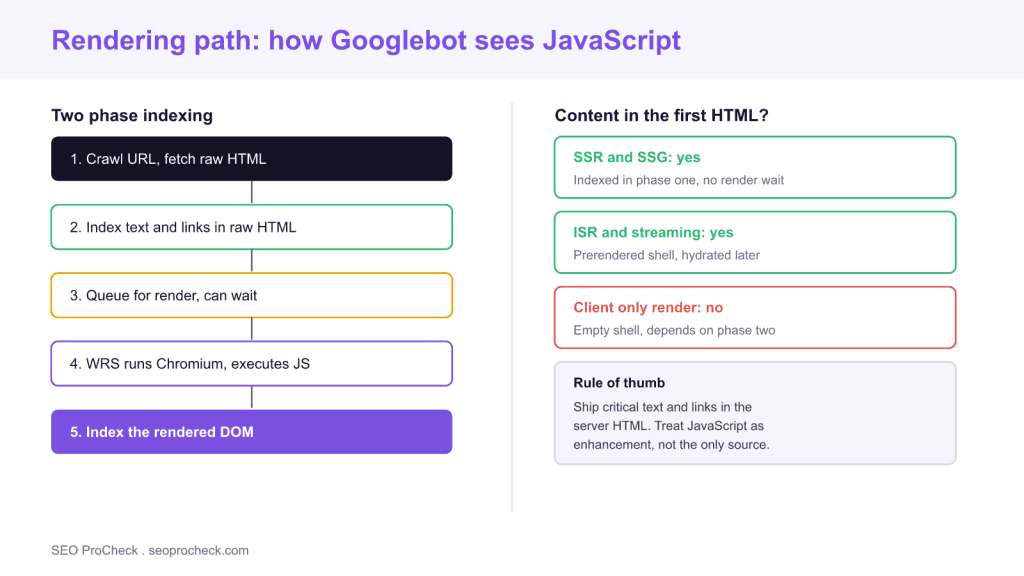
Google indexes JavaScript sites in two phases, not one. In phase one, Googlebot crawls the URL and parses the raw HTML that the server returns. Any text, links and metadata present at that moment are eligible for indexing immediately, and any links found are added to the crawl queue. In phase two, the page is placed in a render queue. When capacity is available, the Web Rendering Service (WRS), which runs a current version of headless Chromium, loads the page, executes the JavaScript, and produces a rendered DOM. Google then indexes that rendered output.
The gap between the two phases is the whole problem. If a heading, a paragraph, a canonical tag or an internal link only appears after JavaScript runs, it does not exist for indexing until phase two completes. For most pages that delay is modest, but it is never zero, and for large or frequently changing sites it can mean stale or missing content. The safest position is simple: do not depend on the render phase for anything that decides indexing or ranking.
The rendering strategies, ranked by SEO safety
Where your content lives in the response is decided by your rendering strategy.
Server side rendering (SSR). The server builds the full HTML per request. Content, links and metadata are all present in phase one. This is the safest option for pages that must rank, and it is why frameworks like Next.js, Nuxt and Remix default to server rendering.
Static site generation (SSG). Pages are prebuilt at deploy time into static HTML. Same SEO benefit as SSR, with better performance and lower server cost, ideal for content that does not change per request.
Incremental static regeneration and streaming. A prerendered shell is served immediately and hydrated or revalidated afterward. Because the shell already contains the meaningful HTML, it indexes cleanly while still supporting dynamic data.
Client side rendering (CSR). The server returns a near empty <div id="root"></div> and the browser builds the page with JavaScript. Everything then depends on phase two. This is the riskiest pattern for SEO, and the one behind most "my content is not indexed" reports. If you must use it, prehydrate the critical content or move those routes to SSR.
Dynamic rendering, once recommended as a workaround, is now treated by Google as a stopgap rather than a long term solution. Prefer real server rendering. For a deeper comparison of how these choices affect both classic and AI crawlers, see our guide to SSR versus CSR for AI crawlers.
Where rendering quietly breaks SEO
A handful of patterns cause most rendering failures. First, content behind user interaction: if text loads only after a click or scroll event, WRS will not trigger it, because it does not interact with the page. Second, blocked resources: if robots.txt blocks the JavaScript or API endpoints the page needs, WRS renders an incomplete page. Third, soft failures: if an API call errors during render, the fallback may be an empty state that gets indexed as the page. Fourth, injected metadata: canonical tags, titles and robots directives added by JavaScript can be missed or applied late, so set them server side. The underlying lesson is that HTML is still the contract with search engines, a point we make in detail in the forgotten HTML.
How to test your rendering path
Do not guess, inspect. Run these checks on any template that relies on JavaScript.
1. URL Inspection live test. In Google Search Console, run a live test on the URL, then open the rendered HTML and the screenshot. Confirm your main content, headings and links are present. This is the single most reliable check because it uses the same rendering pipeline Google uses.
2. View source versus rendered DOM. Compare the raw HTML from view source with the DOM in DevTools Elements. Anything present in the DOM but absent from view source is JavaScript dependent and lives in phase two.
3. Disable JavaScript. Load the page with JavaScript turned off in DevTools. What remains is roughly what phase one indexes. If the page is blank, your critical content is at risk.
4. Fetch as a bot. Request the URL with a plain HTTP client and no JavaScript execution, then grep the response for your H1 and key links. If they are missing, so are they for phase one.
A practical optimization checklist
Ship the essentials server side: title, meta description, canonical, robots meta, H1, body copy and internal links. Keep JavaScript for enhancement, not for delivering primary content. Avoid blocking JS and API routes in robots.txt. Preload critical resources and keep the render fast, because rendering path and Core Web Vitals overlap; a page that renders quickly for users also renders reliably for WRS. Since the largest element usually sits in that critical content, optimizing it also improves your Largest Contentful Paint. Finally, retest after every framework upgrade, because a change in how your app hydrates can move content between phases without warning.
What has changed recently
Two shifts matter. Google now runs an evergreen Chromium in WRS, so it supports modern JavaScript features, which removed a class of old rendering bugs but did not remove the two phase delay. And AI crawlers entered the picture: many assistant and answer engine bots do not execute JavaScript at all, so client rendered content that Google eventually sees may be completely invisible to them. That raises the stakes on server rendering. If you want your content in both classic search and AI answers, the reliable path is to put it in the HTML.
| Strategy | Content in first HTML | Indexing phase | SEO risk |
|---|---|---|---|
| SSR | Full | Phase one | Low |
| SSG | Full | Phase one | Low |
| ISR / streaming | Shell plus content | Phase one | Low to medium |
| Client only render | Empty shell | Phase two | High |
| Dynamic rendering | Full for bots only | Phase one | Medium, stopgap |
Frequently asked questions
What is the critical rendering path in SEO terms?
For SEO the critical rendering path is the sequence a search engine follows to turn your URL into indexed content: crawl the HTML, index what is present, queue the page, run JavaScript in the renderer, then index the rendered DOM. Optimizing it means putting important content early in that sequence.
Does Google render JavaScript?
Yes. Google runs an evergreen headless Chromium in its Web Rendering Service and can execute modern JavaScript. The catch is timing: rendering happens in a second phase after an initial HTML pass, so JavaScript dependent content can be indexed later than server rendered content.
Is client side rendering bad for SEO?
It is the highest risk pattern because your content only exists after the render phase. It can work if the page renders quickly and reliably, but any content that must rank is safer delivered by server side rendering or static generation.
How do I check what Googlebot renders?
Use the URL Inspection tool in Search Console, run a live test, and open the rendered HTML and screenshot. Cross check by comparing view source with the DOM in DevTools and by loading the page with JavaScript disabled.
Do AI crawlers render JavaScript like Google?
Often not. Many AI and answer engine crawlers fetch the raw HTML and do not execute JavaScript at all. Content that Google eventually renders may be invisible to them, so server rendering is the reliable way to appear in both search and AI answers.
Is dynamic rendering still recommended?
Google now treats dynamic rendering as a workaround rather than a long term solution. Prefer real server side rendering or static generation, which serve the same HTML to users and every crawler.
Take this with you
The assistant links open with a question about this page already written. Nothing is sent until you press enter.
Claude Vincent is a technical SEO consultant focused on crawlability, rendering, and AI-search visibility. He writes the field guides and case studies at SEO ProCheck, with a bias toward the durable, unglamorous work that decides whether search engines and AI answer engines can actually read and cite a site.
About SEO ProCheck
Technical SEO consulting and GEO strategy with 20 years of enterprise experience. Case studies, resources, and tools for search and AI visibility.
Work With Me
Technical SEO audits, GEO strategy, site migrations, and international SEO. Hourly consulting for teams who need hands-on support, not just reports.
Subscribe to our newsletter!






Recent Posts
- AI Readiness: The Checklist, the Research and the Free Tools October 28, 2026
- AI Readiness Checklist (2026): 50 Checks, Each With Its Source October 28, 2026
- Most Top Sites Never Say Who They Are in Structured Data October 14, 2026