

JSON-LD Structured Data: Complete Implementation Guide
- August 1, 2024
- Schema and Structured Data, Technical SEO

AI Summary
JSON-LD is Google's preferred way to add structured data: a single script block, placed anywhere on the page, that describes your content to search engines without touching the visible HTML. Choose the most specific schema type, fill every required property, validate with the Rich Results Test, and only mark up content that is actually visible to users.
- JSON-LD lives in a script tag, so you can add or update it without changing page templates.
- Use @id references to define an entity such as your Organization once and reuse it everywhere.
- Missing required properties silently prevent rich results, so validate before every deploy.
- Marking up content users cannot see violates Google guidelines and risks a manual action.
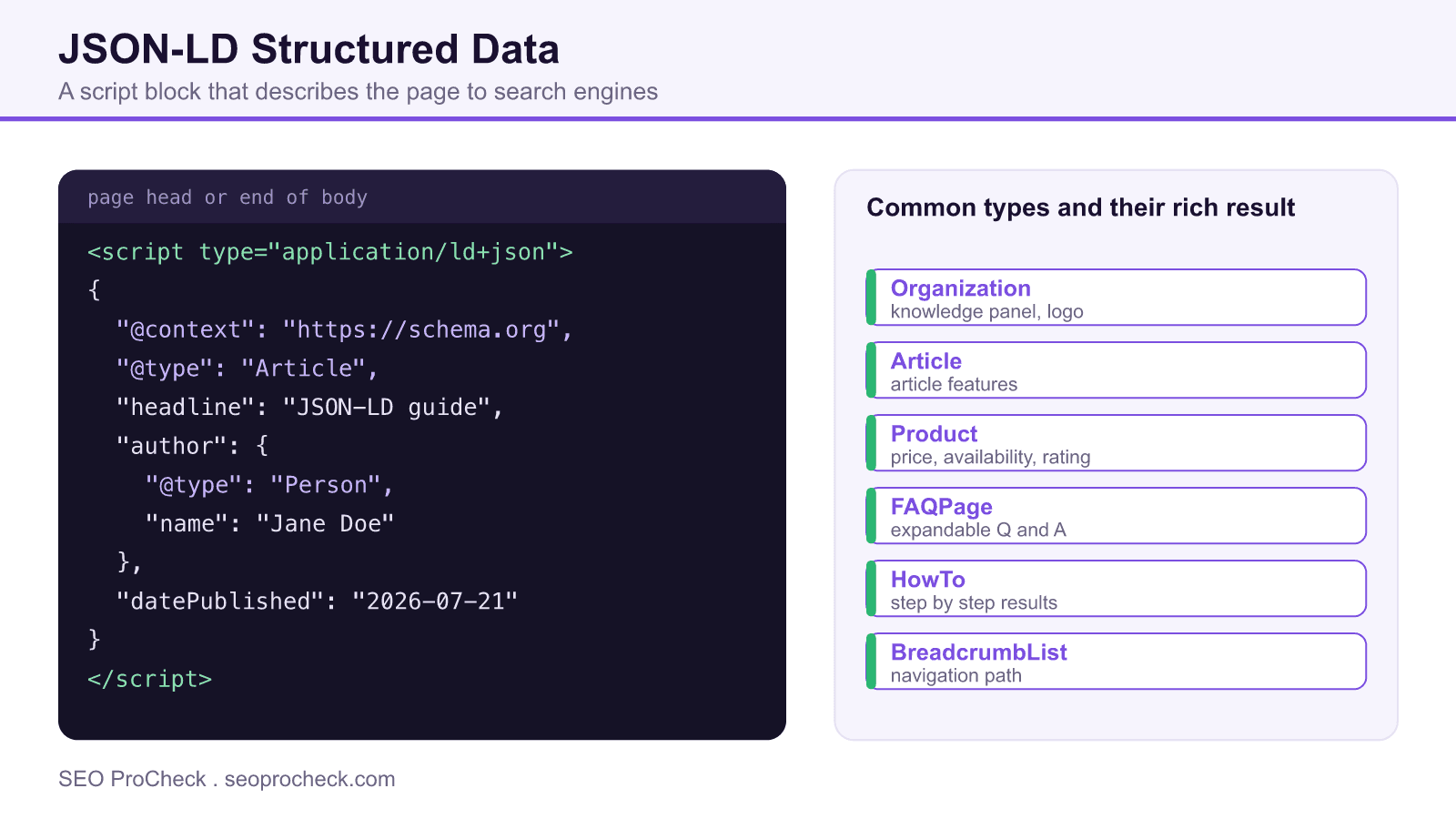
Understanding JSON-LD
JSON-LD (JavaScript Object Notation for Linked Data) is Google's recommended format for implementing structured data markup. Unlike Microdata or RDFa that embed markup within HTML elements, JSON-LD uses a script block that can be placed anywhere on the page, making it easier to implement and maintain. This separation of data from presentation means developers can add structured data without modifying existing HTML, and content management systems can generate it programmatically without complex template changes.
Core Schema Types for SEO
While schema.org defines hundreds of types, certain schemas directly impact search appearance. Organization and LocalBusiness schemas establish entity identity and enable knowledge panels. Article, NewsArticle, and BlogPosting schemas qualify content for Top Stories and article-specific features. Product and Offer schemas enable product rich results with pricing, availability, and reviews. FAQ and HowTo schemas once created expandable results that dominated SERP real estate, but Google retired HowTo rich results in September 2023 and FAQ rich results on May 7, 2026, though other engines and AI assistants can still read the markup. BreadcrumbList improves how navigation paths display in search results.
| Schema Type | Rich Result Enabled | Key Properties |
|---|---|---|
| Organization | Knowledge Panel, Logo | name, logo, url, sameAs, contactPoint |
| LocalBusiness | Local Pack, Knowledge Panel | name, address, geo, openingHours, telephone |
| Product | Product Rich Results | name, image, description, offers, aggregateRating |
| Article | Article Carousels | headline, image, datePublished, author, publisher |
| FAQPage | FAQ Rich Results (retired by Google on May 7, 2026) | mainEntity (Question/Answer pairs) |
| HowTo | How-To Rich Results (retired by Google in September 2023) | name, step, totalTime, supply, tool |
| Review | Review Snippets | itemReviewed, reviewRating, author |
Implementation Best Practices
Place JSON-LD in the head section or end of body for clean separation from content. Use absolute URLs for all @id and url properties. Implement the most specific type available (LocalBusiness subtypes like Restaurant rather than generic LocalBusiness). Include all required properties for your target rich result, as missing required fields prevent rich results from appearing. Use Google's Rich Results Test to validate markup before deployment. Avoid marking up content not visible to users, as this violates Google's guidelines and can result in manual actions.
Nesting and Entity Relationships
Complex schemas benefit from properly nested entities. An Article schema should nest Author (Person or Organization), Publisher (Organization), and optionally ImageObject for the article image. Product schemas nest Offer for pricing and AggregateRating for reviews. Use @id to create references between entities, allowing you to define an Organization once and reference it from multiple Article schemas. This creates a knowledge graph structure that helps search engines understand entity relationships across your site.
Testing and Monitoring Structured Data
Google's Rich Results Test validates markup and shows which rich results you're eligible for. Schema.org's validator checks syntax compliance with the broader specification. Google Search Console's Enhancements reports show structured data performance, errors, and warnings across your site. Monitor for common issues: missing required properties, incorrect data types (string vs number), outdated schema (deprecated properties), and discrepancies between markup and visible content. After fixing errors, use Search Console to request revalidation of affected pages.
Anatomy of a Correct JSON-LD Block
Every JSON-LD block opens with a context and a type, then lists the properties for that type. The context is always "https://schema.org". The type should be the most specific one that fits: a Restaurant rather than a generic LocalBusiness, a BlogPosting rather than a bare Article when that is what the page is. Nest related entities inside the parent, so an Article carries its author as a Person, its publisher as an Organization, and its lead image as an ImageObject. Use absolute URLs for every url and @id value, because relative paths break when the markup is cached or syndicated.
The most common failure is not a syntax error but a missing required property. Google will parse the block happily and still withhold the rich result because a required field is absent. Before shipping, run the exact rendered markup through the Rich Results Test, not just the source, since tag managers and plugins sometimes alter what actually reaches the page. The checklist below covers the properties that most often decide whether a result appears.
| Schema Type | Required Core Properties | Common Missing Field |
|---|---|---|
| Article | headline, image, datePublished | image as an absolute URL |
| Product | name, image, offers | offers.priceCurrency |
| FAQPage | mainEntity question and answer pairs | answer text that is also visible |
| LocalBusiness | name, address, telephone | address as a nested PostalAddress |
| BreadcrumbList | itemListElement with position | item as an absolute URL |
Building a Connected Entity Graph
Beyond single blocks, the real power of JSON-LD is linking entities with @id so search engines read your site as a connected graph rather than a pile of isolated snippets. Define your Organization once with a stable @id such as your homepage URL plus a fragment, then reference that same @id as the publisher on every Article. This is how you build the machine readable brand entity that helps engines resolve who published what. FAQPage markup is still a useful addition because Bing and AI assistants can read its question and answer pairs, although Google stopped showing FAQ rich results on May 7, 2026, so you should confirm the format still suits your goals by reviewing whether FAQ schema is worth it for your particular result types.
Validation, Monitoring, and Governance
Structured data is not set and forget. After launch, watch the Enhancements reports in Search Console for errors and warnings, which flag missing properties and type mismatches across templates. Fix the template rather than the page, since one bad partial usually breaks the markup on every URL that uses it, exactly the kind of pattern a technical SEO audit is built to catch. Keep the visible content and the markup in sync: if you change a price, a date, or an answer on the page, the schema must change with it, or you risk a mismatch penalty. Treat schema as living configuration that ships, gets tested, and is monitored like any other part of the codebase.
Frequently Asked Questions
Where should I place JSON-LD on the page?
Anywhere in the head or body will work, since JSON-LD is parsed independently of visible HTML. Many teams put it in the head for clean separation, but placing it at the end of the body is equally valid and can help pages render first.
Do I need separate schema for every page?
Yes, tailored to each page's content, but you can reuse shared entities. Define your Organization or Person once with a stable @id and reference it from every page rather than repeating all its details.
Why is my valid markup not showing rich results?
Valid syntax is not the same as eligibility. Rich results require every field Google mandates for that type, the content must be visible to users, and the page must meet quality thresholds. Use the Rich Results Test to see exactly which requirement is unmet.
Is JSON-LD better than Microdata?
For most sites, yes. JSON-LD keeps markup separate from HTML, so it is easier to add, maintain, and generate programmatically. Google explicitly recommends it, though it still reads valid Microdata and RDFa.
Can structured data cause a penalty?
It can, if you mark up content that is not visible to users or misrepresent the page. That violates Google's structured data guidelines and can trigger a manual action, so only describe what a visitor actually sees.
How do I keep schema accurate over time?
Treat it as living configuration. Monitor the Search Console Enhancements reports, fix issues at the template level, and update the markup whenever the visible content it describes changes so the two never drift apart.
Take this with you
The assistant links open with a question about this page already written. Nothing is sent until you press enter.
Claude Vincent is a technical SEO consultant focused on crawlability, rendering, and AI-search visibility. He writes the field guides and case studies at SEO ProCheck, with a bias toward the durable, unglamorous work that decides whether search engines and AI answer engines can actually read and cite a site.
About SEO ProCheck
Technical SEO consulting and GEO strategy with 20 years of enterprise experience. Case studies, resources, and tools for search and AI visibility.
Work With Me
Technical SEO audits, GEO strategy, site migrations, and international SEO. Hourly consulting for teams who need hands-on support, not just reports.
Subscribe to our newsletter!








Recent Posts
- Most Top Sites Never Say Who They Are in Structured Data October 14, 2026
- Homepage Titles Are Mostly Too Short, Not Too Long October 8, 2026
- Who Actually Serves an llms.txt? 184 Top Sites Measured September 29, 2026