

AI Summary
SEO for a progressive web app comes down to one thing: the content and per-route metadata a user sees must also be present in the HTML that Googlebot renders. Because a PWA renders much of its content with JavaScript, the safe approach is server-side rendering or prerendering, real URLs for every view, and per-route title, description, and canonical tags.
- Give every view a real, crawlable URL with the History API, not fragment (
#) routing. - Prefer server-side rendering or prerendering so crawlers get content without waiting on client-side JavaScript.
- Set title, meta description, and canonical per route, updated on navigation, not just on the shell.
- Never block your JavaScript or CSS in robots.txt; Google must fetch them to render the page.

A progressive web app is a web app built to feel like a native one: it works offline through a service worker, can be installed to the home screen via a web app manifest, and is served over HTTPS. Those capabilities are great for users. They also introduce the exact rendering and routing problems that trip up search crawlers. SEO for a PWA is really JavaScript SEO with a service worker layered on top, and the whole discipline reduces to a single test: does the content and metadata a user sees also exist in the HTML that Googlebot renders and indexes.
Google renders JavaScript, but rendering is deferred and resource-bound, and other crawlers and AI answer engines render far less reliably. The safe posture is to hand crawlers real content on the first response rather than depend on them to execute your app.
The core problem: client-side rendering hides content
In a pure client-side rendered PWA, the server sends a near-empty app shell, and JavaScript fetches data and builds the DOM in the browser. If a crawler reads only that first response, it sees a shell with no content. Google will usually render the page in a second pass and pick up the content, but that pass is not guaranteed to be complete or timely, and non-Google crawlers may never run it. The fix is to make sure meaningful HTML exists before JavaScript runs.
Rendering strategies, from safest to riskiest
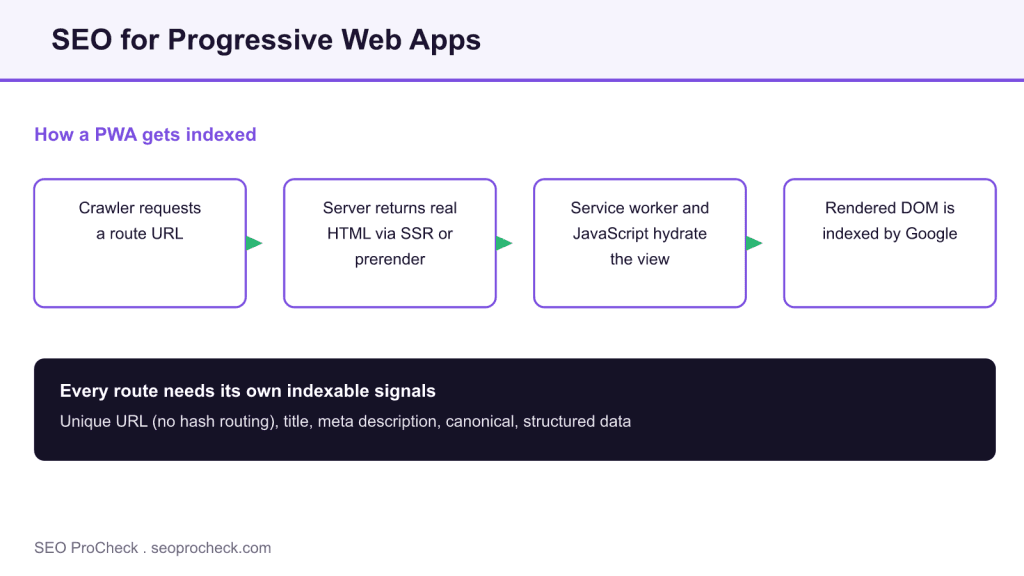
The diagram above shows the ideal flow: the first response already contains real HTML, and hydration enhances it. These are your options, ordered by how reliably a crawler gets content.
| Strategy | What the crawler receives first | SEO reliability |
|---|---|---|
| Server-side rendering (SSR) | Fully rendered HTML per request, then hydration | High |
| Static generation or prerendering | Pre-built HTML for each route | High |
| Hybrid (SSR plus client hydration) | Rendered HTML, enhanced in the browser | High |
| Client-side rendering only | Empty app shell, content built by JavaScript | Low, depends on render pass |
Google once recommended dynamic rendering (serving prerendered HTML to bots and the app to users) as a workaround. It has since called that a workaround rather than a long-term solution, so build toward SSR or static generation instead of maintaining a separate bot path.
Give every view a real URL
A single-page app that changes the view without changing the URL is invisible to search. Each meaningful view must have its own crawlable URL, updated with the History API (pushState), not with a fragment identifier after a #. Fragment-based routes are not treated as separate pages. Confirm that typing a deep route URL directly into the browser loads that view server-side, which is also what a crawler does.
Set metadata per route, on navigation
Because the shell loads once and the app swaps views, it is easy to leave the same title and description on every route. Each route must update its own <title>, meta description, canonical, Open Graph tags, and structured data as the user navigates. In an SSR framework this happens on the server per request; in a client-rendered app you must update the document head on each route change, and verify the rendered result, not just the code.
Do not let the service worker or robots.txt hide resources
Two PWA-specific traps. First, never block your JavaScript, CSS, or API endpoints in robots.txt; if Google cannot fetch them, it cannot render the page and may index a broken version. Second, a service worker’s cache is designed for return visits, but Googlebot generally arrives without that cache, so make sure the uncached first load returns complete content. Test the page as a first-time visitor, not as one with a warm cache.
The manifest, installability, and Core Web Vitals
The web app manifest and service worker make the app installable, but installability itself is not a ranking factor. What does matter is that a well-built PWA can be extremely fast, and speed feeds the page-experience signal through Core Web Vitals. Measure Largest Contentful Paint, Interaction to Next Paint, and Cumulative Layout Shift on real routes, as covered in the Core Web Vitals and performance guide. A fast app shell with slow content hydration can still fail LCP, so measure the content, not just the shell.
How to verify a PWA is indexable
Use Search Console URL Inspection on a deep route, then open the rendered HTML and confirm the content and the per-route title, description, and canonical are present. Run Lighthouse for both the SEO and PWA audits. Marking up each route with the right structured data is one of the higher-leverage steps, and the same care that avoids the common technical SEO mistakes applies here: no accidental noindex, clean status codes, and one canonical per route.
FAQ
Yes, Google can render and index JavaScript, but it does so in a deferred second pass that is not guaranteed to be complete or fast. Other search and AI crawlers render far less reliably. Server-side rendering or prerendering removes that dependency by serving real HTML on the first response.
You do not strictly need it for Google, but it is the most reliable option and the only safe one if you care about non-Google crawlers and AI answer engines. If full SSR is not feasible, prerendering or static generation of your key routes achieves the same indexing benefit.
Neither directly. A service worker improves performance and offline behavior for returning users, which is good for experience. It does not help indexing, and it can hide problems if you only test with a warm cache. Always verify the uncached first load, because that is what a crawler sees.
Usually because the deep views do not have real URLs, or the metadata is not updated per route. If routing uses fragments after a #, or every view keeps the shell’s title and canonical, crawlers cannot distinguish or index the views. Give each view a History-API URL and its own head tags.
No. The web app manifest and installability do not affect rankings on their own. The SEO benefit of a PWA is indirect: a well-built one is fast, and speed contributes to the Core Web Vitals part of the page-experience signal.
Run the route through URL Inspection in Search Console and view the rendered HTML. If the main content and the route’s title, description, and canonical appear there, Google is rendering it correctly. If the rendered HTML is an empty shell, you have a client-side rendering problem to solve.
Not sure your app’s routes are being indexed?
Client-side rendering can hide half your site from search. An audit tests what crawlers actually render on every route.
Take this with you
The assistant links open with a question about this page already written.
Claude Vincent is a technical SEO consultant focused on crawlability, rendering, and AI-search visibility. He writes the field guides and case studies at SEO ProCheck, with a bias toward the durable, unglamorous work that decides whether search engines and AI answer engines can actually read and cite a site.
About SEO ProCheck
Technical SEO consulting and GEO strategy with 20 years of enterprise experience. Case studies, resources, and tools for search and AI visibility.
Work With Me
Technical SEO audits, GEO strategy, site migrations, and international SEO. Hourly consulting for teams who need hands-on support, not just reports.
Subscribe to our newsletter!








Recent Posts
- Google Algorithm Updates: The Dated List Since 2003, and What to Do After Each October 31, 2026
- AI Readiness: The Checklist, the Research and the Free Tools October 28, 2026
- AI Readiness Checklist (2026): 51 Checks, Each With Its Source October 28, 2026