


AI Summary
A service worker is a background script that caches assets and intercepts network requests, making repeat visits fast and enabling offline use, but it does not run for Googlebot. Because search crawlers register no service worker, your indexable content must live in the server HTML, never in something the service worker injects.
- Googlebot does not register or run your service worker, so caching logic never affects what gets crawled or indexed.
- Service workers help SEO indirectly by improving repeat visit speed and reliability for real users, which supports engagement.
- The app shell pattern is risky if the shell is empty and content is injected client side, the same problem as client only rendering.
- Register the service worker after content loads, use navigation preload, and never cache stale HTML that hides fresh content.
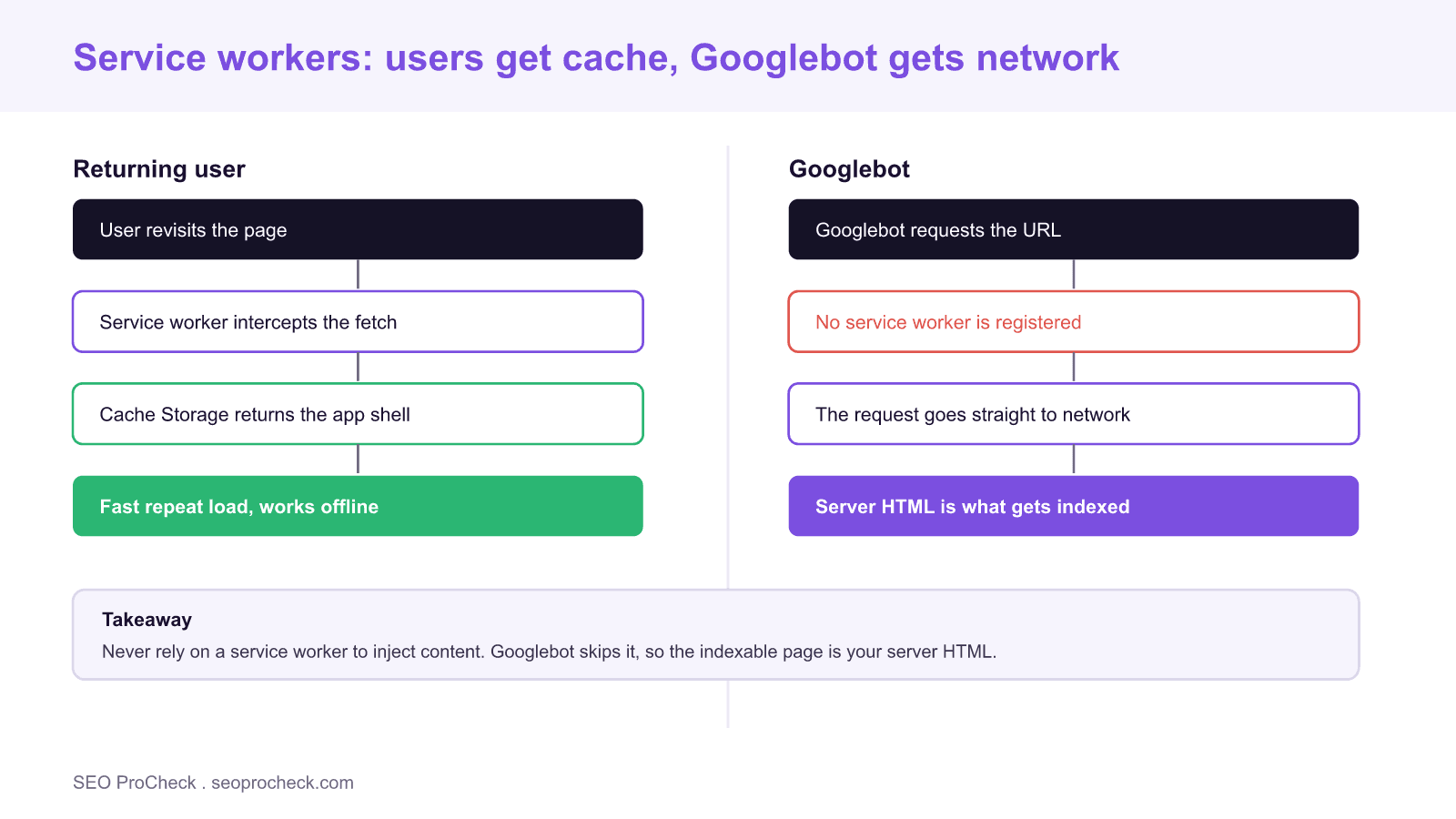
A service worker is a JavaScript file that the browser runs in the background, separate from your page, so it can intercept network requests, cache responses, and serve content even when the user is offline. It powers Progressive Web Apps, push notifications and instant repeat loads. The question for SEO is narrower than most guides suggest: service workers do not run for search crawlers, so they cannot directly help or hurt indexing. Their real SEO value, and their real risk, is in how they shape the experience for users and how you architect the content they cache. This guide covers both, with the checks that keep a service worker from quietly breaking your rankings.
Does a service worker affect crawling and indexing?
No, not directly. Googlebot fetches your URLs statelessly. It does not register service workers, it does not carry a persistent Cache Storage between requests, and it does not replay your caching logic. Every crawl is effectively a first visit that goes to the network and reads the server response. That means the elaborate offline caching you built for users is invisible to the crawler, which is exactly why you cannot depend on it to deliver anything that must be indexed.
This is the single most important fact about service workers and SEO. If a page only assembles its real content after the service worker responds from cache, or after client side JavaScript stitches cached fragments together, the crawler sees none of that. The indexable page is whatever your server returns on a clean request.
The app shell trap
Progressive Web Apps often use the app shell model: the service worker caches a minimal HTML, CSS and JavaScript shell, then fills it with content fetched from an API. For users on repeat visits this feels instant. For search engines it can be a trap identical to client only rendering. If the cached shell is an empty frame and the content arrives through client side fetches, the crawler can index an empty page. The fix is the same as for rendering path problems: make sure the meaningful content exists in the server HTML, and treat the service worker as an enhancement layer on top. The trade offs here mirror those in our guide to server versus client rendering for AI crawlers.
How service workers help SEO indirectly
Although they do not touch indexing, service workers can improve the signals that do matter. A well built caching strategy makes repeat page loads near instant, which reduces bounce and supports the engagement patterns search engines reward. Precaching critical assets can steady your Core Web Vitals for returning visitors, and background sync can make forms and interactions feel resilient on flaky connections. None of this ranks you by itself, but a faster, more reliable site earns more return visits and longer sessions. If interactivity is your weak point, pair caching work with the fixes in our guide to Interaction to Next Paint.
Common failure modes and how to avoid them
Caching stale HTML. If your service worker caches full HTML pages with a cache first strategy, users and, on updates, your own testing can see outdated content long after you publish. Use stale while revalidate or network first for HTML, and reserve cache first for versioned static assets like images and scripts.
Blocking the first render. Registering the service worker too early, or doing heavy work in the install event, can delay the initial load. Register after the page content is ready, and keep the install step lean.
Intercepting requests you should not. A broad fetch handler can accidentally serve cached or transformed responses for URLs that should hit the network, including pages you later change. Scope your fetch handler carefully and exclude anything dynamic.
Skipping navigation preload. Without navigation preload, the browser waits for the service worker to boot before it can start the navigation request. Enabling navigation preload lets the network request begin in parallel, which recovers speed on the first navigation after the worker starts.
A service worker SEO checklist
Confirm the server HTML contains your title, meta tags, canonical, H1, body copy and internal links without any service worker involvement. Test the page in an incognito window with no prior cache to see the true first visit. Run the URL Inspection live test in Search Console and confirm the rendered content matches what you expect. Choose a caching strategy per resource type: network first or stale while revalidate for HTML, cache first for fingerprinted static assets. Enable navigation preload. Version your caches and clean up old ones in the activate event so updates propagate. If your platform is WordPress, most of these gains overlap with general performance work covered in our guide to speeding up WordPress.
What has changed recently
Service workers are now broadly supported and stable, and the tooling has matured, with libraries like Workbox making sane caching strategies the default rather than a research project. At the same time, the rise of AI crawlers reinforces the core lesson: those bots, like Googlebot, do not run your service worker, and many do not run JavaScript at all. If your content strategy depends on caching or client side assembly to show the real page, it will be invisible to a growing set of crawlers. Build for the network first request, and let the service worker make the repeat visit delightful.
| Resource type | Recommended strategy | Why |
|---|---|---|
| HTML pages | Network first or stale while revalidate | Keeps content fresh, avoids serving outdated pages |
| Fingerprinted JS and CSS | Cache first | Filenames change on deploy, so cache is always valid |
| Images and fonts | Cache first with expiry | Rarely changes, big repeat visit speed win |
| API and dynamic data | Network first with timeout | Freshness matters, cache only as fallback |
| Offline fallback | Precached page | Graceful message when the network fails |
Frequently asked questions
Do service workers help or hurt SEO?
By themselves they do neither directly, because Googlebot does not run them. They help indirectly by making repeat visits faster and more reliable for users, and they hurt only when you rely on them to deliver content that should be in the server HTML.
Does Googlebot execute service workers?
No. Googlebot crawls statelessly and does not register or run service workers, and it does not keep a persistent cache between requests. Every crawl behaves like a first visit that fetches the server response.
Can a service worker cause indexing problems?
Yes, if you use the app shell pattern with an empty shell and inject the real content client side. The crawler can index the empty frame. Keep meaningful content in the server HTML and use the service worker as an enhancement.
What caching strategy should I use for HTML?
Use network first or stale while revalidate for HTML so users and crawlers get fresh content. Reserve cache first for fingerprinted static assets like scripts, styles, images and fonts whose filenames change on each deploy.
Do service workers improve Core Web Vitals?
They can improve metrics for returning visitors by precaching critical assets and serving them instantly. The first visit still depends on your server and network, so treat caching as a repeat visit optimization rather than a fix for a slow first load.
Should I add a service worker just for SEO?
Not for SEO alone, since it does not affect indexing. Add one when you want offline support, installability, push notifications or faster repeat visits, and make sure your content is already fully available in the server HTML first.
Take this with you
The assistant links open with a question about this page already written. Nothing is sent until you press enter.
Claude Vincent is a technical SEO consultant focused on crawlability, rendering, and AI-search visibility. He writes the field guides and case studies at SEO ProCheck, with a bias toward the durable, unglamorous work that decides whether search engines and AI answer engines can actually read and cite a site.
About SEO ProCheck
Technical SEO consulting and GEO strategy with 20 years of enterprise experience. Case studies, resources, and tools for search and AI visibility.
Work With Me
Technical SEO audits, GEO strategy, site migrations, and international SEO. Hourly consulting for teams who need hands-on support, not just reports.
Subscribe to our newsletter!






Recent Posts
- AI Readiness: The Checklist, the Research and the Free Tools October 28, 2026
- AI Readiness Checklist (2026): 50 Checks, Each With Its Source October 28, 2026
- Most Top Sites Never Say Who They Are in Structured Data October 14, 2026