

How to Implement Hreflang Tags
- January 20, 2025
- International SEO and Hreflang, Technical SEO

AI Summary
Hreflang tags tell Google and Yandex which language and region a page targets so the right version ranks for the right audience. You implement them in one of three places, HTML head link tags, an HTTP Link header, or an XML sitemap, and every URL in a set must point back to every other URL including itself.
- Use a value of language, or language plus region, for example
en,en-gb, ores-mx. - Always add an
x-defaultentry for users whose language is not covered. - Return tags are mandatory: a missing back reference invalidates the whole cluster.
- Validate in Google Search Console and with a crawler before and after launch.
What hreflang actually does
Hreflang is an annotation that maps equivalent pages across languages and regions. It does not change rankings on its own and it is not a redirect. Its job is disambiguation: when you publish the same product page for the United States, the United Kingdom, and France, hreflang tells search engines these three URLs are alternates of one another so the engine can serve a French searcher the French URL and a British searcher the British URL. Google and Yandex support it. Bing ignores hreflang and relies on the content language meta tag instead, so international sites usually run both signals.
Choose one delivery method per URL
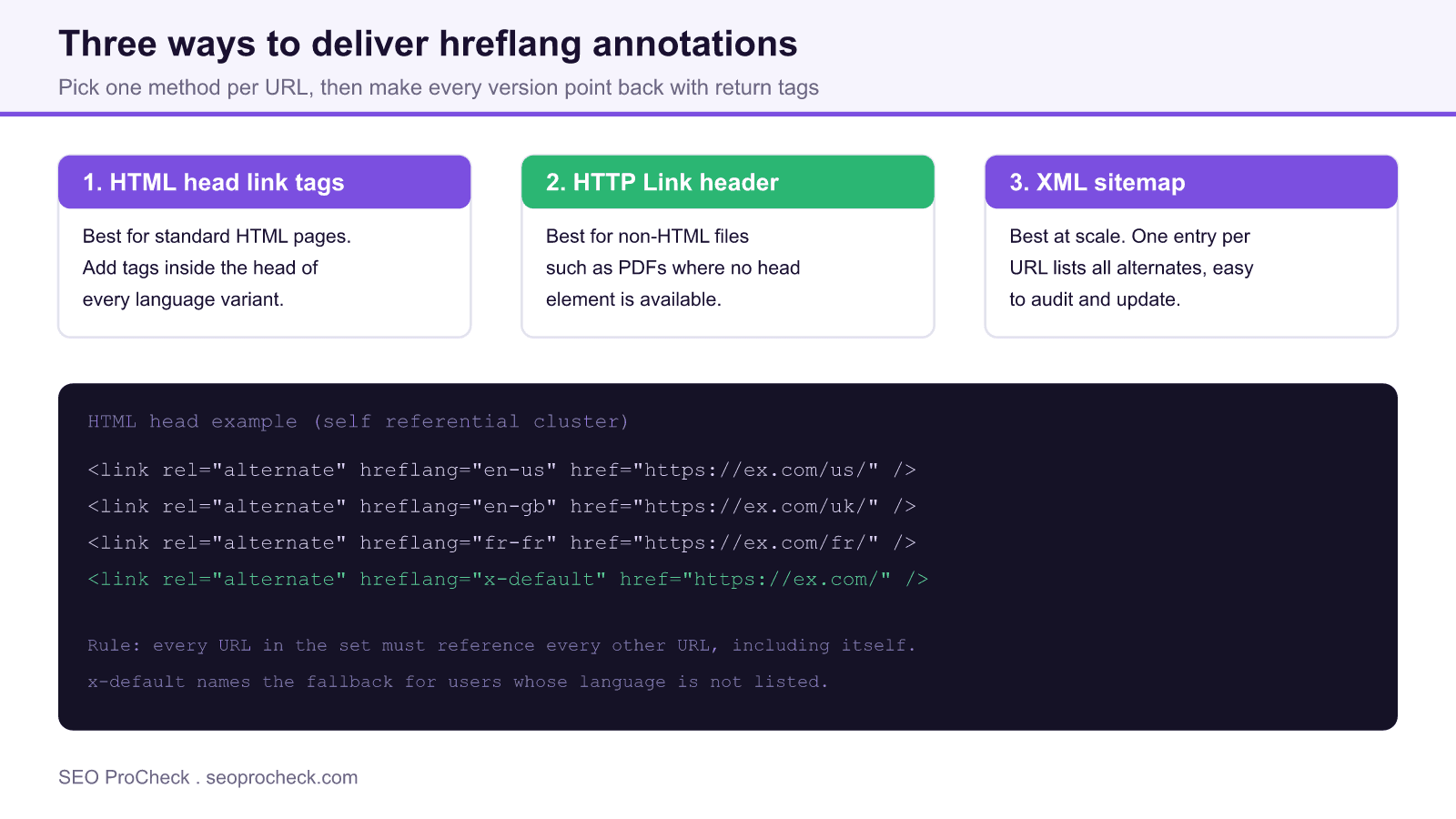
There are exactly three supported places to declare hreflang. Pick the one that matches your stack and stay consistent, because mixing methods on the same URL is a common source of conflicting signals.
1. HTML head link tags
The default for ordinary HTML pages. Place a self referential cluster in the <head> of every variant. This is easy to inspect with view source but it adds weight to every page and is painful to maintain by hand once you pass a few dozen URLs.
2. HTTP Link header
The only option for non-HTML resources such as PDFs, where there is no head element to edit. You emit the same relationships as HTTP response headers at the server or CDN layer.
3. XML sitemap
The most maintainable method at scale. Each URL entry lists every alternate with an xhtml:link element, which keeps the annotations out of the page payload and makes bulk auditing straightforward. If you are building sitemaps from scratch, see our guide on how to create an XML sitemap, then combine the hreflang entries into that file.
Worked example
Say you serve one page in three markets plus a global fallback. The head implementation on every one of the four URLs contains the identical block:
<link rel="alternate" hreflang="en-us" href="https://example.com/us/" />
<link rel="alternate" hreflang="en-gb" href="https://example.com/uk/" />
<link rel="alternate" hreflang="fr-fr" href="https://example.com/fr/" />
<link rel="alternate" hreflang="x-default" href="https://example.com/" />
The same relationships expressed in an XML sitemap look like this for the US entry, and each other entry repeats the full alternate list with its own loc:
<url>
<loc>https://example.com/us/</loc>
<xhtml:link rel="alternate" hreflang="en-us" href="https://example.com/us/" />
<xhtml:link rel="alternate" hreflang="en-gb" href="https://example.com/uk/" />
<xhtml:link rel="alternate" hreflang="fr-fr" href="https://example.com/fr/" />
<xhtml:link rel="alternate" hreflang="x-default" href="https://example.com/" />
</url>
Language and region codes reference
The value before the hyphen is an ISO 639-1 language code. The optional value after the hyphen is an ISO 3166-1 Alpha 2 country code, and it narrows targeting to a region, never a language on its own. A frequent bug is writing a region as if it were a language, for example using en-uk when the valid country code is gb.
| Value | Targets | Notes |
|---|---|---|
en | English speakers, any country | Language only, no region narrowing |
en-gb | English in the United Kingdom | Country code is gb, not uk |
es-mx | Spanish in Mexico | Distinct from es-es |
pt-br | Portuguese in Brazil | Distinct from pt-pt |
x-default | Fallback for unmatched users | Point at a language selector or global home |
The three rules that break most implementations
First, return tags. If page A lists page B as an alternate, page B must list page A. Google discards clusters with a missing return reference. Second, use absolute URLs with the exact protocol and trailing slash you canonicalize to, because hreflang follows the URL you literally write. Third, keep hreflang and canonical consistent: each variant should canonicalize to itself, not to another language, or the annotations and the canonical fight each other. Because indexation directives interact here, it is worth reviewing the meta robots and x-robots-tag reference so a stray noindex does not strip a variant out of the set.
Validate before and after launch
Crawl the site with a tool that reports hreflang, such as Screaming Frog, and filter for missing return tags, non canonical alternates, and invalid codes. After deployment, monitor the coverage of your sitemap in Google Search Console and spot check key alternates with URL Inspection, since Google deprecated the International Targeting report in 2022. If you deliver hreflang through the sitemap, confirm the file is actually being read by following our steps on how to submit a sitemap to Google.
Frequently asked questions
Do hreflang tags improve my rankings?
Not directly. They do not add ranking power. What they do is route each ranking to the correct regional URL, which reduces the wrong version showing in results and cuts the bounce that comes from serving a mismatched language.
Is x-default required?
It is not strictly required but it is strongly recommended. Without it, users whose language is not in your set have no defined fallback, so add an x-default that points to a global home page or a language selector.
Can I mix delivery methods?
Pick one method per URL. You can use head tags for HTML pages and the HTTP header for PDFs across the same site, but declaring the same page in both the head and the sitemap risks conflicting or duplicated signals.
Does Bing use hreflang?
No. Bing ignores hreflang and reads the content language meta tag and other regional signals instead. If Bing traffic matters, set the content language signal in addition to hreflang.
Why is Search Console reporting no return tags?
Search Console no longer shows it, since Google deprecated the International Targeting report in 2022, but crawlers still flag it. That error means an alternate you named does not name your page back. Check for protocol mismatches, missing trailing slashes, or a variant that was noindexed or blocked, any of which can break the reciprocal reference.
How many alternates can one page have?
There is no hard cap, but every alternate you add multiplies the return tags every other page must carry. At scale this is exactly why the XML sitemap method is preferred over head tags.
Take this with you
The assistant links open with a question about this page already written.
Claude Vincent is a technical SEO consultant focused on crawlability, rendering, and AI-search visibility. He writes the field guides and case studies at SEO ProCheck, with a bias toward the durable, unglamorous work that decides whether search engines and AI answer engines can actually read and cite a site.
About SEO ProCheck
Technical SEO consulting and GEO strategy with 20 years of enterprise experience. Case studies, resources, and tools for search and AI visibility.
Work With Me
Technical SEO audits, GEO strategy, site migrations, and international SEO. Hourly consulting for teams who need hands-on support, not just reports.
Subscribe to our newsletter!








Recent Posts
- Google Algorithm Updates: The Dated List Since 2003, and What to Do After Each October 31, 2026
- AI Readiness: The Checklist, the Research and the Free Tools October 28, 2026
- AI Readiness Checklist (2026): 51 Checks, Each With Its Source October 28, 2026