

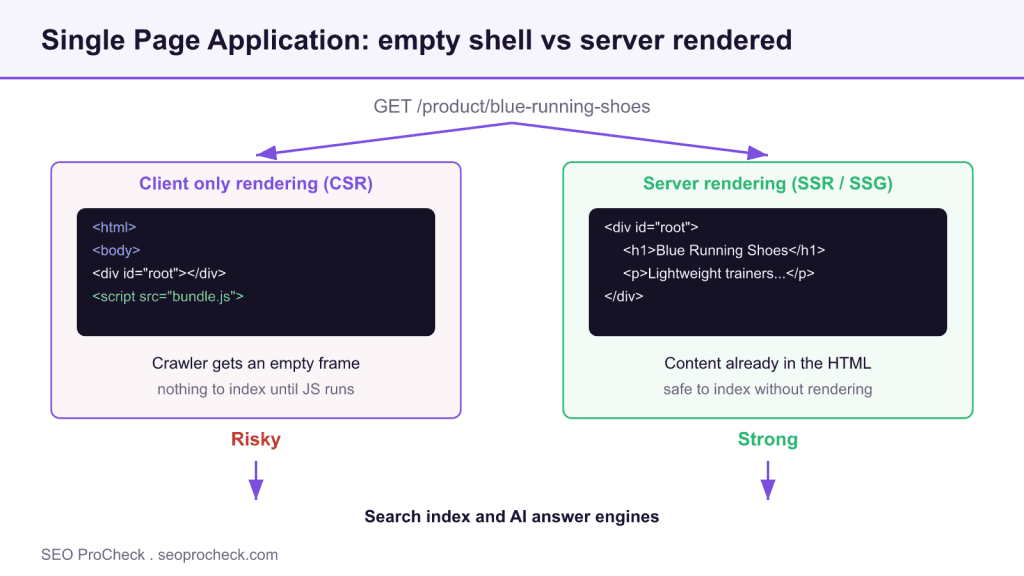
A Single Page Application loads one HTML shell and builds the rest with JavaScript, so the SEO risk is a crawler receiving an empty page before the script runs. Server side rendering or prerendering puts your content in the initial HTML, which removes the indexing gamble.
- SPAs built with React, Vue, or Angular can ship a blank root div that has nothing to index until JavaScript executes.
- Google can render JavaScript, but rendering is deferred and resource limited, and most AI answer engines do not run it at all.
- Server side rendering (SSR) and static generation (SSG) are the durable fixes; prerendering is a reasonable stopgap.
- Use real URLs and real anchor links, not hash fragments or JavaScript click handlers, so views stay crawlable.
Single Page Application (SPA): definition and why it matters
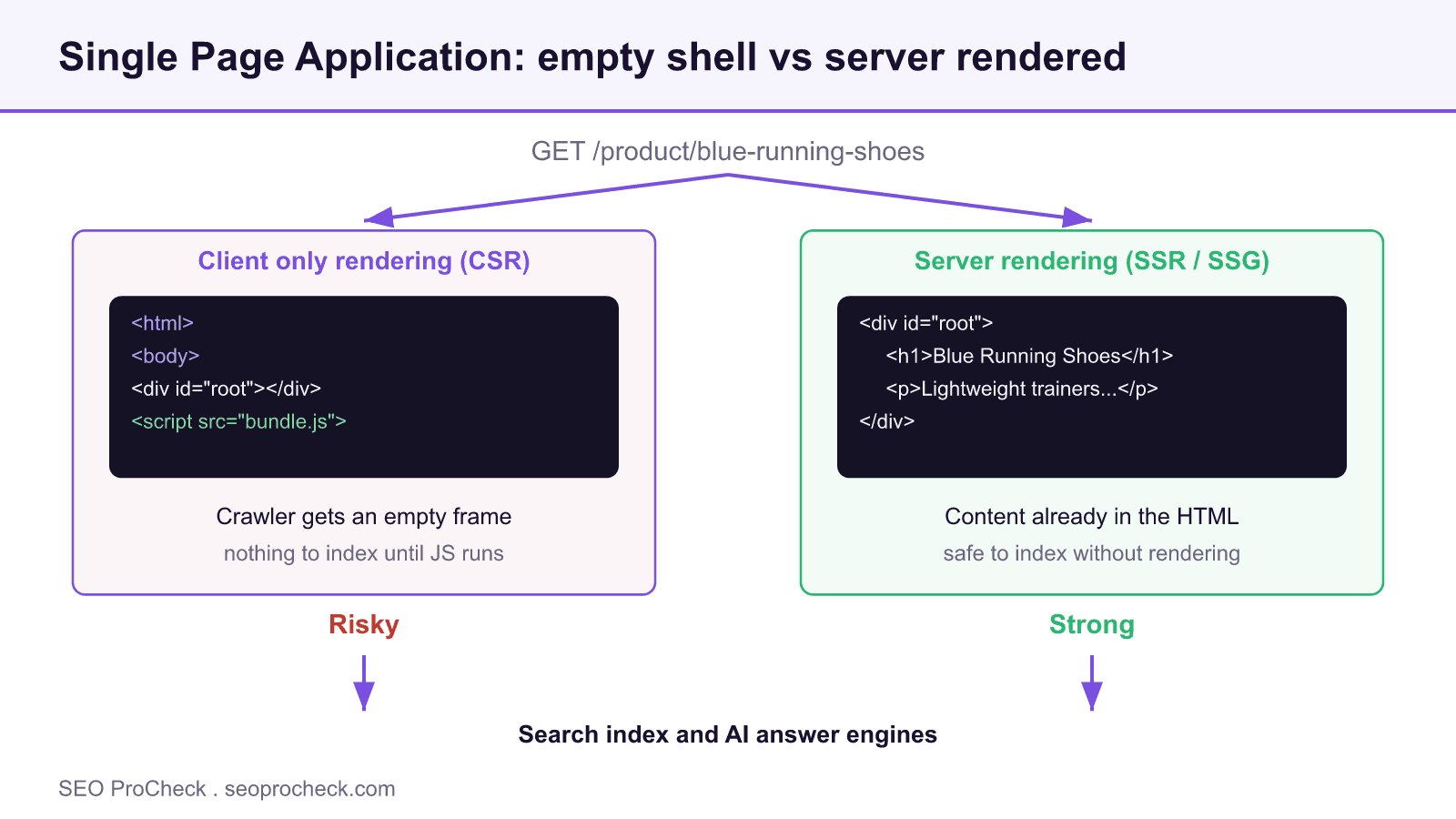
A Single Page Application loads one HTML document and then uses client-side JavaScript to swap views, fetch data, and change URLs without full page reloads. React, Vue, and Angular apps are the usual suspects. The SEO stakes are blunt: the classic SPA failure is an empty initial HTML document, so if a crawler fetches your URL and gets a bare <div id="root"></div>, there's nothing to index until JavaScript runs, and that's a gamble you don't want to take.
Google can render JavaScript, but rendering is deferred, resource-limited, and easy to break. Other crawlers and most AI answer engines are far less forgiving. The fix is well established: render your content on the server (SSR) or prerender it, so the HTML that arrives already contains the content.
The core problem: empty HTML vs. server-rendered HTML
Here's what a crawler receives from a client-only SPA versus a server-rendered version of the same page. The difference is the entire ballgame.
<!-- Client-only SPA: what the crawler gets on first fetch -->
<!DOCTYPE html>
<html>
  <head><title>Loading...</title></head>
  <body>
    <div id="root"></div>          <!-- no content until JS runs -->
    <script src="/bundle.js"></script>
  </body>
</html>

<!-- Server-rendered (SSR): content is already in the HTML -->
<!DOCTYPE html>
<html>
  <head><title>Blue Running Shoes | Acme</title></head>
  <body>
    <div id="root">
      <h1>Blue Running Shoes</h1>
      <p>Lightweight trainers with a 4mm drop...</p>
    </div>
    <script src="/bundle.js"></script>   <!-- hydrates the same markup -->
  </body>
</html>
Both apps feel identical to a user. Only the second one is safe to index without depending on a crawler to execute your bundle. If you can't do full SSR, prerendering, which serves a static HTML snapshot to bots, gets you the same result for content that doesn't change per user.
SPA rendering strategies compared
| Strategy | Where content is built | Initial HTML has content? | SEO safety | Best for |
|---|---|---|---|---|
| CSR (client-side only) | In the browser, after JS runs | No | Risky | Logged-in dashboards, not public pages |
| SSR (server-side rendering) | On the server, per request | Yes | Strong | Dynamic, frequently changing content |
| SSG (static generation) | At build time | Yes | Strong | Content that changes rarely |
| Prerendering | Cached snapshot served to bots | Yes (for bots) | OK as a stopgap | Legacy SPAs you can't rebuild yet |
| Dynamic rendering | Bots get prerendered, users get JS | Yes (for bots) | Workaround / last resort | Short-term bridge only |
Google's stated preference is SSR or SSG. Dynamic rendering is explicitly a workaround, not a long-term strategy, more on that in its own entry.
How to check if your SPA is crawlable
- Look at the raw HTML.
curl -s https://yoursite.com/page | lessor View Source. If your main content isn't there, you're relying on rendering. - Disable JavaScript and reload. In DevTools, disable JS, reload the page. Whatever remains is roughly what a non-rendering crawler sees.
- Run URL Inspection in Search Console. Inspect a live URL, then view the rendered HTML and screenshot. Confirm your content and internal links are present, not a spinner.
- Verify real URLs, not fragments. Each view needs its own path (
/products/shoes), not/#/products/shoes. Confirm the server returns a proper 200 with content for each. - Check internal links are real anchors. Crawlers follow
<a href>. Click handlers on<div>s that navigate via JS aren't crawlable links.
Common mistakes and how to fix them
- Shipping an empty
#rootand hoping Google renders it. Sometimes it does, often late or incompletely, and other crawlers don't. Fix: SSR or prerender the content. - Hash-based routing (
/#/about). Fragments aren't distinct URLs to crawlers. Fix: use the History API with clean paths. - Navigation via JS click handlers instead of anchors. No crawlable link graph. Fix: use real
<a href>elements; attach routing on top. - Titles and meta set only after JS runs. Non-rendering crawlers see the default shell title. Fix: emit correct
<title>and meta in the server response. - Blocking your JS bundle in robots.txt. Then even Google can't render it. Fix: allow the resources needed to render.
FAQ
Can Google index a Single Page Application?
Yes, Google can render JavaScript and index SPAs, but rendering is deferred and resource-constrained, and it can silently fail on heavy or slow apps. Relying on it is a risk. Server-side rendering or prerendering removes the gamble. See our SPA SEO patterns for React, Vue, and Angular.
Do I need SSR, or is client-side rendering enough?
For public, indexable pages, use SSR or static generation. Client-side-only rendering is fine for logged-in areas that don't need to rank. The server-side vs client-side rendering guide lays out the tradeoffs.
Is prerendering the same as SSR?
No. SSR renders per request on the server. Prerendering serves a cached static snapshot, often only to bots. Prerendering is a reasonable stopgap for a legacy SPA, but SSR or SSG is the durable answer.
Why do AI crawlers struggle with SPAs more than Google?
Most AI answer-engine crawlers fetch raw HTML and don't execute JavaScript at all. If your content isn't in the initial HTML, they see nothing. That's why SSR matters even more for AI search, covered in JavaScript and AI search.
What's the fastest fix for an existing client-only SPA?
Prerendering is usually the quickest bridge: serve static HTML snapshots so bots get content while you plan a proper SSR migration. Treat it as temporary, not the destination.
Do URL fragments (the part after #) get indexed separately?
No. Anything after a # is a fragment, and crawlers treat /page#a and /page#b as the same URL. That's why hash-based SPA routing hides your views from search entirely: every route collapses to one indexable URL. Use the History API so each view has a real, distinct path the server responds to with content.
Take this with you
The assistant links open with a question about this page already written. Nothing is sent until you press enter.
Claude Vincent is a technical SEO consultant focused on crawlability, rendering, and AI-search visibility. He writes the field guides and case studies at SEO ProCheck, with a bias toward the durable, unglamorous work that decides whether search engines and AI answer engines can actually read and cite a site.
- Angular, JavaScript SEO, React, SSR, Vue
About SEO ProCheck
Technical SEO consulting and GEO strategy with 20 years of enterprise experience. Case studies, resources, and tools for search and AI visibility.
Work With Me
Technical SEO audits, GEO strategy, site migrations, and international SEO. Hourly consulting for teams who need hands-on support, not just reports.
Subscribe to our newsletter!








Recent Posts
- Most Top Sites Never Say Who They Are in Structured Data October 14, 2026
- Homepage Titles Are Mostly Too Short, Not Too Long October 8, 2026
- Who Actually Serves an llms.txt? 184 Top Sites Measured September 29, 2026