

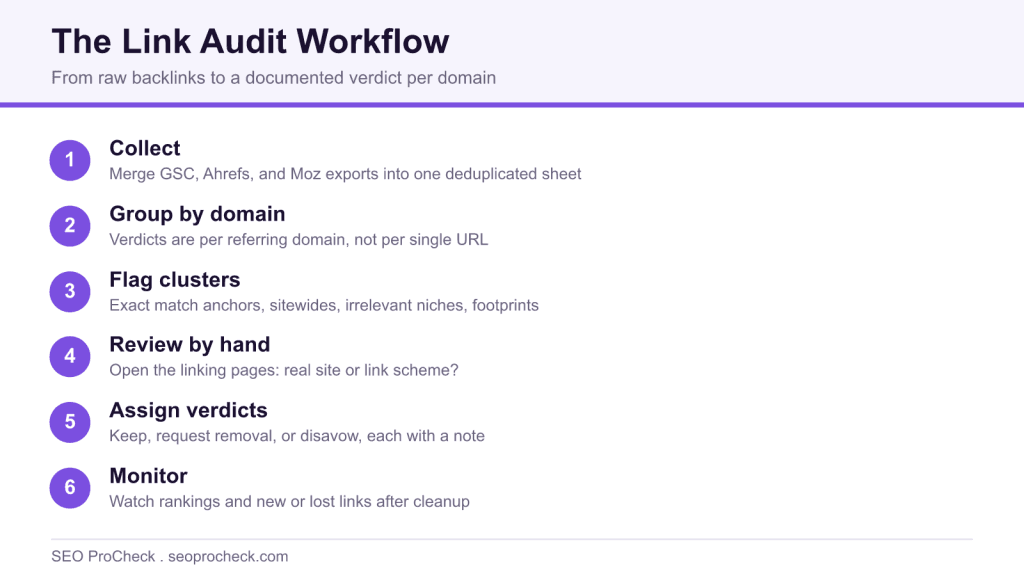
AI Summary
A link audit is a systematic review of every backlink pointing at your site that ends in a verdict per suspicious domain: keep, request removal, or disavow. Run a full audit only when a real trigger fires, such as a manual action or an inherited site, and judge domains by eye rather than by any tool toxicity score.
- Group and decide per referring domain, not per single link.
- Merge at least two backlink sources plus Search Console for completeness.
- Most sites with no manual action do not need the disavow tool at all.
- An audit removes risk; only new earned links rebuild the profile.
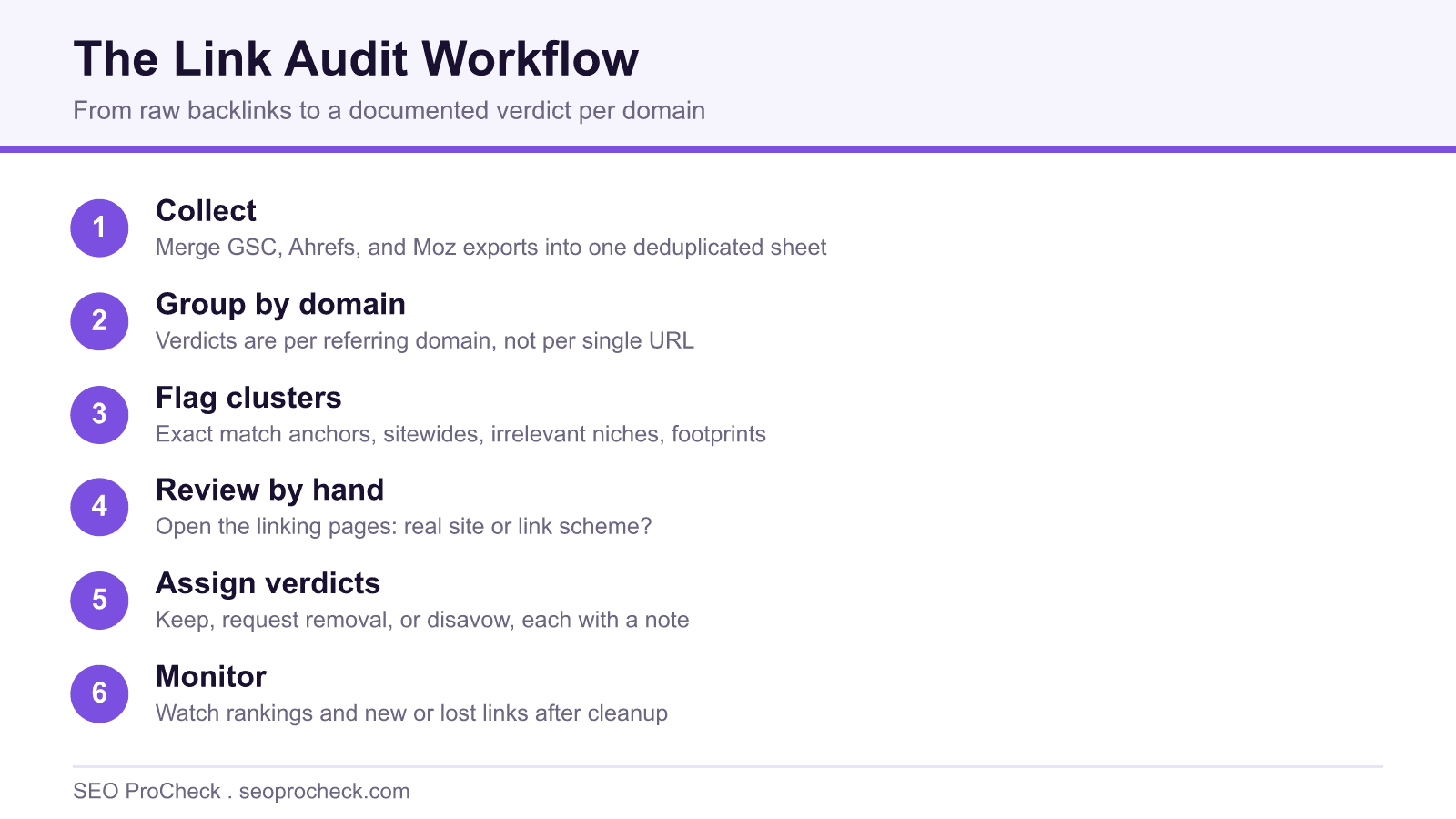
A link audit is a systematic review of every backlink pointing at your site, ending in a verdict for each suspicious cluster: keep, attempt removal, or disavow. It's the difference between vaguely worrying about "bad links" and knowing exactly what's pointing at you, why it's there, and whether it needs action.
When you actually need one
A full audit is real work, so be honest about the trigger. The situations that genuinely justify one:
- A manual action for unnatural links in Search Console. Non-negotiable, the reconsideration request requires documented cleanup.
- You inherited the site. New client, acquired domain, or a predecessor agency whose "link building" nobody can explain. You need to know what you're standing on.
- A suspected negative SEO blast, a sudden wall of junk links you didn't build.
- A past you're not proud of. The site bought links, ran PBNs, or did mass guest posting, and you want the skeletons catalogued before Google catalogues them.
- An unexplained ranking decline after other causes (content, technical, competitors, algorithm updates) have been ruled out. Note the order: links are the last suspect, not the first.
What does not justify an audit: a tool emailing you that your "toxicity score" went up. More on that below.
The audit, step by step
| Step | Data source | Decision you're making |
|---|---|---|
| 1. Collect every known backlink | GSC Links export + Ahrefs + Moz, deduplicated in a sheet | None yet, completeness is the goal; each index misses links the others catch |
| 2. Group by referring domain | Your merged sheet, pivoted | Verdicts are per domain, not per URL, 500 links from one spam site is one decision |
| 3. Flag suspicious clusters | Anchor report, domain metrics, link placement patterns | Which domains need human review: exact-match anchors, sitewides, irrelevant niches, footprint patterns |
| 4. Manually review flagged domains | Your own eyes on the actual linking pages | Real site or link scheme? Would this link exist if rankings didn't? |
| 5. Assign verdicts | Review notes | Keep / request removal / disavow, with a note explaining each, because you'll forget by next year |
| 6. Execute and document | Outreach for removals; disavow file in GSC if warranted | Whether disavow is justified at all, for most sites without a manual action, it isn't |
| 7. Monitor aftermath | Rankings, GSC, new/lost link reports | Did cleanup change anything? Feed the answer back into how aggressive you are next time |
A concrete example
Typical inherited-site audit: an ecommerce client whose previous agency had "built 800 links." Merging GSC and Ahrefs exports and pivoting by domain turned 6,000 backlink rows into about 480 referring domains. Flagging pulled out ~120 for review: 60 were guest-post farms with the same three exact-match anchors, 30 were scraper sites echoing real pages (harmless, ignored), 20 were real niche blogs (keepers), and 10 were an expired-domain network all registered the same month. Verdict: disavow the farms and the network, roughly 70 domains, touch nothing else, and redirect the effort into earning links that dilute the mess. That last part matters: an audit removes risk, but only new links rebuild a link profile.
How to run it: tools and sequence
- Google Search Console → Links → Export external links. Google's own sample of what it knows about. Always include it; it's the only source that reflects Google's index at all.
- Ahrefs Webmaster Tools (free) → Site Explorer → Backlinks export, plus the Referring domains and Anchors reports for the flagging pass.
- Moz Link Explorer (free tier) as the third index and for its Spam Score, as a sorting aid to prioritize manual review, never as a verdict.
- Merge and pivot in a spreadsheet by referring domain, with columns for anchor, target page, first seen, and your verdict.
- Review flagged domains by hand. Open the pages. Two minutes per domain answers what no score can: is this a real site with a real audience?
- File the disavow only if warranted, manual action, or a large-scale pattern you can't get removed. The format and the judgment calls are covered in our guide to toxic backlinks and the disavow tool.
Common mistakes (and fixes)
- Outsourcing judgment to a toxicity score. Tool scores flag patterns, and they misfire constantly, directories, forums, and small foreign-language sites get branded "toxic" while polished PBNs sail through. Fix: scores prioritize the review queue; a human makes the call.
- Disavowing as a wellness ritual. Google has said for years that most sites don't need the disavow tool and that random spam links are simply ignored. Careless disavows throw away links that were helping. Fix: no manual action and no clear attack? Default to doing nothing.
- Auditing single links instead of domains. You'll drown in rows and miss the network-level patterns that actually matter. Fix: pivot by referring domain first, always.
- Using one backlink index. Every crawler has blind spots; auditing from Ahrefs alone means verdicts on a partial dataset. Fix: minimum two sources plus GSC, merged.
- Treating the audit as an endpoint. The audit tells you where you are; it earns you nothing. Fix: pair every cleanup with a plan for new earned links, and watch for the ongoing junk that link-building outreach spam keeps trying to add to your profile.
FAQ
How long does a link audit take?
For a site with a few hundred referring domains, a focused day: an hour of collection and merging, a couple of hours of flagging, and the bulk of the time in manual domain review. Sites with tens of thousands of referring domains are multi-week projects and need sampling strategies.
How often should I audit my links?
A full audit only when a trigger fires. Between triggers, a quarterly fifteen-minute profile review, new/lost referring domains and the anchor report, catches most problems while they're still small.
Will a link audit and disavow recover my rankings?
If the drop was caused by a manual action, cleanup plus reconsideration is the documented path back. If the drop was algorithmic, honestly, recovery is slower and less certain, removing bad signals helps, but you're mostly waiting on Google reprocessing and on new, better links accumulating.
Can I skip removal outreach and just disavow?
For algorithmic concerns, yes, disavow alone is fine and removal emails to spam-site owners are mostly theater. For a manual action, show removal effort anyway: reviewers want evidence you tried before disavowing the remainder.
Do I need to audit links if I never built any?
Almost never. Sites that never manipulated links accumulate ordinary web noise, scrapers, directories, weird aggregators, and Google is demonstrably good at ignoring it. Check your profile quarterly and save the audit for real anomalies.
Take this with you
The assistant links open with a question about this page already written. Nothing is sent until you press enter.
Claude Vincent is a technical SEO consultant focused on crawlability, rendering, and AI-search visibility. He writes the field guides and case studies at SEO ProCheck, with a bias toward the durable, unglamorous work that decides whether search engines and AI answer engines can actually read and cite a site.
About SEO ProCheck
Technical SEO consulting and GEO strategy with 20 years of enterprise experience. Case studies, resources, and tools for search and AI visibility.
Work With Me
Technical SEO audits, GEO strategy, site migrations, and international SEO. Hourly consulting for teams who need hands-on support, not just reports.
Subscribe to our newsletter!








Recent Posts
- Most Top Sites Never Say Who They Are in Structured Data October 14, 2026
- Homepage Titles Are Mostly Too Short, Not Too Long October 8, 2026
- Who Actually Serves an llms.txt? 184 Top Sites Measured September 29, 2026