

AI Summary
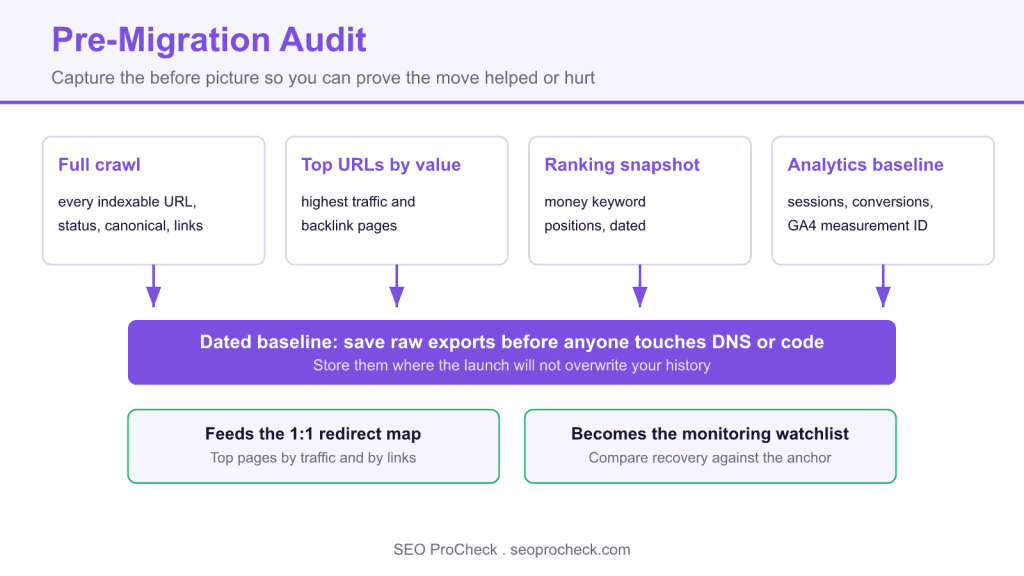
A pre-migration audit is the dated benchmark you capture of your live site before you move it: a full crawl, top URLs by traffic and links, a ranking snapshot, and a clean analytics baseline. Skip it and you have no before picture, so when rankings drop weeks later you cannot tell if the migration caused it or know which pages to rescue first.
- Capture four data pulls, exported and dated, before anyone touches DNS or pushes code to production.
- The single most important output is the merged list of top URLs by traffic and by links, which drives the redirect map and the monitoring watchlist.
- Always pull backlink data: a zero traffic page with 90 referring domains still needs its redirect.
- Record the GA4 measurement ID and tag setup so you can confirm tracking survives the move.

What a pre-migration audit is
A pre-migration audit is the benchmark you take of your live site before you move it, a full crawl, your top URLs ranked by traffic and links, current keyword positions, and a clean analytics baseline, so that after launch you can prove whether the migration helped, held steady, or quietly torched your organic traffic. Skip it and you have no "before" picture: when rankings drop three weeks later you won't know if the migration caused it, and you won't know which pages to rescue first.
This is step one of the migration sequence. Everything downstream, your staging environment checks, your redirect mapping, and your post-migration monitoring, is measured against the baseline you capture here. If the baseline is sloppy, the whole project flies blind.
What actually goes in the baseline
Four data pulls, exported and dated, stored somewhere that won't get overwritten when the new site goes live. Get these before anyone touches DNS or pushes code to production.
- Full crawl of the live site, every indexable URL, status code, title, canonical, meta robots, word count, and internal link count. Screaming Frog, Sitebulb, or a hosted crawler. Save the raw export, not just a screenshot.
- Top URLs by value, pull your highest-traffic and highest-backlink pages from Search Console and your backlink tool. These are the URLs that must have a 1:1 redirect and must be watched hardest afterward.
- Ranking snapshot, positions for your money keywords, ideally the day before launch. A rank tracker gives you a dated file; GSC gives you the honest, un-sampled version for your own domain.
- Analytics baseline, 3 to 6 months of sessions, conversions, and revenue by landing page. Note your GA4 measurement ID and tag setup so you can confirm tracking survives the move.
Example: a real "top pages" baseline export
This is the kind of row-level file you keep. It becomes the input to your redirect map and your monitoring watchlist.
url,clicks_28d,impressions_28d,avg_position,ref_domains,status
/guides/technical-seo/,1840,52100,4.2,63,200
/blog/log-file-analysis/,1215,38400,6.8,41,200
/tools/redirect-checker/,980,21770,3.1,58,200
/services/,742,15900,8.4,29,200
/blog/old-crawl-budget-post/,610,44300,11.2,88,200
That last row matters: an aging post with 88 referring domains and big impressions. Lose its redirect and you bleed link equity you spent years earning.
Pre-migration audit checklist
| Item | Tool / source | What you're capturing | Why it bites you later if you skip it |
|---|---|---|---|
| Full URL inventory | Screaming Frog / Sitebulb | Every indexable URL + status + canonical | No source list to build the redirect map from |
| Top pages by traffic | GSC / GA4 | Clicks, impressions, position per URL (last 3 to 6 mo) | Can't tell a migration dip from normal noise |
| Top pages by links | Ahrefs / Majestic / Moz | Referring domains per URL | Redirect the wrong URLs, lose earned equity |
| Keyword rankings | Rank tracker + GSC | Dated position snapshot for money terms | No "before" to compare recovery against |
| Indexed count | GSC Pages report + site: | How many URLs Google actually holds | Can't spot mass de-indexing after launch |
| Analytics config | GA4 / Tag Manager | Measurement ID, events, conversions | Tracking silently breaks, data goes dark |
| XML sitemaps & robots.txt | Live site | Current directives, sitemap URLs | Push stale rules to the new site |
| Structured data | Rich Results Test / crawl | Schema types per template | Lose rich results after template swap |
How to check it on your own site
- Crawl the live site end to end. Run Screaming Frog against the production domain in list-or-spider mode, let it finish, and export "Internal > All" plus "Response Codes." Date the filename,
audit_prod_2026-07-07.csv. - Pull GSC performance. Search Console > Performance > Pages, last 3 to 6 months, export. Sort by clicks. Flag your top 50 to 100 URLs.
- Pull backlink data. In your link tool, export "Best by links" for the domain. Cross-reference with the GSC export, any URL high on either list is a "must-redirect, must-monitor" page.
- Snapshot rankings. Run your rank tracker the day before launch, or export a GSC position table. Save it. This is your comparison anchor.
- Record the indexed count. Note the GSC "Indexed" number and a rough
site:yourdomain.comfigure. A big drop after launch is your earliest deindexing alarm. - Document config. Save robots.txt, sitemap URLs, GA4 measurement ID, and a list of schema types. You'll verify each one survived when you move to post-migration monitoring.
Common mistakes & how to fix them
- Auditing only the homepage and a handful of "important" pages. The long tail is where most migration losses hide. Fix: crawl the whole site and export the full list, every URL is a redirect candidate.
- Taking the baseline after work has already started. Once a dev team edits templates or trims pages, your "before" is contaminated. Fix: freeze the audit before any production or staging changes touch content.
- Ignoring backlink data. Traffic tells you what converts today; links tell you what holds ranking power. A zero-traffic page with 90 referring domains still needs its redirect. Fix: always pull both and merge them.
- Not saving raw exports. Dashboards refresh and overwrite history. Fix: keep dated CSVs in a folder nobody will clean up mid-project.
- Forgetting the analytics config. Teams obsess over redirects and then launch with a broken GA4 tag, so they can't even see the damage. Fix: record the measurement ID and event setup, and verify tracking fires on the new site day one.
Frequently asked questions
Capture the full crawl and traffic/link data a few weeks out so you have time to build the redirect map, but take the ranking snapshot as close to launch as possible, ideally the day before, so it reflects reality, not last month.
The merged list of top URLs by traffic and by links. That list drives your redirect map and becomes your monitoring watchlist. If you only had time for one thing, do that.
No. Search Console (free) covers traffic, indexing, and rankings for your own domain, and the free tier of Screaming Frog crawls up to 500 URLs. Paid tools help on large sites and for competitor backlink depth, but the core baseline is doable for free.
No. Any change to URLs, templates, CMS, hosting, or protocol counts as a migration. A redesign that keeps the same domain but changes URL structure needs the same baseline and the same redirect discipline.
It's the foundation. See our site migration SEO planning checklist for the full sequence, and the migration that lost 90% of its traffic for what happens when the baseline and redirect work get skipped.
Take this with you
The assistant links open with a question about this page already written. Nothing is sent until you press enter.
Claude Vincent is a technical SEO consultant focused on crawlability, rendering, and AI-search visibility. He writes the field guides and case studies at SEO ProCheck, with a bias toward the durable, unglamorous work that decides whether search engines and AI answer engines can actually read and cite a site.
About SEO ProCheck
Technical SEO consulting and GEO strategy with 20 years of enterprise experience. Case studies, resources, and tools for search and AI visibility.
Work With Me
Technical SEO audits, GEO strategy, site migrations, and international SEO. Hourly consulting for teams who need hands-on support, not just reports.
Subscribe to our newsletter!








Recent Posts
- Most Top Sites Never Say Who They Are in Structured Data October 14, 2026
- Homepage Titles Are Mostly Too Short, Not Too Long October 8, 2026
- Who Actually Serves an llms.txt? 184 Top Sites Measured September 29, 2026