

AI Summary
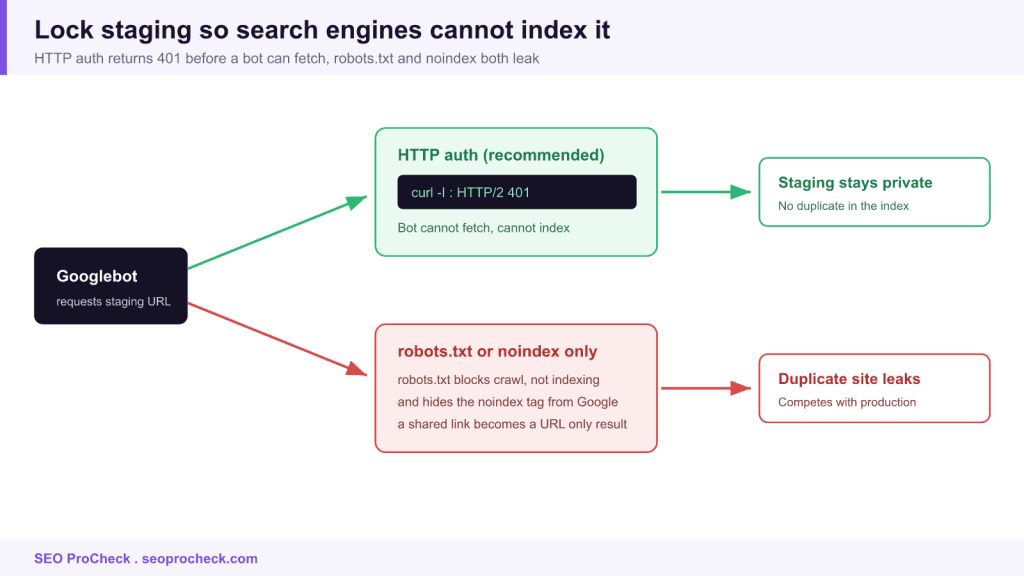
A staging environment is a private copy of your site where you build and test changes before they go live. Lock it behind HTTP authentication or an IP allowlist so search engines cannot fetch it, because robots.txt and noindex both leak and a crawled staging copy becomes a duplicate that competes with your real site.
- HTTP auth returns 401 before a bot can fetch, so nothing gets indexed.
- robots.txt blocks crawling but not indexing, and it hides your noindex tag from Google.
- Confirm protection with curl and expect a 401 or 403, never a 200.
- On launch day, remember to strip the block so production does not go dark.

What a staging environment is
A staging environment is a private copy of your website, same code, same content, same templates, where you build and test changes before they hit the live site. The one rule that keeps it from wrecking your SEO: lock it behind HTTP authentication or an IP allowlist so search engines physically cannot reach it, because a staging copy that gets crawled and indexed becomes a duplicate of your real site competing against you in the SERPs.
Staging sits in the middle of the migration sequence. You build the new site here after your pre-migration audit, you validate your redirect mapping against it, and only when it's clean do you cut over to production.
Why robots.txt and noindex are not enough
The instinct is to drop Disallow: / in robots.txt or slap a noindex tag on staging and call it protected. Both leak.
Robots.txt only asks crawlers not to crawl. It does nothing to stop a staging URL that got shared, linked, or scraped from being indexed as a URL-only result, and because you blocked crawling, Google can't even see the noindex tag you were relying on to save you. Noindex alone is a bet that every bot obeys it and that no page ever renders before the tag loads. The safe answer removes the guesswork: make staging return a 401 until someone supplies credentials. No bot indexes what it can't fetch.
Example: lock staging with HTTP Basic Auth (Nginx)
# /etc/nginx/sites-available/staging
server {
    server_name staging.example.com;

    auth_basic           "Staging - authorized only";
    auth_basic_user_file /etc/nginx/.htpasswd;
    # ...
}

# create the credential file:
#   htpasswd -c /etc/nginx/.htpasswd deploy
Now confirm it actually blocks an anonymous request, this is the check that matters:
$ curl -I https://staging.example.com/
HTTP/2 401
www-authenticate: Basic realm="Staging - authorized only"
A 401 is what you want. A 200 means staging is wide open and Google can walk right in.
Ways to protect staging, ranked
| Method | Blocks indexing? | How solid | Watch out for |
|---|---|---|---|
| HTTP auth (401) | Yes, bot can't fetch at all | Strong (recommended) | Team must share credentials; APIs/webhooks need an exception |
| IP allowlist | Yes, blocks everyone off-list | Strong | Remote/VPN team, dynamic IPs, and external testers need managing |
| VPN-only / private network | Yes | Strong | Highest setup overhead; contractors need access |
| noindex meta tag | Partial, only if crawled & obeyed | Weak on its own | Leaks before render; ignored by some bots; useless if robots.txt blocks the crawl |
| robots.txt Disallow | No, still index-able URL-only | Weak on its own | Hides the noindex tag from Google; not a security control |
| Nothing / "it's obscure" | No | None | One shared link and it's in the index |
How to check it on your own site
- Curl the staging root anonymously. Run
curl -I https://staging.yourdomain.com/from a machine that isn't allowlisted. You want401or403. A200means it's exposed. - Search for leaks in Google. Run
site:staging.yourdomain.comandinurl:staging. Any result is a live leak that needs cleanup, not just a lock. - Check GSC. If you ever verified the staging host, look at its Page indexing report. Indexed staging URLs there confirm the leak.
- Grep the codebase for the live domain. Hardcoded absolute URLs and canonicals pointing at production are how staging content sneaks into the real index. Search for
https://www.yourdomain.comin templates. - If already leaked: keep staging reachable, remove the block temporarily if needed, serve
noindexor return 410 on those URLs, and request removal in GSC, then re-lock behind auth once they're gone. Blocking a leaked URL in robots.txt keeps it stuck in the index.
Common mistakes & how to fix them
- Relying on robots.txt to hide staging. It doesn't hide anything, it just stops the crawl that would have read your noindex. Fix: use HTTP auth so the fetch returns 401 before robots even matters.
- Launch day: forgetting to strip the block. The new production site inherits staging's noindex or auth and goes dark. This is a classic self-inflicted traffic wipeout. Fix: add "remove noindex, remove auth, confirm 200 + indexable" to the go-live checklist and re-crawl production immediately after cutover.
- Canonicals pointing at the wrong host. Staging pages that canonicalize to production (or vice versa) confuse indexing on both. Fix: use relative or environment-aware canonicals.
- Sharing staging links in public tickets or Slack that get scraped. That's how "obscure" URLs get discovered. Fix: auth makes a leaked link harmless, the bot still hits a 401.
- Testing redirects on staging but never on production. Rewrite rules behave differently across environments. Fix: re-verify your redirect map on the live domain after launch, not just on staging.
Frequently asked questions
Is robots.txt ever okay for staging?
As a belt-and-suspenders extra on top of HTTP auth, sure. As the only protection, no, it doesn't prevent indexing and it blinds Google to your noindex tag. Lead with authentication.
My staging URLs are already in Google. Now what?
Don't block them in robots.txt, that traps them. Keep them crawlable, serve a noindex header or return 410, let Google recrawl and drop them, then lock the environment behind auth so it can't happen again.
Does HTTP auth break my build tools or previews?
It can. Webhooks, headless CMS previews, and CI screenshot tools may need credentials or an IP exception. Allowlist those specific services rather than opening the whole environment.
Should staging share a domain with production?
Use a separate subdomain (staging.) or separate domain, never a crawlable subfolder of the live site. A subfolder is far easier to leak into the production index.
Where does staging fit in a migration?
You build and validate the new site on staging, including your full redirect map, before cutover. See managing staging environment SEO risks for the deeper playbook and redirect mapping for the piece you test here.
Take this with you
The assistant links open with a question about this page already written. Nothing is sent until you press enter.
Claude Vincent is a technical SEO consultant focused on crawlability, rendering, and AI-search visibility. He writes the field guides and case studies at SEO ProCheck, with a bias toward the durable, unglamorous work that decides whether search engines and AI answer engines can actually read and cite a site.
About SEO ProCheck
Technical SEO consulting and GEO strategy with 20 years of enterprise experience. Case studies, resources, and tools for search and AI visibility.
Work With Me
Technical SEO audits, GEO strategy, site migrations, and international SEO. Hourly consulting for teams who need hands-on support, not just reports.
Subscribe to our newsletter!








Recent Posts
- Most Top Sites Never Say Who They Are in Structured Data October 14, 2026
- Homepage Titles Are Mostly Too Short, Not Too Long October 8, 2026
- Who Actually Serves an llms.txt? 184 Top Sites Measured September 29, 2026