

AI Summary
An internal HTTP URL is any page on your own site that still answers over plain HTTP instead of redirecting to HTTPS. The fix is a site wide 301 from HTTP to HTTPS, backed by an HSTS header and updated internal links and canonicals, so only the secure version is ever reachable or indexable.
- HTTP URLs can be crawled and indexed separately from HTTPS, splitting signals and creating a duplicate content risk.
- The correct redirect is a 301 permanent, applied at the server or CDN, pointing each HTTP URL to the exact HTTPS equivalent.
- HSTS tells browsers to request HTTPS before they ever try HTTP, closing the initial insecure request.
- Detect it by crawling the HTTP version, checking response codes, and confirming no page returns 200 over HTTP.

Quick Reference
Element Code: SE-012
Issue: Site has internal pages accessible via HTTP without redirect
Impact: Insecure pages may be indexed, users may access insecure versions
Fix: Implement 301 redirects from HTTP to HTTPS for all pages
Detection: Screaming Frog, manual testing
What Is This Issue?
If pages are accessible via HTTP without redirecting to HTTPS, users and search engines can access insecure versions. This splits indexation and creates security risks.
Why This Matters for Your Website
HTTP pages can be indexed separately from HTTPS, causing duplicate content and security inconsistency.
How to Fix This Issue
- Implement redirects: 301 from HTTP to HTTPS
- Server-level: Configure in .htaccess, nginx.conf, or CDN
- Test thoroughly: All pages should redirect
Tools for Detection
- Screaming Frog: Crawl HTTP version to check redirects
TL;DR (The Simple Version)
Your site allows HTTP access without redirecting to HTTPS. Add 301 redirects so all HTTP requests go to HTTPS.
How the HTTP to HTTPS Redirect Should Work
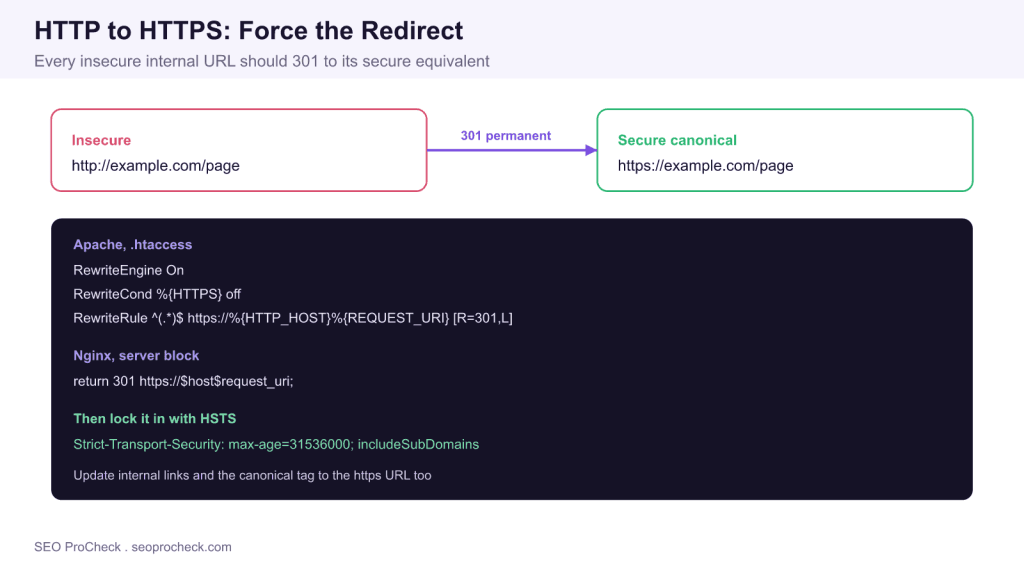
The goal is that no internal URL ever answers with a 200 status over HTTP. Every insecure request should return a 301 permanent redirect to the identical path on HTTPS, preserving the full path and query string. A 302 temporary redirect is the wrong tool here because it tells search engines the move is not permanent, so signals stay split. The diagram above shows the pattern and the exact server rules, with the secure URL as the single canonical destination.
Apply the rule once at the lowest practical layer rather than per page. On Apache that is a RewriteCond and RewriteRule in the .htaccess or virtual host. On Nginx it is a return 301 in the HTTP server block. If a CDN such as Cloudflare sits in front, enable its always use HTTPS rule so the edge handles the upgrade before the request reaches your origin. Applying the redirect in more than one layer is fine as long as they agree and do not create a loop.
Lock It In With HSTS
A redirect fixes the request after it happens, but the very first request still goes out over HTTP before it is bounced. HTTP Strict Transport Security closes that gap. Sending the Strict-Transport-Security response header with a max-age tells the browser to convert every future request for your domain to HTTPS automatically, before any insecure request leaves the device. Start with a modest max-age while you confirm every subdomain and asset works over HTTPS, then raise it. Only add includeSubDomains once you are certain every subdomain has a valid certificate, because the directive applies to all of them.
Fix the Signals, Not Just the Redirect
A redirect at the edge is necessary but not sufficient. Search engines also read the links and tags on the page. Update every internal link, image source, script, and stylesheet reference to use the HTTPS URL directly, so crawlers never discover an HTTP link in the first place. Make sure the canonical tag on each page points at the HTTPS URL, never the HTTP one, or you send a mixed message. Resubmit an HTTPS XML sitemap and confirm the HTTPS property is verified in Search Console. Each of these removes a way for the insecure version to keep being discovered.
HTTP URL Issues and Their Fixes
The table maps the specific problems an unredirected HTTP URL creates to the concrete fix, so you can work through them in order.
| HTTP URL problem | Why it matters | The fix |
|---|---|---|
| HTTP page returns 200 | Insecure version is crawlable and indexable | Serve a 301 to the exact HTTPS URL |
| Split indexation | HTTP and HTTPS compete as duplicates | Consolidate signals onto the HTTPS canonical |
| First request insecure | The initial hop still leaves over HTTP | Send an HSTS Strict-Transport-Security header |
| Mixed internal links | Crawlers keep rediscovering HTTP URLs | Rewrite links, sources, and canonicals to HTTPS |
| 302 instead of 301 | Signals never consolidate onto HTTPS | Switch the redirect to a 301 permanent |
| Redirect chain | Extra hops dilute signals and slow crawling | Point HTTP straight at the final HTTPS URL |
How to Verify the Fix
Verification is quick and worth doing. Request a known HTTP URL and confirm it returns a 301 whose location header is the HTTPS equivalent, using a crawler or a command line request. Crawl the site starting from the HTTP scheme and confirm every response is a redirect, with no page returning 200 over HTTP. Check the response headers of a secure page to confirm the Strict-Transport-Security header is present. Finally, review Search Console coverage to confirm HTTP URLs are dropping out of the index and their HTTPS counterparts are indexed.
Common Mistakes
Three mistakes account for most lingering HTTP URLs. The first is redirecting the homepage but leaving deep pages, subdomains, or old asset paths on HTTP, which a full crawl exposes. The second is using a 302 instead of a 301, so signals never consolidate. The third is a redirect chain, where HTTP goes to a non canonical HTTPS URL that then redirects again; each hop dilutes signals and slows crawling, so point HTTP straight at the final canonical HTTPS URL in a single step.
Related SEO ProCheck resources
- Mixed content check: find insecure assets loaded on secure pages.
- Redirect chains check: make sure your HTTPS redirect resolves in one hop.
- Security checks overview: the full set of on site security checks.
Frequently Asked Questions
What is an internal HTTP URL issue?
It means one or more pages on your own site still respond over plain HTTP with a 200 status instead of redirecting to HTTPS. Search engines can crawl and index those insecure versions separately from the secure ones, which splits ranking signals and creates a duplicate content and security risk.
How do I redirect HTTP to HTTPS?
Apply a site wide 301 permanent redirect at the server or CDN level. On Apache use a RewriteCond and RewriteRule in .htaccess, on Nginx use a return 301 in the HTTP server block, or enable an always use HTTPS rule at your CDN. Each HTTP URL should point at the exact HTTPS equivalent, preserving the path and query string.
Should I use a 301 or 302 redirect for HTTPS?
Use a 301 permanent redirect. A 302 is temporary and tells search engines the move may be reversed, so ranking signals never fully consolidate onto the HTTPS version. The HTTP to HTTPS migration is permanent, so a 301 is the correct status.
What is HSTS and do I need it?
HSTS, sent as the Strict-Transport-Security header, tells browsers to request your site over HTTPS automatically before any insecure request is made. It closes the small window where the first request still goes out over HTTP. It is strongly recommended, though you should confirm every subdomain works over HTTPS before adding includeSubDomains.
Will HTTP pages hurt my SEO?
They can. If HTTP and HTTPS versions of a page are both indexable, search engines may treat them as duplicates and split signals between them, and users may land on an insecure version. Consolidating everything onto HTTPS with a 301 removes the ambiguity and the security warning.
How do I find internal HTTP URLs on my site?
Crawl your site with a tool such as Screaming Frog, starting from or forcing the HTTP scheme, and look for any URL that returns a 200 over HTTP instead of a 301. Also check response headers for the HSTS header, and review Search Console coverage for indexed HTTP URLs that should have been redirected.
Take this with you
The assistant links open with a question about this page already written. Nothing is sent until you press enter.
Claude Vincent is a technical SEO consultant focused on crawlability, rendering, and AI-search visibility. He writes the field guides and case studies at SEO ProCheck, with a bias toward the durable, unglamorous work that decides whether search engines and AI answer engines can actually read and cite a site.
About SEO ProCheck
Technical SEO consulting and GEO strategy with 20 years of enterprise experience. Case studies, resources, and tools for search and AI visibility.
Work With Me
Technical SEO audits, GEO strategy, site migrations, and international SEO. Hourly consulting for teams who need hands-on support, not just reports.
Subscribe to our newsletter!








Recent Posts
- Most Top Sites Never Say Who They Are in Structured Data October 14, 2026
- Homepage Titles Are Mostly Too Short, Not Too Long October 8, 2026
- Who Actually Serves an llms.txt? 184 Top Sites Measured September 29, 2026