

Pagination SEO: Complete Implementation Guide
- September 2, 2024
- Site Architecture, Technical SEO
AI Summary
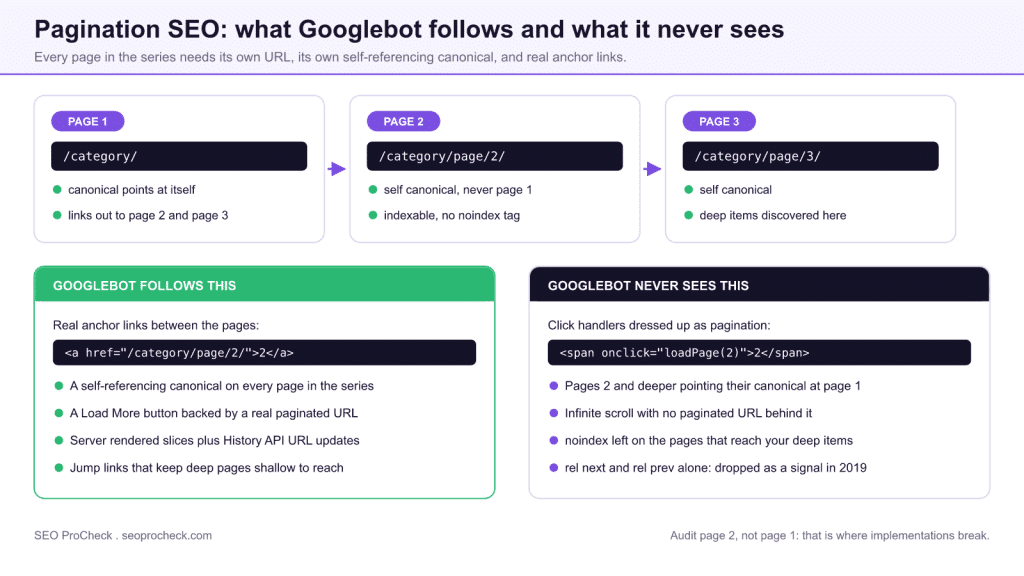
Pagination SEO now rests on three things: a unique crawlable URL for every page in the series, a self-referencing canonical on each of those URLs, and ordinary <a href> links joining them together. Google retired rel="prev" and rel="next" as an indexing signal in March 2019, so site architecture and internal linking now carry the entire load.
- Never point the canonical of pages 2 and deeper back to page 1: that declares them duplicates and their links to deep items stop counting.
- Keep paginated pages indexable. A long-standing
noindexeventually costs you the crawl path to items 200 and beyond. - Load More buttons and infinite scroll are fine as interface, but only when a real paginated URL sits behind them.
- Audit page 2, not page 1. Canonical and
noindexbugs almost always begin at the second page.
Quick answer: Pagination SEO in the current Google era comes down to three rules: give every page in the series its own crawlable URL, put a self-referencing canonical on each one (never canonical everything to page 1), and link the pages together with real <a href> links in the HTML. Google confirmed in 2019 that it no longer uses rel="prev/next" as an indexing signal, so architecture and internal linking now do all the work.
Pagination Fundamentals
Pagination divides content across multiple pages, commonly used for blog archives, product listings, search results, and article series. Proper pagination implementation ensures search engines can discover and index all content while understanding the relationship between pages. Poor pagination creates crawl budget waste, duplicate content issues, and can prevent deep content from being indexed. With Google's deprecation of rel="prev/next" as an indexing signal, modern pagination SEO relies on site architecture, internal linking, and crawlability fundamentals.
What happened to rel="prev/next"
For years the canonical advice was to mark up series with link tags in the head:
<!-- on /category/page/2/ -->
<link rel="prev" href="https://example.com/category/" />
<link rel="next" href="https://example.com/category/page/3/" />
In March 2019 Google announced it had not used these tags as an indexing signal for years and retired the guidance. Leaving them in place does no harm, and they retain minor value for accessibility tooling and some browsers, but adding them today buys you nothing with Google. Bing has said it still looks at them as a hint. Treat them as optional; never treat them as a substitute for real crawlable pagination links in the body.
Every pagination pattern and how Google handles it
| Pattern | How Google handles it | Recommended implementation |
|---|---|---|
| Numbered pagination (unique URLs) | Each page is crawled and indexed on its own merits; links on page 2+ pass discovery signals to deep items | Real <a href> links, self-canonical per page, keep depth shallow with jump links |
| rel="prev"/rel="next" head tags | Ignored as an indexing signal since 2019 (Bing still treats them as a hint) | Optional; harmless to keep, pointless to add for Google |
| "Load More" button | Googlebot does not click buttons; content behind the button is invisible unless it has its own URL | Back the button with a real paginated URL: the button is an <a href="?page=2"> enhanced by JavaScript, so crawlers follow the link while users get in-place loading |
| Infinite scroll | Googlebot does not scroll to trigger lazy-loaded batches; everything past the first viewport-load never enters the index | Paginated component pages (?page=n) that each render their slice server-side, with the scroll experience layered on top via the History API (pushState updating the URL as the user scrolls) |
| View All page | Crawled like any single page; may be truncated if extremely heavy or slow to render | Only for short series; if used, paginated pages may canonical to it, and it must render fully and fast |
Pagination vs Infinite Scroll vs Load More
Traditional pagination with numbered page links remains the most SEO-friendly approach because each page has a crawlable URL. Infinite scroll and "Load More" buttons load content dynamically without URL changes, making that content invisible to crawlers unless properly implemented. For SEO, infinite scroll requires a paginated fallback (separate URLs that crawlers can access) while JavaScript renders the scrolling experience for users. The hybrid approach provides the best of both worlds: smooth user experience with full crawlability.
| Method | SEO Friendliness | User Experience | Implementation Complexity |
|---|---|---|---|
| Traditional Pagination | Excellent | Good | Low |
| Infinite Scroll | Poor without fallback | Excellent | Medium |
| Load More Button | Poor without fallback | Very Good | Medium |
| Hybrid (Scroll + URLs) | Excellent | Excellent | High |
Canonical Strategy for Paginated Content
Each paginated page should have a self-referencing canonical tag pointing to itself, not to page one. Canonicalizing all pages to page one would signal that pages 2+ are duplicates, preventing their content from being indexed. The exception is parameter-based pagination combined with other parameters: if /products?page=2&sort=price exists, it might canonical to /products?page=2 to consolidate sorting variations while maintaining pagination integrity. Never use noindex on paginated pages you want indexed, as this blocks all content on those pages.
Concretely, page 2 of a category should carry:
<!-- on https://example.com/category/page/2/ -->
<link rel="canonical" href="https://example.com/category/page/2/" />
The most common implementation bug is a theme or SEO plugin stamping <link rel="canonical" href="https://example.com/category/"> onto every page of the series. View source on page 2 and check; if the canonical points at page 1, every deeper page is telling Google to ignore it.
Internal Linking for Paginated Series
Strong internal linking ensures crawlers can reach all paginated pages efficiently. Include links to first, previous, next, and last pages at minimum. For long series, implement "jump" links to pages in the middle (1, 2, 3... 10... 50... 100). Ensure pagination links are in the HTML, not JavaScript-only. Consider adding links directly to deep pages from your sitemap or other high-authority pages. Keep pagination depth manageable: if content requires 100+ pages to reach, consider restructuring into subcategories or implementing additional filtering options.
The "real links" requirement is specific: crawlers follow <a href="/category/page/2/">2</a>, and they do not follow <span onclick="loadPage(2)">2</span> or <a href="#"> with a click handler. If your pagination controls are a JavaScript component, confirm the rendered HTML still contains genuine hrefs; a quick check is running the URL through the URL Inspection tool in Search Console and reading the rendered HTML for the page-2 link.
View All Pages Considerations
A "View All" page that displays all content on a single page can simplify canonicalization (all paginated pages canonical to the View All page) but creates challenges. Extremely long pages hurt user experience and page load performance. Google may not fully render very long pages, missing content at the bottom. If implementing View All, ensure the page loads quickly, consider lazy loading images, and test that Google can render the complete content. For most sites, properly implemented pagination outperforms View All approaches.
How to audit a paginated section
- View source on page 2, not page 1. Check three things: the canonical is self-referencing, there is no
noindex, and the pagination links are plain hrefs. Page 1 is almost always fine; page 2 is where implementations break. - Search Console, URL Inspection. Inspect a page-2 URL. "URL is on Google" with "User-declared canonical" matching the inspected URL is the healthy state. "Alternate page with proper canonical tag" pointing at page 1 means the canonical bug above.
- Search Console, Indexing > Pages. Paginated URLs piling up under "Alternate page with proper canonical tag" or "Excluded by 'noindex' tag" tells you the series is sealed off. "Discovered, currently not crawled" on deep pages usually means the series is too deep or too weakly linked.
- Search Console, Settings > Crawl stats. If parameterized pagination generates unbounded URL combinations (page + sort + filter), you will see it here as crawl volume spent on parameter permutations. Fix with canonicals on the sorted/filtered variants and by not linking to the permutations, the same discipline that keeps faceted navigation under control.
- Crawl it yourself. In Screaming Frog, crawl the section and sort by crawl depth; if real products or articles sit at depth 10+ purely because of pagination, add jump links or split the category.
- Read the server logs. Pull Googlebot hits for the
/page/or?page=pattern over 30 days. Healthy series show crawl spread across the pages; a series where Googlebot only ever fetches page 1 is telling you the links to pages 2 and deeper are not being followed. Log file analysis is the only place this distinction is unambiguous, because Search Console aggregates it away.
Pagination URL patterns by platform
Before auditing, know what your stack actually emits. The URL shape decides whether pagination is a clean path or a parameter swamp, and each platform has its own trap:
| Platform | Default paginated URL | What to watch for |
|---|---|---|
| WordPress (core archives) | /category/name/page/2/ | SEO plugins that stamp the archive canonical onto every page of the series; check page 2 in view source after any plugin update |
| WooCommerce | /shop/page/2/ and /product-category/name/page/2/ | Sorting and filter parameters (?orderby=, attribute filters) multiplying on top of the page path |
| Shopify | /collections/all?page=2 | Collection plus tag URLs (/collections/x/tag-y?page=2) generating large parameter sets; theme pagination rendered as JavaScript in some templates |
| Magento 2 | ?p=2, often with ?product_list_limit= | Layered navigation combining with p; a View All variant existing in parallel and competing for the same content |
| Drupal (Views pager) | ?page=1 for the second page | The pager is zero indexed, so off-by-one errors in redirect maps and reporting are routine |
| Next.js and similar frameworks | Whatever you route: /blog/page/2 or ?page=2 | Client-side routers rendering pagination without real href values; confirm the anchors exist in the initial HTML response |
Whichever shape you get, pick one and make it the only one that resolves. The expensive failure is not the format, it is having both ?page=2 and /page/2/ serve the same items with no canonical choosing between them, which splits one series into two duplicate clusters and halves the signal reaching your deep pages.
FAQ
Should paginated pages be indexed or noindexed?
Indexed, if the items they link to matter to you. Pagination pages are primarily discovery paths: they are how crawlers reach item 200 in a category. A long-standing noindex also leads Google to crawl those pages less and eventually treat their links as less important, cutting off the deep items.
Do I still need rel="next" and rel="prev" for SEO?
Not for Google, which stopped using them as an indexing signal (announced March 2019). Bing still describes them as a hint, and they cost nothing to keep if your platform outputs them. What you actually need are ordinary crawlable anchor links between the pages.
Should page 2 canonical to page 1?
No. Each paginated page canonicals to itself. Pointing pages 2+ at page 1 tells Google those pages are duplicates of page 1, so their content and their links to deep items drop out of consideration. This is the single most common pagination mistake in the wild.
Is infinite scroll bad for SEO?
Only when it is the sole access path. Googlebot loads a page at a tall viewport but does not keep scrolling to trigger new batches, so content that only appears on scroll is invisible. Pair the scroll UI with real paginated URLs (updated via the History API as the user scrolls) and the pattern is fine.
Should paginated URLs go in the XML sitemap?
Generally no; the sitemap should list the canonical content (the items and the first page of each category). The paginated pages get discovered by crawling. The exception is a series whose deep pages you specifically need crawled faster, where listing them is a legitimate nudge.
Does Google treat ?page=2 differently from /page/2/?
No, both are just URLs to Google. Pick whichever your platform produces and keep it consistent. The thing to avoid is both formats resolving for the same content without a canonical choosing one, which splits the series into duplicate clusters.
Claude Vincent is a technical SEO consultant focused on crawlability, rendering, and AI-search visibility. He writes the field guides and case studies at SEO ProCheck, with a bias toward the durable, unglamorous work that decides whether search engines and AI answer engines can actually read and cite a site.
About SEO ProCheck
Technical SEO consulting and GEO strategy with 20 years of enterprise experience. Case studies, resources, and tools for search and AI visibility.
Work With Me
Technical SEO audits, GEO strategy, site migrations, and international SEO. Hourly consulting for teams who need hands-on support, not just reports.
Subscribe to our newsletter!






