

AI Summary
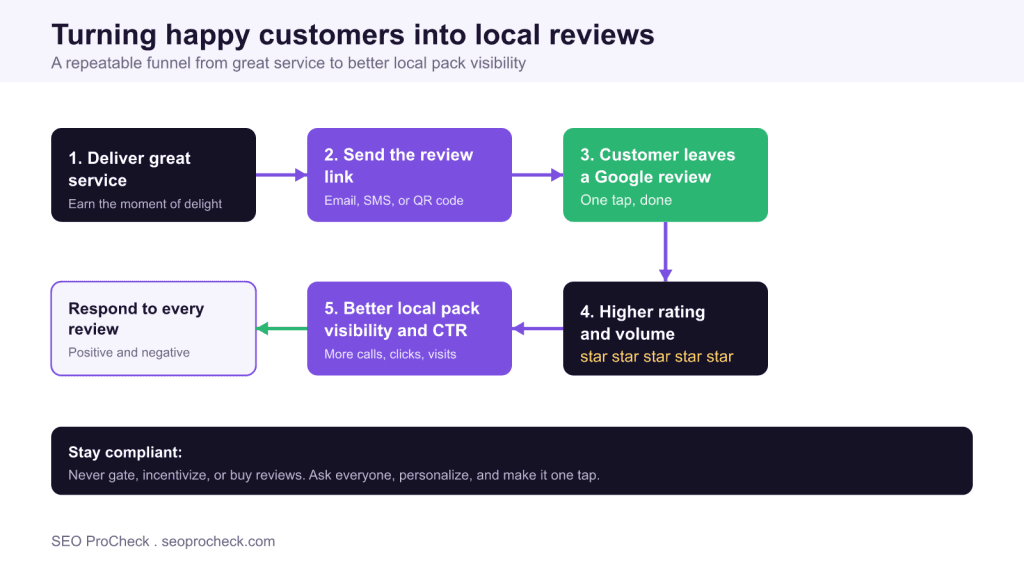
When your local business has few or no customer reviews, you lose visibility in the Google local pack and on Maps, and you lose the click to competitors whose star ratings signal trust at a glance. You fix it by building a simple, repeatable habit: ask every satisfied customer at the moment of delight, hand them a one tap Google review link by email, SMS, or QR code, and reply to every review that comes back.
- Reviews are a recognized local ranking factor: quantity, rating, recency, velocity, and even keywords inside reviews all feed local relevance and prominence.
- Grab your Google review short link from your Business Profile under the option to ask for reviews, then reuse it everywhere.
- Never gate, incentivize, or buy reviews; those tactics break Google policy and put your listing at risk.
- Respond to every review, positive and negative, because future customers read your replies as much as the reviews themselves.
- Element Code: LOC-004
- Issue: Business has few or no customer reviews
- Impact: Lower local pack performance and reduced click to customer conversion
- Fix: Build a steady, policy compliant review generation habit and respond to all reviews
- Detection: Google Business Profile review count
What "no local reviews" really costs you
A local listing with no reviews, or a handful of stale ones, is a quiet leak in your marketing. Two problems happen at the same time. First, you rank lower, because reviews are one of the inputs Google uses to decide who appears in the local pack and on Maps. Second, even when you do appear, you lose the click. A searcher scanning three results in the local pack gravitates toward the business showing a solid star rating and a healthy review count, because those numbers act as instant social proof. An empty rating row reads as "new, untested, or neglected," and the click goes to the competitor next to you.
This is one of the highest leverage fixes in local SEO precisely because it improves ranking and conversion together. You are not just climbing the results; you are earning more of the clicks once you are there.
Why reviews are a genuine local ranking signal
Google has stated for years that local results are shaped by relevance, distance, and prominence, and reviews feed directly into prominence. Several distinct properties of your review profile matter, so it helps to think of them separately rather than chasing a single number:
- Quantity: the total count of genuine reviews signals an established, active business.
- Rating: your average star rating influences both ranking prominence and whether a human clicks.
- Recency: fresh reviews suggest you are currently open and serving customers, not coasting on years old praise.
- Velocity: a steady arrival of new reviews looks natural and healthy; long gaps followed by a sudden flood can look manufactured.
- Keywords in reviews: when customers naturally describe what they bought or the neighborhood you serve, that language can reinforce relevance for those terms.
You cannot script exactly what customers write, and you should not try, but you can influence every one of these properties by simply asking consistently and making the process effortless.
Get your Google review link and put it to work
The single biggest reason customers do not leave reviews is friction. They are willing, but they cannot find your listing, or the process takes too many taps. Remove that friction with your direct review link.
Open your Google Business Profile and look for the option to ask for reviews. Google generates a short review link for your business, a g.page/r/ style URL that opens the review box on your listing directly. Copy it once, then reuse it everywhere your customers already are:
- Email: a short thank you note with a clear "Leave us a review" button pointing at the link.
- SMS: a one line text a day or two after service, with the link at the end.
- QR code: generate a QR code that resolves to the link and print it on receipts, table tents, packaging, or a small counter card.
The goal is one tap between "I had a good experience" and a published review. Every extra step you remove raises your conversion rate.
A repeatable review request workflow
Reviews rarely arrive by accident. Build a small routine your whole team follows:
- Ask at the moment of delight. The best time is right after a customer expresses satisfaction: the job is done, the meal was great, the problem is solved. Enthusiasm fades fast, so ask while it is high.
- Personalize the ask. Use the customer's name and reference what you did for them. A human, specific request converts far better than a generic blast.
- Make it one tap. Hand over the direct link or QR code. Do not make them search for your business or log in through a maze.
- Follow up once. A single polite reminder a few days later recovers many customers who meant to leave a review and forgot. Do not nag beyond that.
Here is a simple template you can adapt for SMS or email. Notice it thanks the customer, keeps it short, and asks everyone the same way:
Hi [First name], thank you for choosing [Business name] for your [service or purchase] today. If you have a moment, a quick Google review helps other local folks find us and tells us how we did. It takes about thirty seconds: [review link]. Thanks so much, [Your name].
Respond to every review, especially the hard ones
Replying to reviews is not optional busywork; it is public relations that every future customer reads. For positive reviews, a short, warm, specific thank you closes the loop and encourages more. For negative reviews, your reply is where trust is won or lost. Respond promptly, stay professional, acknowledge the person's experience without arguing, and offer a concrete path to make it right, then move the detail offline with a phone number or email. Prospective customers judge you far more by how you handle a complaint than by the complaint itself. A business that answers criticism with grace often looks more trustworthy than one with an unbroken wall of five star ratings and no human voice.
What not to do
The fastest way to undo all of this is to cut corners in ways Google explicitly prohibits. Avoid these entirely:
- Do not gate reviews. Filtering so that only happy customers are asked, while unhappy ones are quietly routed elsewhere, violates Google policy.
- Do not incentivize. Never offer discounts, gifts, entries, or any reward in exchange for a review.
- Do not buy fake reviews. Purchased or fabricated reviews are detectable, removable, and can get your profile suspended. They also erode the trust of real customers when the praise does not match reality.
Ask everyone, make it easy, and let genuine feedback do the work. Compliant and consistent beats clever every time.
Spread your presence across the right platforms
Google is the center of gravity for local reviews, but it is not the only place that matters. Depending on your industry, reviews on other platforms reinforce trust and can appear in search or influence buying decisions. Prioritize where your customers actually look:
| Platform | Why it matters | How to get the review link |
|---|---|---|
| Google Business Profile | Directly feeds local pack and Maps ranking and shows stars in search. | In your profile, choose ask for reviews to copy the g.page/r/ short link. |
| Industry specific sites | High intent buyers in fields like hospitality, home services, health, or legal often check niche platforms first. | Claim your listing on the platform, then use its share or request review feature. |
| Yelp | Strong for restaurants and services and often surfaces in general search results. | Claim the business page and share it; note Yelp discourages directly soliciting reviews, so display a "Find us on Yelp" badge instead. |
| Useful where your audience is already active socially and shares recommendations. | Enable recommendations on your Page and link customers to the reviews tab. |
Resist the urge to be everywhere at once. Pick the two or three platforms your customers genuinely use, keep those profiles accurate, and route your review requests there.
Using Review and AggregateRating schema correctly
Schema markup is powerful, but reviews are the area where it is most often misused, and misuse can trigger a manual action. The key rule: Google does not show review rich results based on ratings a business marks up about itself. Self serving AggregateRating and Review markup added to a LocalBusiness or Organization page, describing the business itself, is ignored and can be flagged as spam.
Use this markup only where it genuinely applies. Structured Review and AggregateRating data is appropriate on specific product pages or individual service pages that carry real, verifiable customer ratings you collect and display honestly on that page. It is not a shortcut for painting stars onto your homepage. Above all, never fabricate ratings, review counts, or quotes. For your overall business reputation, rely on genuine third party reviews on Google and other platforms, which is exactly where those stars are meant to come from. When in doubt, mark up only what a visitor can actually see and verify on the page.
Where to go next
Reviews work best alongside a complete, accurate local presence. If you have not fully set up your listing yet, start with your Google Business Profile, since it is the source of your review link and your local pack visibility. While you are tightening your on page signals, it is also worth fixing a missing meta description so your search snippet earns the click your reviews helped you win. For more local SEO fixes, browse the full library at SEO ProCheck.
Frequently asked questions
How do I find my Google review link to share with customers?
Open your Google Business Profile, then choose the option to ask for reviews. Google generates a short link (a g.page/r/ style URL) that opens the review box on your listing with one tap. Copy that link and reuse it in emails, text messages, receipts, and a printed QR code so every customer reaches the same place.
How many reviews do I need to rank in the local pack?
There is no fixed threshold, and quantity is only one part of the picture. Google weighs how many reviews you have alongside your average rating, how recently they arrived, and how consistently new ones come in. A steady flow of genuine, recent reviews with thoughtful replies tends to help more than a single burst that then goes quiet for a year.
Can I offer a discount or gift for leaving a review?
No. Incentivizing reviews violates Google policy and can lead to reviews being removed or your profile being penalized. You are allowed to ask everyone and to make the process easy, but the review itself must be freely given. Never trade a discount, entry, or freebie for a rating.
Should I ask only happy customers so I avoid bad reviews?
No. Selectively soliciting only customers you expect to be positive, sometimes called review gating, is against Google policy. Ask every customer the same way. A handful of critical reviews answered gracefully actually builds trust, because a wall of nothing but five star ratings can look staged.
How should I respond to a negative review?
Respond promptly, stay calm, thank the person for the feedback, and acknowledge their experience without arguing. Offer a specific way to make it right and move the detailed conversation offline with a phone number or email. Future customers read your replies, so a professional, human response to criticism often wins more business than the complaint costs you.
Do review stars in my search result come from schema markup?
For a local business the star ratings shown in Google come from your Google Business Profile and genuine customer reviews, not from ratings you mark up about yourself. Google ignores self serving AggregateRating markup that a business adds about its own entity on LocalBusiness or Organization pages. Use Review and AggregateRating schema only where it genuinely applies, such as individual product or specific service pages backed by real customer ratings, and never invent numbers.
Take this with you
The assistant links open with a question about this page already written. Nothing is sent until you press enter.
Claude Vincent is a technical SEO consultant focused on crawlability, rendering, and AI-search visibility. He writes the field guides and case studies at SEO ProCheck, with a bias toward the durable, unglamorous work that decides whether search engines and AI answer engines can actually read and cite a site.
About SEO ProCheck
Technical SEO consulting and GEO strategy with 20 years of enterprise experience. Case studies, resources, and tools for search and AI visibility.
Work With Me
Technical SEO audits, GEO strategy, site migrations, and international SEO. Hourly consulting for teams who need hands-on support, not just reports.
Subscribe to our newsletter!








Recent Posts
- Most Top Sites Never Say Who They Are in Structured Data October 14, 2026
- Homepage Titles Are Mostly Too Short, Not Too Long October 8, 2026
- Who Actually Serves an llms.txt? 184 Top Sites Measured September 29, 2026