

AI Summary
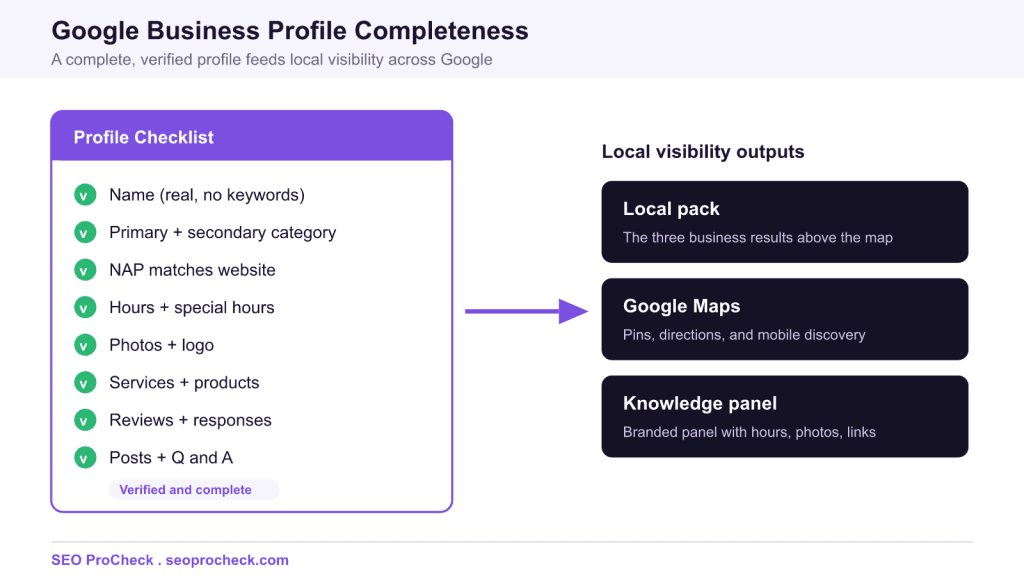
A Google Business Profile is the free Google listing that makes a local business eligible for the local pack, Google Maps, and the branded knowledge panel, so a business without one is invisible in the results that capture most local clicks. You set it up by creating or claiming the listing at google.com/business, verifying ownership, then completing every field and keeping it active with photos, reviews, and posts.
- The profile powers three surfaces at once: the local pack, Google Maps, and the knowledge panel.
- You must verify ownership (postcard, phone, email, video, or bulk) before the profile can rank.
- Pick the most specific primary category and keep your name, address, and phone identical to your website.
- A keyword stuffed name, a PO box, or a virtual office address are common suspension triggers, so keep the profile accurate.
What a Google Business Profile is and why it matters
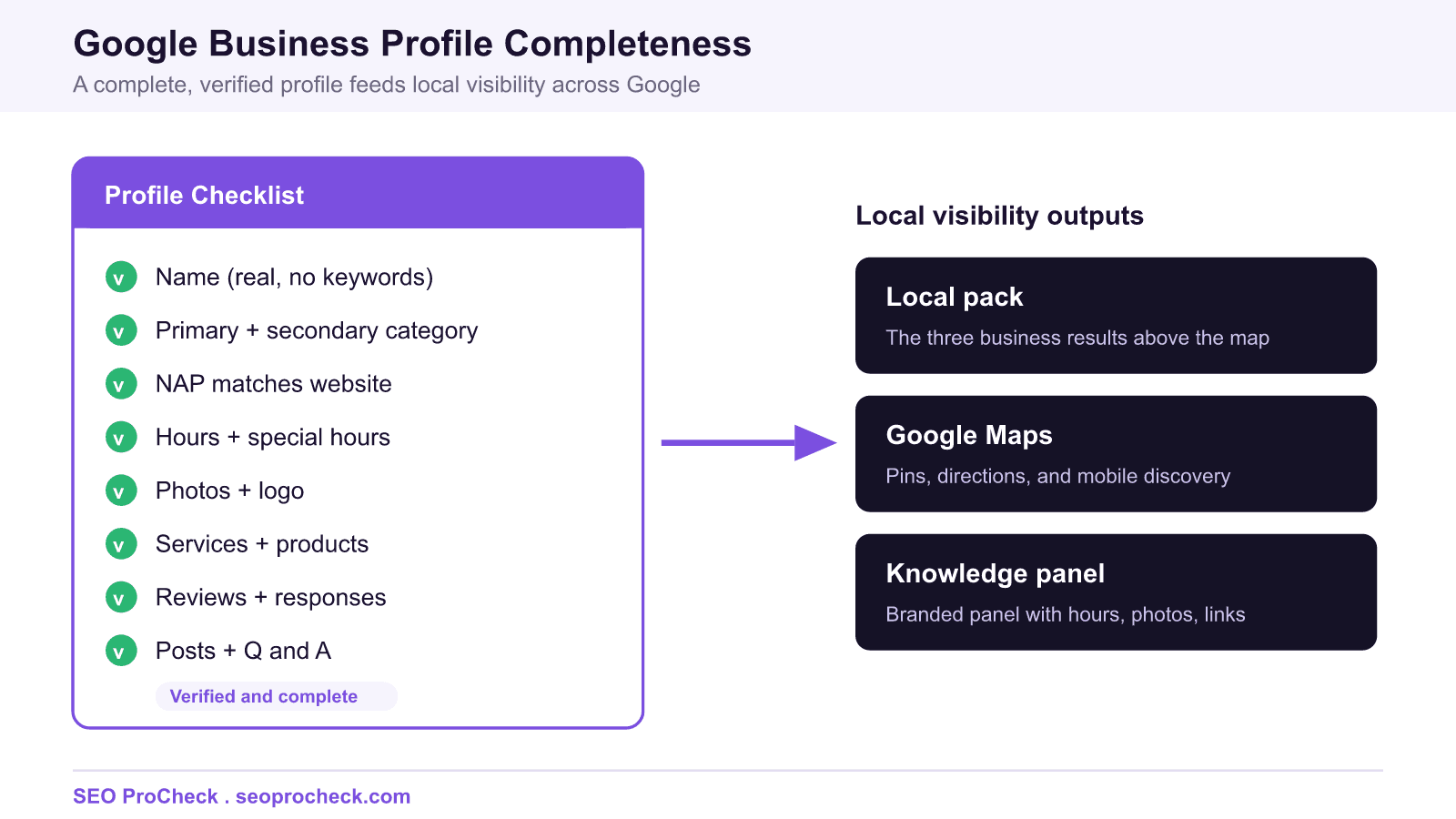
A Google Business Profile, formerly called Google My Business, is the free listing that represents your business inside Google Search and Google Maps. It is the object that Google uses to build the local pack (the block of three business results shown above the map), the pins and business cards you see in Google Maps, and the knowledge panel that appears on the right of a branded search. If your business has no profile, none of those surfaces can display you, no matter how strong your website is.
Local intent searches such as "plumber near me" or "family dentist in Springfield" push the local pack above the traditional organic results, and that block captures the majority of clicks for those queries. A complete, verified profile is therefore the single highest leverage local asset you can own, and it costs nothing. The rest of this guide walks through how to create, verify, and fully populate the profile, how to connect it to structured data on your own site, and how to avoid the mistakes that get profiles suspended.
How to create or claim the profile
Go to google.com/business and sign in with the Google account you want to own the listing (use a business account you control, not a personal one owned by an employee who may leave). Search for your business name and address. If Google already has an unclaimed listing, you will see an option to claim it; if not, you can add a new business. Claiming an existing listing matters because Google may have auto generated a profile from map data or user submissions, and you want to take control of that record rather than create a duplicate.
During setup you enter the business name exactly as it appears on your storefront and website, choose a category, and specify whether you serve customers at a physical address, in a service area, or both. Storefront businesses show an address; service area businesses (a mobile locksmith, a plumber) can hide the street address and instead list the regions they cover.
Verification methods
Google requires you to prove you control the business before the profile can appear or be edited freely. The available methods depend on your business type and history, and Google chooses which options you are offered.
| Verification method | Best for | Typical timeline |
|---|---|---|
| Postcard by mail | Single location storefronts with a mailing address | Roughly 5 to 14 days for the code to arrive |
| Phone or text | Eligible businesses with a listed phone number | Immediate code delivery |
| Businesses offered the option based on category | Immediate | |
| Video verification | Proving location, equipment, and management on camera | Reviewed within a few business days |
| Bulk verification | Chains and franchises with 10 or more locations | One to two weeks after the request is approved |
If you are asked for video verification, prepare to show your signage, the surrounding street, any specialized equipment, and proof that you manage the business (for example, opening a locked area or accessing a point of sale system). Do not stop or edit the recording, because a single continuous clip is what Google reviews.
Choosing categories
Your primary category is one of the strongest relevance signals the profile carries, so choose the most specific option that describes your core business. A category of "Mexican restaurant" outperforms the generic "Restaurant" for the queries you actually want. Add secondary categories for genuine additional services (a "Bakery" that also offers "Cafe"), but do not pad the list with loosely related categories, which can dilute relevance and, in some cases, trigger a review.
NAP consistency
Your name, address, and phone number (NAP) on the profile must match the same details on your website and across other citations exactly. Inconsistent NAP, such as a call tracking number on the profile that does not appear anywhere on your site, confuses Google and can undermine ranking. Use your real, forward facing business phone number, write the address the same way everywhere (suite versus ste, street versus st), and reflect the same legal name.
Completing every field
Profiles that are fully populated tend to perform better and inspire more confidence, so fill in everything Google offers:
- Hours, including special hours for holidays and seasonal changes, so customers are never misled.
- Service areas if you travel to customers, listing the towns or regions you cover.
- Services and products with short descriptions and prices where relevant.
- Attributes such as wheelchair accessible, outdoor seating, or women owned, which Google surfaces as filters and badges.
- Business description that reads naturally and explains what you do, without stuffing keywords.
- Website and appointment links pointing to the correct pages, including a booking URL if you take reservations.
Photos, posts, and reviews
Add a real logo, a cover photo, and genuine photos of your premises, team, and work. Authentic images help customers recognize you and give Google fresh content to associate with the profile. Use Google Posts to share offers, events, and updates; seed the Q and A section with a few honest questions and answers you hear often; and, most importantly, earn and respond to Google hosted reviews. Responding to reviews, both positive and critical, is a visible trust signal and keeps the profile active.
Connecting LocalBusiness schema on your site
Structured data on your own website reinforces the same facts the profile carries. Add a LocalBusiness JSON-LD block to your site (typically on the homepage or a contact page) with your real NAP, hours, and geo coordinates, and use the sameAs property to point to your Google Maps place URL. Never fabricate data in schema: every value should match what a visitor can verify on the page and on the profile. Here is a minimal skeleton you can adapt:
<script type="application/ld+json">
{
  "@context": "https://schema.org",
  "@type": "LocalBusiness",
  "name": "Your Exact Business Name",
  "image": "https://www.example.com/photo.jpg",
  "@id": "https://www.example.com/#business",
  "url": "https://www.example.com/",
  "telephone": "+1-555-123-4567",
  "address": {
    "@type": "PostalAddress",
    "streetAddress": "123 Main Street",
    "addressLocality": "Springfield",
    "addressRegion": "IL",
    "postalCode": "62704",
    "addressCountry": "US"
  },
  "geo": {
    "@type": "GeoCoordinates",
    "latitude": 39.7817,
    "longitude": -89.6501
  },
  "openingHoursSpecification": [{
    "@type": "OpeningHoursSpecification",
    "dayOfWeek": ["Monday","Tuesday","Wednesday","Thursday","Friday"],
    "opens": "09:00",
    "closes": "17:00"
  }],
  "sameAs": [
    "https://www.google.com/maps/place/?q=place_id:YOUR_PLACE_ID"
  ]
}
</script>
Keep the schema values and the profile values identical. If you change hours or a phone number in one place, update the other so Google never sees conflicting information.
Keeping the profile healthy and avoiding suspension
A profile can be suspended if Google decides it violates the guidelines, and recovering a suspended profile is slow and stressful. Keep the listing accurate and updated, and avoid the most common triggers:
- Keyword stuffed name: the name field must be your real business name only, not "Joe Plumber Best Emergency Plumbing Springfield".
- PO box or mailbox address: a PO box or a UPS store mailbox is not a valid business address.
- Virtual office or coworking address where you do not staff the location during business hours, which Google treats as ineligible for a storefront listing.
- Frequent unexplained edits to the name, address, or category, which can flag the profile for manual review.
Step by step claim and verify checklist
- Sign in to google.com/business with a business owned Google account.
- Search for your business; claim the existing listing if one exists, otherwise add a new business.
- Enter the exact business name, then choose whether you have a storefront, a service area, or both.
- Set the most specific primary category and add only truly relevant secondary categories.
- Enter the address (or service areas) and a real, forward facing phone number that matches your website.
- Request verification and complete the method Google offers (postcard, phone, email, video, or bulk).
- Once verified, fill in hours and special hours, services, products, attributes, and a natural description.
- Upload a logo, cover image, and real photos; add your website and any booking link.
- Publish a first Google Post, seed the Q and A, and set a routine for requesting and answering reviews.
- Add matching LocalBusiness schema on your site with a sameAs link to your Google Maps place URL.
Related local SEO reading: building Google reviews and writing strong meta descriptions both support the same local visibility. You can also start from the SEO ProCheck homepage to explore the full checklist.
Frequently asked questions
Is a Google Business Profile free?
Yes. Creating, verifying, and managing a Google Business Profile is completely free. Google does not charge for the listing itself, so any service asking for a recurring fee just to keep the profile live is unnecessary.
How long does verification take?
Phone, text, and email verification are usually instant. A postcard typically arrives within 5 to 14 days, and video or bulk verification is reviewed within a few business days to about two weeks. Your profile will not rank in the local pack until verification is complete.
Can a service area business hide its address?
Yes. If you travel to customers rather than serving them at a storefront, you can hide the street address and list the regions you cover instead. You still need a real address to verify, but it will not be shown publicly.
Why can I add keywords to boost the profile name?
You should not. The name field must contain only your real business name. Adding keywords or a city to the name violates Google guidelines and is a frequent cause of suspension, so keep it clean and put keywords in the description and services instead.
Do I need LocalBusiness schema if I have a profile?
The profile works on its own, but adding matching LocalBusiness schema on your website reinforces the same facts and helps Google connect your site to your listing. Keep every value identical across the two and never invent data.
What should I do if my profile gets suspended?
Review your listing against the guidelines, correct any violation such as a keyword stuffed name or an ineligible address, then submit a reinstatement request through Google. Keeping the profile accurate from the start is the best way to avoid the slow reinstatement process entirely.
Take this with you
The assistant links open with a question about this page already written.
Claude Vincent is a technical SEO consultant focused on crawlability, rendering, and AI-search visibility. He writes the field guides and case studies at SEO ProCheck, with a bias toward the durable, unglamorous work that decides whether search engines and AI answer engines can actually read and cite a site.
About SEO ProCheck
Technical SEO consulting and GEO strategy with 20 years of enterprise experience. Case studies, resources, and tools for search and AI visibility.
Work With Me
Technical SEO audits, GEO strategy, site migrations, and international SEO. Hourly consulting for teams who need hands-on support, not just reports.
Subscribe to our newsletter!








Recent Posts
- Google Algorithm Updates: The Dated List Since 2003, and What to Do After Each October 31, 2026
- AI Readiness: The Checklist, the Research and the Free Tools October 28, 2026
- AI Readiness Checklist (2026): 51 Checks, Each With Its Source October 28, 2026