

Two sites can look identical in a browser and be worlds apart to a machine. The difference is where the HTML gets built — on the server before it is sent, or in the browser after JavaScript runs. For AI crawlers, which mostly do not run JavaScript, that single choice decides whether your content exists at all.
The four words you need
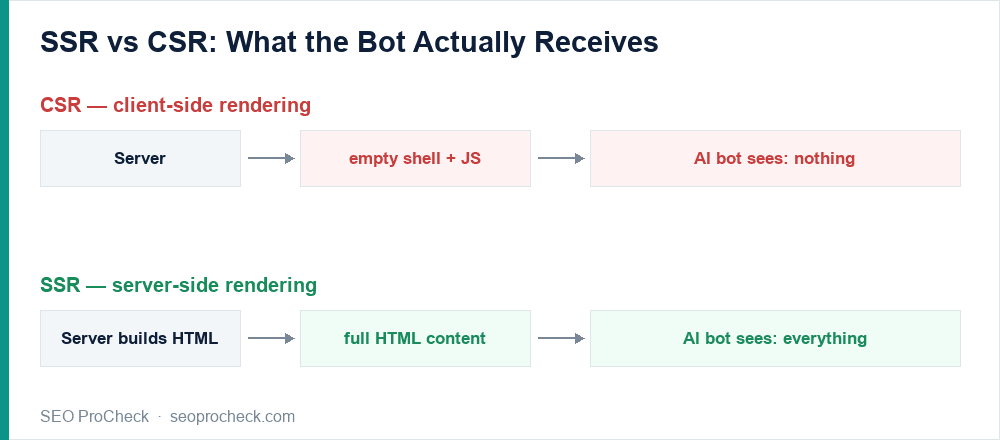
- CSR (client-side rendering): the server sends a near-empty shell plus JavaScript; the browser builds the page. Great for app-like interactivity, terrible for non-rendering bots.
- SSR (server-side rendering): the server builds the full HTML per request and sends it ready to read. Bots and humans both get content immediately.
- SSG (static generation): pages are pre-built into HTML at deploy time. Fastest and most crawler-proof.
- Hydration: ship real HTML, then let JavaScript "wake it up" with interactivity. The content is in the payload; the JS only enhances it.
Why AI crawlers make this non-negotiable
Googlebot renders JavaScript (slowly, at a cost). Almost nothing else does. Vercel's analysis of over 500 million GPTBot fetches found zero JavaScript execution (Vercel); roughly 69% of AI crawlers can't run JS at all. So with CSR, GPTBot, ClaudeBot and PerplexityBot receive your empty shell and leave. With SSR or SSG, they get the whole page.
The receipts
I fetched a set of well-known sites with a GPTBot user agent and counted the body words in the raw HTML — before any JavaScript. The ones serving content server-side hand the bot real text:
| Site | Words in raw HTML (bot's view) |
|---|---|
| Wikipedia (reference) | 6,657 |
| Crunchbase | 3,347 |
| Robinhood | 1,677 |
| Linear | 1,572 |
| react.dev | 1,439 |
| Vercel | 1,102 |
| Notion | 702 |
That is what "done right" looks like: even sophisticated single-page-app companies render their marketing and content pages on the server so machines can read them. A pure-CSR build, by contrast, would show a near-empty raw HTML and a full rendered page — the gap is exactly the content the bots never see.
Which one do you have? Check in 30 seconds
- View Source (Ctrl/Cmd+U): if your headline and body copy are not in there but appear in DevTools → Elements, you are client-rendering it.
- The bookmarklet from The Forgotten HTML reports the exact percentage of your content that reaches a non-rendering bot.
- Wappalyzer tells you the framework; Quick Javascript Switcher lets you disable JS and watch what survives.
How to fix it
- Render on the server. Next.js, Nuxt, SvelteKit and Angular Universal all do SSR; frameworks like Astro and 11ty do SSG. Modern frameworks make this the default — you often just have to not opt out of it.
- Static-generate anything that doesn't change per request (blogs, docs, marketing).
- Keep the money content in the HTML. Prices, reviews, specs and key copy belong in the initial payload — not injected after a tab click or "load more."
- Prerender as a stopgap if a full migration isn't feasible: serve bots a fully-rendered snapshot.
- Re-test with View Source and the bookmarklet until the raw HTML contains your content.
And once the content is renderable, make sure the bots are actually allowed in — see which AI bots you might be blocking.
Not sure which bots can see (or are blocked from) your site?
An advanced technical audit checks rendering, retrievability, and bot access end to end. See how an advanced SEO audit works →
Claude Vincent is a technical SEO consultant focused on crawlability, rendering, and AI-search visibility. He writes the field guides and case studies at SEO ProCheck, with a bias toward the durable, unglamorous work that decides whether search engines and AI answer engines can actually read and cite a site.
About SEO ProCheck
Technical SEO consulting and GEO strategy with 20 years of enterprise experience. Case studies, resources, and tools for search and AI visibility.
Work With Me
Technical SEO audits, GEO strategy, site migrations, and international SEO. Hourly consulting for teams who need hands-on support, not just reports.
Subscribe to our newsletter!






