

AI Summary
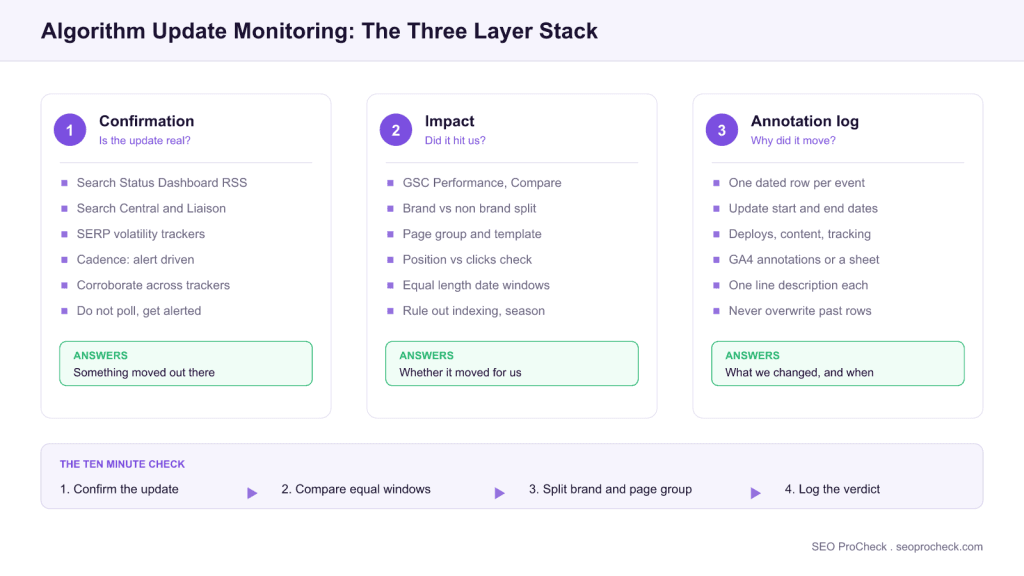
An algorithm update monitoring setup is three independent layers: confirmation sources that tell you an update is real, your own Search Console data that tells you whether it touched your site, and an annotation log that keeps the causal story straight months later. Built once, it turns “did the update hit us?” into a ten minute check instead of a day of guesswork.
- No external tracker can tell you whether you were hit: only your own segmented Search Console data can.
- Split brand from non-brand queries first. A core update hit lands almost entirely in non-brand.
- Compare equal-length windows on the same weekdays, and only after Google marks the rollout complete.
- Log every update start date, end date, and site change on one timeline. Six months later that log is the whole diagnosis.

An algorithm update monitoring setup has three layers: confirmation sources that tell you an update is real (Google's Search Status Dashboard plus two or three SERP volatility trackers), your own impact data (a standing Search Console comparison workflow segmented by page group and query type), and a permanent annotation log that records every update and site change on one timeline. With those in place, "did the update hit us?" becomes a ten-minute check instead of a day of panic.
Understanding Algorithm Updates
Algorithm Updates represents a critical component of modern SEO strategy. As search engines continue to evolve and user expectations shift, understanding the nuances of algorithm updates becomes essential for maintaining and improving organic visibility. This guide covers the key concepts, implementation approaches, and strategic considerations that SEO practitioners need to master.
The monitoring problem splits in two: knowing that an update is happening (Google confirms core updates and spam updates, but ships many unconfirmed adjustments), and knowing whether it touched your site, which no external tracker can tell you. A proper setup answers both independently, because the most common analysis error is pinning an ordinary traffic wobble on whatever update happened to be in the news that week.
The Monitoring Stack
| Layer | Source | What it gives you | Cadence |
|---|---|---|---|
| Official confirmation | Google Search Status Dashboard (status.search.google.com/summary): subscribe to its RSS feed | Confirmed core, spam, and ranking updates with start and end dates; the ground truth for annotations | Alert-driven |
| Official commentary | Google Search Central blog and @searchliaison | What the update targets, official guidance, rollout notes | Alert-driven |
| Volatility trackers | Semrush Sensor, MozCast, and similar SERP "weather" tools that quantify algorithm volatility | Detects unconfirmed turbulence; per-vertical breakdowns show whether your niche is in the blast zone | Glance daily / during rollouts |
| Your impact data | GSC Performance report (compare mode); GA4 landing-page report | The only source that says whether you were hit, and where | Weekly + during rollouts |
| Community signal | SEO news outlets and practitioner forums | Early chatter on unconfirmed updates; recovery patterns others observe | Weekly digest |
Wire the alert layer once: the Status Dashboard RSS into whatever you actually read (Slack channel, feed reader, email), so confirmation reaches you without you polling for it.
The GSC Impact-Check Workflow
When an update is confirmed or a tracker spikes, run this fixed sequence in Search Console (it takes about ten minutes):
- Performance → Search results → Date range → Compare: set "last 7 days vs. previous 7 days" during rollout, then re-run with post-rollout vs. pre-rollout windows of equal length once Google marks the update complete. Compare same weekdays to avoid weekend skew.
- Split brand from non-brand: add a Query filter for your brand terms, check the comparison, then invert it (queries not containing brand). A regex filter in Search Console handles brand variants, misspellings, and product names in one expression. Core update losses show up almost entirely in non-brand; if brand traffic fell too, look for a technical problem instead.
- Segment by page group: Pages tab, sorted by click delta. Updates rarely hit uniformly: identify which templates or topics absorbed the loss. That pattern is your diagnosis: a hit concentrated in one content type points at what the update reweighted.
- Check position vs. clicks: if clicks fell but average position held, the cause may be SERP-feature changes (AI Overviews, more ads) rather than ranking loss, a different problem with different fixes.
- Rule out non-algorithmic causes: GSC Pages report for indexing drops, the Manual Actions report (a manual action is a different problem with a different fix), recent deploys in your change log, seasonality (compare year over year), and tracking breakage in GA4 before concluding "the update did it."
Reading the result: what each Search Console pattern actually means
The comparison gives you a shape, not a verdict. These are the patterns worth recognising before you commit to a diagnosis, because four of the six point somewhere other than the update:
| What the comparison shows | Most likely cause | Next step |
|---|---|---|
| Non-brand clicks down, brand flat, decline starts inside the rollout window | Genuine core update reassessment | Segment by page group, plan substantive content work, measure at the next update |
| Brand and non-brand both down together | Technical or tracking, not the update | Check the Pages report, recent deploys, and GA4 tag health before anything else |
| Impressions flat, average position flat, clicks down | SERP layout shift (AI Overviews, ads, other features) | Check the Search Appearance breakdown, revisit titles, weight lower-funnel queries |
| Loss concentrated in one template while others hold | Page-group specific reassessment | Diff the affected template against the ones that held: thinness, duplication, intent mismatch |
| Decline begins outside the announced rollout dates | Seasonality or an unrelated site change | Compare year over year, then check the annotation log before blaming the update |
| Near-total drop to almost zero | Indexing regression, robots.txt, or a manual action | Check the Pages report and Manual Actions immediately: this is not a ranking problem |
Two of these patterns are frequently misread. A clicks-only decline with position intact is a presentation problem rather than a ranking problem, and rewriting the page rarely fixes it. A decline that starts before the rollout is almost never the update, no matter how well the dates seem to line up once you squint at a weekly chart.
The Annotation Log
Keep one running timeline (a shared sheet is fine, or GA4’s built-in annotations under Admin, or right-click on any report chart → "Create annotation") with a row per event: date, type (Google update / site deploy / content change / tracking change), and a one-line description. Log every confirmed update's start and end date, since rollouts run for days to weeks and mid-rollout data is noisy. Six months later, this log is the difference between "traffic changed at some point" and "the March core update cost this template 30% of its non-brand clicks, and the recovery began after the enrichment sprint", the causal story stakeholders and future-you both need.
Key Considerations for Algorithm Update Monitoring Setup
When approaching algorithm updates, several factors require careful attention. Technical implementation must align with broader SEO objectives while maintaining site performance and user experience. The balance between optimization and over-optimization requires ongoing monitoring and adjustment based on performance data and algorithm changes. Industry benchmarks and competitor analysis provide context for evaluating your own implementation.
The key discipline is separating detection from reaction. Detection is fast and automated; reaction should be slow and evidence-based. Google's own guidance for core updates is that there is often nothing to "fix" in the hotfix sense: recovery comes from sustained quality improvement, frequently visible only at the next update. So the monitoring setup's job is to produce an accurate damage report and a prioritized list of affected page groups, not to trigger same-day rewrites while the rollout is still moving.
Implementation Best Practices
Successful implementation begins with thorough auditing of current state and clear goal definition. Document baseline metrics before making changes to enable accurate impact measurement. Prioritize changes based on potential impact and implementation effort, focusing on high-impact items first. Test changes in staging environments when possible, and monitor closely after deployment to production. Maintain documentation of changes for future reference and troubleshooting.
For monitoring, "baseline" means pre-computing your normal weekly variance: eyeball the last six months of weekly GSC clicks and note the typical swing. If your site normally moves 10% week to week, an 8% dip during an update is noise, not impact, and having that number written down in advance prevents rollout-week overreaction. Set up the whole stack on a quiet week, not mid-rollout when every decision is emotional.
Common Mistakes to Avoid
Several patterns consistently cause problems in algorithm updates implementations. Rushing implementation without proper planning leads to errors that can be costly to fix. Ignoring the interplay between different SEO factors creates conflicts that undermine results. Failing to monitor and iterate based on performance data means missing optimization opportunities. Over-optimization signals can trigger algorithmic penalties that take months to recover from.
Monitoring-specific mistakes: judging impact mid-rollout and shipping "fixes" that make post-update analysis impossible; comparing unequal or misaligned date windows (14 days vs. 7, Tuesday-start vs. Saturday-start); attributing a drop to an update without ruling out indexing, seasonality, or tracking causes first; treating volatility-tracker spikes as proof you were affected; and making major site changes during a rollout, which permanently contaminates the before/after read.
Measuring Success
Effective measurement requires defining appropriate KPIs aligned with business objectives. Track both leading indicators (rankings, impressions, technical metrics) and lagging indicators (traffic, conversions, revenue) to build a complete picture. Establish reasonable timeframes for evaluation, as SEO changes often take weeks or months to fully manifest in results. Compare performance against historical baselines and competitor benchmarks to contextualize results.
For the monitoring program itself, success looks like: every confirmed update annotated within a day of announcement; an impact verdict (hit / not hit / inconclusive, with affected page groups) produced within a week of rollout completion; and a stable measurement definition reused across updates so impacts are comparable over the years, not re-derived ad hoc each time.
Strategic Recommendations
Approach algorithm updates as an ongoing program rather than a one-time project. Build processes for regular auditing, monitoring, and optimization. Stay current with industry developments and algorithm changes that may affect your strategy. Invest in education for team members to build internal capabilities. Consider how algorithm updates fits within your broader digital marketing and business strategy for maximum impact.
Frequently Asked Questions
How do I know if a Google algorithm update is happening?
Check Google's Search Status Dashboard, which lists confirmed core, spam, and ranking updates with start and completion dates: subscribe to its RSS feed so confirmations come to you. For unconfirmed turbulence, SERP volatility trackers like Semrush Sensor and MozCast show when rankings are churning abnormally, ideally corroborated across two or more trackers before you take it seriously.
How can I tell if my site was hit by an algorithm update?
Compare equal-length GSC date windows before and after the rollout, segmented by brand vs. non-brand queries and by page group. A genuine update hit shows as a non-brand decline concentrated in specific templates or topics, beginning within the rollout window. If brand traffic dropped too, or the decline started outside the rollout dates, look for technical or seasonal causes instead.
What tools do I need to monitor algorithm updates?
A minimal free stack covers it: the Search Status Dashboard RSS for confirmation, one or two volatility trackers for early warning, Search Console for impact measurement, and an annotation log (a shared sheet or GA4 annotations). Paid rank trackers add daily keyword-level granularity and competitor visibility, which matters most in volatile verticals, but they supplement the stack rather than replace it.
How long does a Google core update take to roll out?
Typically one to three weeks; the Status Dashboard shows both the start date and the completion date for each update. Data collected mid-rollout is unstable, because rankings can swing and partially revert, so run your definitive before/after comparison only after Google marks the rollout complete.
Should I make changes to my site during an algorithm update rollout?
Hold significant changes until the rollout completes. Mid-rollout rankings are in flux, so you can't attribute movement to your change or to the update, and you destroy the clean before/after comparison you'll need. Use rollout time for analysis and planning; ship the remediation after completion, when you can measure it.
How do I recover from a core update?
Diagnose which page groups lost non-brand visibility, then improve them substantively on depth, accuracy, first-hand value, and intent match, rather than hunting for a single technical fix, because per Google's own guidance core updates reassess content quality broadly. Meaningful recovery frequently arrives at a subsequent update, so annotate the work you shipped and measure across the following updates, not the following week.
Take this with you
The assistant links open with a question about this page already written. Nothing is sent until you press enter.
Claude Vincent is a technical SEO consultant focused on crawlability, rendering, and AI-search visibility. He writes the field guides and case studies at SEO ProCheck, with a bias toward the durable, unglamorous work that decides whether search engines and AI answer engines can actually read and cite a site.
About SEO ProCheck
Technical SEO consulting and GEO strategy with 20 years of enterprise experience. Case studies, resources, and tools for search and AI visibility.
Work With Me
Technical SEO audits, GEO strategy, site migrations, and international SEO. Hourly consulting for teams who need hands-on support, not just reports.
Subscribe to our newsletter!








Recent Posts
- Most Top Sites Never Say Who They Are in Structured Data October 14, 2026
- Homepage Titles Are Mostly Too Short, Not Too Long October 8, 2026
- Who Actually Serves an llms.txt? 184 Top Sites Measured September 29, 2026