


Pre-rendering generates a page's full HTML before the request, so crawlers and users receive finished content instead of an empty JavaScript shell. It comes in two forms: build time static generation served to everyone, and on demand prerender services that cache HTML for bots.
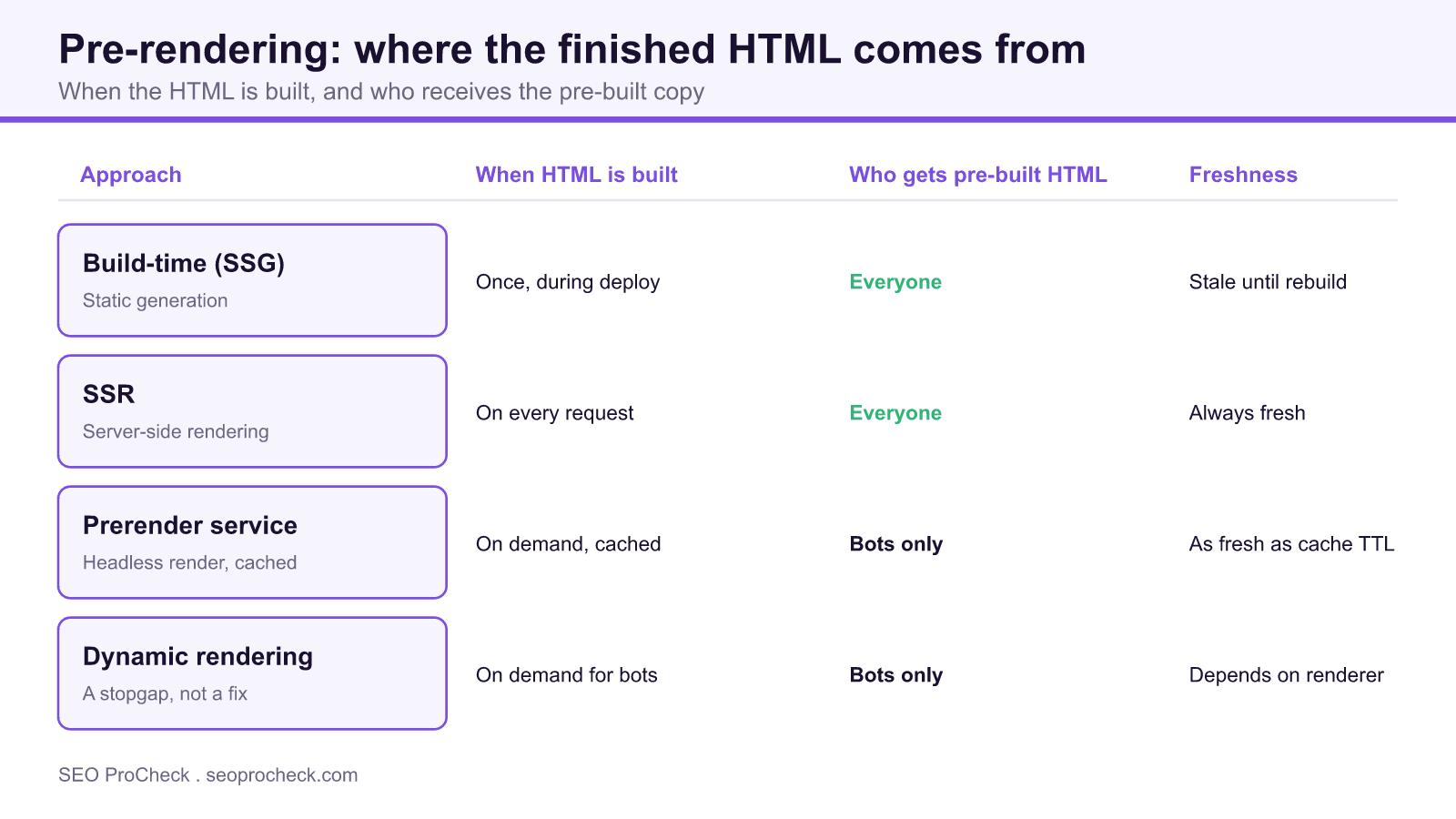
- Build time (SSG) bakes HTML at deploy, SSR builds it on every request, and both serve the same output to users and bots.
- Prerender services and dynamic rendering serve pre built HTML to bots only, which Google treats as a stopgap, not a destination.
- Many AI crawlers do not run JavaScript, so pre rendered HTML is what makes your content visible to them.
- Pre-rendering helps LCP and indexing but does not fix INP, since interactivity still waits on hydration.
Pre-rendering is generating a page's full HTML ahead of the request, so the content is ready and complete before anyone (human or crawler) asks for it. It matters because a JavaScript app that renders in the browser can serve a near-empty shell to bots, and pre-rendering is the cheapest way to make sure the words are actually in the HTML.
The term covers two related things people often confuse: build-time pre-rendering (static generation, where HTML is baked during your build and served from a CDN) and on-demand pre-rendering services like Prerender.io that run a headless browser, cache the rendered HTML, and hand that cached copy to crawlers. Both put finished HTML in front of the requester instead of asking the browser to build it.
Pre-rendering vs. SSR vs. dynamic rendering
These three get used interchangeably in stand-ups and they should not be. The difference is when the HTML is built and who gets the pre-built version.
| Approach | When HTML is built | Who gets pre-built HTML | Freshness | Typical use |
|---|---|---|---|---|
| Build-time pre-rendering (SSG) | Once, during deploy | Everyone | Stale until next build (unless ISR) | Docs, blogs, marketing, catalogs |
| SSR (server-side rendering) | On every request | Everyone | Always fresh | Logged-in, personalized, fast-changing data |
| Prerender service (e.g. Prerender.io) | On demand, then cached | Bots only (users still get the SPA) | As fresh as the cache TTL | Legacy SPA you cannot re-architect yet |
| Dynamic rendering | On demand for detected bots | Bots only (by user-agent) | Depends on the renderer | Google calls it a workaround, not a fix |
Google's own guidance treats dynamic rendering as a stopgap, not a long-term architecture. If you can serve the same pre-rendered HTML to users and bots (SSG or SSR), do that instead of forking behavior by user-agent.
A real build-time example
Here is Next.js generating static HTML for a set of blog posts at build time. Every URL in getStaticPaths becomes a finished .html file on the CDN:
export async function getStaticPaths() {
  const posts = await fetchPostSlugs();
  return {
    paths: posts.map(slug => ({ params: { slug } })),
    fallback: 'blocking', // new URLs render on first hit, then cache
  };
}

export async function getStaticProps({ params }) {
  const post = await fetchPost(params.slug);
  // HTML is produced now, at build time, not in the visitor's browser
  return { props: { post }, revalidate: 3600 }; // ISR: refresh hourly
}
The revalidate line is Incremental Static Regeneration: you keep the speed of pre-rendered HTML but let it refresh on a schedule, which solves the "static content goes stale" complaint without moving to full SSR.
How to check pre-rendering on your own site
- Fetch the raw HTML with no JavaScript.
curl -sL -A "Googlebot" https://yoursite.com/page | grep "your headline". If the text is there, the page is pre-rendered (or server-rendered). If you get an empty shell, it is not. - Compare bot vs. browser response. Fetch the same URL with a Googlebot user-agent and a normal one. If the HTML differs, you are on dynamic rendering or a prerender service, so audit both paths for parity.
- Use URL Inspection in Search Console. Check the rendered HTML and confirm your content and internal links are present without relying on the render queue.
- Check response headers and timing. Static pages usually come off a CDN with cache headers; SSR shows higher, request-time TTFB. This tells you which mechanism is actually serving the page.
- Verify freshness. Change a piece of content, redeploy or wait for the cache TTL, and confirm the pre-rendered copy updated. A page that never refreshes is a stale-cache bug waiting to happen.
Common mistakes and how to fix them
- Serving stale pre-rendered HTML. Build-time HTML from three weeks ago still shows last month's prices. Fix: use ISR, on-demand revalidation, or scheduled rebuilds so the cache reflects reality.
- Prerender cache mismatch. The bot version (from the prerender service) says one thing; the user's SPA says another. That is a cloaking risk and a trust problem. Fix: keep both in sync and audit the cached HTML regularly.
- Pre-rendering only some routes. Teams pre-render the homepage and forget deep product or article pages, which are exactly the ones that need organic traffic. Fix: enumerate every indexable route and confirm each returns real HTML.
- Treating dynamic rendering as permanent. It is a bridge, not a destination. Fix: plan the migration to SSR or SSG so users and bots eventually get the same pre-rendered output.
- Forgetting hydration still runs. Pre-rendered HTML is inert until the client framework hydrates it. Fix: budget for hydration cost separately; pre-rendering solves indexing, not interactivity.
Frequently asked questions
Is pre-rendering the same as server-side rendering?
Related but not identical. SSR builds the HTML fresh on every request. Pre-rendering (in the strict sense) builds it ahead of time, either at deploy for everyone or on demand and cached for bots. Both hand over finished HTML; the difference is timing and freshness.
Does pre-rendering help with AI crawlers, not just Google?
Yes, and arguably more. Many AI crawlers do not execute JavaScript at all, so if your content only exists after client-side rendering, they see nothing. Pre-rendered HTML gives every bot the text directly, which is why server-side output matters for GEO as much as classic SEO.
Will Google penalize dynamic rendering?
Not as long as the bot and user versions carry the same content; serving genuinely different content to bots is cloaking and that is a problem. Google labels dynamic rendering a workaround and steers you toward SSR or static generation, but it is not against the rules when done honestly.
When should I use a prerender service instead of rebuilding?
When you have inherited a client-side SPA you cannot re-architect this quarter and you need crawlers to see content now. A prerender service is a fast bandage. Budget the real fix (SSR or SSG) as a follow-up so you are not maintaining a bot-only cache forever.
Does pre-rendering fix Core Web Vitals?
It helps LCP because meaningful content paints immediately from HTML rather than after a JavaScript round trip. It does not automatically fix INP, since interactivity still waits on hydration. Treat pre-rendering as a load-and-indexing win, and handle responsiveness separately.
Related reading: Prerendering as a Stopgap for JavaScript SEO, JavaScript and AI Search: Why Server-Side Rendering Matters for GEO, JavaScript for SEO Checklist.
Take this with you
The assistant links open with a question about this page already written. Nothing is sent until you press enter.
Claude Vincent is a technical SEO consultant focused on crawlability, rendering, and AI-search visibility. He writes the field guides and case studies at SEO ProCheck, with a bias toward the durable, unglamorous work that decides whether search engines and AI answer engines can actually read and cite a site.
About SEO ProCheck
Technical SEO consulting and GEO strategy with 20 years of enterprise experience. Case studies, resources, and tools for search and AI visibility.
Work With Me
Technical SEO audits, GEO strategy, site migrations, and international SEO. Hourly consulting for teams who need hands-on support, not just reports.
Subscribe to our newsletter!








Recent Posts
- Most Top Sites Never Say Who They Are in Structured Data October 14, 2026
- Homepage Titles Are Mostly Too Short, Not Too Long October 8, 2026
- Who Actually Serves an llms.txt? 184 Top Sites Measured September 29, 2026