

AI Summary
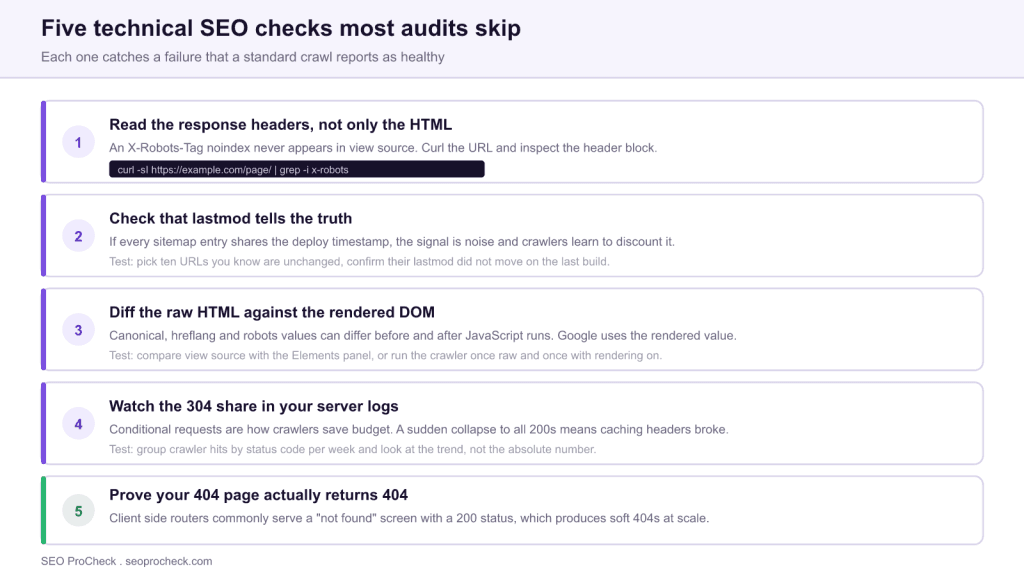
Standard technical SEO audits check the HTML, and most of the failures that actually cost traffic do not live in the HTML. These five checks look at the HTTP response, the rendered DOM and the server logs, which is where a site can be broken while every crawl report comes back green.
- An X-Robots-Tag noindex in the response header is invisible in view source and can silently deindex a whole directory.
- If every sitemap entry carries the deploy timestamp, your lastmod signal is noise and gets discounted.
- Canonical, hreflang and robots values can differ between raw HTML and the rendered DOM. Google uses the rendered one.
- A 404 page that returns a 200 status produces soft 404s at scale, which is a default behaviour of many client side routers.

Technical SEO checklists converge. Run three different audit tools on the same site and you get three versions of the same report: title lengths, missing alt attributes, redirect chains, heading order. That overlap is not a criticism, those things matter. But it means the checks everybody runs are also the checks everybody has already fixed, and the problems that survive are the ones the standard report cannot see.
The five below share a common property: in each case the crawl report says the page is fine and the page is not fine. They are unusual not because they are exotic, but because they require looking somewhere other than the rendered HTML of a single page.
Crawlability Essentials
Read the response headers, not only the HTML
Indexing directives can be delivered two ways: a meta robots tag in the HTML head, or an X-Robots-Tag in the HTTP response header. They are equally binding. Only the first one is visible in view source, and only the first one is what most page level audits inspect.
The failure mode is severe because headers are usually set at the server, CDN or edge worker level, which means they apply to whole directories at once. A rule added during a staging deployment and never removed will quietly hold an entire section out of the index while your crawl report shows every page as indexable.
curl -sI https://example.com/resources/whitepaper.pdf | grep -i "x-robots"
Run it against a sample from every directory, not just the homepage, and include your non HTML assets. PDFs are where header directives hide most often, because a PDF has no head section to put a meta tag in. If you need the full directive syntax and how conflicts resolve, see the meta robots and X-Robots-Tag reference. If the problem turns out to be a block rather than a directive, the robots.txt reference covers the other half.
Check that lastmod tells the truth
The lastmod element in an XML sitemap is a request for attention: it tells a crawler this URL changed and is worth refetching. Google has been explicit that it only uses the value when it finds it consistently accurate.
Most sitemap generators break this by default. They stamp every entry with the time of the last build, so a deploy that changed one template rewrites the modification date of forty thousand URLs that did not change. Once that pattern is established the signal is worthless, and the site loses a legitimate mechanism for getting genuinely updated pages recrawled quickly.
Testing it takes five minutes. Pick ten URLs you are certain have not been edited in months, note their current lastmod value, trigger a deploy, and check again. If the values moved, your generator is lying on your behalf. The fix is to source lastmod from the content modification date in the database rather than from the build process, and to omit the element entirely rather than emit a value you cannot stand behind.
Indexation Optimization
Diff the raw HTML against the rendered DOM
Google indexes the rendered page. Auditing the raw HTML therefore tells you what the server intended, not what gets indexed, and the two diverge more often than teams expect. Tag managers inject canonical tags. Consent and personalization scripts rewrite head elements. Single page application frameworks set robots meta values on route change. Third party widgets add their own markup.
The check is a comparison, not an inspection. Fetch the raw HTML, then capture the rendered DOM, and diff four specific values:
- The canonical URL
- The robots meta content
- The complete hreflang annotation set
- The count of internal links in the main content
In a crawler, the practical version is to run the site twice, once with JavaScript rendering off and once with it on, then compare the two exports on those columns. Any URL where they disagree is worth reading manually. Rendering behaviour and how to diagnose it in depth is covered in the JavaScript SEO and rendering guide.
Prove your 404 page actually returns 404
A soft 404 is a page that says it does not exist while returning HTTP 200. Search engines then have to infer the truth from the content, and they spend crawl budget doing it. At scale the result is a large set of URLs that are neither properly removed nor properly indexed.
This is the default behaviour of most client side routers. The server matches any path, returns the app shell with a 200, and JavaScript renders a not found screen. It looks correct to a human and is wrong to a crawler.
curl -sI https://example.com/this-page-does-not-exist-12345/ | head -n 1
You want HTTP/2 404. Test more than one shape of bad URL, because routing often differs between a missing top level path, a missing nested path, a missing path with a file extension, and a URL with an unmatched query parameter. Also confirm that permanently removed pages return 404 or 410 rather than redirecting to the homepage, which is a redirect that search engines will treat as a soft 404 anyway. Redirect behaviour worth checking alongside this is covered in redirect chains and loops.
Performance and Experience
Watch the 304 share in your server logs
When a crawler has seen a URL before, it can send a conditional request carrying If-Modified-Since or If-None-Match. If nothing changed, the server answers 304 Not Modified with no body. The crawler saves bandwidth, your server saves work, and the crawl budget goes further.
This only functions if your responses carry usable Last-Modified or ETag headers. Caching layers, security plugins and CDN configuration changes routinely strip or randomize them, and nothing in a standard audit will tell you it happened. The symptom is visible only in the logs: the proportion of crawler requests answered with 304 collapses, and every fetch starts returning a full 200 response.
Track the ratio over time rather than the absolute number, since the absolute number moves with crawl volume. A sharp drop that coincides with a release is the signal. The fix is usually restoring a stable ETag, and the trap to avoid is an ETag derived from something that changes on every request, such as a timestamp or a server node identifier, which technically exists but never matches.
The five checks at a glance
| Check | Where you look | What a normal audit reports | The failure it hides |
|---|---|---|---|
| 1. Response headers | HTTP response, per directory and per file type | Page is indexable | X-Robots-Tag noindex applied at server or CDN level to a whole directory |
| 2. Lastmod honesty | XML sitemap across two deploys | Sitemap is valid | Every URL restamped on build, so the signal is discounted |
| 3. Raw versus rendered | Two crawls, one with rendering on | Canonical and robots tags present | Injected or overwritten values that differ from the served HTML |
| 4. 304 share in logs | Server access logs, crawler user agents only | Site responds quickly | Broken validators forcing full refetches and burning crawl budget |
| 5. Real 404 status | HTTP status of deliberately bad URLs | No broken links found | Soft 404s from a client side router returning 200 for everything |
Why standard audits miss all five
There is a pattern here worth naming. Every one of these checks requires either a second observation to compare against, or a data source outside the page itself.
The header check needs the response, not the document. The lastmod check needs two points in time. The rendering check needs two versions of the same page. The 304 check needs logs and a trend. The 404 check needs you to request a URL that does not exist, which no crawler following links will ever do on its own.
Audit tools are built to crawl a set of URLs and evaluate each one against rules. That design is efficient and it structurally cannot catch a problem defined by a difference between two observations. Which is the practical takeaway: when you are looking for what your tooling missed, look for the checks that require comparison rather than inspection.
FAQ
Because the directive can be delivered in the HTTP response instead, as an X-Robots-Tag header. It never appears in view source, so it survives page level review indefinitely. It is commonly applied at the server or CDN level to a whole directory and then forgotten.
It does not carry a direct penalty, but it destroys the usefulness of the signal. Google has said it ignores lastmod values it finds unreliable, so a site that stamps every URL with the build timestamp gives up a legitimate way to request faster recrawling of genuinely updated pages.
A soft 404 is a page that tells the user it does not exist while returning a 200 status code. Search engines have to guess, and the guess costs crawl budget and can pull junk URLs into the index. Client side routers produce these by default unless the server is configured to return a real 404.
No, that is the healthy state. A 304 means the crawler asked whether the page changed and the server said no, which is cheap for both sides. Worry about the opposite: a sudden shift to all 200 responses usually means your caching headers broke.
Because Google indexes the rendered result. Scripts, tag managers and third party widgets can inject or overwrite canonical, hreflang and robots values after the raw HTML is served, so the value you reviewed is not necessarily the value that counts.
The response header check, because it takes seconds and the failure mode is total. A directory wide noindex delivered by header removes pages from search entirely while every page level audit tool reports them as healthy.
Take this with you
The assistant links open with a question about this page already written.
Claude Vincent is a technical SEO consultant focused on crawlability, rendering, and AI-search visibility. He writes the field guides and case studies at SEO ProCheck, with a bias toward the durable, unglamorous work that decides whether search engines and AI answer engines can actually read and cite a site.
About SEO ProCheck
Technical SEO consulting and GEO strategy with 20 years of enterprise experience. Case studies, resources, and tools for search and AI visibility.
Work With Me
Technical SEO audits, GEO strategy, site migrations, and international SEO. Hourly consulting for teams who need hands-on support, not just reports.
Subscribe to our newsletter!








Recent Posts
- Google Algorithm Updates: The Dated List Since 2003, and What to Do After Each October 31, 2026
- AI Readiness: The Checklist, the Research and the Free Tools October 28, 2026
- AI Readiness Checklist (2026): 51 Checks, Each With Its Source October 28, 2026