

AI Summary
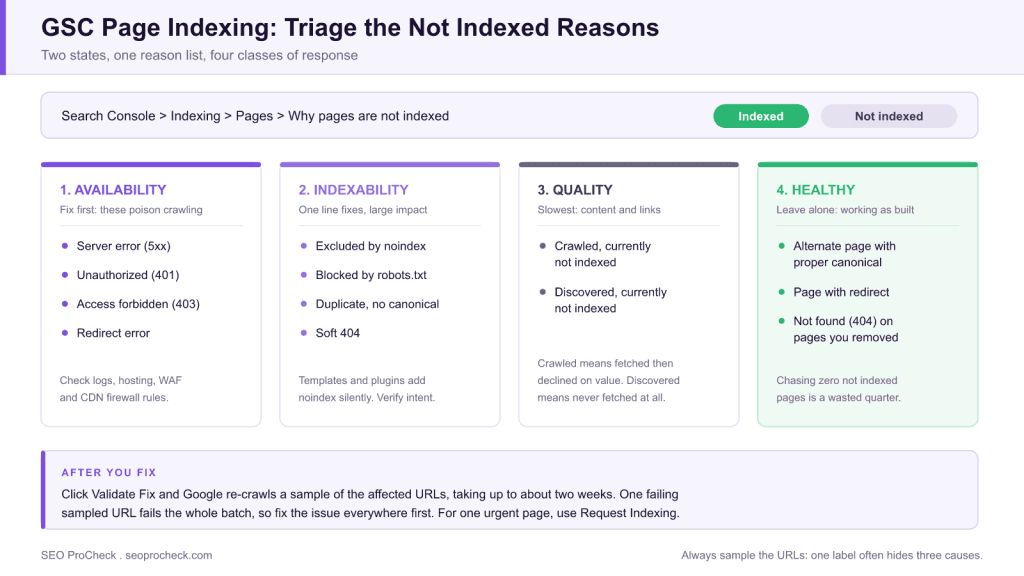
Index coverage errors are diagnosed today in Google Search Console under Indexing then Pages, the Page indexing report that replaced the old Index Coverage report in 2022. Read the "Why pages aren't indexed" reason list, sample the affected URLs with URL Inspection, fix the cause site-wide, then click Validate Fix.
- There are now two top-level states, Indexed and Not indexed, instead of the old four buckets.
- Fix availability errors first (5xx, 401, 403, redirect errors): they poison crawling beyond the affected URLs.
- "Crawled, currently not indexed" is a quality verdict, not a technical toggle.
- Many exclusions are healthy. Chasing a zero in the Not indexed column is a wasted quarter.
Quick answer: Index coverage errors are diagnosed today in Google Search Console under Indexing, then Pages (the "Page indexing" report, which replaced the old Index Coverage report in 2022). The workflow is always the same three steps: read the "Why pages aren't indexed" reason list, sample the affected URLs with the URL Inspection tool to confirm the cause, fix the underlying issue site-wide, then click Validate Fix so Google re-crawls the group. The critical skill is knowing which reasons are genuine errors and which are healthy exclusions you should leave alone.
Where the Report Lives Now
The source below, ContentKing's academy guide, was written against the old Index Coverage report with its four buckets (Error, Valid with warnings, Valid, Excluded). Google replaced that layout in 2022 with the Page indexing report: left navigation, then Indexing, then Pages. There are now only two top-level states, Indexed and Not indexed, with a "Why pages aren't indexed" table listing each reason, its page count, and its trend. The old "warnings" concept is gone; robots.txt conflicts surface under "Improve page appearance" and in the reason list. The diagnostic logic of the original guide still holds, and only the labels and paths changed. (ContentKing itself was acquired by Conductor in 2022 and the product now lives under the Conductor brand, so expect the source URL to redirect.)
Reading the "Why Pages Aren't Indexed" Reasons
| Reason (current GSC label) | What it means | Action |
|---|---|---|
| Not found (404) | URL returns 404/410 | Fine for genuinely removed pages; redirect if a replacement exists; fix internal links pointing there |
| Page with redirect | URL redirects elsewhere | Normal after migrations; only act if the URL should be indexable |
| Excluded by 'noindex' tag | Page carries a noindex directive | Verify intent, because templates and plugins add these silently; see our meta robots and X-Robots-Tag reference |
| Alternate page with proper canonical tag | Google honored your canonical | Healthy exclusion, so leave it alone |
| Duplicate without user-selected canonical | Duplicates with no canonical declared | Add canonicals; consolidate or differentiate the duplicates |
| Duplicate, Google chose different canonical than user | Google overruled your canonical | Investigate: your canonical target is likely too similar, weakly linked, or inconsistent with redirects/sitemaps |
| Crawled - currently not indexed | Crawled, then declined on quality/value grounds | Content problem, not technical: enrich thin pages, strengthen internal links, consolidate near-duplicates |
| Discovered - currently not indexed | Known but not yet crawled | Crawl prioritization problem: improve internal linking and sitemap hygiene; on large sites, crawl budget |
| Soft 404 | Page returns 200 but looks like an error/empty page | Return a real 404/410, or add genuine content; see our soft 404 guide |
| Blocked by robots.txt | Crawling disallowed | Intended? Fine. If not, fix the disallow rule, and remember robots.txt blocks crawling, not indexing |
| Blocked due to unauthorized request (401) / access forbidden (403) | Server refuses Googlebot | Check auth walls, WAF/bot-protection rules, and CDN firewall settings |
| Server error (5xx) | Server failed during crawl | Check logs and hosting capacity; persistent 5xx suppresses crawling site-wide |
| Redirect error | Loop, chain too long, or broken redirect | Flatten chains to a single hop; fix loops |
A Practical Triage Order
- Fix availability errors first (5xx, 401/403, redirect errors) because they poison crawling beyond the affected URLs.
- Then indexability mistakes (unintended noindex, wrong robots.txt disallows, bad canonicals), which are usually one-line fixes with large impact.
- Then quality exclusions ("Crawled - currently not indexed" is the big one), the slowest to resolve because the fix is better content and stronger internal linking, and Google re-evaluates on its own schedule.
- Ignore healthy exclusions. "Alternate page with proper canonical" and "Page with redirect" on migrated URLs are the system working. Chasing a zero in the Not-indexed column is a fool's errand, because every real site has legitimate exclusions.
Two habits make the report far more useful. First, always sample: click a reason, export the URLs, and inspect a handful with URL Inspection, because the aggregate label often hides two or three distinct causes. Second, cross-check against your sitemaps: filter the report to "All submitted pages" so you judge indexing against the URLs you actually care about, not every parameter variant Google ever discovered. Our XML sitemaps reference covers keeping that submitted set clean.
Reading the Trend Line, Not the Number
A single count in the Not indexed column tells you almost nothing on its own. The same 4,000 excluded URLs can be perfectly healthy on one site and an emergency on another. What carries the signal is the shape of the change, and each shape points at a different cause:
| What the trend looks like | Most likely cause | First thing to check |
|---|---|---|
| Vertical cliff in Indexed, same day | A deployment shipped a site-wide directive or a robots.txt change | Diff robots.txt and the template head against the release, then URL Inspect a sample |
| Steady climb in "Crawled, currently not indexed" | Publishing volume outpacing page quality, or near-duplicate templates | Sample ten of the URLs and ask honestly whether each deserves its own page |
| Steady climb in "Discovered, currently not indexed" | Crawl prioritization: new URLs generated faster than Google chooses to fetch them | Click depth from the homepage, sitemap freshness, and server response times in logs |
| Spike in "Page with redirect" plus a matching Indexed drop | A migration or URL structure change working as intended | Confirm the destination URLs are climbing in the Indexed count |
| Spike in Server error (5xx) that resolves itself | Hosting capacity or a rate limit hit during a crawl burst | Server logs for the exact window, and crawl rate against response time |
| Slow drift up in "Duplicate, Google chose different canonical" | Parameter URLs or pagination generating near-identical pages | Whether internal links, sitemaps, and canonicals all point at the same URL |
The single most useful habit here is annotating your own releases. When you can line up a cliff in the Indexed count against a deployment date, diagnosis takes minutes instead of a week of theorizing. Without that record, every drop looks like an algorithm update, and teams tend to reach for content rewrites when the real culprit was a template change nobody flagged.
What's Changed Since the Original Guide
Beyond the report redesign, the substance shifted: indexing became selective. Google now routinely declines to index crawlable, technically-clean pages it judges low-value, which is why "Crawled - currently not indexed" has grown from a curiosity into the dominant complaint on thin or templated sites. The old mental model ("fix the errors and everything indexes") no longer holds; the report is now as much a content-quality dashboard as a technical one. Validation flows also matured: the Validate Fix button tracks a sample of affected URLs over roughly two weeks and emails pass/fail. That is useful but slow, so for urgent single pages use URL Inspection's Request Indexing instead.
FAQ
It was renamed and redesigned in 2022. It is now the Page indexing report, under Indexing then Pages in the left navigation, with an Indexed and Not indexed split instead of the old four buckets.
Treat it as a quality verdict: substantially enrich the page, link to it from stronger pages, and consolidate near-duplicate siblings. There is no technical toggle, because Google re-evaluates only after the page genuinely improves.
Discovered means Google knows the URL but has not fetched it, which is a crawl-priority issue. Crawled means Google fetched it and chose not to index it, which is a value or quality issue. The fixes are completely different.
Mostly no. Redirected URLs, canonicalized alternates, and intentionally noindexed pages are healthy exclusions. Only reasons that contradict your intent, such as blocked pages you want indexed or a noindex you did not place, need fixing.
Typically up to about two weeks. Google re-crawls a sample of affected URLs and marks the validation Passed or Failed; a failure on any sampled URL fails the batch, so fix the issue everywhere before starting validation.
Canonicals are hints. When Google picks a different canonical, it usually found stronger conflicting signals: internal links, redirects, or sitemap entries pointing at the other URL, or pages too similar to distinguish. Align all signals and the choice normally follows.
This resource contributes to the knowledge base SEO practitioners need for effective optimization in an evolving search landscape.
Take this with you
The assistant links open with a question about this page already written. Nothing is sent until you press enter.
Claude Vincent is a technical SEO consultant focused on crawlability, rendering, and AI-search visibility. He writes the field guides and case studies at SEO ProCheck, with a bias toward the durable, unglamorous work that decides whether search engines and AI answer engines can actually read and cite a site.
About SEO ProCheck
Technical SEO consulting and GEO strategy with 20 years of enterprise experience. Case studies, resources, and tools for search and AI visibility.
Work With Me
Technical SEO audits, GEO strategy, site migrations, and international SEO. Hourly consulting for teams who need hands-on support, not just reports.
Subscribe to our newsletter!








Recent Posts
- Most Top Sites Never Say Who They Are in Structured Data October 14, 2026
- Homepage Titles Are Mostly Too Short, Not Too Long October 8, 2026
- Who Actually Serves an llms.txt? 184 Top Sites Measured September 29, 2026