

Google Search Console Search Analytics API gains Discover, News and Regex
- November 11, 2021
- General
AI Summary
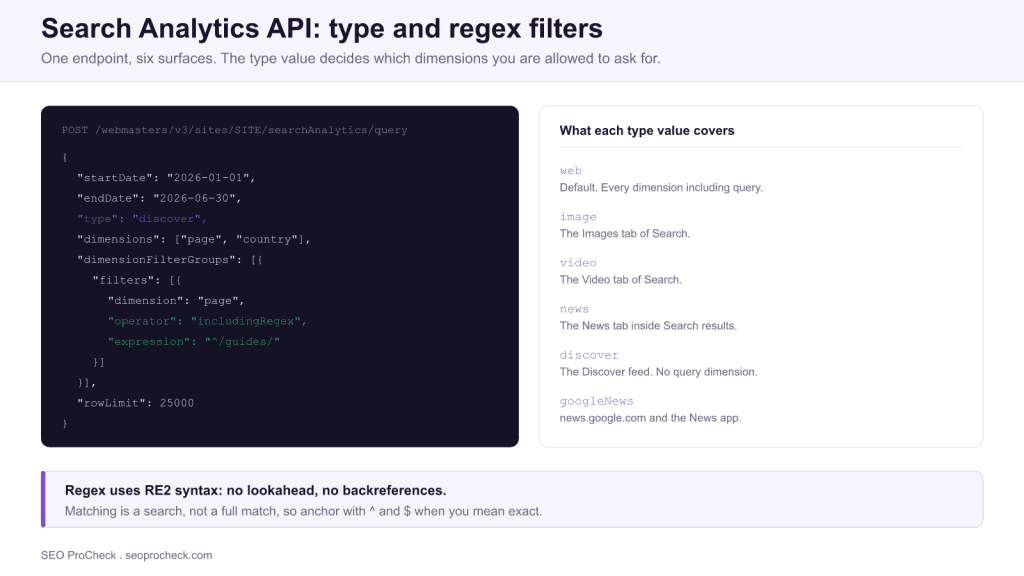
The Search Console Search Analytics API gained Discover and Google News as queryable surfaces plus regex filters on the query and page dimensions. That combination is what makes programmatic, surface separated reporting possible, because it lets one request target a single surface and a single URL pattern instead of pulling everything and filtering afterwards.
- The
typeparameter selects the surface:web,image,video,news,discover,googleNews. - Discover has no query dimension, because there is no query behind it.
- Regex filters use RE2: no lookahead, no backreferences, and case sensitive unless you prefix
(?i). - 25000 rows per request, roughly 16 months of history. Beyond that, use the BigQuery bulk export.
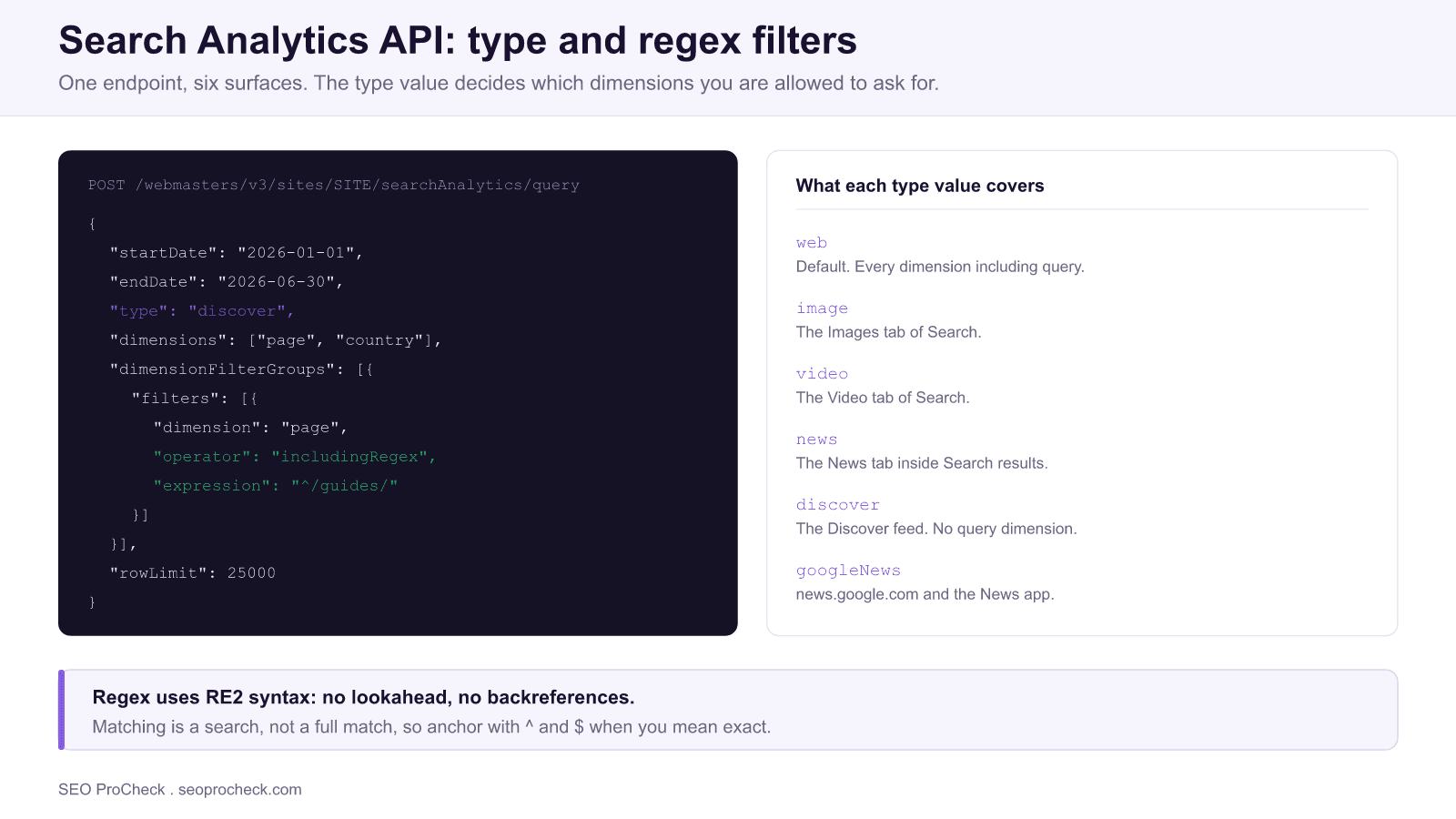
The addition of Discover, Google News and regex filtering to the Search Analytics API, reported in the Search Engine Land article linked at the end of this page, looked like a minor capability note at the time. It was actually the change that made honest reporting practical, because it is the point at which you can ask the API a precise question instead of downloading everything and reconstructing the answer in a spreadsheet.
This page covers what the parameters actually do, the constraints that bite in production, and the query patterns worth having on hand.
The request, parameter by parameter
Everything happens in one POST to the searchAnalytics.query endpoint. The body is where all the decisions live.
| Parameter | What it does | Practical notes |
|---|---|---|
type | Selects the surface | Defaults to web. Omitting it is why most reports silently exclude Discover |
dimensions | How rows are grouped | query, page, country, device, date, searchAppearance. Availability depends on type |
dimensionFilterGroups | Filters rows before aggregation | Holds the regex operators. Groups combine, filters within a group can be ANDed |
rowLimit | Rows per response | Maximum 25000 |
startRow | Pagination offset | Increment by rowLimit until a short page comes back |
dataState | Whether to include fresh, incomplete data | all includes recent partial days, final does not. Mixing them across reports causes phantom trends |
aggregationType | How metrics are consolidated | byPage or byProperty. Changing it changes your totals, so fix it once |
The type parameter is the one that quietly determines whether a report is trustworthy. Because it defaults to web, a dashboard built without thinking about it reports Search only, and a publisher whose Discover traffic halved will see a chart that looks broadly stable. Any reporting layer intended to explain traffic changes needs to pull each surface as a separate series.
Understanding AI Content Consumption
Discover deserves a section of its own, because it is the surface that behaves least like search and the one this API change made measurable.
Discover has no query, which is not a data gap but a description of the mechanism. Google is predicting what an individual will want to read without being asked, so the selection is driven by inferred interest, entity level authority and engagement rather than by matching a string. That is algorithmic recommendation, and it is the closest thing in the Google ecosystem to how an AI system decides what is worth surfacing on a user's behalf: no explicit request, a model deciding relevance, and the publisher never seeing the intent that triggered it.
The practical consequence is that Discover performance has to be analysed with different dimensions and different expectations. Without a query dimension, your levers are page and date, which means the analysis is about which content types and which publication patterns get picked up, not which keywords won. Volatility that would signal a penalty in web search is normal behaviour in Discover, and treating a Discover swing as an SEO incident is one of the most common misdiagnoses in publisher reporting. Reporting on the two together, unsplit, guarantees that error.
Optimization Approaches
Three query patterns cover most of what teams actually need.
Separate the surfaces. Run the same date range once per type value that applies to your site and store the results as distinct series. This is the foundation, and it is the step that turns "traffic is down" into "Discover is down and web is flat".
Group queries with regex instead of exporting everything. Filtering server side keeps you inside the row limit and makes the grouping logic explicit and reviewable rather than buried in a spreadsheet formula.
{
  "startDate": "2026-01-01",
  "endDate": "2026-06-30",
  "type": "web",
  "dimensions": ["query"],
  "dimensionFilterGroups": [{
    "filters": [{
      "dimension": "query",
      "operator": "includingRegex",
      "expression": "(?i)^(how|what|why|when|which|where) "
    }]
  }],
  "rowLimit": 25000
}
Two details in that snippet matter more than they look. The (?i) prefix makes the pattern case insensitive, and without it you will miss a substantial share of matching queries. The ^ anchor is required because RE2 matching here behaves as a search rather than a full match, so an unanchored pattern matches anywhere in the string.
The same operator applied to the page dimension gives you section level reporting without maintaining a URL list, which is the practical way to report on a content hub as it grows. For a deeper treatment of pattern design, including the branded and non branded split, see using regex in Google Search Console.
Watch the RE2 limits. Lookahead, lookbehind and backreferences are absent by design, since RE2 guarantees linear time matching. Patterns that depend on them are rejected outright rather than running slowly, and the usual rewrite is an alternation list or two passes instead of one clever expression. Very long alternation lists can also exceed the accepted expression length, so a pattern that grows every time a brand variant is added will eventually need restructuring.
What has changed since this was published
The article this page is built on documented the original capability addition. Several relevant things have happened since, and they change the recommended approach.
- Regex filters reached the Search Console interface as well. Patterns can be prototyped in the UI and then moved into API calls, which is a much faster loop than debugging expressions through API responses.
- A bulk data export to BigQuery arrived in 2023. This is the significant one. It streams daily performance data into your own BigQuery dataset with no row limit and no sampling, which makes it the correct choice for any site large enough to be paginating heavily. The API remains the right tool for targeted questions and for keeping history beyond the retention window in your own store.
- The retention window did not move. Roughly 16 months remains the ceiling, so long term trend analysis still depends on you exporting and warehousing the data yourself. This is worth setting up before it is needed, since data outside the window cannot be recovered afterwards.
If you are building an extraction pipeline rather than running one off queries, the wider workflow is covered in reading the page indexing report for the coverage side, and connecting GA4 and Search Console for joining performance data to behaviour.
Strategic Implications
The reason this API matters is that it decides what your organisation is able to notice. A reporting layer that pulls only the default web type cannot see a Discover collapse, and a team that cannot see it will attribute the traffic loss to whatever is culturally salient that quarter. That is how content strategies get rebuilt on top of a misdiagnosis.
Surface separated reporting is cheap to build once and expensive to retrofit during an incident. The same applies to warehousing: the 16 month window means the historical baseline you will want during your next major traffic event is being permanently discarded right now unless something is already exporting it.
The broader pattern is that measurement granularity is becoming a competitive input rather than a hygiene task. As discovery fragments across more surfaces, each with its own selection mechanism, the aggregate number becomes less interpretable every year. Teams that can decompose it will diagnose correctly and respond proportionately, and teams that cannot will keep responding to the wrong thing.
Frequently asked questions
Because there is no query. Discover is a feed that surfaces content based on predicted interest rather than something a user typed, so the query dimension does not exist for that surface. You can still break Discover performance down by page, date, country and device.
The news type covers the News tab inside a Google Search results page, so it is still search behaviour with a query behind it. The googleNews type covers news.google.com and the Google News app, which is a separate product with its own surface. Publishers frequently attribute a change to the wrong one because they only ever pull the default web type.
RE2, which is the same engine used elsewhere at Google. It deliberately omits lookahead, lookbehind and backreferences in exchange for guaranteed linear time matching, so patterns that rely on those features will be rejected rather than run slowly. Character classes, alternation, quantifiers and capture groups all work normally.
Yes by default, which surprises people comparing branded query variants. Prefix the pattern with the inline flag (?i) to make the rest of it case insensitive. That one change usually accounts for a large gap between an expected and an actual branded query total.
A single request returns at most 25000 rows, and you page through larger result sets with the startRow parameter. If you routinely need more than a few pages, the bulk data export into BigQuery is a better fit because it removes the row ceiling and the sampling behaviour entirely.
Search Console retains roughly 16 months of performance data, and the API cannot reach beyond that window regardless of how you construct the request. If you need longer history you have to export and store it yourself, which is the main argument for setting up a scheduled export before you need the data rather than after.
Take this with you
The assistant links open with a question about this page already written. Nothing is sent until you press enter.
Claude Vincent is a technical SEO consultant focused on crawlability, rendering, and AI-search visibility. He writes the field guides and case studies at SEO ProCheck, with a bias toward the durable, unglamorous work that decides whether search engines and AI answer engines can actually read and cite a site.
About SEO ProCheck
Technical SEO consulting and GEO strategy with 20 years of enterprise experience. Case studies, resources, and tools for search and AI visibility.
Work With Me
Technical SEO audits, GEO strategy, site migrations, and international SEO. Hourly consulting for teams who need hands-on support, not just reports.
Subscribe to our newsletter!








Recent Posts
- Most Top Sites Never Say Who They Are in Structured Data October 14, 2026
- Homepage Titles Are Mostly Too Short, Not Too Long October 8, 2026
- Who Actually Serves an llms.txt? 184 Top Sites Measured September 29, 2026