


AI Summary
Google Discover is a queryless feed, so optimization means maximising eligibility and click appeal rather than targeting keywords. The levers are large image previews, entity-clear headlines that are not clickbait, demonstrable topical authority, and fast indexable mobile pages.
- Set
max-image-preview:largesitewide and use lead images at least 1200px wide. - Only indexed pages are eligible. There is no submission process and no markup that opts you in.
- The Discover report sits at Performance then Discover in Search Console, and has no query dimension.
- Feed traffic is spiky by design: treat Discover as upside on top of search, never as a forecast baseline.
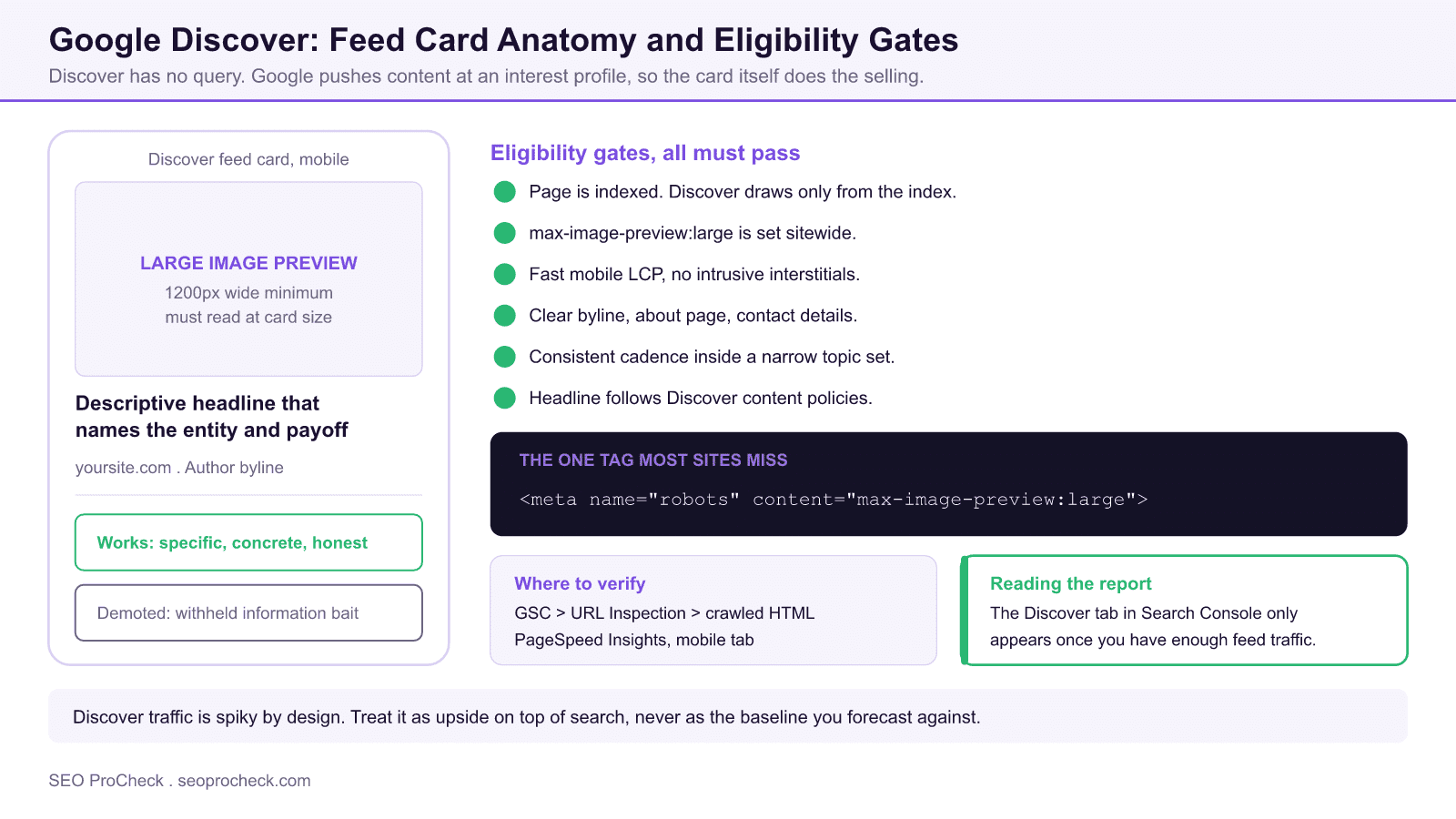
Google Discover is Google's queryless feed on mobile: you can't target keywords, so optimization means maximizing eligibility and click appeal, large images served via max-image-preview:large, entity-clear headlines that aren't clickbait, demonstrable topical authority, and fast, indexable mobile pages. Performance is measured only in Search Console's dedicated Discover report, and traffic arrives in spikes rather than the steady curve you see from Search.
Understanding Google Discover
Google Discover represents a critical component of modern SEO strategy. As search engines continue to evolve and user expectations shift, understanding the nuances of google discover becomes essential for maintaining and improving organic visibility. This guide covers the key concepts, implementation approaches, and strategic considerations that SEO practitioners need to master.
What makes Discover fundamentally different from Search: there is no query. Google matches content to a user's inferred interests (built from search history, followed topics, and app activity), so classic keyword optimization has nothing to grip. There is no special feed, no markup that "submits" you, and no way to force inclusion: any indexed page is technically eligible. In practice, Discover overwhelmingly surfaces fresh content from sites Google associates strongly with a topic, which is why the tactics below are split into eligibility mechanics you control directly and authority signals you build over time.
Discover Optimization Checklist
Work through these in order: the technical rows are binary and take an afternoon; the content rows are ongoing.
| Factor | What to do | Where to verify |
|---|---|---|
| Large image previews | Add <meta name="robots" content="max-image-preview:large"> sitewide (or via your SEO plugin, which usually sets it by default) | View source; GSC URL Inspection → crawled page HTML |
| Image dimensions | Lead image at least 1200px wide, compelling at feed-card size; avoid logo-only or text-heavy images | Featured image file properties; og:image tag |
| Indexability | Page must be indexed: Discover only draws from the index | GSC URL Inspection: "URL is on Google" |
| Headline quality | Descriptive title that names the entity and the payoff; no withheld-information clickbait ("You won't believe…"), which Google's Discover policies explicitly demote | Editorial review against Google's Discover content policies |
| Freshness | Publish or substantially update on a consistent cadence within your topic; Discover heavily favors recent content | Publication dates; GSC Discover report date pattern |
| Topical authority | Concentrate publishing on a small number of topics until Google reliably ranks you for them, rather than spreading across many verticals | GSC Search performance by query cluster |
| Author and site transparency | Clear bylines, about page, contact info: the same E-E-A-T page-experience signals Google documents for Discover | Manual site review |
| Mobile experience | Fast LCP on mobile, no intrusive interstitials; virtually all Discover traffic is mobile | PageSpeed Insights (mobile); CrUX data in GSC Core Web Vitals report |
| Feed presence | Google publisher presence helps topic association; an RSS/Atom feed no longer plays a Discover role, since Google removed the Follow feature and its feed guidance; Web Stories are separately Discover-eligible | Feed validator; GSC |
Discover and Search Are Not the Same Product
Most Discover mistakes come from applying Search habits to a surface that does not work like Search. The differences that change your tactics:
| Dimension | Google Search | Google Discover |
|---|---|---|
| Trigger | A query the user types | An inferred interest profile, with no query at all |
| Intent | Stated by the searcher | Inferred by Google from history, follows, and app activity |
| Reporting dimension | Queries, pages, countries, devices | Pages, countries, devices. No query dimension exists |
| Role of the image | Optional, often a thumbnail | The dominant element of the card and the main click driver |
| Freshness weighting | Varies by query, many results are evergreen | Strongly favours recent and recently updated content |
| Traffic shape | Relatively stable, seasonal | Spiky. Large bursts that decay toward zero within days |
| How you influence it | Target queries and match intent | Earn eligibility, then win the card on image and headline |
Discover eligibility rests on the same foundations as the rest of your search program, so the diagnostic work overlaps. A page that never enters the index cannot enter the feed, which makes discovered, currently not indexed the first report to clear. Because the feed is close to entirely mobile, mobile performance is a live constraint rather than a nicety, and Interaction to Next Paint is the field metric that most often exposes it. For judging whether a piece is strong enough to deserve feed distribution at all, apply the rubric in measuring content quality objectively.
Key Considerations for Google Discover Optimization Tactics
When approaching google discover, several factors require careful attention. Technical implementation must align with broader SEO objectives while maintaining site performance and user experience. The balance between optimization and over-optimization requires ongoing monitoring and adjustment based on performance data and algorithm changes. Industry benchmarks and competitor analysis provide context for evaluating your own implementation.
The consideration teams most often miss: Discover traffic is inherently volatile. A page can pull a large share of a month's sessions in 48 hours and then go to zero: that is normal feed behavior, not a penalty. Plan editorial and revenue expectations around spikes, and never present Discover as a stable acquisition channel in forecasts. The second is content-type fit: evergreen how-to content can surface in Discover, but the feed skews hard toward timely angles: a fresh development, a seasonal hook, an updated take. If your library is evergreen, systematic refreshes with genuinely updated substance (and an honest updated date) are your main lever.
Implementation Best Practices
Successful implementation begins with thorough auditing of current state and clear goal definition. Document baseline metrics before making changes to enable accurate impact measurement. Prioritize changes based on potential impact and implementation effort, focusing on high-impact items first. Test changes in staging environments when possible, and monitor closely after deployment to production. Maintain documentation of changes for future reference and troubleshooting.
For Discover specifically, the audit sequence is: (1) confirm the technical checklist above sitewide; (2) pull your GSC Discover report (Performance → Discover: the report only appears once the site has meaningful Discover impressions) and note which pages have ever surfaced; (3) reverse-engineer the pattern (topic, image style, headline construction, publish timing) and produce more content matching that pattern; (4) log every Discover spike in an annotations sheet with the URL, date, and traffic, because the report only retains 16 months and spike patterns are your best planning data.
Common Mistakes to Avoid
Several patterns consistently cause problems in google discover implementations. Rushing implementation without proper planning leads to errors that can be costly to fix. Ignoring the interplay between different SEO factors creates conflicts that undermine results. Failing to monitor and iterate based on performance data means missing optimization opportunities. Over-optimization signals can trigger algorithmic penalties that take months to recover from.
Discover-specific failure modes: drifting into clickbait headlines to chase CTR (Google's Discover policies target exactly this, and sites see feed visibility collapse); cropping or compressing hero images below the size that qualifies for large cards; publishing outside your established topical lane and diluting the site's topic association; and misreading the natural end of a traffic spike as a penalty and "fixing" things that weren't broken.
Measuring Success
Effective measurement requires defining appropriate KPIs aligned with business objectives. Track both leading indicators (rankings, impressions, technical metrics) and lagging indicators (traffic, conversions, revenue) to build a complete picture. Establish reasonable timeframes for evaluation, as SEO changes often take weeks or months to fully manifest in results. Compare performance against historical baselines and competitor benchmarks to contextualize results.
The Discover scorecard lives in Search Console: Performance → Discover gives clicks, impressions, and CTR by page and date (no query dimension exists, by design). In GA4, isolate the traffic under Reports → Acquisition → Traffic acquisition: Discover sessions arrive attributed to google / organic mixed with Search, so the GSC Discover report is the only clean source of truth; use GA4 for downstream behavior (engagement, conversions) on the URLs GSC identifies. Sensible KPIs: number of distinct URLs that surfaced in Discover per month, total Discover clicks per quarter, and Discover CTR trend: per-day traffic is too spiky to target.
Strategic Recommendations
Approach google discover as an ongoing program rather than a one-time project. Build processes for regular auditing, monitoring, and optimization. Stay current with industry developments and algorithm changes that may affect your strategy. Invest in education for team members to build internal capabilities. Consider how google discover fits within your broader digital marketing and business strategy for maximum impact.
Treat Discover as amplification on top of a search-first content program, never as the primary channel: everything that earns Discover eligibility (authority, freshness, strong images, clean technical foundation) also compounds in organic Search, so the work is never wasted even in months when the feed sends nothing.
Frequently Asked Questions
How do I get my content into Google Discover?
You can't submit to Discover: any indexed page is automatically eligible. What moves the odds: strong 1200px+ imagery with max-image-preview:large enabled, clear non-clickbait headlines, fresh content in a topic where your site already demonstrates authority, and a fast mobile experience. Then publish consistently and let the feed find you.
Where do I see Google Discover traffic in Search Console?
Performance → Discover, a separate report from Search results. It only appears in the left navigation once your site has accumulated meaningful Discover impressions. It shows clicks, impressions, and CTR by page, country, and appearance type, but no queries, because Discover has none.
Why did my Google Discover traffic suddenly drop to zero?
Usually because a content spike naturally expired: Discover surfaces items for a short window and moves on, so zero after a spike is normal. A sustained drop across all content is different: check for a shift toward clickbait-style headlines, image quality regressions, a core update coinciding with the drop, or indexing problems, roughly in that order.
Does Discover use keywords or search queries?
No. Discover matches content to users' inferred interests, not typed queries, which is why the GSC Discover report has no query dimension. Optimize for entities and topics (make it unambiguous who and what the piece is about in the headline, opening paragraph, and structured data) rather than for keyword strings.
What image size does Google Discover require?
Google's documentation asks for large, high-quality images at least 1200px wide, with the site opted into large previews via the max-image-preview:large robots setting (most SEO plugins output this by default). Small images relegate you to thumbnail cards, which get materially fewer clicks in the feed.
Does evergreen content appear in Discover?
It can, but the feed strongly favors freshness. The reliable pattern for evergreen libraries is substantive refreshes (updated data, new sections, a current angle) republished with an honest updated date. A cosmetic date bump without real changes does not work and erodes trust signals.
Take this with you
The assistant links open with a question about this page already written. Nothing is sent until you press enter.
Claude Vincent is a technical SEO consultant focused on crawlability, rendering, and AI-search visibility. He writes the field guides and case studies at SEO ProCheck, with a bias toward the durable, unglamorous work that decides whether search engines and AI answer engines can actually read and cite a site.
About SEO ProCheck
Technical SEO consulting and GEO strategy with 20 years of enterprise experience. Case studies, resources, and tools for search and AI visibility.
Work With Me
Technical SEO audits, GEO strategy, site migrations, and international SEO. Hourly consulting for teams who need hands-on support, not just reports.
Subscribe to our newsletter!








Recent Posts
- Most Top Sites Never Say Who They Are in Structured Data October 14, 2026
- Homepage Titles Are Mostly Too Short, Not Too Long October 8, 2026
- Who Actually Serves an llms.txt? 184 Top Sites Measured September 29, 2026