

AI Summary
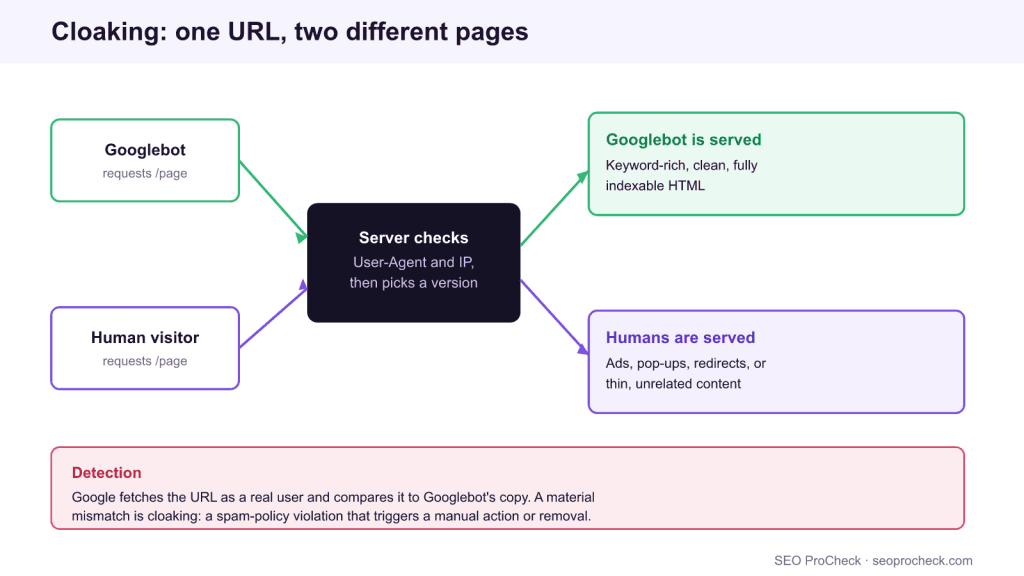
Cloaking means showing search engines one version of a page and human visitors another version at the same URL. Google treats a material difference between what Googlebot fetches and what a real user sees as a spam-policy violation, so the technique risks a manual action or full removal from search.
- Cloaking is defined by intent to deceive plus a material content difference, not by any single technique.
- robots.txt only governs crawlers, so you cannot “disallow humans”: feeding bots one page while blocking or redirecting people is still cloaking.
- Responsive design, equivalent dynamic serving, and declared paywalls are not cloaking, because the underlying content matches.
- Google’s live URL Inspection test renders the page as Googlebot, which is how most mismatches surface in seconds.
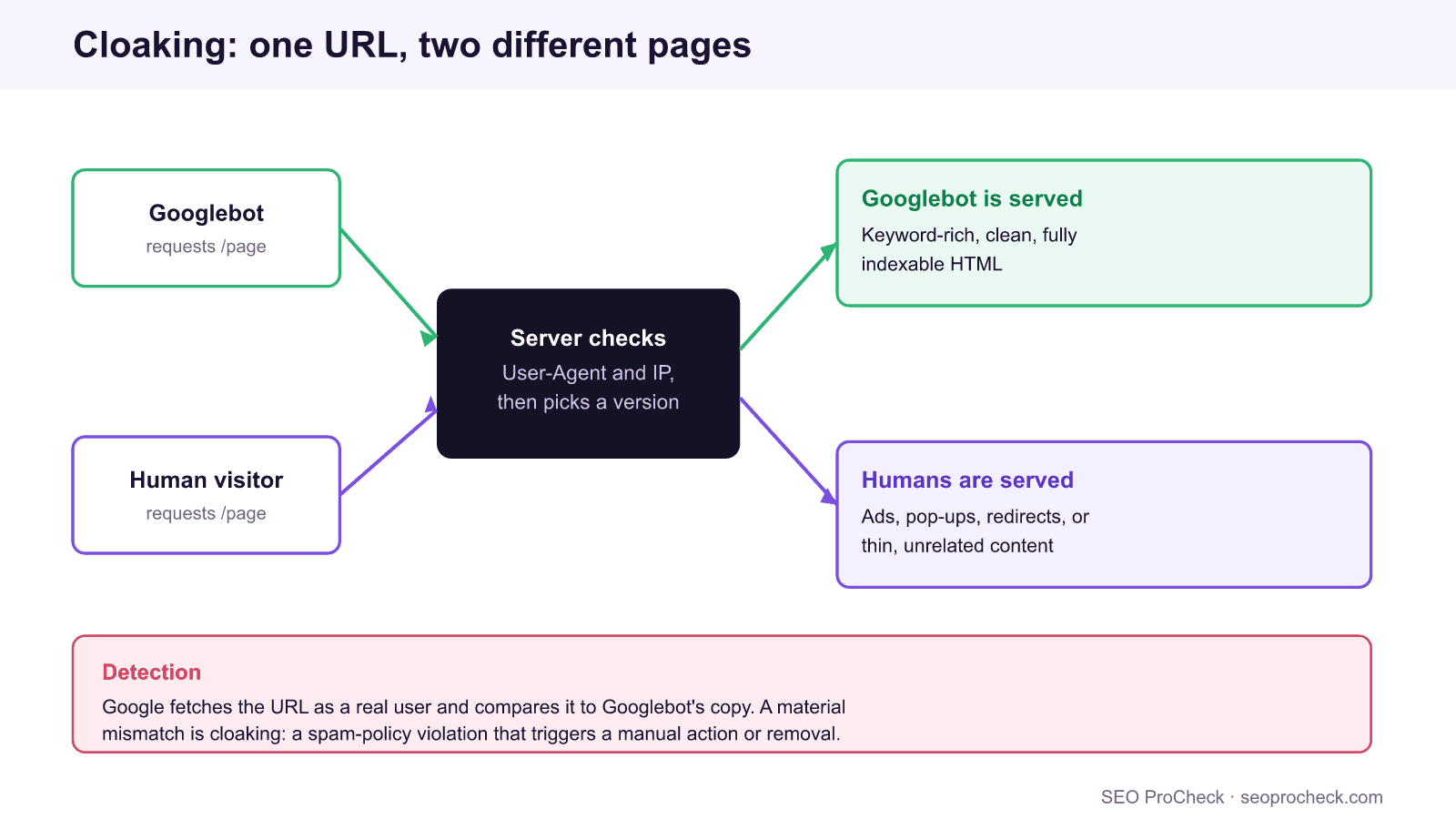
The title of the case study this page points to, “Disallow Humans,” is a joke with a serious core. You cannot write a robots.txt rule that hides a page from people while showing it to Googlebot, and every clumsy attempt to do something like it lands in the same bucket: cloaking. Cloaking is the practice of serving search engines different content, or a different URL, than you serve to the humans who click through from the results. It is one of the oldest spam techniques on the web, and it remains one of the fastest ways to get a page or a whole domain removed from Google.
This walkthrough covers what actually counts as cloaking, the bright line that separates it from legitimate content variation like responsive design and geo-redirects, exactly how Google detects a mismatch, and what recovery looks like if a site is already caught. The underlying rule has not moved in years, even as rendering has improved: what Googlebot sees and what a signed-out visitor sees must be materially the same.
This SEO case study documents a successful optimization initiative, providing actionable insights for practitioners. The documented approach demonstrates how strategic SEO implementation drives measurable results.
Initial Situation
Understanding the starting point is essential context for evaluating any case study. This documentation covers the initial challenges, competitive position, and business objectives that shaped the SEO strategy.
Strategy and Approach
The strategic approach combined multiple SEO disciplines to address identified opportunities. Key decisions around prioritization and resource allocation provide a template for similar initiatives.
Implementation
Moving from strategy to execution required specific technical implementations, content development, and process changes. This case study documents the practical steps that translated strategy into action.
Results and Learnings
The outcomes demonstrate effectiveness through measurable improvements in rankings, traffic, and business metrics. Analysis of successes and challenges provides learning value for practitioners.
Case studies like this contribute to the SEO knowledge base, helping practitioners learn from documented real-world experiences.
What cloaking actually is
Cloaking has two ingredients, and both have to be present. The first is a material difference between the content served to a crawler and the content served to a user. The second is the intent to gain a ranking or click advantage from that difference. A page that detects Googlebot by user-agent string or by IP range, then swaps in keyword-stuffed copy, hides a redirect, or replaces an article with an affiliate landing page, satisfies both. So does the reverse trick some sites try: showing a rich, indexable article to the crawler while gating real visitors behind an interstitial, a login wall with no structured-data declaration, or an unrelated offer.
The detection surface is usually one of two signals. User-agent sniffing keys on the crawler’s reported identity, and IP-based cloaking keys on Google’s published crawler address ranges. Both are trivially reversible by Google, because the crawler can request the same URL from a different user-agent and a different network and compare the responses.
Why you cannot “disallow humans” and still rank
robots.txt is a set of instructions for automated crawlers. It has no mechanism to identify a human, and honoring it is voluntary even for bots. There is no User-agent: humans token. So the moment you try to give people a different experience than the crawler while keeping the crawler’s version in the index, you have stopped using robots.txt and started cloaking. The full syntax and every real directive live in the complete robots.txt reference, and none of them separate people from bots.
This matters because the intent behind cloaking is nearly always to rank for something the real page does not deliver. Google’s answer is simple and old: it evaluates the page as a user would experience it. If the indexed version and the lived version diverge in a way that would change a searcher’s decision, the indexed version is the fiction, and the fiction is what gets penalized.
Cloaking versus legitimate content variation
Plenty of sites serve slightly different bytes to different requests without cloaking. The deciding question is always the same: would a reasonable user feel deceived if they saw what Googlebot was shown? The table sorts the common cases.
| Technique | Cloaking? | Why |
|---|---|---|
| Detect Googlebot, swap in keyword-rich copy or a redirect | Yes | Material difference plus intent to mislead the crawler |
| Responsive design (one HTML payload, CSS adapts by viewport) | No | Every request receives the same content |
Dynamic serving of mobile and desktop HTML with Vary: User-Agent | No | Layout differs but the content is equivalent for all clients |
| Geo-redirect users by IP; Googlebot (a US client) sees the US page | No, if consistent | Google is treated as any US visitor would be; do not special-case the crawler |
Declared paywall using isAccessibleForFree and flexible sampling | No | The difference is disclosed through an approved program |
| Show text to Googlebot, an image-only or empty shell to users | Yes | Indexed content the visitor never receives |
| Hide sections behind a “read more” toggle in the same HTML | No | The content ships in the response; it is only visually collapsed |
The safe patterns share one trait: the content Google indexes is the content a person actually gets. For the grey-area cases, our notes on the Vary header and caching and on geo IP blocking cover how to vary responses without crossing into cloaking.
How Google detects the mismatch
You do not need Google’s internal tooling to reproduce its detection. Three checks catch almost every cloaked page, and they are the same three an auditor runs.
1. Fetch as a bot and as a browser, then diff. Request the URL with a Googlebot user-agent and again as a normal client, and compare the HTML that comes back:
curl -s -A "Googlebot" https://example.com/page > bot.html
curl -s https://example.com/page > user.html
If bot.html and user.html carry different main content, you have found cloaking by user-agent. Repeat from a non-Google IP to catch IP-based variants.
2. Run the live URL Inspection test in Search Console. The live test renders the page exactly as Googlebot does and shows the resulting HTML and screenshot. Compare that screenshot to what you see in an incognito browser. Any content that appears for the crawler but not the human, or the reverse, is the smoking gun.
3. Read the rendered DOM, not just view-source. Some cloaking hides in JavaScript that behaves differently for the crawler. Open the rendered HTML from URL Inspection and confirm the main content matches the user experience.
| Signal Google can use | How you reproduce it |
|---|---|
| Different response to Googlebot user-agent | curl with and without -A "Googlebot", then diff |
| Different response to Google crawler IP ranges | Request from a Google Cloud IP versus a residential IP |
| Rendered content differs from raw HTML | URL Inspection live test, View crawled page → rendered HTML |
| User reports and spam reports | Manual review comparing indexed snippet to the live page |
Consequences and recovery
Cloaking is listed directly in Google’s spam policies. The outcomes range from an algorithmic demotion to a manual action labelled “Cloaking and sneaky redirects,” which appears in the Search Console Manual Actions report and can suppress a single template, a directory, or the entire domain. Recovery is not a negotiation. You remove every path where the crawler and the user diverge, confirm parity with the three checks above, and only then file a reconsideration request that documents exactly what changed. Sites that try to keep a “lighter” version of the trick almost always get re-flagged, because the same diff that caught them the first time still returns a mismatch.
The practical takeaway is the one the source case study makes with humor: stop trying to outguess the crawler. Serve one honest page, make it genuinely good, and let responsive design and declared programs handle the legitimate reasons a response might vary. If you want the formal definition and the policy text, see the cloaking entry in our technical SEO glossary.
FAQ
Cloaking is showing search engines different content or a different URL than you show to human visitors at the same address, in order to influence rankings. It is defined by a material difference plus the intent to deceive, and Google classifies it as a spam-policy violation.
Yes. Cloaking is named explicitly in Google’s spam policies. Depending on scope it can trigger an algorithmic demotion or a manual action called “Cloaking and sneaky redirects” that removes affected pages from search.
No, as long as the content is equivalent. Responsive design sends one HTML payload that adapts with CSS, and dynamic serving sends device-specific HTML with a Vary: User-Agent header. Neither hides content from users that the crawler is shown, so neither is cloaking.
Google can request a URL as Googlebot and again as an ordinary client, from different IP ranges, and compare the responses. It also renders the page and compares that to the raw HTML. You can reproduce all of this with curl and the live URL Inspection test in Search Console.
Expect a ranking demotion or a manual action. To recover you must remove every case where the crawler and the user receive materially different content, verify parity, and file a reconsideration request that explains the fix. Partial cleanups usually get re-flagged.
No. robots.txt only addresses automated crawlers and has no way to identify a person, so there is no method to “disallow humans.” Trying to give people a different page than the crawler while keeping the crawler’s version indexed is itself cloaking.
Not sure whether your site serves crawlers and users the same page?
A technical audit fetches your key templates as Googlebot and as a user, then flags any material mismatch before it costs you rankings.
Source: https://ohgm.co.uk/bad-cloaking/
Take this with you
The assistant links open with a question about this page already written.
Claude Vincent is a technical SEO consultant focused on crawlability, rendering, and AI-search visibility. He writes the field guides and case studies at SEO ProCheck, with a bias toward the durable, unglamorous work that decides whether search engines and AI answer engines can actually read and cite a site.
About SEO ProCheck
Technical SEO consulting and GEO strategy with 20 years of enterprise experience. Case studies, resources, and tools for search and AI visibility.
Work With Me
Technical SEO audits, GEO strategy, site migrations, and international SEO. Hourly consulting for teams who need hands-on support, not just reports.
Subscribe to our newsletter!








Recent Posts
- Google August 2026 Spam Update: Dates, Duration and How to Read Your Data November 2, 2026
- Google Algorithm Updates: The Dated List Since 2003, and What to Do After Each October 31, 2026
- AI Readiness: The Checklist, the Research and the Free Tools October 28, 2026