

AI Summary
A Valid with warnings status in the old Coverage report, most often Indexed though blocked by robots.txt, means Google indexed a URL it is not allowed to crawl, so the listing is weak. Fix it by deciding whether the page belongs in the index, then either allow crawling to keep it or allow crawling plus a noindex tag to remove it.
- The warning means a URL is indexed but blocked from crawling in robots.txt.
- Google usually finds such URLs through external or internal links.
- A noindex tag is useless while the page is blocked, because Google cannot read the tag.
- Google retired the Valid with warnings label when Coverage became the Page Indexing report.
This SEO case study documents a successful optimization initiative, providing actionable insights for practitioners. The documented approach demonstrates how strategic SEO implementation drives measurable results.
Initial Situation
Understanding the starting point is essential context for evaluating any case study. This documentation covers the initial challenges, competitive position, and business objectives that shaped the SEO strategy.
Strategy and Approach
The strategic approach combined multiple SEO disciplines to address identified opportunities. Key decisions around prioritization and resource allocation provide a template for similar initiatives.
Implementation
Moving from strategy to execution required specific technical implementations, content development, and process changes. This case study documents the practical steps that translated strategy into action.
Results and Learnings
The outcomes demonstrate effectiveness through measurable improvements in rankings, traffic, and business metrics. Analysis of successes and challenges provides learning value for practitioners.
Case studies like this contribute to the SEO knowledge base, helping practitioners learn from documented real-world experiences.
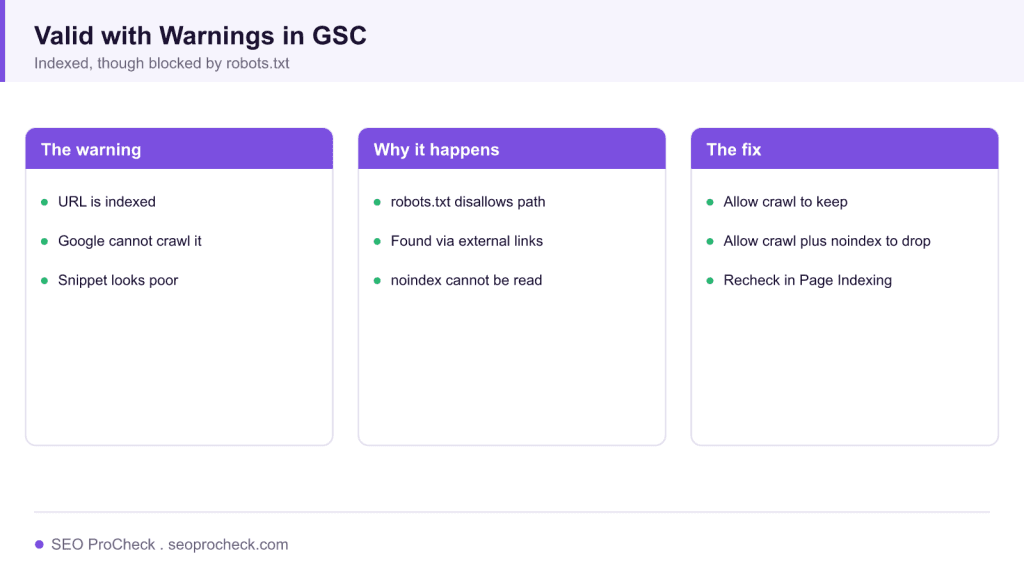
What the warning meant
Valid with warnings was a status in the old Index Coverage report. It meant a URL was in Google's index but had a condition worth your attention. By far the most common case was Indexed, though blocked by robots.txt: Google had listed the URL, usually after finding it through links, but your robots.txt disallowed crawling, so Google never read the page. The result is a live listing with a poor or missing snippet and no control over how the page appears.
Why it happens
Indexing and crawling are separate steps. A disallow rule in robots.txt stops crawling, but it does not stop indexing, because Google can index a URL from links alone without fetching it. That leads to the trap many teams fall into: they add a noindex tag to keep a page out of the index, then also block it in robots.txt. Google cannot see the noindex tag on a page it is not allowed to crawl, so the page stays indexed with the warning. The two directives work against each other.
How to fix it
Start by deciding whether the page belongs in the index. If you want it indexed, remove the disallow rule so Google can crawl and render it, then request validation. If you want it out, do the opposite of the common mistake: allow crawling in robots.txt and add a robots noindex tag on the page, so Google can crawl the URL, read the noindex, and drop it. Our meta robots and x-robots-tag reference shows both the meta tag and the header form for pages that are not HTML.
A related warning, a disallowed resource such as a script or stylesheet, can also weaken rendering. If Google cannot fetch a file the page needs, the rendered version may be incomplete, which our note on a disallowed JavaScript file explains. Confirm the current state and reasons in the Search Console Page Indexing report, then use the URL Inspection tool to fetch the live URL and validate the fix.
What has changed since
Google replaced the Index Coverage report with the Page Indexing report and retired the Valid and Valid with warnings labels. The same underlying issue now appears as its own reason, Indexed though blocked by robots.txt, under the not fully indexed or excluded groupings. The cause and the fix are unchanged, only the wording and the report layout moved. For the definition of the tool itself, see our lexicon entry on Google Search Console.
Common Search Console warnings and how to resolve them
| Warning | What it means | Fix |
|---|---|---|
| Indexed, though blocked by robots.txt | Indexed but not crawlable | Allow crawl to keep, or allow crawl plus noindex to remove |
| Page indexed without content | Crawled but content not seen | Check rendering and blocked resources |
| Duplicate without canonical | Google chose a different canonical | Set a clear canonical and consolidate |
| Blocked resource affecting render | A needed file is disallowed | Allow the script or style file in robots.txt |
Frequently asked questions
What does Indexed, though blocked by robots.txt mean?
Google has the URL in its index but your robots.txt blocks crawling, so Google never read the page. The listing usually shows a poor snippet and you have little control over how it appears.
How do I remove a page that is blocked by robots.txt?
Do not rely on the block. Allow crawling in robots.txt and add a robots noindex tag on the page. Google can then crawl the URL, read the noindex, and drop it from the index.
Why does a noindex tag not work here?
A noindex tag lives on the page, so Google must crawl the page to see it. If robots.txt blocks crawling, Google never reads the tag and the page stays indexed.
Where did Valid with warnings go in Search Console?
Google replaced the Index Coverage report with the Page Indexing report and retired the Valid with warnings label. The same issues now appear as named reasons in the new report.
Should I block low value pages in robots.txt?
Blocking prevents crawling but not indexing, and it can leave thin listings. To keep pages out of the index, allow crawling and use noindex, or return a 404 or 410 if the page should not exist.
How do I confirm the warning is fixed?
Use the URL Inspection tool to fetch the live URL, confirm the intended directive is read, then request validation in the Page Indexing report and monitor the status over the next crawl cycles.
Source: https://gentofsearch.com/blog/uncrawled-urls-in-google-search/
Claude Vincent is a technical SEO consultant focused on crawlability, rendering, and AI-search visibility. He writes the field guides and case studies at SEO ProCheck, with a bias toward the durable, unglamorous work that decides whether search engines and AI answer engines can actually read and cite a site.
About SEO ProCheck
Technical SEO consulting and GEO strategy with 20 years of enterprise experience. Case studies, resources, and tools for search and AI visibility.
Work With Me
Technical SEO audits, GEO strategy, site migrations, and international SEO. Hourly consulting for teams who need hands-on support, not just reports.
Subscribe to our newsletter!







Recent Posts
- Can AI Crawlers Actually Read Your Site? I Measured 400 of the Biggest September 5, 2026
- The Pre-Publish Quality Gate for AI-Assisted Content August 6, 2026
- AGENTS.md vs llms.txt vs llms-full.txt: Which Agent File Does What July 18, 2026