

Adobe's SEO strategy to get 7.5M traffic for a single product! Network of feature pages
- January 5, 2022
- Growth
AI Summary
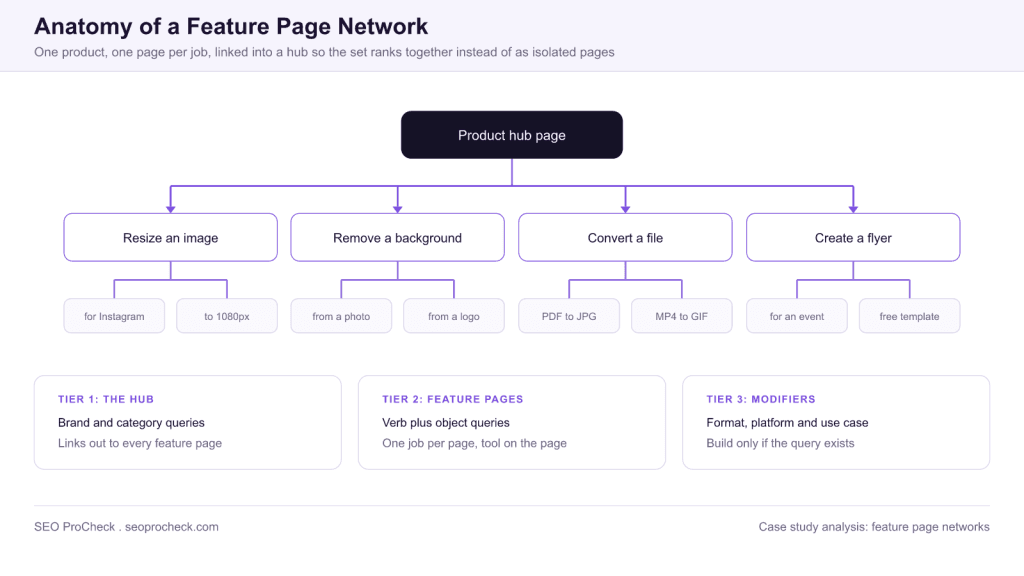
This case study covers a network of feature pages built around a single product, where each page targets one job the product performs rather than the product as a whole. The pattern works because search demand for software is shaped as verb plus object, resize an image or remove a background, and a page that lets the visitor do that job matches the intent better than a page that describes the product.
- One page equals one job, expressed the way people actually search for it.
- A hub page links to every feature page, so the set accumulates authority as a network.
- Third tier modifier pages get built only where a distinct query genuinely exists.
- Let visitors complete the core job before asking for an account, or the pages convert nothing.
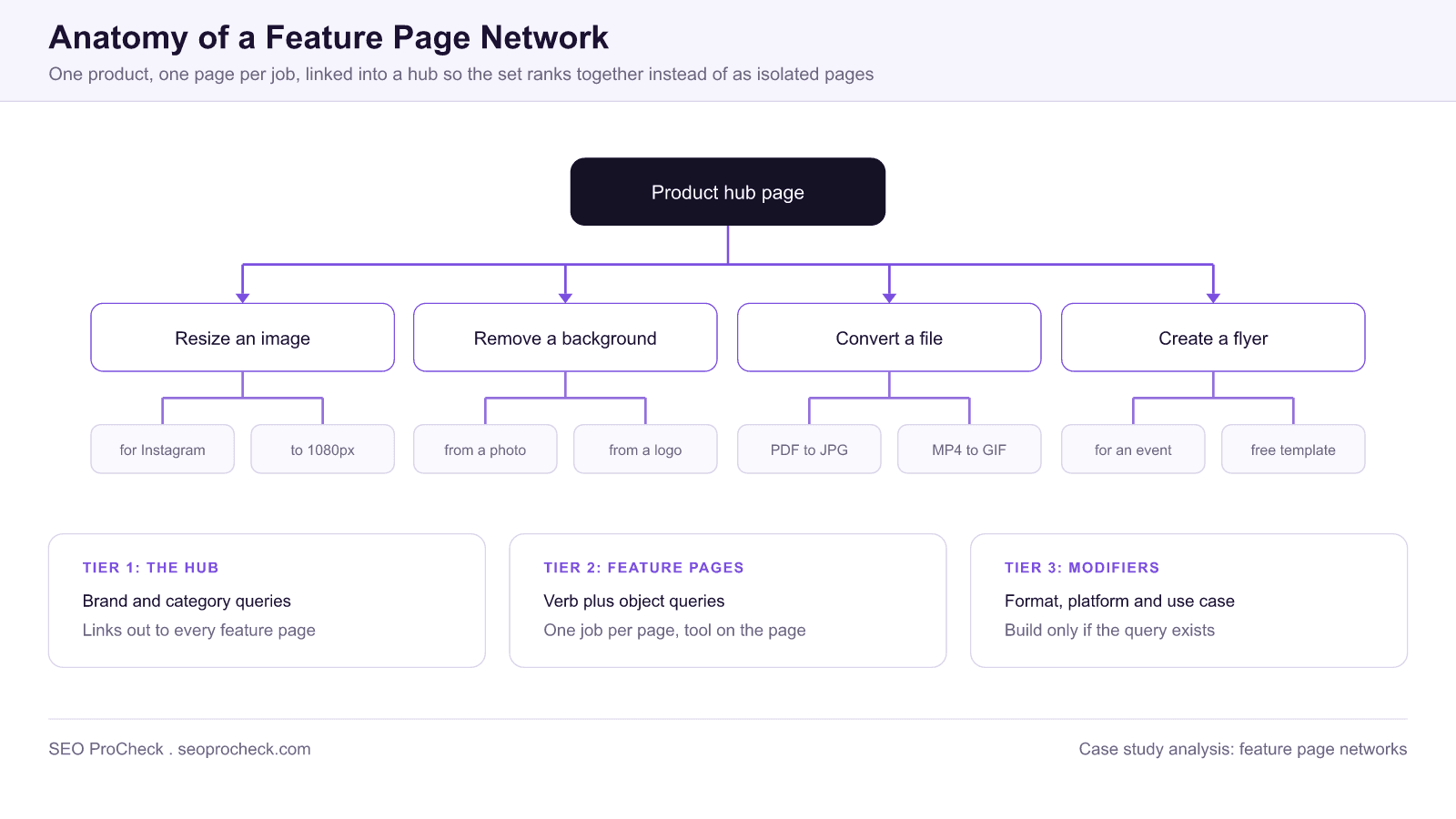
A feature page network turns one product into a large number of ranking pages by mapping each capability to the query pattern people use to search for it. The structure is three tiers: a hub for the product and category terms, feature pages for verb plus object jobs, and modifier pages for formats, platforms and use cases where a distinct query exists. The discipline that keeps it out of thin content territory is one page per job, with the job actually doable on the page. Interlink every feature page to the hub and to close siblings, keep titles and on page copy specific to the job, and check Search Console regularly for two pages showing up for one query, which is the signal to merge.
The case study below is summarised from the original source, credited in full at the end of the summary. What follows is the operating detail: how to derive the job list, what has to be on a feature page for it to compete, how the three tiers link together, and the reports that catch the two characteristic failures, cannibalisation and thin modifier pages.
This case study documents a successful organic growth strategy, demonstrating how strategic SEO implementation drives measurable business results. The approach provides actionable insights for practitioners facing similar challenges.
Challenge and Context
Every successful SEO initiative begins with understanding the starting position and objectives. This case study reveals the initial challenges, competitive landscape, and business goals that shaped the strategy. Understanding context helps practitioners assess applicability to their own situations.
Strategic Approach
The methodology employed combined technical optimization, content strategy, and authority building in a coordinated approach. Key decisions around prioritization, resource allocation, and tactical execution provide a template for similar initiatives. The strategy balanced quick wins with sustainable long-term growth.
Implementation Details
Moving from strategy to execution required specific technical implementations, content creation processes, and measurement frameworks. This case study documents the practical steps taken, tools used, and workflows developed. These implementation details help practitioners translate strategy into action.
Results and Analysis
The outcomes demonstrate the effectiveness of the approach through measurable metrics: traffic growth, ranking improvements, and business impact. Analysis of what worked best and what could have been done differently provides learning value beyond the raw results.
This case study contributes to the evidence base for effective SEO strategy, helping practitioners learn from documented successes.
Source: https://buildd.co/marketing/adobe-seo-strategy
Practitioner notes: why job pages beat product pages
Search demand for software does not follow the shape of a product catalogue. Almost nobody searches for a design suite. Very many people search for how to remove a background from a photo, or resize an image for Instagram. Those are jobs, phrased as a verb and an object, and each one is a separate query with separate competition. A single product page cannot rank for hundreds of them, because it is not about any of them specifically.
A feature page network answers this by giving every job its own URL. The strategic advantage is compounding: the pages are related, so they can link to each other credibly, and the hub accumulates authority from all of them. That is the difference between a network and a pile of landing pages. The same clustering logic applied to editorial content is covered in semantic SEO and content strategy.
Deriving the job list without inventing demand
- List capabilities from the product, not from a keyword tool. Every distinct thing the product can do is a candidate. Ask support and sales what people say they are trying to do, because that phrasing is closer to search language than the internal feature name.
- Rewrite each capability as a verb plus an object. Background removal tool becomes remove background from image. This step alone changes what the page can rank for.
- Validate each phrasing. Check volume, then look at the results page for at least five of them. What ranks tells you what the searcher expects to find.
- Classify the intent. If the results are dominated by free browser tools, the expectation is to do the job on the page. If they are dominated by tutorials, the expectation is instruction. Build to whichever one the results show, not to whichever one you would prefer.
- Only then look at modifiers. Formats, platforms and use cases become their own pages only when the modified query has its own demand and its own results page.
What has to be on a feature page
| Element | What it does | Common mistake |
|---|---|---|
| The tool or action itself, above the fold | Matches doing intent immediately and keeps people on the page | A marketing headline and a signup button where the tool should be |
| Title and H1 naming the exact job | Wins relevance for the query as it is actually typed | Product name first, job buried at the end of the title |
| A short how to, three to five steps | Captures the instructional slice of the same query | A thousand words of preamble ahead of the tool |
| Before and after example specific to this job | Proves the result without requiring a signup | A generic product screenshot reused across every feature page |
| Links to the hub and to two or three sibling jobs | Builds the network and helps people who mis picked the page | A sitewide footer link list that is identical everywhere |
| Job specific FAQs | Covers the long tail around the same job and feeds AI answers | Copy pasted FAQs about pricing and accounts |
| The account prompt after the job is done | Converts at the point of demonstrated value | A wall before any value is delivered |
Linking the three tiers
The hub page is not a navigation dump. It should read as a genuine overview of what the product does, with a link to each feature page using the job as the anchor text, so the anchor matches the query the target page wants. Feature pages link back to the hub and sideways to the two or three closest sibling jobs, chosen by what a confused visitor would actually need next. Modifier pages link up to their parent feature page, and the parent lists them only when there are enough to justify a section.
Two checks keep the structure honest. Run a crawl and confirm every feature page is reachable within two clicks of the hub and has more than a handful of internal links pointing at it. Then confirm those links exist in the raw HTML rather than being injected by a component that renders client side, because an internal link a crawler does not see is not an internal link. If any part of the network is deliberately held back from the index while it is being built, manage that with the directives described in the meta robots and X-Robots-Tag reference, rather than by leaving pages unlinked.
The two failure modes, and the reports that catch them
- Cannibalisation between near identical jobs. In Search Console, open Performance then Queries, pick a target query, then switch to the Pages tab with that query filter applied. More than one of your URLs appearing for the same query means the job split was too fine. Merge and redirect rather than trying to differentiate after the fact.
- Thin modifier pages. Check Indexing then Pages for a rising Crawled currently not indexed count on the modifier tier. That is the engine telling you those pages add nothing beyond their parent. Enrich them with genuinely modifier specific content, or fold them into the parent page as sections.
- Set level tracking. Filter Performance by the feature page URL prefix and watch indexed page count against impressions. A network that is growing in pages but flat in impressions is adding pages nobody searches for.
- Engagement per page. In GA4 under Reports then Engagement then Landing page, look for pages with impressions and near zero engagement time. On a feature page that usually means the tool does not work as expected, not that the traffic is bad.
What travels to a smaller site, and what does not
The mechanics transfer at any size: map jobs, one page per job, let people do the job, interlink into a hub. What does not transfer is the ability to rank a brand new page quickly on brand strength alone. A large established domain can publish a feature page and gain traction; a small site publishing the same page competes on the merits of the page itself. The practical adjustment is to build fewer pages and make each one better, starting with the jobs where the results page is weakest rather than the jobs with the highest volume, and to earn links to the strongest two or three pages rather than spreading effort across the whole network.
Related programmatic and structural examples are collected in the growth case study library.
FAQ
It is a set of pages built around a single product, where each page targets one job the product does rather than the product as a whole. A hub page covers the product and category queries, feature pages cover verb plus object searches like resize an image, and a third tier covers format, platform or use case modifiers where those searches genuinely exist.
A feature page lets the visitor do the job on the page, and a blog post explains how to do it somewhere else. For a query with clear doing intent, the page that performs the task tends to satisfy the searcher faster, which is why software companies build feature pages instead of tutorials for those queries.
Start from your product's actual capabilities, then convert each one into the phrasing people search: the verb plus the object. Validate each phrasing in a keyword tool, and check the results page for what currently ranks. If free tools dominate the results, the searcher expects to complete the job in the browser, and a marketing page will not compete.
Only if two of them target the same job. That is why one page equals one job is the rule, and why the third tier of modifier pages needs evidence of a distinct query before it gets built. If two pages show up for each other's target query in Search Console, merge them and redirect one.
Let the visitor complete the core job first, then ask for the account at the point where they want something extra such as saving, exporting at high resolution, or sharing. A page that demands signup before any value is delivered has high impressions, high bounce, and almost no conversion, which is a slow and expensive way to learn.
The first pages take months rather than weeks, because they need to earn their position against established competitors. The network effect appears later: as the hub accumulates authority and links, new feature pages added to the set start ranking faster than the first ones did, because they inherit internal links and topical context.
Want this analysed against your own site?
Case studies are only useful once you know which constraint is actually holding your site back. An audit tells you that.
Take this with you
The assistant links open with a question about this page already written.
Claude Vincent is a technical SEO consultant focused on crawlability, rendering, and AI-search visibility. He writes the field guides and case studies at SEO ProCheck, with a bias toward the durable, unglamorous work that decides whether search engines and AI answer engines can actually read and cite a site.
About SEO ProCheck
Technical SEO consulting and GEO strategy with 20 years of enterprise experience. Case studies, resources, and tools for search and AI visibility.
Work With Me
Technical SEO audits, GEO strategy, site migrations, and international SEO. Hourly consulting for teams who need hands-on support, not just reports.
Subscribe to our newsletter!








Recent Posts
- Google August 2026 Spam Update: Dates, Duration and How to Read Your Data November 2, 2026
- Google Algorithm Updates: The Dated List Since 2003, and What to Do After Each October 31, 2026
- AI Readiness: The Checklist, the Research and the Free Tools October 28, 2026