


AI Summary
Google indexes in two waves: it reads the raw HTML first, then queues the page for rendering to run its JavaScript later. Rendering is expensive, so on a large JavaScript heavy site the render queue and its cost can slow how fast Google discovers and indexes your content. This case study looks at that trade off between JavaScript and crawl budget.
- Crawl budget is crawl rate limit plus crawl demand, and it matters most on large sites.
- Rendering runs in a second wave through Google's Web Rendering Service, often after a delay.
- Links and content that appear only after JavaScript are found late, or not at all if rendering is skipped.
- Keeping key content and internal links in the HTML lets the first wave index them immediately.
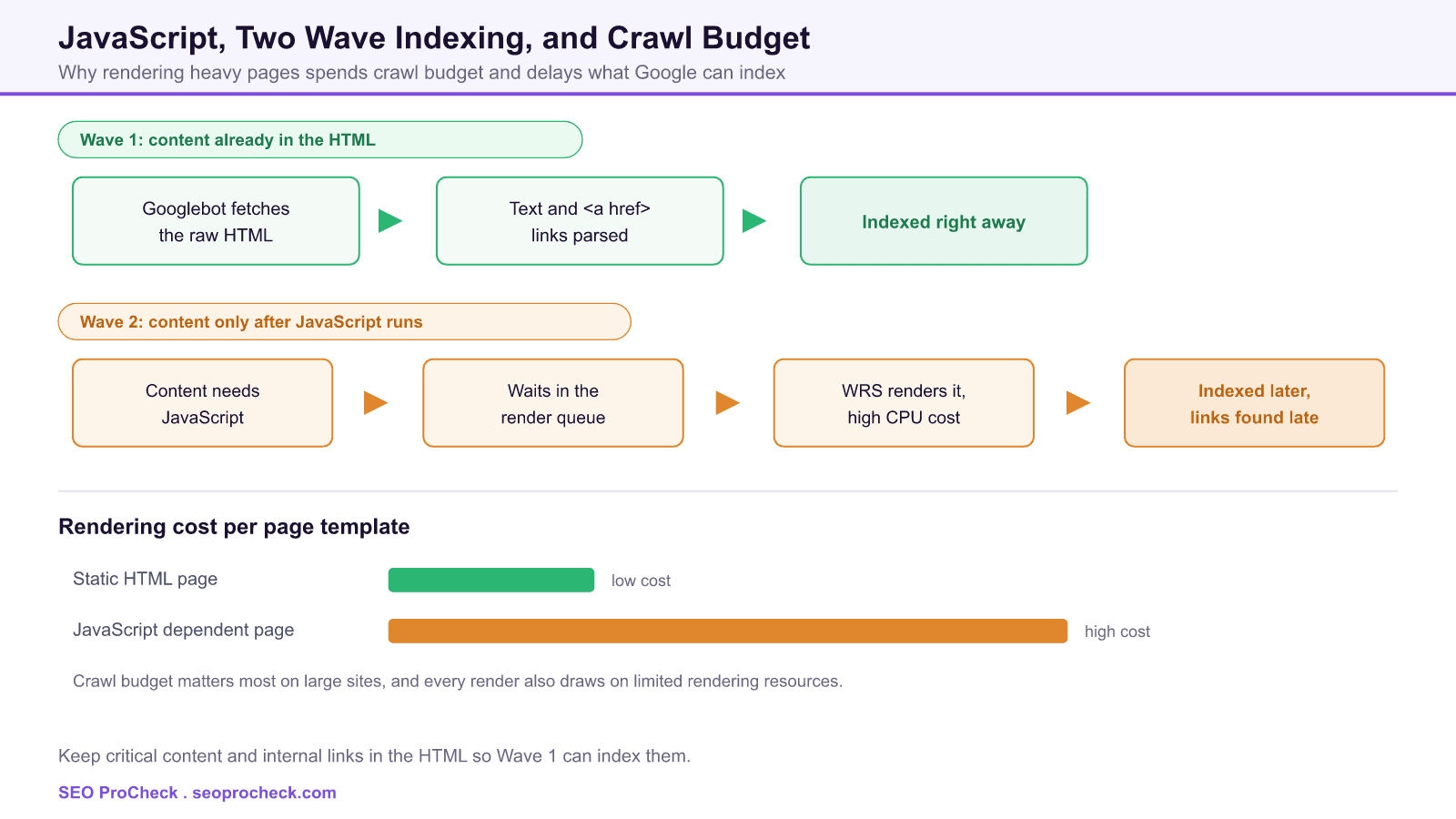
Crawl budget and JavaScript pull in opposite directions. Crawl budget is the finite attention Google gives your site, and JavaScript rendering is one of the most resource hungry things you can ask it to do. This case study frames that tension directly: when a template depends on client side JavaScript to build its content and links, Google has to spend more to see the same page, and on a large site that cost shows up as slower discovery and delayed indexing.
What crawl budget actually is
Crawl budget is not a single dial. Google describes it as the product of two forces. The crawl rate limit is how hard Google is willing to hit your server without degrading it, which rises when your site responds quickly and falls when it slows down or returns errors. Crawl demand is how much Google wants to crawl you, driven by popularity, freshness, and how many URLs you expose. Most small sites never bump into these limits. The sites that do are large, with tens of thousands of URLs or more, or ones that change constantly.
The rendering budget that is easy to forget
Indexing a modern page happens in two waves. In the first wave Google fetches the raw HTML, extracts the text and the <a href> links it can see, and can index that immediately. If the page needs JavaScript to build its real content, that content is not there yet. The URL goes into a render queue, and in a second wave Google's Web Rendering Service loads the page in a headless browser, runs the scripts, and only then sees the final DOM. That second pass can lag the first by anywhere from seconds to much longer, because rendering competes for limited resources across the whole web.
What Google gets from each wave
| Aspect | Wave 1: raw HTML | Wave 2: rendered page |
|---|---|---|
| When it happens | At crawl time, immediately | Later, after the render queue clears |
| Text content | Only what is in the HTML source | Content injected by JavaScript appears |
| Internal links | Only real anchors in the HTML | Links added by scripts are discovered late |
| Resource cost | Low, a single fetch | High, a full browser plus every script and API call |
| Risk if it fails | The page still has its HTML baseline | JavaScript only content may never be seen |
How JavaScript inflates the cost
Every render is a small browsing session. Google has to fetch the HTML, then the JavaScript bundles, the CSS, and whatever the scripts request at runtime, execute all of it, and wait for the page to settle. Multiply that by a large catalog of templated pages and the render workload becomes the bottleneck. Two failure patterns tend to follow. Discovery slows, because internal links built in JavaScript are only found on the second wave, so new URLs enter the queue later. And budget is wasted, because rendering low value or near duplicate URLs consumes the same expensive pass that your important pages are waiting in line for.
How to reduce the crawl and render bill
- Put critical content and links in the HTML. Server side rendering or prerendering means the first wave already has your text and real
<a href>links, so nothing waits on rendering. - Use real anchors, not click handlers. Google follows
<a href>links. Adivwith anonclickthat navigates is not a link it can queue. - Shrink the payload. Smaller bundles, fewer runtime requests, and good caching make each render cheaper and faster.
- Stop wasting budget on junk URLs. Faceted navigation, session parameters, and infinite calendars create endless low value URLs, control them so rendering is spent where it counts.
- Keep the server fast and healthy. Quick, error free responses raise the crawl rate limit, slow or 5xx heavy responses lower it.
How to diagnose a crawl budget problem
Start in Search Console. The Crawl Stats report shows total requests, average response time, and the breakdown by response and file type, which is where an overloaded or error prone site reveals itself. Use URL Inspection to compare the raw HTML with the rendered HTML, so you can see exactly what only appears after JavaScript. For large sites, server log analysis shows what Googlebot is actually spending its crawls on, and often surfaces the low value URL patterns quietly eating the budget. The related failure where rendering breaks entirely is covered in this server side rendering crawl case, and the delay side of the second wave is measured in the JavaScript indexing drag race.
This SEO case study documents a successful optimization initiative, providing actionable insights for practitioners. The documented approach demonstrates how strategic SEO implementation drives measurable results.
Initial Situation
Understanding the starting point is essential context for evaluating any case study. This documentation covers the initial challenges, competitive position, and business objectives that shaped the SEO strategy.
Strategy and Approach
The strategic approach combined multiple SEO disciplines to address identified opportunities. Key decisions around prioritization and resource allocation provide a template for similar initiatives.
Implementation
Moving from strategy to execution required specific technical implementations, content development, and process changes. This case study documents the practical steps that translated strategy into action.
Results and Learnings
The outcomes demonstrate effectiveness through measurable improvements in rankings, traffic, and business metrics. Analysis of successes and challenges provides learning value for practitioners.
Case studies like this contribute to the SEO knowledge base, helping practitioners learn from documented real-world experiences.
Source: https://www.onely.com/blog/javascript-vs-crawl-budget-ready-player-one/
FAQ
JavaScript itself is not penalized, but rendering it is expensive, and that cost is what pressures crawl budget on large sites. Google must run a full headless browser and fetch every script and runtime request, so heavy templates at scale slow how quickly it can crawl and index.
It is how Google handles pages that rely on JavaScript. In the first wave it indexes the raw HTML, then it queues the page and, in a second wave, renders the JavaScript to see the final content. The second wave can be delayed because rendering competes for limited resources.
Usually not. Crawl budget becomes a real constraint mainly on large sites with tens of thousands of URLs or sites that change very frequently. Smaller sites are typically crawled fully without hitting Google rate or demand limits.
Because links added by scripts are not in the raw HTML, so Google only sees them after the render wave. Until then those URLs are not queued for crawling. Rendering internal links as real anchors in the HTML lets Google find them in the first wave.
Use the URL Inspection tool in Search Console and compare the crawled raw HTML with the rendered HTML. Anything present only in the rendered version depends on JavaScript, which tells you what is at risk if rendering is delayed or skipped.
Move critical content and internal links into the HTML through server side rendering or prerendering. That removes the dependence on the second wave, so your important pages and links are available to Google the moment it crawls them.
Take this with you
The assistant links open with a question about this page already written. Nothing is sent until you press enter.
Claude Vincent is a technical SEO consultant focused on crawlability, rendering, and AI-search visibility. He writes the field guides and case studies at SEO ProCheck, with a bias toward the durable, unglamorous work that decides whether search engines and AI answer engines can actually read and cite a site.
About SEO ProCheck
Technical SEO consulting and GEO strategy with 20 years of enterprise experience. Case studies, resources, and tools for search and AI visibility.
Work With Me
Technical SEO audits, GEO strategy, site migrations, and international SEO. Hourly consulting for teams who need hands-on support, not just reports.
Subscribe to our newsletter!








Recent Posts
- Most Top Sites Never Say Who They Are in Structured Data October 14, 2026
- Homepage Titles Are Mostly Too Short, Not Too Long October 8, 2026
- Who Actually Serves an llms.txt? 184 Top Sites Measured September 29, 2026