AI Summary
Zapier lets you automate repetitive SEO tasks by connecting apps with a trigger, an optional filter, and one or more actions, all without code. The highest value SEO Zaps handle instant indexing, alerting, and reporting, freeing you from manual busywork so you can focus on strategy.
- Every Zap is a trigger, an optional filter or path, then actions.
- Use webhook triggers for instant runs and polling triggers for the rest.
- Top Zaps: publish to IndexNow, rank alerts, and automated reporting.
- Switch to Python when logic gets heavy or task costs climb at scale.

What Zapier does for an SEO workflow
Zapier is a no code automation platform that connects the apps you already use so they talk to each other without you copying data by hand. For SEO that means the tedious, repetitive glue work, submitting URLs, watching for rank drops, compiling reports, routing leads, can run on its own. You build a workflow, called a Zap, once, and it fires every time its trigger event happens. The result is fewer forgotten steps, faster reactions to problems, and more of your time spent on decisions instead of data shuffling.
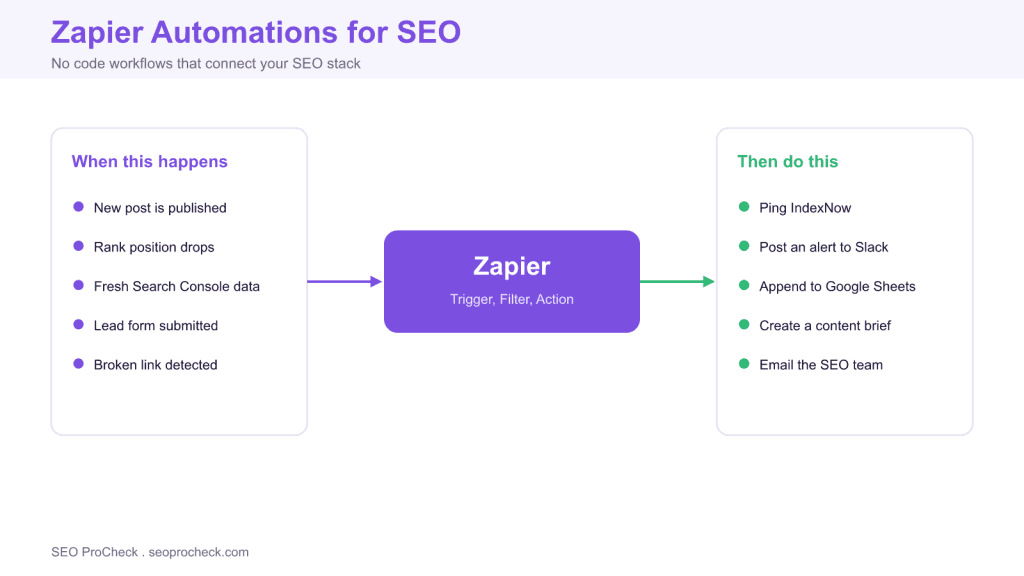
The mental model is simple. A Zap has a trigger that starts it, an optional filter or path that decides whether and how to continue, and one or more actions that do the work. A single publish event can ping IndexNow, post to Slack, and log a row in a Sheet, all from one trigger.
Triggers, filters, and actions
Triggers come in two flavors. Polling triggers check the source app for new data on a schedule that ranges from roughly one to fifteen minutes depending on your plan. Webhook triggers are instant: the source app pushes the event to Zapier the moment it occurs, which is what you want for a publish to IndexNow flow where speed matters. Filters let a Zap stop early when a condition is not met, for example only continuing when a rank drop exceeds three positions. Paths branch a Zap so different conditions run different actions. Getting comfortable with filters is the single biggest lever on both reliability and cost, because a task only runs when it should.
SEO automations worth building
| Trigger | Action | Payoff |
|---|---|---|
| New WordPress post published | Webhooks POST the URL to IndexNow | Instant discovery on publish |
| Rank tracker flags a drop | Message a Slack channel | Fast response to volatility |
| New row in a rank export Sheet | Append to the master reporting Sheet | Hands off reporting |
| Lead form submitted | Create a CRM contact and notify sales | No lost leads |
| Uptime monitor flags a 5xx | Send an SMS and Slack alert | Catch outages before crawlers do |
The publish to IndexNow Zap, step by step
This one earns its keep on any content site. Set the trigger to a new or updated post in WordPress. Add a filter so it only runs for the post types and statuses you care about, typically published articles. Then add a Webhooks by Zapier action that sends a POST to the IndexNow endpoint with a JSON body containing your host, key, keyLocation, and the post URL. Now every publish submits the URL to participating engines with no plugin and no manual step. Layer a second action that appends the URL and timestamp to a Google Sheet, and you get a running log of everything you submitted, which is handy when you cross check against your XML sitemap and coverage reports.
When to reach for code instead
Zapier is the right tool when connectors already exist, the logic is light, and you want to ship today. It becomes the wrong tool when you need heavy data processing, complex branching, tight cost control at high volume, or actions no app supports. Zapier bills per task, and each action step in a run counts, so a chatty Zap running thousands of times a day can cost more than a small scheduled script. A common pattern is to prototype in Zapier, prove the workflow, then port the high volume pieces to Python once the requirements are clear. Automations that validate output, such as checking that a page still returns valid structured data, are often easier and cheaper to run as scheduled code.
Keeping automations reliable
Automation only helps if you trust it. Turn on Zap error notifications so a failed run emails you instead of failing silently. Use the task history to replay runs after you fix an issue, and add filters early so Zaps exit before spending tasks on data you do not need. Review your Zaps monthly: retire ones you no longer use, tighten filters that fire too often, and watch for loops where an action re triggers its own trigger. Treated with that discipline, a handful of well built Zaps quietly remove hours of manual SEO busywork every week.
Frequently asked questions
What can Zapier automate for SEO?
Zapier connects the apps in your SEO stack without code. Common jobs include submitting new URLs to IndexNow on publish, alerting Slack when a rank drops, appending rank exports to a reporting Sheet, routing lead forms to a CRM, and firing alerts when an uptime or broken link monitor trips.
How does a Zap actually work?
Every Zap has a trigger, an optional filter or path, and one or more actions. The trigger is an event in one app, the filter decides whether to continue, and the actions do the work in other apps. Multi step Zaps chain several actions from a single trigger.
Is Zapier instant or delayed?
Polling triggers check for new data on an interval that ranges from about one to fifteen minutes depending on your plan. For instant runs, use a webhook trigger so the source app pushes the event to Zapier the moment it happens, which is ideal for publish to IndexNow flows.
When should I use Zapier instead of writing Python?
Use Zapier when the apps already have connectors, the logic is simple, and you value speed over control. Move to Python or a scheduled script when you need heavy data processing, tight cost control at scale, complex logic, or actions that no Zapier app supports.
Can Zapier submit URLs to IndexNow automatically?
Yes. Trigger on a new or updated WordPress post, then use the Webhooks action to POST the URL to the IndexNow endpoint with your key. This gives you hands off instant submission every time you publish, without touching a plugin or writing a script.
How do I keep Zapier costs under control?
Zapier bills by task, where each successful action step counts as a task. Add filters early so Zaps stop before running unnecessary steps, batch where you can, and review your task history monthly to catch runaway Zaps. High volume, repetitive jobs are often cheaper as a scheduled script.
Take this with you
The assistant links open with a question about this page already written.
Claude Vincent is a technical SEO consultant focused on crawlability, rendering, and AI-search visibility. He writes the field guides and case studies at SEO ProCheck, with a bias toward the durable, unglamorous work that decides whether search engines and AI answer engines can actually read and cite a site.
About SEO ProCheck
Technical SEO consulting and GEO strategy with 20 years of enterprise experience. Case studies, resources, and tools for search and AI visibility.
Work With Me
Technical SEO audits, GEO strategy, site migrations, and international SEO. Hourly consulting for teams who need hands-on support, not just reports.
Subscribe to our newsletter!